1. Introdução
This manual provides instructions for the installation, operation, and maintenance of the Westek In-Wall Programmable Digital Timer, Model ATW-T24. This device is designed to add automated programming functionality to various electrical devices such as lights, heaters, and fans. It features an LCD display for easy programming and a rechargeable battery backup to retain settings during power interruptions.
The timer supports up to 7 weekly programs and includes a random option for enhanced security.
2. Informações de segurança
AVISO: To avoid fire, shock, or death; turn off power at the circuit breaker or fuse box and test that the power is off before wiring. All wiring should be performed by a qualified electrician or in accordance with local electrical codes. This device is for indoor use only. Do not exceed the specified electrical ratings.
- Always disconnect power before installation or servicing.
- Certifique-se de que todas as conexões estejam seguras e devidamente isoladas.
- Não use em molhado ou damp localizações.
- Mantenha fora do alcance de crianças.
3. Conteúdo da embalagem
The package for the Westek In-Wall Programmable Digital Timer (Model ATW-T24) includes:
- One (1) Westek In-Wall Programmable Digital Timer, 120 V, 1 HP
- One (1) Lithium Ion battery (pre-installed)
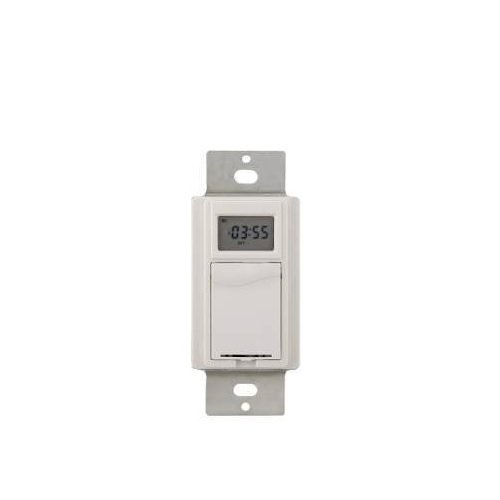
Imagem 1: Frente view of the Westek In-Wall Programmable Digital Timer. The timer features a white faceplate with a digital display and control buttons.
4. Instalação
Installation of this in-wall timer requires electrical wiring knowledge. If you are unsure about any part of the installation process, consult a qualified electrician.
- Desligar a energia: Locate the circuit breaker or fuse that supplies power to the switch box where the timer will be installed. Turn off the power completely. Verify power is off using a voltage testador.
- Remover switch existente: Remova cuidadosamente a placa de parede e desparafuse o interruptor existente da caixa de parede. Desconecte os fios do interruptor antigo.
- Conecte o temporizador: Connect the wires to the Westek timer according to the wiring diagram provided with the product packaging. Typically, this involves connecting line (hot), load, and ground wires. Ensure all connections are tight and secure.
- Instale o temporizador: Gently push the wired timer into the wall box. Secure it with the provided screws.
- Instale a placa de parede: Attach the new or existing wall plate over the timer.
- Restaurar energia: Ligue a energia novamente no disjuntor ou na caixa de fusíveis.

Image 2: The Westek In-Wall Programmable Digital Timer shown with its internal components and wiring connections. This image illustrates the back of the timer where electrical connections are made.
5. Instruções de operação
The Westek In-Wall Programmable Digital Timer allows for flexible scheduling of connected devices. The LCD display and control buttons facilitate programming.
5.1 Configuração inicial e ajuste de hora
- Ao ligar o aparelho pela primeira vez ou após um período prolongado sem energiatage, the display may show a default time or require setting.
- Use the designated buttons (e.g., "SET," "HOUR," "MINUTE," "DAY") to adjust the current time and day of the week. Refer to the specific button labels on your device for precise controls.
- Confirm the settings to save the current time.
5.2 Programming On/Off Cycles
The timer supports up to 7 custom weekly programs.
- Press the "PROG" or "PROGRAM" button to enter programming mode.
- The display will typically show "PROG 1 ON" or similar. Use the "HOUR," "MINUTE," and "DAY" buttons to set the desired ON time and days for the first program.
- Press "PROG" again to set the "PROG 1 OFF" time and days.
- Repeat for up to 7 programs as needed.
- Exit programming mode by pressing a dedicated "RUN" or "CLOCK" button, or by allowing the timer to time out.
5.3 Random Option
To deter intruders, the timer includes a random ON/OFF feature. When activated, the timer will randomly vary the programmed ON/OFF times by a small interval (e.g., +/- 30 minutes) to simulate occupancy.
- Locate the "RANDOM" or "RND" button.
- Press it to activate or deactivate the random function. An indicator on the LCD may confirm its status.
5.4 Substituição Manual
Most digital timers allow for a temporary manual override of the current program without erasinisso.
- Press the "MANUAL" or "ON/OFF" button to toggle the connected device on or off, overriding the current program until the next programmed event.
5.5 Reserva de bateria
The integrated rechargeable Lithium Ion battery maintains the time and programmed settings during power outages. The battery recharges automatically when main power is restored.
6. Manutenção
The Westek In-Wall Programmable Digital Timer requires minimal maintenance.
- Limpeza: To clean the timer, wipe the surface with a soft, dry cloth. Do not use abrasive cleaners, solvents, or spray directly onto the unit.
- Bateria: The internal rechargeable battery is designed for long-term use and typically does not require replacement. If the timer consistently loses settings during power outages, the battery may need servicing by a qualified technician.
7. Solução De Problemas
| Problema | Possível causa | Solução |
|---|---|---|
| O temporizador não liga. | No power to the switch box; incorrect wiring. | Verifique o disjuntor/fusível. Verifique se as conexões da fiação estão corretas e seguras. |
| O dispositivo não liga/desliga conforme programado. | Incorrect program settings; manual override active. | Review and re-enter program settings. Check if manual override is active and deactivate if necessary. |
| LCD display is difficult to read. | Poor lighting conditions; display angle. | Ensure adequate ambient lighting. Adjust viewing angle if possible. |
| O temporizador perde as configurações após a queda de energia.tage. | Rechargeable battery backup not functioning. | Allow time for the battery to recharge. If problem persists, contact customer support. |
| Dificuldade em programar o temporizador. | Desconhecimento dos passos de programação. | Carefully follow the operating instructions in Section 5. Practice programming without a connected load if possible. |
8. Especificações
- Marca: Westek
- Número do modelo: ATW-T24
- Número da peça: TMDW30CC
- Volumetage: 120 V
- Potência (HP): 1 HP
- Material: Plástico
- Cor: Branco
- Peso do item: 5.9 onças
- Dimensões do produto: 1.25 x 1.75 x 3 polegadas
- Baterias: 1 bateria de íon de lítio (incluída)
- Mudar de estilo: Alternar
- Código UPC: 700814916251, 889932723870, 070686506066, 696746170994
- Primeiro disponível: 26 de julho de 2005
9. Garantia e Suporte
Descrição da garantia: The manufacturer states "Not applicable" for warranty information. Please refer to your retailer's return policy for details on returns or exchanges.
For technical assistance or further inquiries, please contact Westek customer support through their official website ou o varejista onde o produto foi comprado.


