Introdução
This manual provides detailed instructions for the proper use and maintenance of your Casio STL-S110H-1ACF Tough Solar Runner Digital Watch. This timepiece is designed for active individuals, featuring solar power, multiple digital functions, and a durable resin construction.
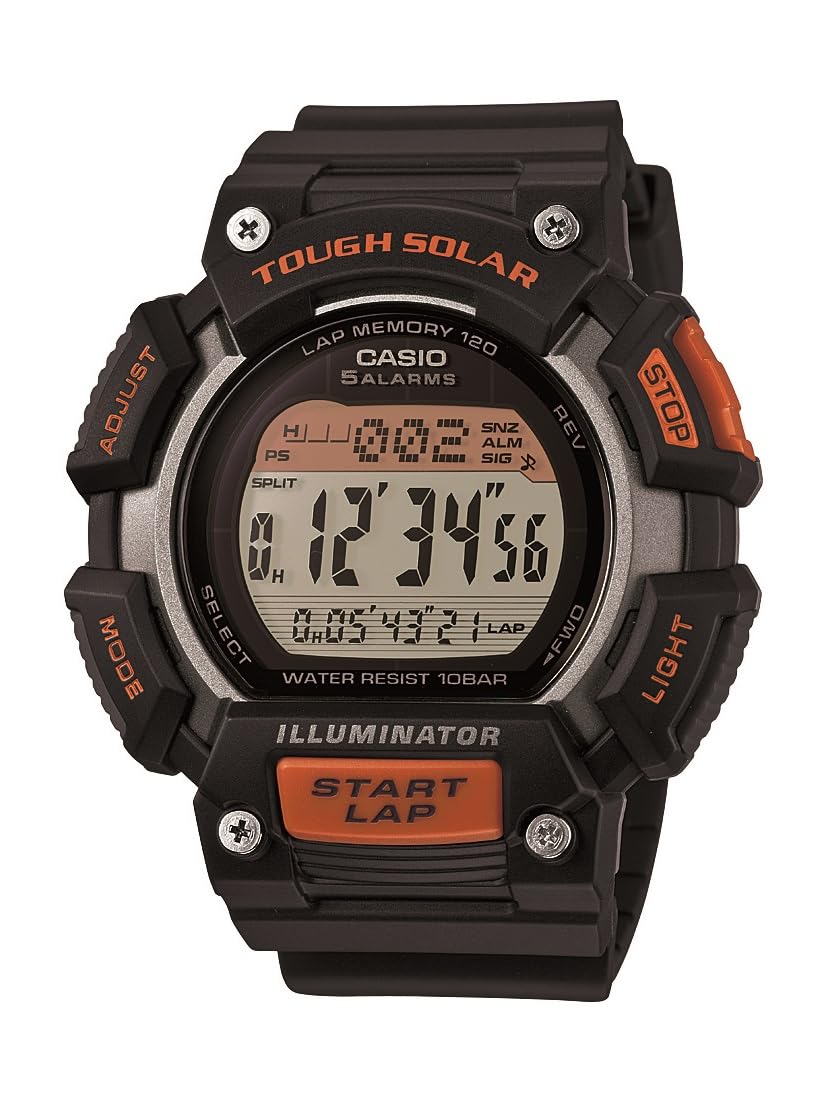
Figura 1: Casio STL-S110H-1ACF Tough Solar Runner Digital Watch. This image displays the watch's digital face, resin case, and band, highlighting its robust design.
Configurar
1. Carregamento inicial
Your watch is equipped with Tough Solar technology, which converts light into electrical energy. Before initial use, or if the display is blank, expose the watch to bright light for several hours. Ensure the watch face is directly exposed to light for efficient charging.
- Ambiente de carregamento: Place the watch near a window or under a strong artificial light source. Avoid extreme heat.
- Indicador de Nível da Bateria: The watch features a battery level indicator. Ensure it shows a sufficient charge before setting the time and using functions.
2 Definir a hora e a data
- No modo de cronometragem, pressione e mantenha pressionado o AJUSTAR button (usually top-left) until the city code starts to flash. This indicates the setting mode.
- Use o MODO button (usually bottom-left) to cycle through the settings: City Code → DST (Daylight Saving Time) → 12/24-hour format → Seconds → Hour → Minute → Year → Month → Day.
- Use o PROCURAR or PARA FRENTE REVERSO buttons (usually top-right and bottom-right) to change the flashing value.
- Assim que todas as configurações estiverem corretas, pressione o AJUSTAR botão novamente para sair do modo de configuração.
Instruções de operação
Your Casio STL-S110H-1ACF watch offers various modes and functions. Use the MODO button to navigate between them.
1. Modo de Cronometragem
This is the default mode, displaying the current time, day, and date. From this mode, you can activate the LED light.
- Luz LED: Pressione o LUZ button (usually top-right) to illuminate the display. The light features an after-glow function.
2. Modo Cronômetro
The stopwatch measures elapsed time, split times, and two finishes. It has a capacity of 1/100-second for 100 hours.
- Entre no modo cronômetro usando o MODO botão.
- Pressione o INICIAR/PARAR button (usually bottom-right) to start timing.
- Imprensa INICIAR/PARAR novamente para parar.
- Pressione o REINICIAR button (usually top-right) to reset to zero.
- For split times, press SPLIT (usually top-right) while timing, then INICIAR/PARAR parar, e REINICIAR para limpar.
3. Modo de temporizador de contagem regressiva
The watch includes two independent countdown timers, useful for interval training or specific tasks.
- Entre no modo de contagem regressiva usando o MODO botão.
- Pressione e segure o AJUSTAR botão para entrar no modo de configuração.
- Use o MODO button to select which timer (T1 or T2) to set, and then to cycle through hours, minutes, and seconds.
- Use o PROCURAR or PARA FRENTE REVERSO botões para alterar os valores.
- Imprensa AJUSTAR Para sair do modo de configuração.
- Imprensa INICIAR/PARAR Para iniciar ou parar a contagem regressiva.
4. Modo de Hora Mundial
View the current time in 48 cities (29 time zones) around the world.
- Enter World Time Mode using the MODO botão.
- Use o PROCURAR or PARA FRENTE REVERSO Botões para navegar pelos códigos das cidades.
- To swap your Home City time with the World Time City, press the AJUSTAR e PROCURAR botões simultaneamente.
5. Modo de Alarme
Set up to five daily alarms and an hourlsinal de tempo y.
- Entre no Modo de Alarme usando o MODO botão.
- Use o PROCURAR or PARA FRENTE REVERSO buttons to select an alarm (AL1 to AL5) or the Hourly Sinal horário (SIG).
- Pressione e segure o AJUSTAR botão para entrar no modo de configuração do alarme.
- Use o MODO button to select hour or minute.
- Use o PROCURAR or PARA FRENTE REVERSO botões para alterar os valores.
- Imprensa AJUSTAR Para sair do modo de configuração.
- To turn an alarm or the hourly time signal on/off, select it and press the INICIAR/PARAR botão.
Manutenção
1. Limpeza
- Limpe o relógio com um pano macio e seco para remover a sujeira e a umidade.
- For stubborn dirt, use a soft cloth dampened with water and a mild neutral detergent. Avoid harsh chemicals.
- Clean the resin band regularly to prevent skin irritation and maintain its appearance.
2. Solar Charging Care
- Ensure the watch face is regularly exposed to light to maintain optimal battery charge.
- Avoid prolonged storage in dark places, as this can lead to battery depletion.
- Do not expose the watch to extremely high temperatures during charging (e.g., on a car dashboard in direct sunlight).
3. Resistência à água
This watch is designed for daily use and can withstand splashes or brief immersion in water. However, it is not suitable for diving or prolonged underwater use. Do not operate buttons while the watch is wet.
Solução de problemas
- A tela está em branco ou com brilho reduzido: The watch battery may be low. Expose the watch to bright light for several hours to recharge.
- O horário está incorreto: Re-adjust the time and date settings as described in the "Setting the Time and Date" section. Ensure the correct home city and DST settings are selected.
- Os botões não respondem: This could indicate a very low battery level. Charge the watch fully. If the issue persists, contact customer support.
- Watch stops functioning after exposure to water: Ensure buttons were not pressed underwater. Allow the watch to dry completely. If issues persist, seek professional service.
Especificações
| Número do modelo | STLS110H-1A |
| Fonte de energia | Tough Solar (bateria recarregável por energia solar) |
| Duração da bateria (carga completa) | Approx. 11 months (without further exposure to light) |
| Material da caixa | Resina |
| Material da banda | Resina |
| Material da janela do mostrador | Mineral |
| Dimensões da caixa | 49 mm (diâmetro) |
| Dimensões do produto | 5.26 x 5.46 x 1.4 cm |
| Peso | 54.43 g |
| Resistência à água | General daily use (splash resistant) |
| Funções | LED light with after-glow, 5 daily alarms, hourly time signal, world time (48 cities), stopwatch (1/100-second, 100-hour capacity), 2 countdown timers, auto-calendar. |
Garantia e Suporte
Your Casio watch is covered by a manufacturer's warranty. Please refer to the warranty card included with your purchase for specific terms and conditions, including warranty period and coverage details. For technical support, service, or inquiries regarding your watch, please contact Casio customer service through their official website ou as informações de contato fornecidas na sua documentação de garantia.
For further assistance, visit the official Casio support website: www.casio.com/support


