Introdução
The ASTRO Gaming A40 TR Headset and MixAmp Pro TR are designed to provide a high-fidelity audio experience for gaming on PlayStation 4 and PC. The A40 TR headset offers user customization, allowing transformation from an open-back to a closed-back noise-canceling headset with optional Mod Kits. The MixAmp Pro TR features all-digital components for clear, interference-free audio and voice communication, with customizable settings via the ASTRO Command Center software.

Image: The ASTRO Gaming A40 TR Headset and MixAmp Pro TR, showcasing both components together. The headset is black with gold accents, and the MixAmp is a compact black unit with control dials.
Conteúdo da embalagem
Verifique se todos os itens listados abaixo estão incluídos na embalagem do seu produto:
- ASTRO A40 TR Headset
- ASTRO MixAmp Pro TR
- A40 TR Inline Mute Cable (2.0m)
- TOSlink Optical Cable (3.0m)
- Micro-USB Cable (3.0m)
- Digital Daisy Chain Cable (0.5m)
- Swappable Microphone
Configurar
Connecting to PlayStation 4 (PS4)
- Conecte o TOSlink Optical Cable from the MixAmp Pro TR's OPTICAL port to the PS4's Optical Out port.
- Conecte o Cabo Micro-USB from the MixAmp Pro TR's USB port to an available USB port on the PS4.
- Conecte o A40 TR Inline Mute Cable from your A40 TR Headset to the headset port on the front of the MixAmp Pro TR.
- On your PS4, navigate to Settings > Sound and Screen > Audio Output Settings.
- Definir Porta de saída primária para Saída digital óptica).
- Selecione Dolby Digital (Bitstream) for the audio format.
- Vá para Configurações> Dispositivos> Dispositivos de áudio.
- Definir Dispositivo de entrada para USB Headset (ASTRO MixAmp Pro TR).
- Definir Dispositivo de saída para USB Headset (ASTRO MixAmp Pro TR).
- Ajustar Controle de volume (fones de ouvido) ao máximo.
- Definir Saída para fones de ouvido para Áudio de bate-papo or Todo o áudio as preferred.
Conectando ao PC
- Conecte o Cabo Micro-USB from the MixAmp Pro TR's USB port to an available USB port on your PC.
- Conecte o A40 TR Inline Mute Cable from your A40 TR Headset to the headset port on the front of the MixAmp Pro TR.
- On your PC, ensure the MixAmp Pro TR is selected as the default playback and recording device in your sound settings.
- Baixe e instale o ASTRO Command Center software from the official ASTRO Gaming website to customize settings, update firmware, and manage EQ presets.
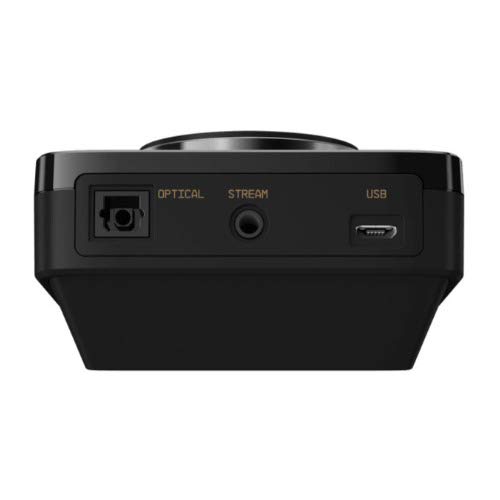
Imagem: Traseira view of the ASTRO MixAmp Pro TR, highlighting the Optical, USB, AUX, and Stream ports for various connections.
Operating the MixAmp Pro TR
A misturaAmp Pro TR provides intuitive controls for managing your audio experience:
- Master Volume Dial: The large dial on the left controls the overall volume of your headset. Rotate clockwise to increase volume, counter-clockwise to decrease.
- Game/Voice Balance Dial: The smaller dial on the right allows you to adjust the balance between game audio and voice chat.
- Rotate towards "GAME" to prioritize game audio.
- Rotate towards "VOICE" to prioritize voice chat.
- EQ Presets Button: Located in the center, this button cycles through four customizable equalizer presets. The active preset is indicated by the illuminated icon (star, headphone, etc.). These presets can be configured using the ASTRO Command Center software.
- Dolby Button: Activates or deactivates Dolby Surround Sound. When active, the Dolby logo will illuminate.
- Botão de silenciamento do microfone: Located on the A40 TR Inline Mute Cable, this switch mutes or unmutes your microphone. When muted, the MixAmp's volume dials will typically glow red.
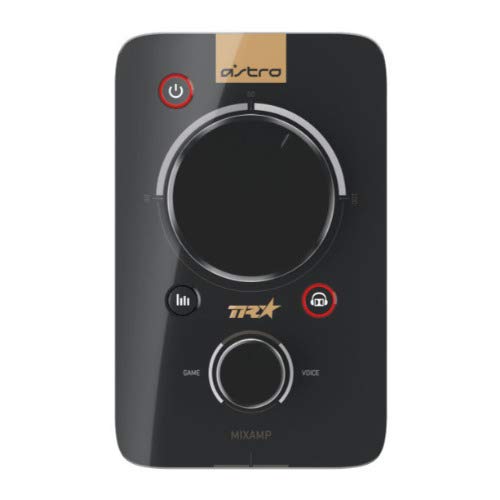
Imagem: Topo view of the ASTRO MixAmp Pro TR, showing the large master volume dial, the smaller game/voice balance dial, and the EQ preset buttons.
Manutenção
- Limpeza: Use a soft, dry cloth to clean the headset and MixAmpEvite produtos de limpeza ou solventes abrasivos.
- Armazenar: Store the headset and MixAmp em local fresco e seco, longe da luz solar direta e de temperaturas extremas.
- Cuidados com os cabos: Manuseie os cabos com cuidado para evitar danos. Evite dobras acentuadas ou puxões excessivos.
- Almofadas de ouvido: Periodically check ear cushions for wear and tear. Replacement cushions are available from ASTRO Gaming.
Solução de problemas
If you encounter issues with your ASTRO Gaming A40 TR Headset or MixAmp Pro TR, try the following solutions:
| Problema | Solução |
|---|---|
| Sem áudio nos fones de ouvido. |
|
| O microfone não está funcionando. |
|
| Áudio com qualidade distorcida ou ruim. |
|
For more detailed troubleshooting, please refer to the official ASTRO Gaming support resources.
Especificações
- Número do modelo: 939-001511
- Resposta de frequência: 20 - 20,000 Hz
- Impedância nominal: 48 ohms
- Pressão da faixa de cabeça: 2.6N
- Dimensões do produto: 9.06 x 13.87 x 4.33 polegadas
- Peso do item: 1.06 libras
- Conectividade: Ótico, USB
- Compatibilidade: PlayStation 4, PC
Garantia e Suporte
For detailed warranty information and product support, please visit the official ASTRO Gaming website ou consulte a documentação fornecida:
Ensure you register your product on the ASTRO Gaming website for the latest updates and support.


