1. Introdução
The Muse M-192 CR is a versatile clock radio designed to provide reliable timekeeping, alarm functions, and FM radio reception. It features a large, easy-to-read digital display, dual alarms, and convenient functions such as snooze, sleep, and NAP. This manual provides detailed instructions for the proper setup, operation, and maintenance of your device.
2. Instruções de segurança
- Leia todas as instruções cuidadosamente antes de operar o dispositivo.
- Mantenha o dispositivo longe de água ou umidade.
- Não obstrua nenhuma abertura de ventilação. Certifique-se de que haja espaço suficiente ao redor do aparelho para permitir a circulação adequada do ar.
- Use only the AC adapter supplied with the unit.
- Evite expor o dispositivo a temperaturas extremas, luz solar direta ou alta umidade.
- Não tente desmontar ou modificar a unidade. Encaminhe todos os serviços de manutenção para pessoal qualificado.
3. Conteúdo da embalagem
Por favor, verifique se a embalagem contém os seguintes itens:
- 1 x Muse M-192 CR Clock Radio
- 1 x Adaptador AC
- 1 x Manual de Instruções (este documento)
4. Produto acabadoview
Familiarize yourself with the various parts and controls of your Muse M-192 CR Clock Radio.

Figura 1: Frente angulada view of the Muse M-192 CR Clock Radio, showcasing its large digital display and control buttons.
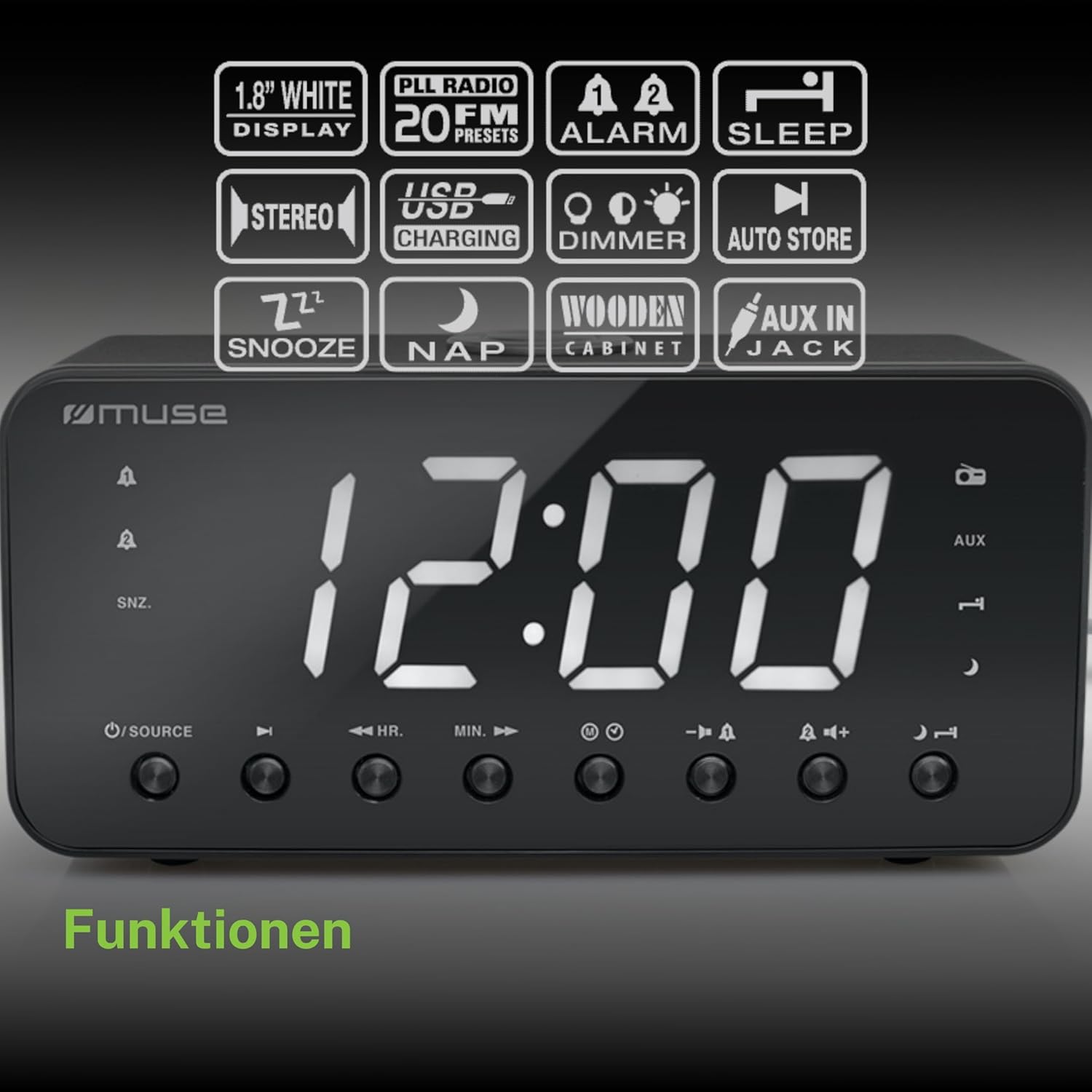
Figure 2: Diagram illustrating the key features and control buttons on the Muse M-192 CR Clock Radio, including the 1.8-inch white display, PLL FM radio with 20 presets, dual alarms, sleep, snooze, NAP functions, USB charging, dimmer, auto store, and AUX input jack.
Controles do painel frontal:
- Mostrar: Large 1.8-inch white LED display for time and status.
- Botão FONTE: Selects between FM radio and AUX input.
- HR (Hour) Button: Adjusts hour for time and alarm settings.
- MIN (Minute) Button: Adjusts minute for time and alarm settings.
- Botão ALARME 1: Sets and activates/deactivates Alarm 1.
- Botão ALARME 2: Sets and activates/deactivates Alarm 2.
- Botão SNOOZE/DIMMER: Activates snooze during an alarm; adjusts display brightness (High/Low/Off) when not alarming.
- Botão de suspensão: Sets the sleep timer for radio playback.
- NAP Button: Sets a short nap alarm.
- Botões de aumentar / diminuir o volume: Ajusta o volume do áudio.
Conexões do painel traseiro:
- Entrada AUX IN: Conecta dispositivos de áudio externos.
- Porta de carregamento USB: Provides power to charge compatible devices.
- Conector DC IN: Connects the AC adapter for power.
- Compartimento da bateria: Holds backup batteries.
5. Configuração
5.1 Conexão de Energia
- Insert the small plug of the supplied AC adapter into the DC IN jack on the rear of the clock radio.
- Plug the AC adapter into a standard wall outlet. The display will light up.
5.2 Instalação da bateria de reserva
The clock radio requires 2 x 1.5V AAA batteries (not included) for backup power. These batteries maintain the time and alarm settings during a power outage.
- Abra a tampa do compartimento da bateria na parte inferior da unidade.
- Insira duas pilhas AAA, observando a polaridade correta (+ e -) conforme indicado dentro do compartimento.
- Feche bem a tampa do compartimento da bateria.
Note: Battery backup only preserves settings; the display will not illuminate and alarms will not sound during a power outage if only running on battery backup.
6. Instruções de operação
6.1 Definição da hora
- In standby mode (when the radio is off), press and hold the HORÁRIO DEFINIDO button (if available, otherwise use HR/MIN directly or a dedicated time set button not explicitly listed but implied by HR/MIN). If no dedicated button, proceed to step 2.
- Pressione o HR botão para ajustar a hora.
- Pressione o MÍNIMO botão para ajustar os minutos.
- Release the buttons to confirm the time. The time will automatically set after a few seconds of inactivity.
6.2 Configurar alarmes (Alarme 1 e Alarme 2)
The Muse M-192 CR features two independent alarms.
- Pressione e segure o ALARME 1 button until the alarm time flashes on the display.
- Use o HR e MÍNIMO botões para definir a hora do alarme desejada.
- Pressione o ALARME 1 Pressione o botão novamente para selecionar a fonte do alarme: Campainha or Rádio.
- Pressione o ALARME 1 button a third time to confirm and activate Alarm 1. An alarm icon will appear on the display.
- Repita o processo para ALARME 2 usando o ALARME 2 botão.
Para desativar um alarme, pressione o botão correspondente. ALARME button until its icon disappears from the display.
6.3 Função de soneca
Quando o alarme tocar, pressione o SNOOZE / DIMMER Pressione o botão para silenciar temporariamente o alarme. O alarme soará novamente após aproximadamente 9 minutos.
6.4 Função Sono
A função soneca permite que você adormeça ouvindo o rádio, que desligará automaticamente após um período predefinido.
- Enquanto o rádio estiver tocando, pressione o DORMIR button repeatedly to cycle through available sleep times (e.g., 90, 60, 30, 15 minutes, or OFF).
- O rádio tocará durante o período selecionado e depois desligará automaticamente.
6.5 NAP Function
The NAP function sets a short alarm for a specified duration.
- Pressione o SESTA button repeatedly to select a nap duration (e.g., 10, 20, 30, 60, 90, 120 minutes, or OFF).
- The alarm will sound after the selected duration.
6.6 Operação de rádio (FM)
- Pressione o FONTE botão para selecionar o modo de rádio FM.
- Pressione e segure o HR or MÍNIMO button to automatically scan for the next available station. Briefly press to manually tune.
- Ajuste o volume usando o Aumentar/diminuir volume botões.
Configurando estações de rádio predefinidas:
The unit supports up to 20 FM radio presets.
- Sintonize a estação de FM desejada.
- Pressione e segure o PREDEFINIDO button (often combined with a number or memory button, if not explicitly labeled, refer to the full manual for specific button). If no dedicated PRESET button, the HR/MIN buttons might serve this function in radio mode.
- Use o HR or MÍNIMO botões para selecionar um número predefinido (P01-P20).
- Pressione o PREDEFINIDO button again to save the station.
- Para recuperar uma predefinição, pressione brevemente o PREDEFINIDO botão e, em seguida, use HR or MÍNIMO para selecionar o número predefinido desejado.
6.7 Entrada AUX
Connect an external audio device (e.g., MP3 player, smartphone) to the AUX IN jack on the rear of the unit using a 3.5mm audio cable (not included).
- Connect one end of the audio cable to your external device's headphone jack.
- Connect the other end to the AUX IN jack on the clock radio.
- Pressione o FONTE button to select AUX mode. The display will show "AUX".
- Play audio from your external device. Adjust volume using the clock radio's Aumentar/diminuir volume buttons and your external device's volume control.
6.8 Carregamento USB
The USB port on the rear of the unit can be used to charge compatible devices.

Figure 3: The Muse M-192 CR Clock Radio highlighting its jumbo white display and the USB charging port located on the rear of the unit.
- Connect your device's USB charging cable to the USB charging port on the clock radio.
- Ensure the clock radio is powered on.
- Seu dispositivo deverá começar a carregar.
Note: The USB port is for charging only and does not support data transfer or audio playback.
6.9 Dimmer de tela
Adjust the brightness of the display to suit your preference.
- No modo de espera, pressione o botão SNOOZE / DIMMER botão repetidamente.
- Cycle through the brightness levels: High, Low, and Off.
7. Manutenção
- Limpeza: Limpe a unidade com um pano macio e seco. Não utilize produtos de limpeza abrasivos, ceras ou solventes.
- Ventilação: Mantenha as aberturas de ventilação livres de poeira e detritos.
- Armazenar: If storing the unit for an extended period, disconnect it from the power outlet and remove the backup batteries.
8. Solução De Problemas
| Problema | Possível causa | Solução |
|---|---|---|
| Sem energia / Tela desligada | Adaptador CA desconectado ou com defeito. | Certifique-se de que o adaptador CA esteja firmemente conectado à unidade e a uma tomada elétrica em funcionamento. |
| O alarme não soa | Alarme não ativado ou configurado incorretamente. | Verify alarm time and source are set correctly and the alarm icon is visible on the display. |
| Má recepção de rádio FM | Antena não estendida ou interferência. | Extend the FM wire antenna fully. Reposition the unit to improve reception. |
| Tela muito brilhante/escura | É necessário ajustar a intensidade da luz do dimmer. | Pressione o SNOOZE / DIMMER Botão para alternar entre os níveis de brilho. |
9. Especificações

Figure 4: Technical drawing illustrating the dimensions of the Muse M-192 CR Clock Radio (226mm length, 86mm width, 108mm height).
- Modelo: M-192 CR
- Mostrar: 1.8-inch White Digital LED
- Rádio: FM PLL Radio with 20 Presets
- Funções de alarme: Dual Alarm, Snooze, Sleep, NAP
- Fonte de alarme: Rádio ou campainha
- Conectividade: AUX-in, USB Charging Port
- Poder: AC Power (Adapter Included), Battery Backup (2 x 1.5V AAA batteries, not included)
- Potência de saída: 2 Watts
- Dimensões (C x L x A): 22.6 x 8.6 x 10.8 cm
- Peso: 800 g
10. Garantia e Suporte
For detailed warranty information and technical support, please refer to the documentation provided with your purchase or contact your retailer. Keep your proof of purchase for any warranty claims.


