Introdução
This manual provides detailed instructions for the safe and efficient operation of your Telefunken RC1007BM Bluetooth Boombox. Please read this manual thoroughly before using the device and retain it for future reference.

Imagem: Frente view of the Telefunken RC1007BM Bluetooth Boombox, showcasing its speakers, central control panel, and antenna.
Instruções de segurança
- Não exponha o aparelho à chuva ou umidade para evitar incêndio ou choque elétrico.
- Não obstrua as aberturas de ventilação. Instale de acordo com as instruções do fabricante.
- Não instale perto de fontes de calor, como radiadores, registros de calor, fogões ou outros aparelhos (incluindo amplificadores) que produzem calor.
- Proteja o cabo de alimentação para que não seja pisado ou comprimido, principalmente nos plugues, nas tomadas de conveniência e no ponto de saída do aparelho.
- Utilize somente acessórios/anexos especificados pelo fabricante.
- Desligue este aparelho durante tempestades com raios ou quando não for utilizado por longos períodos de tempo.
- Encaminhe todos os serviços de manutenção para pessoal de serviço qualificado. A manutenção é necessária quando o aparelho foi danificado de alguma forma.
Conteúdo da embalagem
Por favor, verifique se todos os itens estão presentes:
- Telefunken RC1007BM Bluetooth Boombox
- Adaptador de energia
- Alça de ombro
- Controle remoto
- Manual do usuário (este documento)
Produto acimaview
Controles e conexões do painel frontal
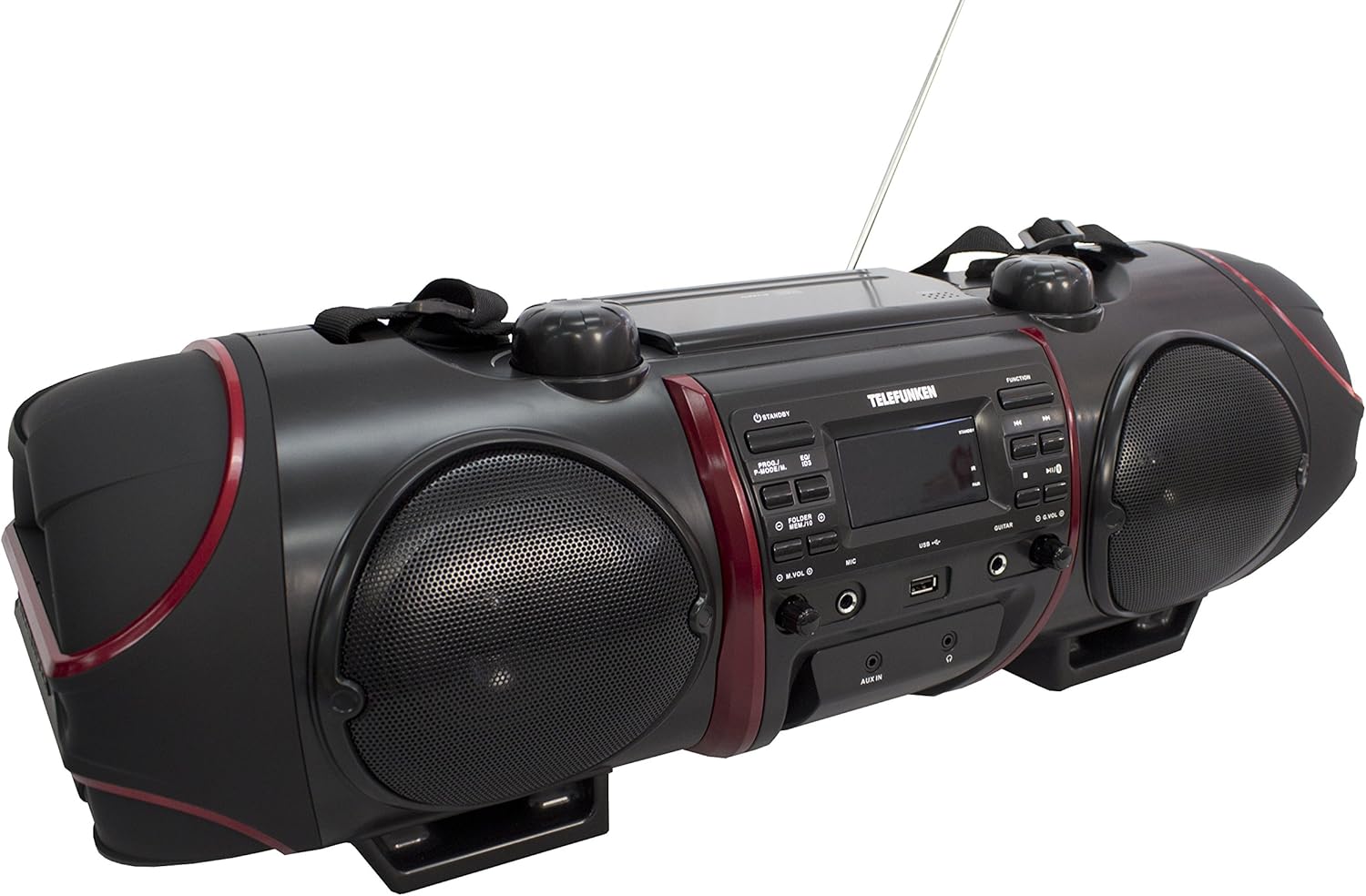
Image: Close-up of the central control panel, showing buttons, LCD display, USB port, and input jacks.
- Botão STANDBY: Liga ou desliga a unidade.
- PROG./P-MODE/M. Button: Program CD tracks, select playback mode, or store/recall radio presets.
- EQ/ID3 Button: Select equalizer presets or display ID3 tag information for MP3s.
- FOLDER/MENU/TS Button: Navigate folders on USB/CD or access menu options.
- M.VOL (Microphone Volume) Knob: Ajusta o volume de entrada do microfone.
- MIC (Microphone) Input: Conector de 3.5 mm para conexão de microfone.
- Porta USB: Para conectar dispositivos de armazenamento USB.
- Entrada de GUITARRA: 3.5mm jack for guitar connection.
- G.VOL (Guitar Volume) Knob: Adjusts guitar input volume.
- Botão FUNÇÃO: Selects input source (CD, FM, Bluetooth, AUX).
- Botão PLAY / PAUSE: Inicia ou pausa a reprodução.
- Botão de parada: Interrompe a reprodução.
- SKIP/TUNE Buttons (Previous/Next): Pula faixas ou sintoniza frequências de rádio.
- Botão EMPARELHAR: Inicia o emparelhamento Bluetooth.
- Botão VOL (Volume): Ajusta o volume principal.
- Entrada AUX IN: Entrada de 3.5 mm para dispositivos de áudio externos.
- Entrada para fone de ouvido: Saída de 3.5 mm para fones de ouvido.
- Tela LCD: Shows current status, track information, and radio frequency.
Top Panel (CD Compartment)

Imagem: Topo view of the boombox, highlighting the CD compartment with 'PUSH TO OPEN' label.
The CD compartment is located on the top of the unit. Press the 'PUSH TO OPEN' area to open the lid and insert a CD.
Rear Panel (Power and Battery Compartment)

Imagem: Traseira view of the boombox, displaying the AC power input and the battery compartment cover.
The AC power input and battery compartment are located on the rear of the unit. Ensure the correct power source is connected or batteries are inserted correctly.
Controle remoto

Image: The remote control for the Telefunken RC1007BM, showing various function buttons.
The remote control provides convenient access to most functions of the boombox. Refer to the button labels on the remote for specific operations.
Configurar
Conexão de energia
- Alimentação CA: Connect the supplied power adapter to the AC input jack on the rear of the unit and then to a standard wall outlet.
- Potência da bateria: For portable use, open the battery compartment on the rear of the unit and insert the required batteries (not included), ensuring correct polarity.
Ajuste da Antena
Extend the telescopic antenna fully for optimal FM radio reception. Adjust its position for the best signal.
Acessório de alça de ombro
Attach the provided shoulder strap to the designated loops on the sides of the boombox for easy portability.
Instruções de operação
Ligar/desligar
Pressione o STANDBY Botão no painel frontal ou no controle remoto para ligar ou desligar o aparelho.
Reprodução de CD/CD MP3
- Pressione o FUNÇÃO para selecionar o modo CD.
- Open the CD compartment lid by pressing 'PUSH TO OPEN' on the top.
- Place a CD or MP3-CD with the label side facing up. Close the lid.
- Playback will start automatically. If not, press the REPRODUZIR/PAUSAR botão.
- Use o SKIP/TUNE botões para pular faixas.
- Pressione o PARAR botão para parar a reprodução.
- Reprodução do programa: Enquanto estiver no modo de parada, pressione PROG./MODO P/M. to program tracks.
- Repetir/Reprodução Aleatória: Imprensa PROG./MODO P/M. during playback to cycle through repeat modes (e.g., repeat one, repeat all) or random play.
Operação de rádio FM
- Pressione o FUNÇÃO botão para selecionar o modo de rádio FM.
- Auto Scan and Store: Pressione e segure o PROG./MODO P/M. Botão para escanear e armazenar automaticamente as estações de FM disponíveis.
- Sintonia manual: Use o SKIP/TUNE botões para sintonizar manualmente as frequências desejadas.
- Recuperar predefinições: Imprensa PROG./MODO P/M. repeatedly to cycle through stored preset stations.
Emparelhamento Bluetooth
- Pressione o FUNÇÃO button to select Bluetooth mode. The display will show "BT" and flash, indicating it's in pairing mode.
- Activate Bluetooth on your smartphone or tablet and search for available devices.
- Select "RC1007BM" from the list of devices.
- Once paired, the display will stop flashing, and you can play music from your device.
- The effective transmission range is up to 10 meters.
Entrada AUX
- Conecte um dispositivo de áudio externo (por exemplo, um reprodutor de MP3) à AUX IN Entrada para fone de ouvido usando um cabo de áudio de 3.5 mm (não incluído).
- Pressione o FUNÇÃO Botão para selecionar o modo AUX.
- Reproduza áudio do seu dispositivo conectado.
Entrada de microfone e guitarra
- Conecte um microfone ao Microfone input jack and/or a guitar to the GUITAR tomada de entrada.
- Ajuste o volume do microfone usando o M.VOL knob and the guitar volume using the G.VOL botão.
Equalizador de som
Pressione o EQ/ID3 button repeatedly to cycle through the 6 preset equalizer levels: Flat, Classic, Pop, Jazz, Rock, and 3D. Select the one that best suits your audio preference.
Manutenção
- Limpeza: Use um pano macio e seco para limpar a parte externa da unidade. Não use produtos de limpeza abrasivos ou solventes.
- Cuidados com o CD: Manuseie os CDs pelas bordas. Limpe os CDs sujos com um pano macio e sem fiapos, limpando do centro para as bordas.
- Cuidados com a bateria: Se o aparelho não for utilizado por um longo período, remova as pilhas para evitar vazamentos e danos.
Solução de problemas
| Problema | Possível causa | Solução |
|---|---|---|
| Sem energia | Cabo de alimentação desconectado; pilhas descarregadas ou inseridas incorretamente. | Ensure AC adapter is securely connected. Replace batteries or check polarity. |
| Sem som | Volume muito baixo; Fonte selecionada incorretamente; Fones de ouvido conectados. | Increase volume. Press FUNCTION to select correct source. Disconnect headphones. |
| CD não está tocando | CD inserted incorrectly; CD dirty or scratched; Disc format not supported. | Insert CD with label side up. Clean or replace CD. Ensure it's a CD-R/RW or MP3-CD. |
| Bluetooth não está pareando | Device too far; Bluetooth not enabled on external device; Unit not in pairing mode. | Move device closer. Enable Bluetooth on your device. Press FUNCTION to select BT mode and PAIR button. |
| Má recepção de rádio | Antena não estendida ou posicionada corretamente; sinal fraco. | Estenda e ajuste completamente a antena telescópica. Tente mover a unidade para um local diferente. |
Especificações
- Modelo: RC1007BM
- Marca: TELEFUNKEN
- Fonte de energia: AC 100-240V ~ 50/60Hz or Batteries (not included)
- Potência total de saída (RMS): 52 W (2 x 8 W speakers, 2 x 18 W subwoofer)
- Versão Bluetooth: 3.0
- Faixa Bluetooth: Até 10 metros
- Sintonizador: Digital PLL FM/FM-Stereo
- Presets FM: 30
- Reprodução de CD: CD, CD-R/-RW, MP3-CD
- Formatos de áudio suportados: MP3, WMA, AAC, WAV
- Entradas: 3.5mm AUX-in, 3.5mm Microphone, 3.5mm Guitar, USB
- Saídas: Fone de ouvido 3.5mm
- Tipo de exibição: LCD
- Predefinições do equalizador: 6 (Flat, Classic, Pop, Jazz, Rock, 3D)
- Dimensões do produto (C x L x A): 68 x 23 x 22 cm
- Peso do item: 6 kg
Garantia e Suporte
For warranty information and technical support, please refer to the documentation provided at the time of purchase or contact your local Telefunken dealer or service center. Keep your proof of purchase for any warranty claims.