1. Introdução
The TROND BT-DUO is a versatile 2-in-1 Bluetooth V5.0 audio adapter designed to function as both a transmitter (TX) and a receiver (RX). It enables wireless audio streaming for a wide range of devices, enhancing your audio experience with convenience and flexibility. Featuring AptX Low Latency technology, it minimizes audio delay for synchronized sound, especially beneficial for video content.

Figure 1: TROND BT-DUO Bluetooth V5.0 Transmitter Receiver
2. Conteúdo da embalagem
Certifique-se de que todos os itens estejam presentes na embalagem:
- 1 × TROND BT-DUO Bluetooth Transmitter Receiver (with CSR8670 chipset)
- 1 × USB to Micro USB Charging Cable (80cm)
- 1 × 3.5mm Male to 3.5mm Male Audio Cable (50cm)
- 1 × 3.5mm Male to 3.5mm Male Aluminum Pin
- 1 × 3.5mm Female to RCA Male Audio Cable (20cm)

Figure 2: Included cables and accessories
3. Produto acabadoview
The TROND BT-DUO is designed for ease of use with a compact form factor.
3.1 Características Físicas
- Botão multifuncional (MFB): Used for power on/off and pairing.
- Indicador LED: Displays device status (power, pairing, codec).
- Chave TX/RX: Alterna entre os modos Transmissor e Receptor.
- Porta auxiliar de 3.5 mm: For audio input/output connection.
- Porta de carregamento micro USB: Para carregar a bateria interna.

Figure 3: TROND BT-DUO with Micro USB Charging Port and 3.5mm Aux-in

Figure 4: Compact design of TROND BT-DUO
4. Configuração e operação
4.1 Ligar/Desligar
- Para ligar: Long-press the Multi-Function Button (MFB) for 3 seconds until the LED indicator flashes blue.
- Para desligar: Long-press the MFB for 3 seconds until the LED indicator turns red and then off.
4.2 Initial Pairing Mode
The first time you power on the TROND BT-DUO, it will automatically enter pairing mode, with the LED indicator flashing blue and red alternately.
4.3 Modos de comutação (TX/RX)
Use the TX/RX switch on the side of the device to select the desired operating mode before powering on.
5. Modos de operação
5.1 Modo de transmissão (TX)
In TX mode, the TROND BT-DUO transmits audio wirelessly from non-Bluetooth devices to Bluetooth-enabled headphones or speakers. This is ideal for TVs, PCs, iPods, or CD players.
- Switch the BT-DUO to TX mode.
- Power on the BT-DUO. If it's not the first time use, quickly double-tap the MFB to activate its pairing mode (LED flashes blue & red alternately).
- Turn on your Bluetooth headphones/speaker and activate its pairing mode.
- Place the BT-DUO and your headphones/speaker close to each other (within 1 foot). They should pair within 30 seconds. Once successfully paired, the LED indicator on the BT-DUO will stay solid blue.
- Connect the BT-DUO to the audio OUT port of your non-Bluetooth audio source (e.g., TV, PC, iPod) using the provided 3.5mm audio cable or 3.5mm to RCA cable.

Figure 5: TX Mode Connection Diagram

Figure 6: TX Mode Pairing Steps
Dual Stream (Pairing with Two Headphones)
In TX mode, the BT-DUO can stream audio to two Bluetooth headphones or speakers simultaneously. Please follow the instructions below:
- Pair the first headphone (Device A) as described above.
- Once Device A is paired, power off both the BT-DUO and Device A.
- Power on the BT-DUO (it will automatically enter pairing mode).
- Power on the second headphone (Device B) and activate its pairing mode.
- Once Device B is paired, power off the BT-DUO.
- Power on the BT-DUO. It will automatically find and connect to both Device A and Device B within 30 seconds.

Figure 7: Dual Link Functionality
Important Notes for TX Mode:
- For AptX Low Latency, both the BT-DUO and your receiving device (headphones/speaker) must support AptX Low Latency. If not, the codec will downgrade to AptX or SBC, potentially causing noticeable audio lag.
- When pairing with two Bluetooth devices simultaneously, the codec will be downgraded to SBC.
- If your TV only offers a digital optical audio out port, you may need a digital to analog audio converter (not included) or a different TROND model (e.g., TROND BT-DUO X).
- The latency of 40ms (AptX LL) is still unacceptable for live sound monitoring (e.g., musical instruments).
5.2 Modo receptor (RX)
In RX mode, the TROND BT-DUO receives audio wirelessly from Bluetooth-enabled devices (e.g., smartphones, tablets) and outputs it to non-Bluetooth audio devices (e.g., wired headphones, wired speakers, car stereos).
- Switch the BT-DUO to RX mode.
- Power on the BT-DUO. If it's not the first time use, quickly double-tap the MFB to activate its pairing mode (LED flashes blue & red alternately).
- Activate the Bluetooth function on your phone/tablet and search for new devices. Select "TROND BT-DUO" for pairing. Once successfully paired, the blue indicator will stay on.
- Connect the BT-DUO to the audio IN port of your wired audio device using the provided 3.5mm audio cable or 3.5mm to RCA cable.
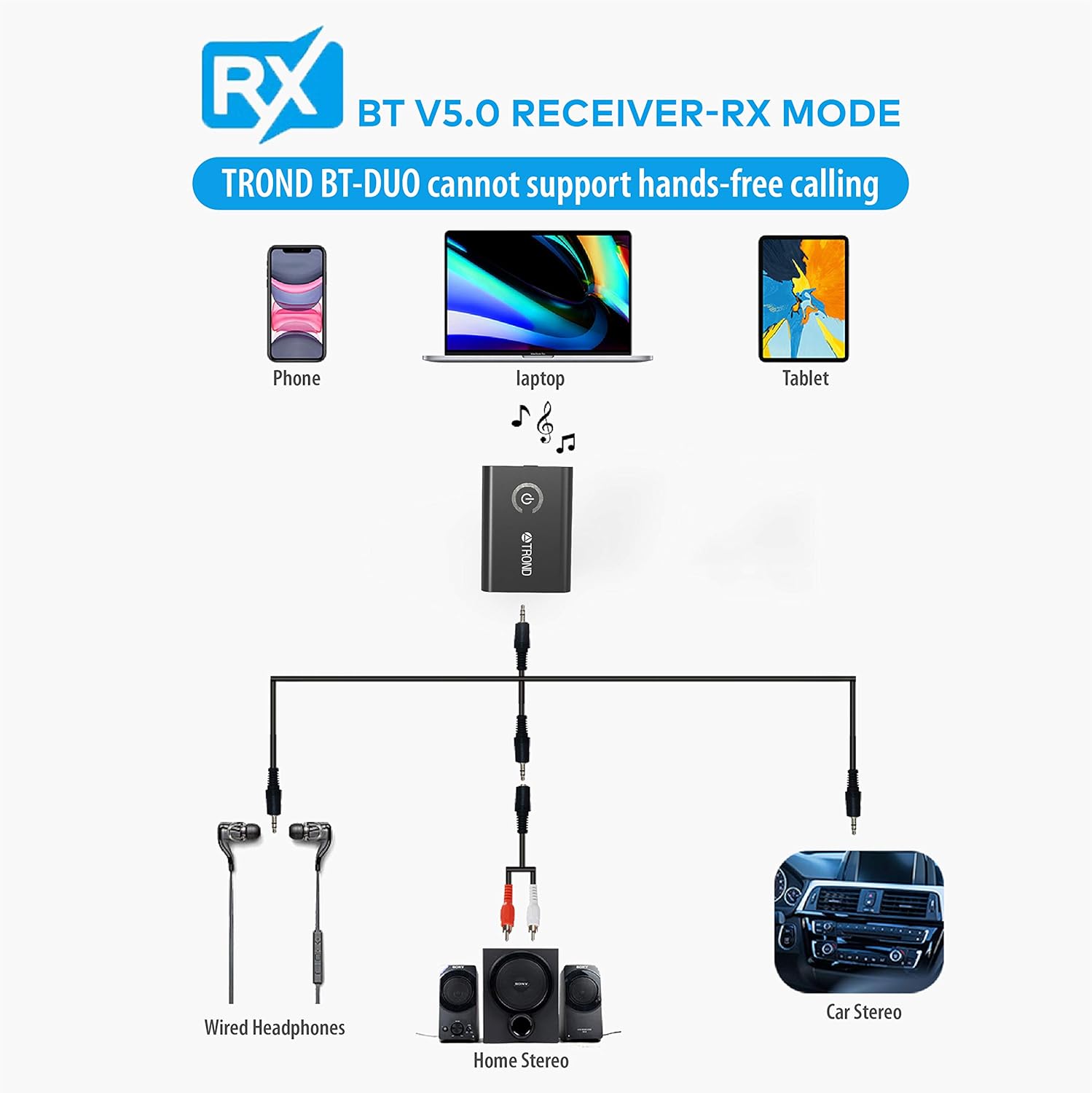
Figure 8: RX Mode Connection Diagram
Important Notes for RX Mode:
- The BT-DUO does not support hands-free phone calls as it lacks a built-in microphone.
- It can be paired to two phones or tablets, but it can only receive audio from one device at a time.
- The receiver will automatically power off if no device is paired within 6 minutes in standby or pairing mode.
- Car Bluetooth systems may require a pin code for pairing, which the BT-DUO cannot input. Therefore, it may not be able to stream music from an iPod to a car stereo in TX mode. However, it can function as a Bluetooth receiver for cars with an AUX jack.
6. Demonstrações em vídeo
6.1 Short Tutorial for BT-DUO in TX/RX
Video 1: A concise guide demonstrating the basic setup and functionality of the TROND BT-DUO in both Transmitter and Receiver modes.
6.2 Tutorial for the usage of BT-DUO in Transmitter mode
Video 2: Detailed instructions on how to set up and use the TROND BT-DUO specifically in Transmitter mode, including connecting to various audio sources.
6.3 Pair with Headphones/Speakers
Video 3: A step-by-step guide on pairing the TROND BT-DUO with Bluetooth headphones or speakers for seamless audio connectivity.
7. Carregando o dispositivo
The TROND BT-DUO has a built-in 160mAh rechargeable lithium battery, providing approximately 8-10 hours of working time (TX/RX) on a full charge.
- Connect the provided USB to Micro USB charging cable to the BT-DUO's charging port and to a power source (e.g., USB wall adapter, computer USB port).
- The LED indicator will turn red while charging and turn off once fully charged (approximately 2 hours).
- O dispositivo pode ser usado durante o carregamento.
Figure 9: Charging the TROND BT-DUO
8. Especificações
| Recurso | Especificação |
|---|---|
| Número do modelo | BT-DUO |
| Versão Bluetooth | V5.0 |
| Internal Chipset | CSR8670, Class II |
| Alcance de transmissão | Até 33 pés / 10 m |
| Freqüência | 2.402 GHz - 2.480 GHz |
| Codec (TX mode) | aptX Baixa Latência, aptX, SBC |
| Codec (RX mode) | aptX Baixa Latência, aptX, SBC |
| Bateria embutida | 160mAh / 3.7V Rechargeable Lithium battery |
| Tempo de trabalho | Approx. 8-10 hours (TX/RX) |
| Tempo de carregamento | Around 2 hours, DC 5V / 300mA |
| Dimensões do produto | 1.77 x 1.3 x 0.35 polegadas |
| Peso do item | 0.5 onças |
9. Solução De Problemas
- Sound Cut Out at Lower Volumes: When watching movies at very low volumes, the CSR chipset might not detect the signal, causing audio cut-outs. Try turning the TV's volume up for better performance.
- AptX Low Latency Not Working: Ensure both the TROND BT-DUO and your Bluetooth headphones/speaker support AptX Low Latency. If only one device supports it, the codec will downgrade, leading to potential audio lag.
- No Hands-Free Calls in RX Mode: The BT-DUO does not have a built-in microphone. When connected as a receiver, the in-line microphone of your wired headset will be disabled, preventing phone calls.
- Car Bluetooth Pairing Issues: Some car Bluetooth systems require a pin code for pairing. Unlike phones, Bluetooth transmitters like the BT-DUO do not have a keypad to enter pin codes, which may prevent direct streaming from an iPod to a car stereo in TX mode. However, it can function as a Bluetooth receiver for cars with an AUX jack.
- No Auto-Power On in Car: Due to its rechargeable battery design, the BT-DUO cannot be powered on automatically after you start the car engine.
10. Garantia e suporte
TROND products come with an 18-month product warranty and a 30-day money-back guarantee. If you encounter any defective product or require technical assistance, please email our service team at support@trond.com. Our service team will usually respond to you within 24 hours.