1. Produto acabadoview
The Manhattan USB 2.0 Multi-Card Reader/Writer is designed for efficient data transfer and management across various flash memory card formats. This device allows you to easily access, download, and manage digital content such as pictures, music, and videos without directly connecting your media device to a computer. It supports simultaneous reading and writing on up to five different flash memory cards and functions as a USB mass storage device.
Os principais recursos incluem:
- Compatibilidade com vários cartões: Supports 79 card formats, including CompactFlash, Memory Stick, Secure Digital, MultiMedia, and XD.
- Operação Plug-and-Play: Na maioria dos sistemas operacionais, não é necessária a instalação de drivers.
- Transferência de dados em alta velocidade: Achieves speeds up to 480 Mbps.
- Simultaneous Card Access: Read and write to five different card slots concurrently.
- Alimentado por USB: No external power supply or adapters needed.

Figure 1: The Manhattan USB 2.0 Multi-Card Reader/Writer, showing its compact design and integrated USB cable.
2. Conteúdo da embalagem
Verifique se seu pacote contém os seguintes itens:
- Manhattan USB 2.0 Multi-Card Reader/Writer (Model 101998)
- Manual do usuário (este documento)
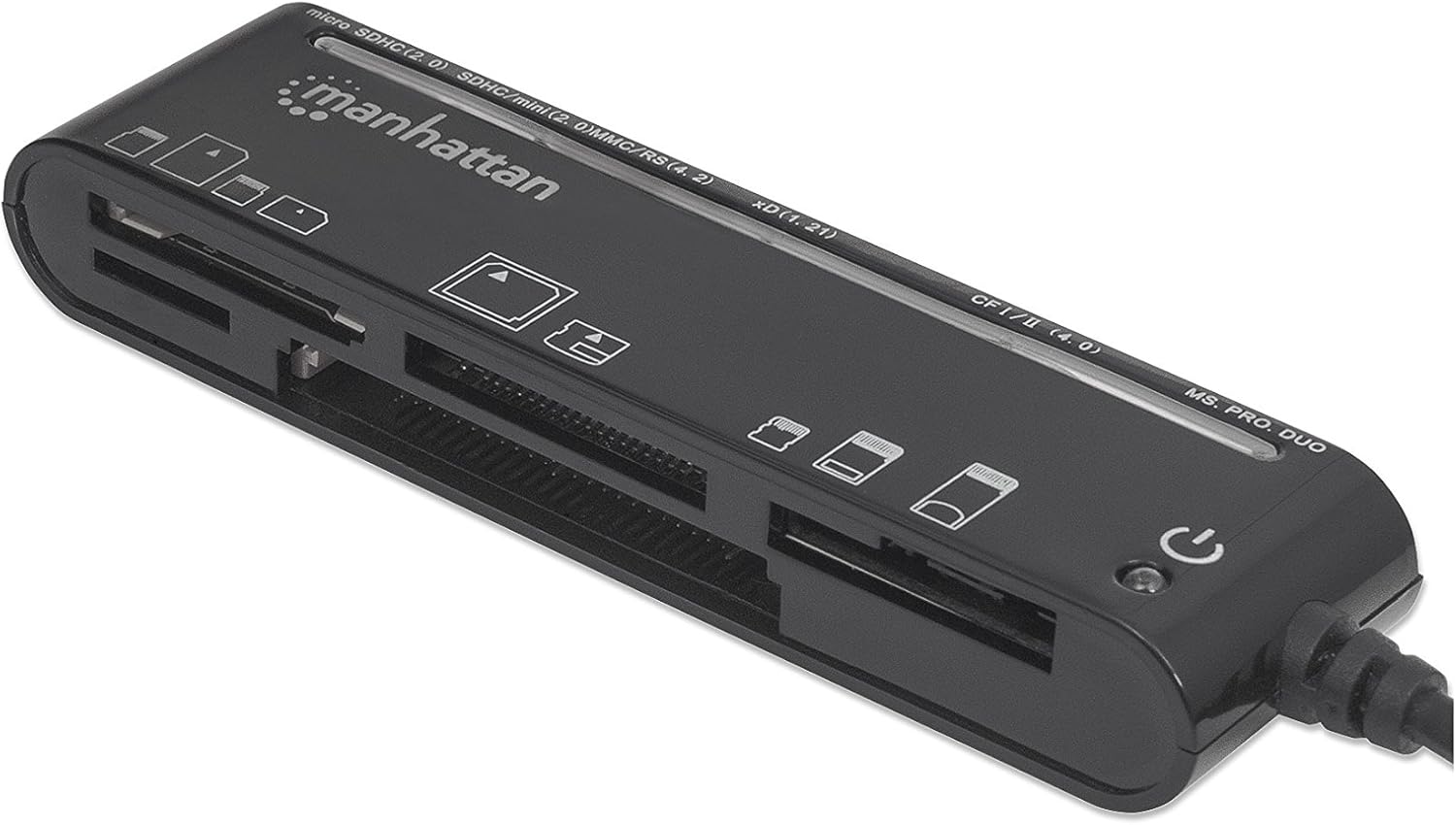
Figure 2: The Manhattan Multi-Card Reader/Writer shown in its retail packaging.
3. Requisitos do sistema
- Available USB 2.0 or 1.1 port
- Windows operating system (Windows XP/Vista/7/8/10/11)
- Mac operating system (macOS 10.x or later)
4. Instruções de configuração
- Conecte o leitor de cartões: Plug the USB connector of the Manhattan Multi-Card Reader/Writer into an available USB port on your computer.
- Instalação automática de drivers: Your operating system will automatically detect the device and install the necessary drivers. This process typically takes a few moments. No manual driver installation is required.
- Verificação: Once installed, the device will appear as several removable disk drives in your computer's "My Computer" (Windows) or "Finder" (Mac) section.

Figure 3: The card reader connected via its USB cable.
5. Instruções de operação
5.1 Inserindo um cartão de memória
Identify the correct slot for your memory card type. The card reader features multiple slots, each designed for specific card formats. Refer to the labels on the device for guidance.

Figura 4: parte superior view of the card reader, highlighting the various card slots and their labels.
- Select Slot: Locate the appropriate slot for your memory card (e.g., SD, microSD, CF, MS PRO DUO, xD).
- Insira o cartão: Gently insert the memory card into the designated slot until it is fully seated. Do not force the card; if it does not insert easily, verify the card's orientation.
- Dados de acesso: Once inserted, the card will appear as a removable drive on your computer. You can now access, copy, move, or delete files conforme necessário.
5.2 Removendo um cartão de memória
- Ejetar em segurança: Before physically removing the card, always safely eject the removable drive from your operating system to prevent data corruption.
- Windows: Right-click on the drive icon in "My Computer" and select "Eject."
- Mac: Arraste o ícone da unidade para a Lixeira ou clique no botão Ejetar ao lado da unidade no Finder.
- Remover cartão: Após ejetar o cartão de memória com segurança, puxe-o cuidadosamente para fora do slot.
5.3 Simultaneous Card Access
The Manhattan Multi-Card Reader/Writer supports simultaneous access to multiple card types. You can insert different types of memory cards into their respective slots and access them as separate drives on your computer. This allows for easy data transfer between different card formats.
6. Manutenção
- Limpeza: Use a soft, dry cloth to clean the exterior of the card reader. Avoid using liquid cleaners or solvents.
- Armazenar: Guarde o dispositivo em local fresco e seco, longe da luz solar direta e de temperaturas extremas quando não estiver em uso.
- Manuseio: Evite deixar o aparelho cair ou submetê-lo a impactos fortes. Não tente desmontá-lo.
7. Solução De Problemas
| Problema | Possível causa | Solução |
|---|---|---|
| Card reader not detected by computer. | Loose USB connection, faulty USB port, operating system issue. |
|
| Cartão de memória não reconhecido. | Incorrect card slot, improper card insertion, damaged card, unsupported card format. |
|
| Velocidades de transferência de dados lentas. | Using a USB 1.1 port, system resource contention, slow memory card. |
|
8. Especificações
| Recurso | Detalhe |
|---|---|
| Número do modelo | 101998 |
| Interface | USB 2.0 |
| Velocidade de transferência de dados | Até 480 Mbps |
| Formatos de cartão suportados | CompactFlash (Type I/II, 4.0, Alpha, Elite Pro, PRO I/II, Turbo, Ultima I/II, UltraX, CF-PSP II, Extreme I/III/IV CF, Platinum II CF, ProMax CF/CF II), IBM/Hitachi/Seagate Microdrive, MagicStor, Memory Stick (MagicGate, MagicGate PRO, MagicGate Duo, High Speed Memory Stick PRO Duo, High Speed MagicGate PRO Duo, High Speed MagicGate PRO, Memory Stick, Memory Stick Duo, Memory Stick Extreme III PRO, Memory Stick Extreme III PRO Duo, Memory Stick Extreme PRO, Memory Stick PRO Duo, Memory Stick PRO Duo PSP, Memory Stick Ultra II PRO, Memory Stick Ultra II PRO Duo, Gaming Edition Memory Stick PRO Duo), SecureDigital (SD, Elite Pro SD, Extreme III SD, Gaming Edition SD, microSD/TransFlash, microSDHC, miniSD, miniSD Ultra II, miniSDHC, miniSD-Pro, Platinum II SD, SD Pro, SDHC, SDXC, SD-Max, SD-Pleomax, SD-Pro C, Super SD, Turbo SD, Ultima I SD, Ultima II SD, Ultimate SD, Ultra High Speed SD, Ultra II SD, Ultra II SD Plus, Ultra SD, Ultra-X SD), MultiMediaCard (MMC/MMC 4.0, DV-RS MMC, High Speed MMC/RS-MMC, MCCmobile, MMC Pro, MMCplus, MMCplus Turbo, RS-MMC), xD Picture Card (1.21/Type M/Type H) |
| Compatibilidade do sistema operacional | Windows, Mac OS |
| Poder | USB powered (5 Volts) |
| Dimensões (CxLxA) | 8.66 x 3.15 x 7.87 polegadas |
| Peso do item | 1.28 onças |
9. Garantia e Suporte
This Manhattan product is backed by a Garantia do fabricante de 3 ano when purchased from the manufacturer or an authorized reseller. For warranty claims or technical support, please contact Manhattan customer service or visit their official website.
Fabricante: MANHATTAN LUXURY BRANDS LLC Parent Code
For further assistance, please refer to the official Manhattan webou entre em contato com os canais de suporte.
10. Informações de segurança
AVISO: Este produto pode conter substâncias químicas que o Estado da Califórnia reconhece como causadoras de câncer e danos reprodutivos. Para mais informações, visite [link para o site do Estado da Califórnia]. P65WARNINGs.ca.gov.


