Instruções importantes de segurança
LEIA TODAS AS INSTRUÇÕES COM ATENÇÃO ANTES DE USAR.
- Desligue sempre o ventilador da tomada antes de limpá-lo, realizar manutenção ou movê-lo.
- Não introduza os dedos ou quaisquer outros objetos pela grelha quando a ventoinha estiver em funcionamento.
- Não opere nenhum ventilador com um cabo ou plugue danificado. Descarte o ventilador ou devolva-o a uma oficina de serviço autorizada para exame e/ou reparo.
- Não passe o fio por baixo do carpete. Não cubra o fio com tapetes, passadeiras ou coberturas semelhantes. Arrume o fio longe da área de tráfego e onde não haja tropeços.
- Não use o ventilador em ambientes úmidos ou damp locais como banheiros ou lavanderias.
- Este ventilador destina-se apenas ao uso interno. Não o utilize ao ar livre.
- Keep the fan away from curtains, drapes, or any objects that may get caught in the fan blades.
- Supervisione as crianças quando o ventilador estiver em uso.
Produto acimaview
The Optimus 18-inch High Velocity Industrial Floor Fan is designed to provide powerful air circulation in various indoor environments. Its robust construction and high-velocity motor make it suitable for workshops, garages, and large rooms.
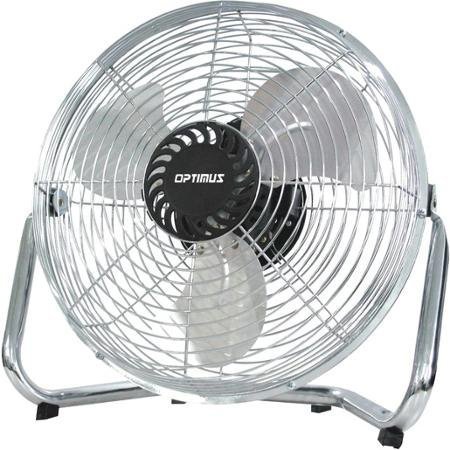
Image: Optimus 18-inch High Velocity Industrial Floor Fan. This image shows the fan with its silver metallic finish and sturdy floor stand.
Principais características:
- 18-inch diameter for wide air distribution.
- Industrial-grade high velocity airflow.
- Durable metallic finish.
- Floor standing design for stable placement.
- Multiple power levels for adjustable airflow.
Instruções de configuração
- Desembale o ventilador: Carefully remove the fan and all components from the packaging. Retain packaging for future storage or transport.
- Assemble the Floor Stand:
- Attach the fan head to the floor stand using the provided screws and tools. Ensure all connections are secure.
- Verify the fan head can pivot smoothly on the stand.
- Colocação: Place the fan on a firm, level surface. Ensure there is adequate space around the fan for proper air circulation and to prevent obstruction of the air intake/output. Keep the fan at least 3 feet away from walls or furniture.
- Conexão de energia: Ensure the fan is in the "OFF" position before plugging it into a standard 120V AC electrical outlet.
Instruções de operação
This fan features push-button controls for easy operation. A remote control may also be included for convenience.
- Ligar/desligar: Locate the power button on the control panel. Press the button once to turn the fan ON. Press it again to turn the fan OFF.
- Ajustando a velocidade do ventilador: The fan has 4 power levels. After turning the fan ON, repeatedly press the speed control button to cycle through the available speed settings (Low, Medium, High, Max). The fan will operate at the selected speed.
- Ajustando a direção do fluxo de ar: The fan head can be tilted manually to direct airflow upwards or downwards. Gently tilt the fan head to the desired angle. Do not force the fan head beyond its intended range of motion.
Manutenção
A limpeza e a manutenção regulares garantirão o desempenho ideal e prolongarão a vida útil do seu ventilador.
- Limpando o Ventilador:
- Desligue sempre o ventilador da tomada antes de limpá-lo.
- Use um pano macio e macioamp cloth to wipe the exterior surfaces of the fan. Do not use abrasive cleaners or harsh chemicals, as these may damage the finish.
- To clean the fan blades, carefully remove the front grille (if detachable, refer to assembly instructions for details). Wipe the blades with a soft cloth. Ensure the grille is securely reattached before operating the fan.
- Certifique-se de que todas as peças estejam completamente secas antes de ligar o ventilador novamente.
- Armazenar: When not in use for extended periods, store the fan in a cool, dry place. It is recommended to store it in its original packaging to protect it from dust and damage.
Solução de problemas
| Problema | Possível causa | Solução |
|---|---|---|
| O ventilador não liga. | Não está conectado à tomada; a tomada não funciona; o interruptor do ventilador está desligado. | Ensure fan is securely plugged into a working outlet. Check household fuse/circuit breaker. Press the power button to turn the fan on. |
| Baixo fluxo de ar. | Fan speed set too low; obstructed intake/output; dirty blades. | Increase fan speed. Clear any obstructions. Clean fan blades and grilles as per maintenance instructions. |
| Ruídos ou vibrações incomuns. | Loose parts; fan not on a level surface; foreign object in blades. | Unplug the fan and check for any loose screws or components. Place the fan on a stable, level surface. Carefully inspect for and remove any foreign objects. |
Especificações
| Recurso | Detalhe |
|---|---|
| Marca | Ótimo |
| Nome do modelo | Alta velocidade |
| Número do modelo do item | 306c1b92-f36b-4ccc-ac62-2ad33d5c9efb |
| Diâmetro | 18 polegadas |
| Cor | Prata |
| Estilo | Industrial |
| Fonte de energia | Elétrico com fio |
| Número de níveis de potência | 4 |
| Método de controle | Controle de botão |
| Uso interno/externo | Interior |
| Componentes incluídos | Floor Stand, Remote Control |
| Especificação Atendida | OSHA |
Garantia e Suporte
Optimus products are manufactured to high-quality standards. This product is covered by a limited warranty against defects in materials and workmanship from the date of purchase. Please refer to the warranty card included with your product for specific terms and conditions.
For technical support, troubleshooting assistance, or warranty claims, please contact Optimus customer service. Contact information can typically be found on the product packaging or the official Optimus website.
Guarde o comprovante de compra para fins de garantia.


