1. Produto acabadoview
The Telwin 802935 OBDII Memory Saver Cable is an essential tool designed to prevent the loss of stored data in your vehicle's electronic systems when the main battery is disconnected. By providing a continuous 12V power supply, it ensures that programmed driving preferences, radio presets, clock settings, and diagnostic trouble codes (DTCs) are preserved during battery replacement or maintenance.
This cable connects to a 12V power source, such as a jump starter, via a cigarette lighter plug, and to your vehicle's OBDII port. Its robust design ensures reliable performance for automotive service and maintenance tasks.

Image 1.1: The Telwin 802935 OBDII Memory Saver Cable, illustrating its full length and components.
2. Configuração e instalação
Follow these steps to properly set up and install the Telwin 802935 OBDII Memory Saver Cable:
- Prepare o veículo: Ensure the vehicle's ignition is completely off and all accessories (radio, lights, etc.) are turned off.
- Localize a porta OBDII: Identify your vehicle's OBDII diagnostic port. This is typically located under the dashboard on the driver's side, often near the steering column.
- Conectar ao veículo: Plug the OBDII connector end of the Telwin 802935 cable firmly into the vehicle's OBDII port. Ensure a secure connection.
- Conecte à fonte de alimentação: Plug the cigarette lighter connector of the cable into a 12V power source. This can be a fully charged jump starter, a portable power pack, or the cigarette lighter socket of another vehicle (with its engine running).
- Verifique a energia: Confirm that the 12V power source is active and providing power to the cable. Some jump starters may have an indicator light.
- Proceed with Battery Service: Once both connections are secure and power is confirmed, you can safely disconnect and replace the vehicle's main battery without losing electronic data.
- Desconexão: After the new battery is installed and connected, primeiro disconnect the cable from the 12V power source, então disconnect the OBDII connector from the vehicle.

Imagem 2.1: Detalhada view of the OBDII connector pins.
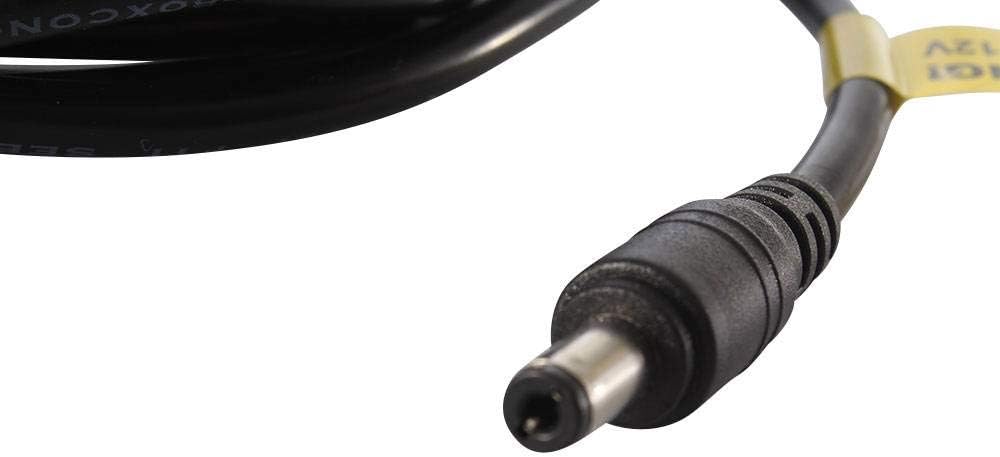
Image 2.2: The barrel connector and the 12V warning tag.
3. Instruções de operação
The Telwin 802935 OBDII Memory Saver Cable operates by maintaining a constant 12V power supply to your vehicle's onboard computer system. This continuous power prevents the vehicle's electronic control units (ECUs) from losing their volatile memory when the primary battery is removed.
To operate, simply follow the setup and installation steps outlined in Section 2. The cable functions automatically once connected to both the vehicle's OBDII port and a 12V power source. There are no additional controls or settings on the cable itself.
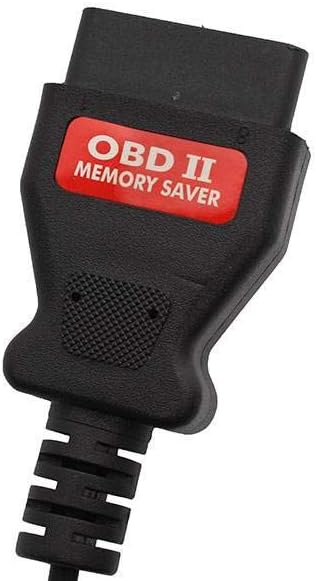
Image 3.1: The OBDII connector clearly labeled as 'OBD II MEMORY SAVER'.
4. Manutenção
Proper maintenance ensures the longevity and reliable performance of your Telwin 802935 OBDII Memory Saver Cable:
- Limpeza: Wipe the cable and connectors with a dry, soft cloth after each use. Do not use abrasive cleaners, solvents, or harsh chemicals, as these can damage the cable's insulation or connectors.
- Armazenar: Store the cable in a dry, cool place, away from direct sunlight, extreme temperatures, and moisture. Coil the cable loosely to prevent kinks, sharp bends, or damage to the internal wiring.
- Inspeção: Periodically inspect the entire cable for any signs of damage, such as cuts, frayed wires, exposed conductors, or bent/corroded pins on the connectors. Do not use the cable if any damage is observed.
- Verificação de fusíveis: The cable includes an inline fuse. If the device stops working, check and replace the fuse with one of the same rating if necessary.
5. Solução De Problemas
If you encounter issues while using the Telwin 802935 OBDII Memory Saver Cable, consider the following troubleshooting steps:
- Sem indicação de energia:
- Ensure the 12V power source (jump starter, auxiliary battery) is fully charged and functioning correctly.
- Verify that the cigarette lighter plug is securely inserted into the power source.
- Check the inline fuse on the cable. Replace if blown (use a fuse of the same ampclassificação etária).
- Conexões soltas: Confirm that both the OBDII connector and the cigarette lighter plug are firmly seated in their respective ports. A loose connection can interrupt the power supply.
- Data Loss Still Occurs:
- Re-verify all connections and the power source's functionality.
- Ensure the vehicle's ignition was completely off before connecting the memory saver and throughout the battery replacement process.
- Confirm that the 12V power source remained active throughout the entire procedure.
- Compatibilidade do veículo: Ensure your vehicle uses a standard OBDII port. While most modern vehicles do, some older or specialized vehicles might have different diagnostic ports.
6. Especificações
| Recurso | Especificação |
|---|---|
| Marca | Telwin |
| Número do modelo | 802935.0 |
| Peso do item | 200 g |
| Dimensões da embalagem | 18.9 x 15.3 x 5.1 cm |
| Vol de entradatage | 12V DC (via cigarette lighter connector) |
| Conector Tipo 1 | OBDII (16-pin) |
| Conector Tipo 2 | Plugue de isqueiro |
| ASIN | B01GTTW6FW |
7. Garantia e Suporte
For detailed warranty information, technical assistance, or customer support regarding your Telwin 802935 OBDII Memory Saver Cable, please refer to the official Telwin website or contact your authorized Telwin dealer. It is recommended to retain your purchase receipt as proof of purchase for any warranty claims.


