1. Introdução
Obrigado pela compra.asing the Sony Signature Series Audio Component Amplifier TA-ZH1ES. This high-resolution headphone amplifier is designed to deliver exceptional audio quality, featuring advanced technologies such as Sony's enhanced S-Master HX digital amplifier and DSD Remastering Engine. This manual provides essential information for the proper setup, operation, and maintenance of your device.
2. Informações de segurança
Please read all safety instructions carefully before using the ampliifier. Guarde este manual para referência futura.
- Fonte de energia: Connect the unit only to the AC power outlet specified in the specifications.
- Ventilação: Assegure ventilação adequada ao redor do aparelho para evitar superaquecimento. Não obstrua as aberturas de ventilação.
- Umidade: Não exponha a unidade à chuva ou umidade para reduzir o risco de incêndio ou choque elétrico.
- Objetos estranhos: Não insira nenhum objeto nas aberturas da unidade.
- Manutenção: Encaminhe todos os serviços de manutenção a pessoal qualificado. Não tente abrir ou reparar a unidade por conta própria.
- Colocação: Coloque a unidade em uma superfície estável e nivelada, longe da luz solar direta, fontes de calor e excesso de poeira ou vibrações.
3. Produto acabadoview
3.1 Painel Frontal
The front panel provides various headphone output connections and essential controls for operation.

Figura 3.1: Layout do painel frontal
This image displays the front panel of the TA-ZH1ES amplifier, highlighting the various headphone output jacks and the volume control knob. From left to right, you can see the XLR4 balanced output, multiple 4.4mm and 3.5mm balanced outputs, and 6.3mm and 3.5mm unbalanced outputs. The large rotary knob on the right is for volume control, and a Walkman/Xperia USB input is also visible.
- Botão de energia: Liga ou desliga a unidade.
- Seletor de entrada: Percorre os ciclos das fontes de entrada disponíveis.
- Output Selector: Selects the desired output mode.
- Mostrar: Mostra as configurações e o estado atuais.
- Botão Menu/Voltar: Navigates menu options or returns to the previous screen.
- Botão Entrar: Confirma seleções.
- Gain Button: Adjusts the output gain for different headphone impedances.
- Botão de volume: Controla o volume de saída.
- Saídas de fone de ouvido:
- Balanced Connections: 4.4mm, 3.5mm x 2, XLR4
- Unbalanced Connections: 6.3mm, 3.5mm
- Walkman/Xperia USB Input: For connecting compatible portable devices.
3.2 Painel traseiro
The rear panel houses various input and output terminals for connecting to other audio components and the power supply.
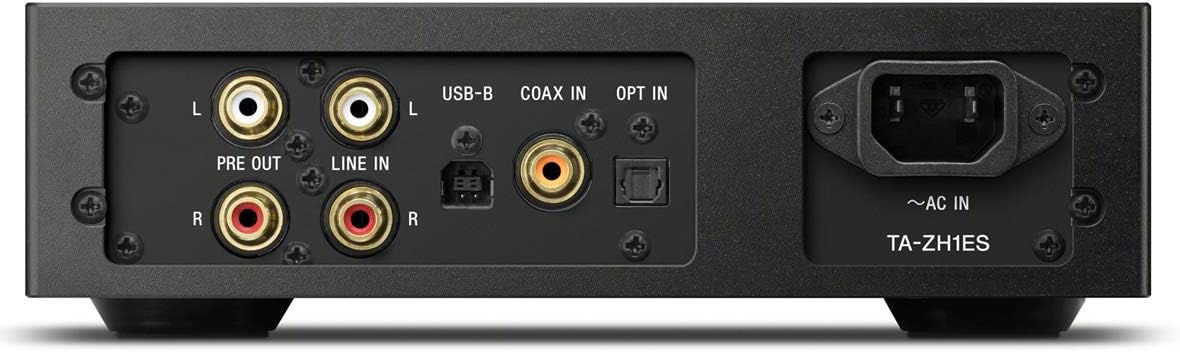
Figura 3.2: Layout do painel traseiro
This image illustrates the rear panel of the TA-ZH1ES amplifier, detailing the various connectivity options. Visible ports include RCA Line In (L/R), RCA Pre Out (L/R), USB-B input, Coaxial input, Optical input, and the AC power inlet. Each port is clearly labeled for easy identification.
- LINE IN (RCA L/R): Analog audio input for connecting external devices.
- PRE OUT (RCA L/R): Analog audio output for connecting to a power ampamplificador ou alto-falantes ativos.
- Entrada USB-B: For connecting to a computer or other digital audio sources.
- COAX IN: Entrada de áudio digital coaxial.
- ATIVAR: Entrada de áudio digital óptica.
- ~AC IN: Power input for the AC power cord.
4. Configuração
Follow these steps to set up your TA-ZH1ES ampmais vivo.
4.1 Posicionamento
Coloque o amplifier on a flat, stable surface with adequate space for ventilation. Avoid placing it near heat sources or in direct sunlight.

Figura 4.1: AmpPosicionamento do elevador
This image shows the Sony TA-ZH1ES amplifier positioned on a flat surface, demonstrating a typical setup environment. Ensure the unit has sufficient space around it for proper airflow.
4.2 Conectando fontes de áudio
Connect your audio sources to the appropriate input terminals on the rear panel.
- Digital Sources (Computer, CD Player, etc.):
- For a computer, connect a USB-B cable from your computer to the Entrada USB-B.
- For a CD player or other digital audio device, use a coaxial cable for the COAXIAL DE ENTRADA or an optical cable for the Entrar.
- Analog Sources (Turntable with pre-amp, etc.): Connect RCA cables from your analog source to the ENTRADA DE LINHA (RCA L/R) terminais.
- Portable Devices (Walkman/Xperia): Connect compatible portable devices to the Walkman/Xperia USB Input on the front panel. This input also supports charging for Walkman devices.
4.3 Connecting Headphones or External Ampmais vivo
- Fones de ouvido: Connect your headphones to the appropriate balanced (4.4mm, 3.5mm x 2, XLR4) or unbalanced (6.3mm, 3.5mm) output jacks on the front panel.
- Potência externa AmpAmplificador/Caixas de Som Ativas: If using the TA-ZH1ES as a DAC or pre-amplifier, connect RCA cables from the PRE OUT (RCA L/R) terminals on the rear panel to your power ampamplificador ou alto-falantes ativos.
4.4 Conexão de Energia
Conecte o cabo de alimentação CA fornecido ao ~AC EM terminal on the rear panel, then plug the other end into a wall outlet.
5. Instruções de operação
5.1 Operação básica
- Ligar: Press the Power button on the front panel.
- Selecione Entrada: Use the Input Selector button to choose the desired audio source (e.g., USB-B, COAX, OPT, LINE IN).
- Conecte fones de ouvido: Plug your headphones into the appropriate jack.
- Ajustar volume: Slowly turn the Volume knob clockwise to increase the volume to a comfortable listening level.

Figura 5.1: Controles do painel superior
Esta imagem fornece uma visão de cima para baixo. view of the TA-ZH1ES amplifier, clearly showing the power button, input/output selectors, display screen, menu navigation buttons (Menu/Back, Enter), and the Gain button. These controls are used for basic operation and feature adjustments.
5.2 DSD Remastering Engine
The DSD Remastering Engine converts all PCM audio sources to DSD 11.2MHz, aiming to provide a more natural and analog-like sound experience. This feature can be enabled or disabled through the unit's menu settings.
5.3 DSEE HX
DSEE HX (Digital Sound Enhancement Engine HX) upscales compressed audio files to near high-resolution quality. This feature is particularly effective for improving the sound of lower-resolution files, such as those from streaming services or older recordings. Access DSEE HX settings via the unit's menu.
5.4 Configurações de ganho
O amplifier features adjustable gain settings to optimize performance with various headphone impedances. Press the Ganho button on the front panel to cycle through available gain levels (e.g., Low, Mid, High). Select the setting that provides sufficient volume without distortion for your specific headphones.
6. Manutenção
Os cuidados adequados garantem a longevidade e o desempenho ideal do seu equipamento. ampmais vivo.
- Limpeza: Limpe a unidade com um pano macio e seco. Não utilize esponjas abrasivas, pó de limpeza ou solventes como álcool ou benzeno.
- Ventilação: Periodically check that the ventilation openings are free from dust and obstructions.
- Armazenar: If storing the unit for an extended period, disconnect it from the power outlet and store it in a clean, dry place.
7. Solução De Problemas
Se você tiver problemas com seu ampPara obter informações sobre o amplificador, consulte os seguintes problemas comuns e suas soluções.
| Problema | Possível causa/solução |
|---|---|
| Sem energia | Ensure the AC power cord is securely connected to both the unit and the wall outlet. Check if the power outlet is functional. |
| Sem som |
|
| Som distorcido |
|
| Unit becomes hot | Ensure adequate ventilation around the unit. Do not block the ventilation openings. If overheating persists, discontinue use and contact service. |
Se o problema persistir após tentar essas soluções, entre em contato com o suporte ao cliente da Sony.
8. Especificações
| Recurso | Detalhe |
|---|---|
| Número do modelo | TA-ZH1ES |
| Dimensões do produto (L x A x P) | 2.56 x 12.36 x 8.27 polegadas (aproximadamente 65 x 314 x 210 mm) |
| Peso do item | 1 libras (aproximadamente 0.45 kg) |
| Impedância do fone de ouvido | 12-600 ohms |
| Saídas de fone de ouvido | Balanced: 4.4mm, 3.5mm x 2, XLR4 Unbalanced: 6.3mm, 3.5mm |
| Entradas Digitais | USB-B, Coaxial, Optical, Walkman/Xperia USB |
| Entradas analógicas | RCA Line In (L/R) |
| Saídas Analógicas | RCA Pre Out (L/R) |
| Fabricante | Sony |
| Data da primeira disponibilidade | 1 de setembro de 2016 |
Nota: as especificações estão sujeitas a alterações sem aviso prévio.
9. Garantia e Suporte
Para obter informações detalhadas sobre a garantia, consulte o cartão de garantia incluído com o produto ou visite o site oficial de suporte da Sony. website for your region. For technical assistance, product registration, or service inquiries, please contact Sony customer support.
Suporte Sony Website: https://www.sony.com/electronics/support