Introdução
The Korg Volca Kick is an analog kick generator featuring an MS-20 resonator and a 16-step sequencer. It is designed to produce a wide range of kick drum and bass sounds, from tight, punchy kicks to deep, resonant bass, suitable for various electronic music genres. This manual provides essential information for setting up, operating, and maintaining your Volca Kick.

Figura 1: Frente view of the Korg Volca Kick, showcasing its controls and 16-step sequencer.
Configurar
Fonte de energia
- Baterias: The Volca Kick requires 6 AA batteries for portable operation. Ensure batteries are inserted with correct polarity.
- Adaptador AC: For extended use, connect a compatible 9V DC center-negative AC adapter (sold separately) to the DC 9V jack.
Conexões de áudio
- Saída: Connect headphones or an audio cable from the AUDIO OUT jack to a mixer or ampmais vivo.
- Alto-falante embutido: The unit features a built-in speaker for immediate sound output without external amplificação.
Synchronization and MIDI
- Sync I/O: Use the SYNC IN and SYNC OUT jacks to synchronize with other Korg Volca series devices or compatible equipment.
- Entrada MIDI: Connect a MIDI cable to the MIDI IN port to control the Volca Kick from an external MIDI device or DAW.
Instruções de operação
Basic Controls and Sound Generation
The Volca Kick utilizes an analog kick generator based on the MS-20 filter, allowing for powerful and resonant sounds. The interface provides direct control over various parameters to shape your kick and bass sounds.
- Tom: Adjusts the fundamental frequency of the kick sound.
- Dobrar: Controls the pitch envelope, creating a 'bending' effect typical of kick drums.
- Tempo: Sets the duration of the pitch bend.
- Pulse Color: Modifies the timbre of the pulse oscillator.
- Nível: Adjusts the output level of the pulse oscillator.
- Ataque: Controls the attack time of the ampenvelope elevador.
- Decadência: Controls the decay time of the ampenvelope elevador.
- Dirigir: Adds distortion and saturation for aggressive sound shaping.
- Tom: Adjusts the overall tonal character of the sound.

Figura 2: Angulado view of the Korg Volca Kick, highlighting the various knobs and buttons for sound manipulation.
Sequenciador de 16 passos
The integrated 16-step sequencer allows for intuitive pattern creation and real-time performance.
- Step Buttons: Use the 16 step buttons to program your rhythm patterns. Press a button to activate a step, press again to deactivate.
- Modo de gravação: Enter record mode to capture real-time knob movements (motion sequencing) and note inputs.
- Reproduzir/Parar: Starts and stops the sequencer playback.
- Tempo: Ajusta a velocidade de reprodução do sequenciador.
- Balanço: Adds a rhythmic swing feel to your patterns.
- Sotaque: Adds emphasis to specific steps.
- Touch FX: Provides real-time effects for dynamic performance.
- Active Step: Allows you to skip steps in a pattern, creating variations.
- Memória: Save and recall your created patterns.
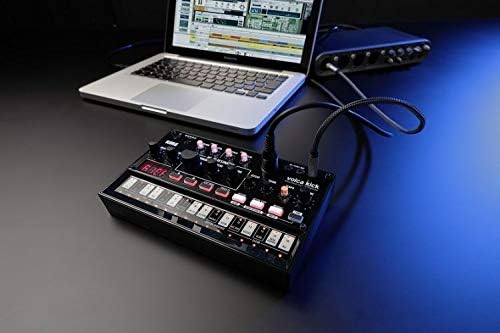
Figure 3: The Korg Volca Kick connected to a laptop, demonstrating its integration capabilities with external devices.
Manutenção
To ensure the longevity and optimal performance of your Korg Volca Kick, follow these maintenance guidelines:
- Limpeza: Use um pano macio e seco para limpar o aparelho. Evite produtos de limpeza abrasivos ou solventes.
- Armazenar: Guarde a unidade em local fresco e seco, longe da luz solar direta, temperaturas extremas e alta umidade.
- Cuidados com a bateria: Remova as pilhas se o aparelho não for usado por um longo período para evitar vazamentos.
Solução de problemas
If you encounter issues with your Volca Kick, refer to the following common troubleshooting steps:
- Sem energia: Check battery installation and charge level. If using an AC adapter, ensure it is correctly connected and the correct voltage/polarity.
- Sem som: Verify that the volume knob is turned up. Check audio cable connections and ensure external speakers/headphones are working.
- Sequenciador não está funcionando: Ensure the sequencer is in play mode and not paused or stopped. Check tempo settings.
- Problemas com MIDI: Confirm MIDI cable connection and correct MIDI channel settings on both the Volca Kick and your external device.
Especificações
| Recurso | Especificação |
|---|---|
| Material do corpo | Plástico |
| Peso do item | 13.3 onças (377 gramas) |
| Dimensões do produto | 10.35 x 6.02 x 2.79 polegadas |
| Número do modelo do item | VOLCAKICK |
| Baterias | São necessárias 6 pilhas AA (alcalinas). |
| Tipo de conector | 9V DC Centre-Negative |
| Número de teclas do teclado | 16 |
| Fabricante | Korg USA Inc. |
Garantia e Suporte
Para informações sobre garantia e suporte técnico, consulte o site oficial da Korg. webou entre em contato com o distribuidor Korg local. Guarde o comprovante de compra para eventuais solicitações de garantia.


