1. Introdução
Thank you for choosing the Lenco PDR-030 DAB+/FM Portable Digital Radio. This manual provides essential information for setting up, operating, and maintaining your device. The PDR-030 offers high-quality digital radio reception (DAB+) and traditional FM radio, along with features such as an integrated rechargeable battery for portability, an RDS display, station memory, and an alarm clock function.
Componentes incluídos:
- Lenco PDR-030 Digital Radio
- AC Power Adapter (220 Volt)
- Manual do usuário
2. Informações importantes de segurança
- Não exponha o aparelho à chuva ou umidade para evitar incêndio ou choque elétrico.
- Certifique-se de que o adaptador de energia esteja configurado corretamente.tage corresponde à sua fonte de alimentação local.
- Não abra o casing. Encaminhe todos os serviços de manutenção para pessoal qualificado.
- Evite colocar o aparelho perto de fontes de calor ou sob luz solar direta.
- Handle the integrated battery with care. Do not attempt to replace it yourself.
- Mantenha o dispositivo longe de campos magnéticos fortes.
3. Produto acabadoview
Familiarize yourself with the main components and controls of your Lenco PDR-030 radio.
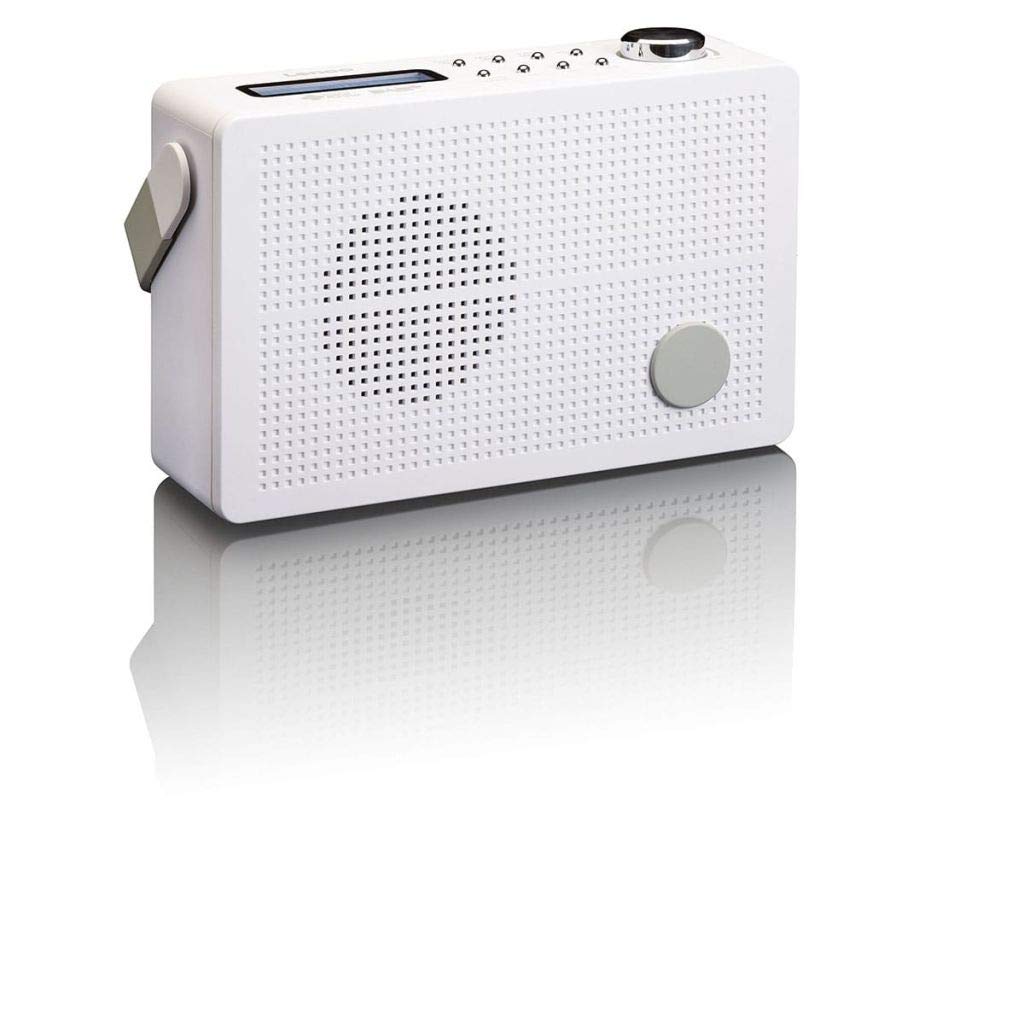
Figura 3.1: Front Panel of Lenco PDR-030 Radio. Features include a blue backlit LCD display, power/source button, alarm, sleep, info/menu, preset buttons, select/snooze, scan, previous, next buttons, and a rotary volume knob.
Key Controls and Features:
- Mostrar: Two-line illuminated LCD for time, date, station name, and information.
- Power/Source Button: Turns the radio on/off and switches between DAB+ and FM modes.
- Botão de volume: Ajusta o nível de saída de áudio.
- Antena Telescópica: Para uma recepção ideal do sinal de rádio.
- Entrada para fone de ouvido (3.5mm): Para audição privada.
- Alarm/Sleep/Info/Menu/Preset Buttons: For various functions including setting alarms, sleep timer, accessing information, menu navigation, and managing station presets.
- Select/Snooze/Scan/Prev/Next Buttons: For station tuning, menu selection, and snooze function.
4. Configuração
4.1 Alimentando o rádio
The PDR-030 can be powered by the included AC adapter or its integrated rechargeable battery.
- Alimentação CA: Connect the supplied 220V AC power adapter to the DC input jack on the radio and then to a wall outlet. The radio will automatically begin charging the internal battery.
- Potência da bateria: The integrated Lithium-ion battery allows for portable use. Ensure the battery is sufficiently charged before use without the AC adapter.
4.2 Configuração da Antena
Extend the telescopic antenna fully for optimal reception of both DAB+ and FM signals. Adjust its position for the best signal quality.
4.3 Initial Power On and Station Scan
- Pressione o Fonte de energia botão para ligar o rádio.
- Upon first use, the radio will automatically enter DAB+ mode and perform a full scan for available digital radio stations. This may take a few minutes.
- Assim que a busca for concluída, o rádio sintonizará a primeira estação disponível.
5. Instruções de operação
5.1 Ligar/Desligar
Pressione o Fonte de energia botão para ligar ou desligar o rádio.
5.2 Mode Selection (DAB+/FM)
Pressione o Fonte button repeatedly to switch between DAB+ and FM radio modes.
5.3 Estações de Sintonia
- DAB+ Mode:
- Após a digitalização inicial, use o Anterior e Próximo buttons to navigate through the list of available DAB+ stations.
- To perform a new full scan, press the Menu button, navigate to "Full Scan" using Anterior / Próxima, e pressione Selecione.
- Modo FM:
- Pressione o Digitalizar Botão para buscar automaticamente a próxima estação de FM disponível.
- Para afinação manual, pressione e mantenha pressionado o Anterior or Próximo botões para ajustar a frequência com precisão.
5.4 Saving and Recalling Preset Stations
The radio allows you to store up to 10 DAB+ and 10 FM preset stations.
- Para salvar uma predefinição:
- Sintonize a estação desejada.
- Pressione e segure o Predefinição Pressione o botão até que "Preset Store" apareça no visor.
- Use o Anterior / Próxima botões para selecionar um número predefinido (1-10).
- Imprensa Selecione Para confirmar e salvar a estação.
- Para recuperar uma predefinição:
- Pressione o Predefinição botão brevemente.
- Use o Anterior / Próxima botões para selecionar o número predefinido desejado.
- Imprensa Selecione to tune to the preset station.
5.5 Controle de volume
Gire o Botão de Volume clockwise to increase the volume and counter-clockwise to decrease it.
5.6 RDS Functionality (FM Mode)
In FM mode, the RDS (Radio Data System) function displays information such as station name, program type, and other broadcast data on the two-line LCD display.
5.7 Função de despertador
The PDR-030 can be used as an alarm clock with two separate alarm times.
- Configurando um alarme:
- Pressione o Alarme botão.
- Usar Anterior / Próxima Para selecionar o Alarme 1 ou o Alarme 2, pressione Selecione.
- Follow the on-screen prompts to set the alarm time, duration, source (Buzzer or Radio), frequency (Daily, Once, Weekdays, Weekends), and volume.
- Ensure the alarm is set to "On" and press Selecione para salvar.
- Função soneca: Quando o alarme tocar, pressione o Soneca botão para silenciá-lo temporariamente por um período determinado.
- Despertador: Pressione o Dormir Pressione o botão repetidamente para definir um temporizador de desligamento automático (por exemplo, 15, 30, 45, 60 minutos), após o qual o rádio desligará automaticamente.
Conexão de fone de ouvido 5.8
Connect 3.5mm stereo headphones to the headphone jack for private listening. The internal speaker will be muted automatically.
6. Manutenção
6.1 Limpeza
Wipe the radio's exterior with a soft, dry cloth. Do not use abrasive cleaners, waxes, or solvents as they may damage the finish. Ensure no liquids enter the device.
6.2 Cuidados com a bateria
The integrated Lithium-ion battery is designed for long life. To maximize battery lifespan:
- Evite descarregar completamente a bateria com frequência.
- Se for guardar o rádio por um longo período, carregue a bateria até aproximadamente 50% e guarde-o em local fresco e seco.
- Do not attempt to replace the battery yourself. Contact qualified service personnel if battery issues arise.
7. Solução De Problemas
| Problema | Possível causa | Solução |
|---|---|---|
| Sem energia | AC adapter not connected or faulty; battery discharged. | Check AC adapter connection. Charge the battery. |
| Recepção DAB+/FM ruim | Antena não estendida; área de sinal fraco; interferência. | Fully extend and adjust the telescopic antenna. Move the radio to a location with better signal. Avoid placing near other electronic devices. |
| Sem som | Volume too low; headphones connected; mute activated. | Increase volume. Disconnect headphones. Check if mute is active (if applicable). |
| Alarme não soa | Alarm not activated; alarm volume too low; incorrect time setting. | Ensure alarm is set to "On". Check alarm volume. Verify current time and alarm time settings. |
8. Especificações
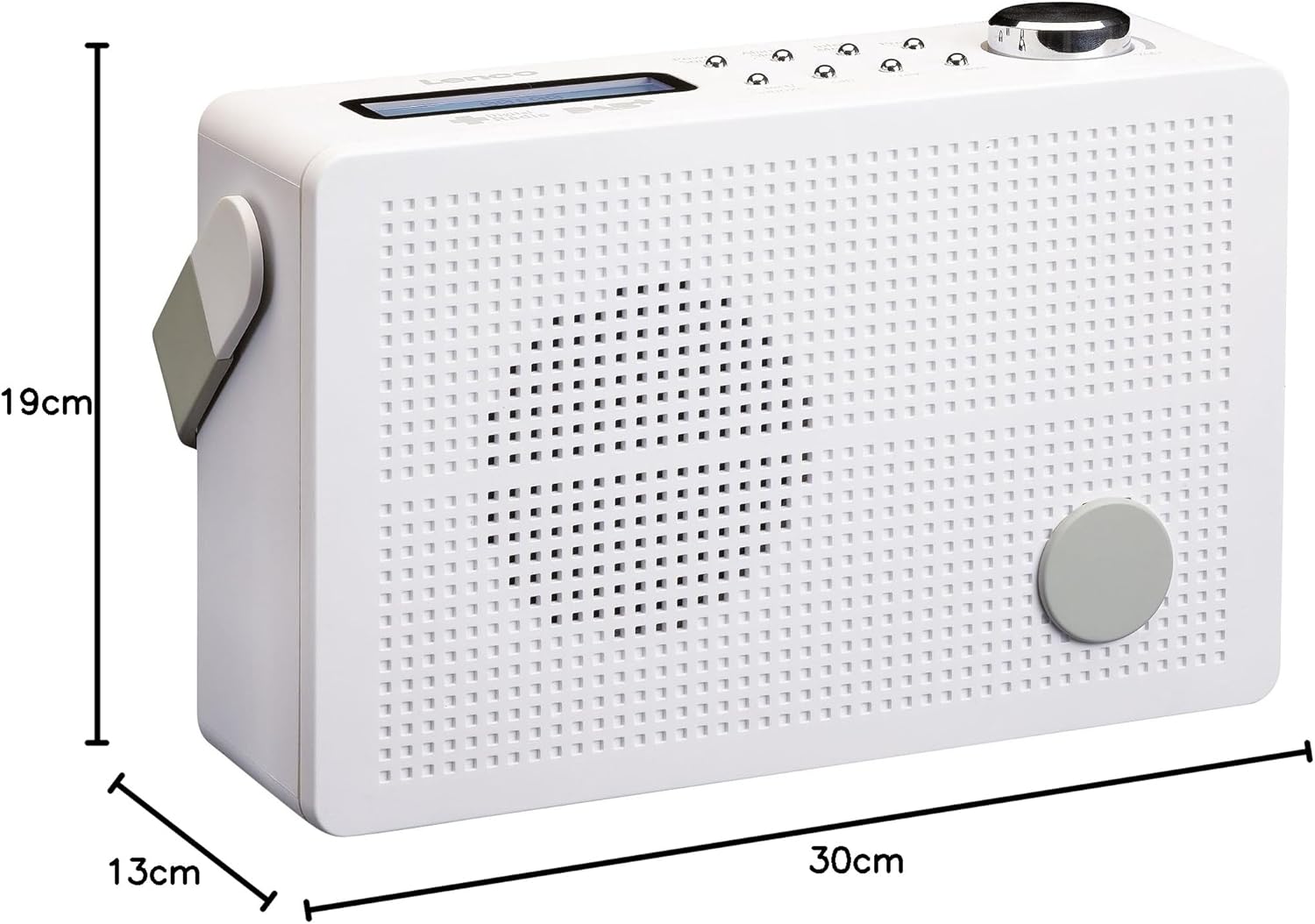
Figura 8.1: Lenco PDR-030 Dimensions.
| Recurso | Detalhe |
|---|---|
| Número do modelo | PDR-030 |
| Tecnologia de sintonizador | DAB+, FM (Ukw) |
| Fonte de energia | Battery-Powered (Integrated Lithium-ion), AC Adapter |
| Vol. CAtage | 220 volts |
| Dimensões do produto (L x P x A) | 21.4 x 6.5 x 13.8 cm (approx. 22.5 x 8.5 x 15 cm as per another spec) |
| Peso do item | 9 g (Note: This seems incorrect, likely 670g from description) |
| Tipo de material | Plástico |
| interface de hardware | 3.5 mm Audio (Headphone Jack) |
| Características especiais | Portable, RDS Display, Alarm Clock, Station Memory (10 DAB+, 10 FM) |
Note: Some dimensions and weight specifications provided by the manufacturer may vary slightly. The description states 670 grams for weight, while specifications list 9g. Please refer to the product packaging for the most accurate information.
9. Garantia e Suporte
Lenco products are designed for reliability and performance. This product typically comes with a 24-month manufacturer's warranty from the date of purchase, covering defects in materials and workmanship. Please retain your proof of purchase for warranty claims.
For technical support, service, or warranty inquiries, please refer to the contact information provided on the Lenco official website or your local retailer. Do not attempt to repair the device yourself.
Para obter mais informações, você pode visitar o Loja Lenco na Amazon.


