1. Introdução
This manual provides essential information for the proper use and maintenance of your WiMiUS Q4 4K Action Camera. Please read it thoroughly before operating the device to ensure optimal performance and longevity. Keep this manual for future reference.
Precauções de segurança
- Não exponha a câmera a temperaturas extremas ou à luz solar direta por períodos prolongados.
- Evite deixar a câmera cair ou submetê-la a impactos fortes.
- Mantenha a câmera longe de campos magnéticos fortes.
- Ensure the waterproof case is properly sealed before submerging the camera in water.
- Use apenas acessórios e carregadores aprovados.
2. Produto acabadoview
Componentes da câmera
Familiarize yourself with the main components of your WiMiUS Q4 Action Camera:
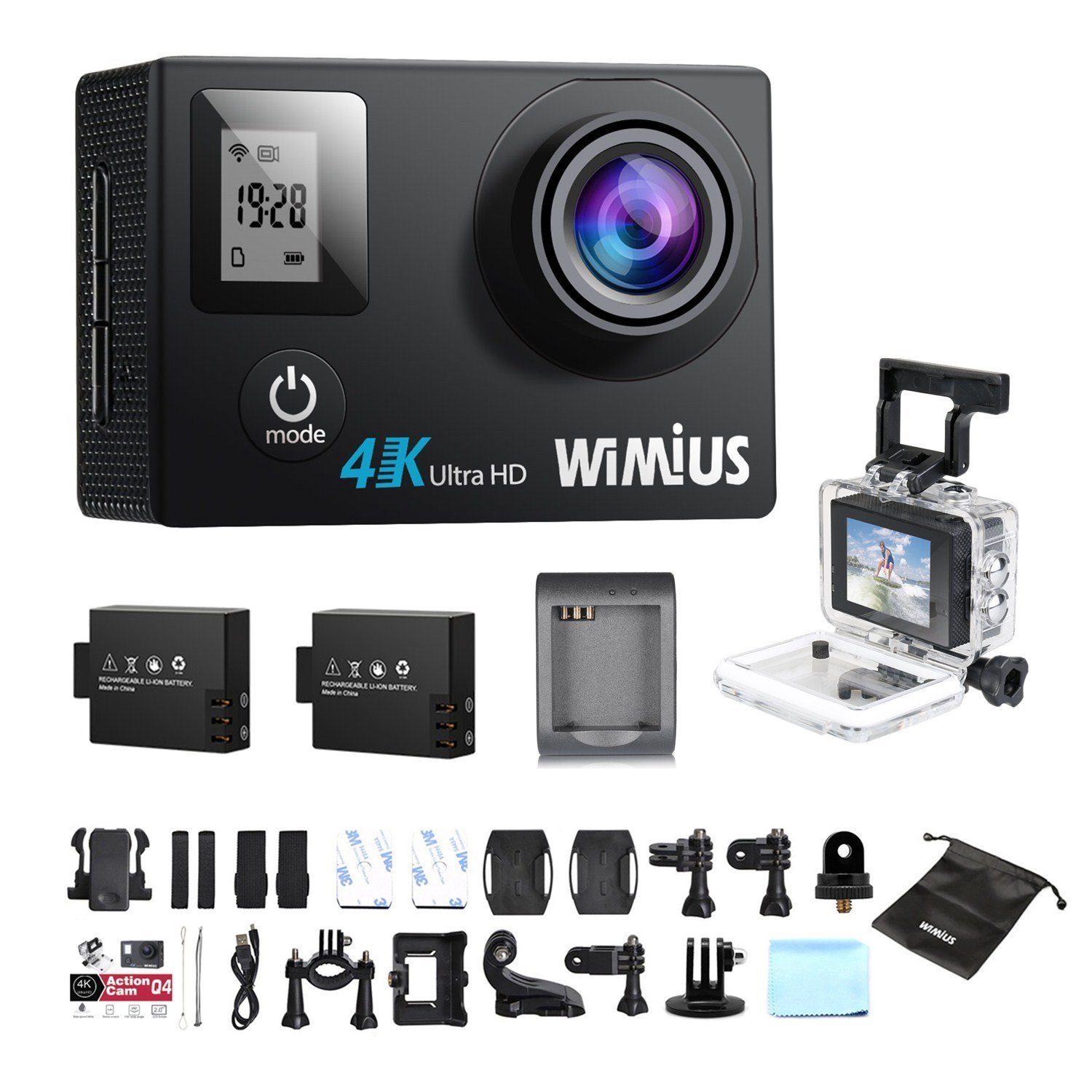
- Lente: Captura vídeo e foto de alimentostage.
- Botão Liga / Desliga / Modo: Powers the camera on/off and switches between modes.
- Botão Obturador/OK: Starts/stops recording, takes photos, or confirms selections.
- Botões para cima / para baixo: Navega pelas opções do menu.
- Tela LCD principal (2.0 polegadas): Exibe ao vivo view, playback, and menu interface.
- Status Screen (0.66 inches): Shows current mode, battery status, and recording time.
- Porta Micro USB: Para carregamento e transferência de dados.
- Porta Micro HDMI: Para conectar a um monitor externo.
- Slot para cartão MicroSD: Para inserir o cartão de memória.
Acessórios incluídos
Your camera comes with a comprehensive kit of accessories:

- Waterproof Case (up to 40M)
- Rechargeable Li-ion Batteries (x2)
- Cabo USB
- Various Mounts and Adapters (e.g., helmet mount, bicycle mount)
- Almofadas adesivas
- Pano de limpeza
- Bands and Straps
3. Configuração
3.1 Instalação e carregamento da bateria
- Abra a tampa do compartimento da bateria na parte inferior da câmera.
- Insert a fully charged Li-ion battery, ensuring the correct orientation.
- Feche bem a tampa do compartimento da bateria.
- To charge, connect the camera to a USB power source (e.g., computer, USB wall adapter) using the provided USB cable. The charging indicator light will illuminate.
- Charging typically takes 2-3 hours. The indicator light will turn off or change color when fully charged.

3.2 Instalação do cartão microSD
A MicroSD card (not included) is required for recording. The camera supports up to 64GB Class 10 or UHS-I MicroSD cards.
- Localize o slot para cartão MicroSD na lateral da câmera.
- Insira o cartão MicroSD com os contatos dourados voltados para a parte traseira da câmera até ouvir um clique.
- Para remover, empurre o cartão delicadamente até que ele se solte.
- It is recommended to format the MicroSD card in the camera before first use and periodically thereafter to ensure stable recording.
3.3 Uso da capa à prova d'água
The waterproof case allows the camera to be used up to 40 meters underwater.
- Certifique-se de que a câmera esteja seca antes de colocá-la dentro da caixa à prova d'água.
- Close the case firmly, ensuring the rubber seal is clean and free of debris.
- Perform a dry test by submerging the empty case in water for a few minutes to check for leaks before inserting the camera.
Acessórios de montagem 3.4
Utilize the various mounts and adapters to attach your camera to helmets, bicycles, or other surfaces. Refer to the accessory diagram for specific attachment methods.
4. Instruções de operação
4.1 Ligar/Desligar
- Ligar: Press and hold the Power/Mode button for 3-5 seconds.
- Desligar: Press and hold the Power/Mode button for 3-5 seconds.
Seleção de 4.2 modos
Press the Power/Mode button repeatedly to cycle through the main modes:
- Modo de gravação de vídeo: Indicado por um ícone de câmera de vídeo.
- Modo de foto: Indicado por um ícone de câmera.
- Modo de reprodução: Indicado por um ícone de reprodução.
- Menu de configurações: Indicado por um ícone de engrenagem.
4.3 Gravação de vídeo
- Mude para o modo de gravação de vídeo.
- Press the Shutter/OK button to start recording. A red indicator light will flash, and the recording time will appear on the screen.
- Pressione o botão Obturador/OK novamente para interromper a gravação.
Video Settings (via Settings Menu)
- Resolução: Select from 4K 30fps, 2.7K 30fps, 1080p 60/30fps, 720p 120/60/30fps.
- Gravação em loop: Set to 2min, 3min, 5min, or Off. When enabled, the camera will continuously record, overwriting the oldest files quando o cartão de memória estiver cheio.
- Vídeo de lapso de tempo: Set intervals (0.5s, 1s, 5s, 10s, 30s, 60s) or Off. The camera will capture frames at set intervals and compile them into a video.
- Câmera lenta: Available at 1080p/60fps and 720p/120fps.
4.4 Tirando fotos
- Mude para o Modo Foto.
- Pressione o botão Obturador/OK para tirar uma foto.
Photo Settings (via Settings Menu)
- Resolução: Up to 16 Megapixels.
- Explosão de fotos: Capture multiple photos in quick succession (e.g., 3P/1S, 5P/1S, 10P/1S).
4.5 WiFi Connection and App Usage
The camera features Wi-Fi connectivity for remote control via a smartphone app.
- Enable Wi-Fi on the camera via the Settings Menu. The Wi-Fi name (SSID) and password will be displayed.
- Download the compatible WiMiUS app from your smartphone's app store (e.g., App Store for iOS, Google Play for Android).
- No seu smartphone, conecte-se à rede Wi-Fi da câmera usando a senha fornecida.
- Open the WiMiUS app to control the camera, view foo vivotage, e transferência files.
4.6 Menu Navigation and General Settings
Access the Settings Menu by cycling through modes. Use the Up/Down buttons to navigate and the Shutter/OK button to select.
- Linguagem: Select your preferred language (French is available).
- Data/Hora: Defina a data e a hora corretas. Note: The date/time setting may reset to 2016/09/01 00:00:00 when batteries are changed. This is a known behavior; reset manually after each battery change.
- Modo veículo: (OUI/NON - Yes/No) This mode typically enables automatic recording when the camera detects power, useful for dashcam functionality.
- Formatar cartão: Erases all data on the MicroSD card.
- Restauração de fábrica: Restores all settings to their default values.
5. Manutenção
5.1 Limpeza da câmera e da lente
- Use um pano macio e sem fiapos para limpar o corpo da câmera.
- For the lens, use a specialized lens cleaning cloth or pen to avoid scratches. Do not use abrasive materials.
- Ensure the camera is off and dry before cleaning.
5.2 Cuidados com a capa à prova d'água
- After each use in water, rinse the waterproof case with fresh water and allow it to air dry.
- Inspect the rubber seal for any dirt, sand, or damage. Clean or replace if necessary to maintain waterproofing.
5.3 Cuidados com a bateria
- Guarde as baterias em um local fresco e seco quando não estiverem em uso.
- Do not expose batteries to high temperatures or direct flame.
- Se o armazenamento for prolongado, carregue as baterias até aproximadamente 50% da capacidade.
5.4 Armazenamento
When not in use, store the camera and accessories in a protective case to prevent damage from dust and impacts.
6. Solução De Problemas
This section addresses common issues you might encounter with your WiMiUS Q4 camera.
| Problema | Possível causa | Solução |
|---|---|---|
| A câmera não liga. | Bateria fraca ou descarregada. | Charge the battery fully. Ensure battery is correctly inserted. |
| Não é possível gravar vídeos/tirar fotos. | No MicroSD card, card full, or card error. | Insert a MicroSD card. Delete old files or replace card. Format the card in the camera. |
| Date/Time resets after battery change. | Standard behavior for this model. | Manually reset the date and time in the settings menu after each battery change. |
| Qualidade de imagem ruim em condições de pouca luz. | Limitations of the camera sensor in low light conditions. | Ensure adequate lighting. Adjust exposure settings if available. |
| Sound is muffled in waterproof case. | Waterproof case seals the microphone. | This is normal. For better audio, use the camera without the waterproof case in dry conditions. |
| Problemas de conexão Wi-Fi. | Incorrect password, app issues, or signal interference. | Verify Wi-Fi password. Restart camera and smartphone. Ensure app is updated. Try resetting camera Wi-Fi settings. |
| Accessories breaking easily. | Material quality or improper use. | Handle accessories with care. Consider purchasing higher quality third-party mounts if needed for demanding activities. |
Etapas gerais de solução de problemas
- Reinicie a câmera: Power off and then on again.
- Verifique o cartão microSD: Ensure it's correctly inserted and formatted. Try a different card if issues persist.
- Restauração de fábrica: If problems continue, perform a factory reset via the settings menu. Note that this will erase all custom settings.
7. Especificações
Key technical specifications for the WiMiUS Q4 Action Camera:
- Marca: WiMiUS
- Modelo: Q4
- Resolução Estática Efetiva: 16 megapixels
- Resolução de vídeo: 4K (30fps), 2.7K (30fps), 1080p (60/30fps), 720p (120/60/30fps)
- Tamanho da tela: 2.0 inches (main LCD), 0.66 inches (status screen)
- Tecnologia de conectividade: Wi-fi
- Profundidade à prova d'água: Até 40 metros (com caixa à prova d'água)
- Estabilização de imagem: Não
- Tecnologia de sensores: CMOS
- Tipo de lente: Grande angular
- Cor: Gold (Note: Product title indicates 'Noir' (Black), but specifications list 'or' (Gold). This manual refers to the Q4 model generally.)
- Armazenar: Supports MicroSD cards up to 64GB (Class 10 or UHS-I recommended)
8. Garantia e Suporte
For warranty information and customer support, please refer to the documentation provided at the time of purchase or contact your retailer. Specific details regarding warranty duration and terms are typically included with your product packaging.
Software updates and spare parts availability information are not provided in the product specifications. Please check the manufacturer's official webPara obter as informações mais recentes, acesse o site ou entre em contato com o serviço de atendimento ao cliente.


