1. Introdução
This manual provides essential information for the proper use and maintenance of your Angrox Universal Remote Control. Designed for seamless compatibility with a wide range of Sony Bravia TVs, this remote offers a reliable and straightforward replacement for your original or damaged remote.
The Angrox remote control is engineered for ease of use, requiring no complex programming or setup. Simply insert batteries, and it's ready to operate your Sony TV.
2. Produto acabadoview
The Angrox Universal Remote Control is a high-quality, compact, and non-slip device designed for comfortable handling and stable performance. It features a larger transmission range compared to many standard remotes, ensuring reliable operation from a distance.

Imagem 2.1: Frente e verso view of the Angrox Universal Remote Control, showcasingraças ao seu design ergonômico e à disposição dos botões.

Imagem 2.2: Múltiplos views of the remote control, highlighting its slim profile and textured back for a secure grip.
Principais características:
- Compatibilidade Universal: 100% compatible with all Sony TV and Sony Bravia remotes.
- Nenhuma programação necessária: Ready to use right out of the box after battery insertion.
- Design ergonômico: Small size and compact, with a non-slip surface for practical handling.
- Desempenho estável: Offers a larger transmission range for reliable control.
- Construção durável: Made from ABS material for enhanced safety and durability.

Imagem 2.3: Close-up view emphasizing the remote's safety features, durable construction, and use of ABS material.
Compatible Sony TV Models:
Este controle remoto é compatível com uma ampla gama de modelos de TV Sony, incluindo, entre outros:
- KDL-40BX420, KDL-40BX421, KDL-22BX320, KDL-22BX321, KDL-32R300B, KDL-32BX320, KDL-32BX321, KDL-32BX420, KDL-32BX421, KDL-40BX421, KDL-40BXB, KDL-421, KDL-46BX420, KDL-46BX421, KDL-55BX520
- KDL-65X830B, KDL-70W830B, KDL-70W840B, KDL-70W850B, KDL-70XX70XX, XBR-40B, 9X850B, XBR-55X850B, XBR-55X900B, XBR-65X850B, XBR-65X900B, XBR-65X950B, XBR-70X850B, XBR-79X900B, XBR-800B, 5X950B
- KDL-19MB4000, KDL-19M4000, KDL-22L4000, KDL-32L4000, KDL-37L4000, KDL-40S4100

Image 2.4: The remote control positioned next to a modern Sony TV, visually confirming its compatibility with Sony LED and LCD televisions.
3. Configuração
The Angrox Universal Remote Control is designed for immediate use with compatible Sony TVs. No complex programming or pairing procedures are required.
Inserindo baterias:
- Localize o compartimento da bateria na parte traseira do controle remoto.
- Deslize a tampa da bateria para baixo ou na direção indicada pela seta para abri-la.
- Insira duas (2) pilhas AAA (não incluídas), certificando-se de que os terminais positivo (+) e negativo (-) estejam alinhados corretamente com as marcações dentro do compartimento.
- Feche a tampa da bateria deslizando-a de volta para o lugar até ouvir um clique.
Once batteries are inserted, the remote control is ready to operate your Sony TV. It is recommended to use new, high-quality alkaline batteries for optimal performance and longevity.

Imagem 3.1: Detalhada view of the remote's battery compartment, illustrating the correct orientation for inserting two AAA batteries.
4. Instruções de operação
The Angrox Universal Remote Control functions identically to the original Sony TV remote. All buttons are pre-programmed to perform their standard functions.
Operação básica:
- Botão de energia: Pressione para ligar ou desligar a sua TV.
- Botões numéricos (0-9): Utilize esta opção para inserir diretamente os números dos canais.
- Canal para cima/para baixo (CH +/-): Navegue pelos canais sequencialmente.
- Aumentar / diminuir o volume (VOL +/-): Ajuste o volume da TV.
- Botão Mudo: Silenciar ou ativar o som da TV.
- Navigation Pad (Arrow Buttons & Enter): Utilize para navegar pelos menus e selecionar opções.
- Botão Home: Access the TV's main menu or smart TV interface.
- Botão de entrada/fonte: Alternar entre diferentes fontes de entrada (HDMI, AV, etc.).
- Controles de reprodução: Buttons for Play, Pause, Stop, Fast Forward, Rewind, etc., for media playback.
Ensure there is a clear line of sight between the remote control and your TV's infrared receiver for optimal signal transmission. The remote offers a stable signal and sensitive buttons for a responsive user experience.

Image 4.1: A hand demonstrating the use of the remote control, highlighting its long-distance capability, fine workmanship, signal stabilization, and sensitive buttons.
5. Manutenção
Proper maintenance will ensure the longevity and optimal performance of your Angrox Universal Remote Control.
Limpeza:
- Wipe the remote control regularly with a soft, dry cloth.
- Para sujeira persistente, levementeampLimpe o pano com água ou um detergente suave e não abrasivo. Não borrife o detergente diretamente no controle remoto.
- Evite usar produtos químicos agressivos, solventes ou esponjas de limpeza abrasivas, pois estes podem danificar a superfície ou os componentes internos do controle remoto.
Substituição da bateria:
Replace batteries when the remote's responsiveness decreases or it stops functioning. Always replace both batteries at the same time with new ones of the same type (AAA). Refer to Section 3 for battery insertion instructions.
Armazenar:
Store the remote control in a cool, dry place away from direct sunlight, extreme temperatures, and high humidity. If the remote will not be used for an extended period, it is advisable to remove the batteries to prevent leakage.
6. Solução De Problemas
If you encounter issues with your Angrox Universal Remote Control, please refer to the following common problems and solutions:
| Problema | Possível causa | Solução |
|---|---|---|
| O controle remoto não está respondendo. | Pilhas descarregadas ou inseridas incorretamente. | Verifique a orientação das pilhas. Substitua por pilhas AAA novas. |
| Remote has limited range or intermittent response. | Weak batteries, obstruction, or remote too far from TV. | Replace batteries. Ensure clear line of sight to TV's IR receiver. Move closer to the TV. |
| Alguns botões não funcionam. | Dirt or debris under the button, or internal malfunction. | Clean the remote surface. If problem persists, contact support. |
| O controle remoto não controla a TV. | Incompatible TV model. | Verify your TV model is listed in the compatible models section (Section 2). |
7. Especificações
| Recurso | Detalhe |
|---|---|
| Nome do modelo | RM-ED047 |
| Marca | Angrox |
| Dispositivos compatíveis | Sony Televisions (various models, see Section 2) |
| Tecnologia de Conectividade | Infravermelho (IV) |
| Alcance máximo | 10 metros |
| Número de botões | 50 |
| Tipo de controlador | Controle remoto |
| Pilhas necessárias | 2 x AAA (não incluído) |
| Dimensões do produto (C x L x A) | 19.99 x 4.78 x 1.98 cm |
| Peso do item | 82 g |
| Características especiais | Universal, Non-slip design |
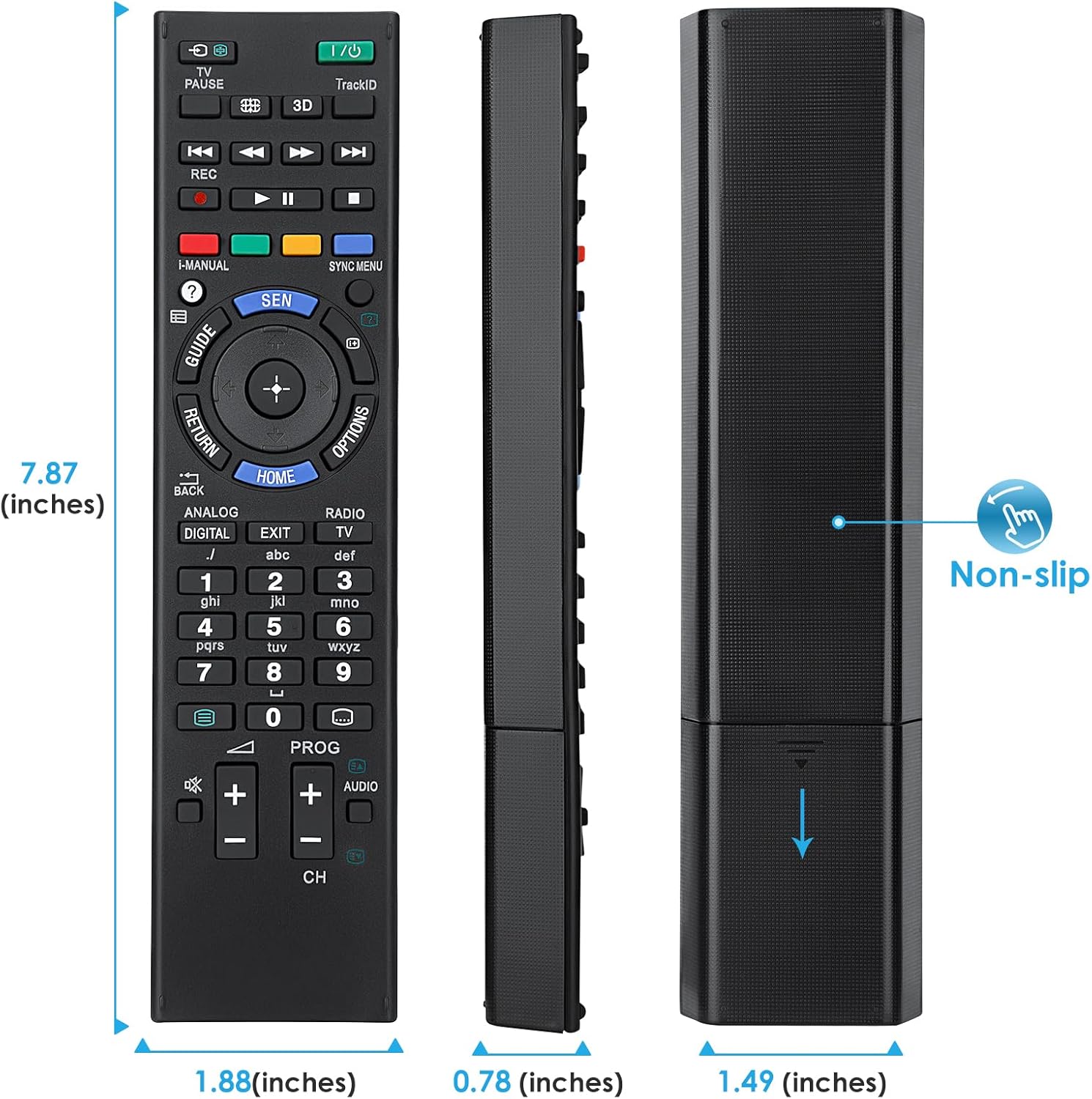
Image 7.1: Visual representation of the remote control's dimensions (length, width, thickness), providing precise measurements for reference.
8. Garantia e Suporte
Informações sobre garantia:
This Angrox Universal Remote Control comes with a Garantia de 60 dias A partir da data da compra. Esta garantia cobre defeitos de fabricação e assegura que o produto funciona conforme descrito em condições normais de uso. Guarde o comprovante de compra para eventuais solicitações de garantia.
Suporte ao cliente:
For any questions, concerns, or technical assistance not covered in this manual, please contact the retailer or the manufacturer's customer support. Provide your product model number (RM-ED047) and a detailed description of the issue to facilitate faster service.


