1. Introdução e maisview
The Aguilar AG 700 is a lightweight, high-power bass amplifier head designed for professional musicians. It delivers 700 watts of continuous power at 4 ohms, offering exceptional clarity, dynamic range, and quick transient response. This amplifier is engineered to provide a robust and articulate bass tone across various musical styles. This manual provides essential information for the safe and effective operation of your AG 700.
Please read this manual thoroughly before operating your AG 700 to ensure proper usage and to maximize its performance and longevity.
2. Principais características
- Saída poderosa: 700 watts at 4 ohms, 350 watts at 8 ohms.
- Versatile EQ Section: Flexible 4-band equalizer with Treble, High Mid, Low Mid, and Bass controls.
- Tonal Shaping Switches: Includes 'Deep' and 'Bright' switches for broad low-end and high-end boosts.
- Entrada de instrumento: Single 1/4-inch input jack with a -10dB pad for active or high-output instruments.
- Integrated Effects Loop: Series effects loop for connecting external effects processors.
- Balanced Direct Output: XLR balanced output with pre/post EQ and ground lift switches for direct connection to mixing consoles.
- Saídas de alto-falante: Two rear panel speakON outputs for secure speaker cabinet connections.
- Design leve: Weighs approximately 6.64 pounds (3.01 kg) for easy portability.
3. Controles e funções
3.1 Painel Frontal
The front panel of the AG 700 provides all essential controls for shaping your tone and managing signal flow.
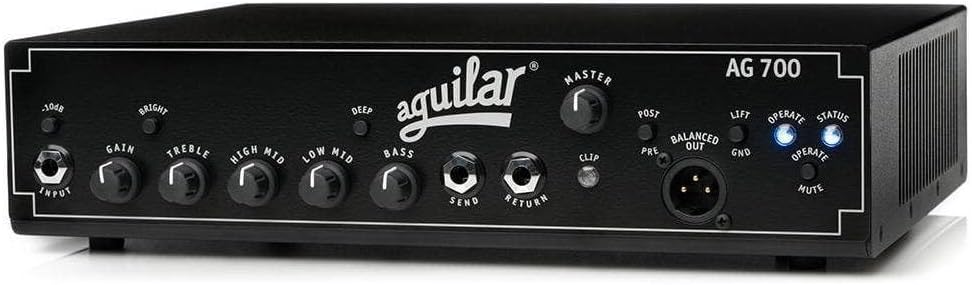
Frente view of the Aguilar AG 700 bass amplifier head, showcasing its black chassis, white Aguilar logo, and all front panel controls including input, gain, EQ knobs, switches, effects loop jacks, master volume, and XLR output.
Another perspective of the Aguilar AG 700 bass amplifier head's front panel, highlighting the layout of the input, gain, EQ section (Treble, High Mid, Low Mid, Bass), Deep and Bright switches, and the Master volume control.
- Conector de ENTRADA: Standard 1/4-inch input for your bass instrument.
- Chave PAD de -10dB: Engages a -10dB attenuation for high-output instruments (e.g., active basses) to prevent input clipping.
- Ganhar controle: Adjusts the input level of the amplifier. Set this to achieve a strong signal without clipping.
- Interruptor BRIGHT: Provides a broadband treble boost, adding presence and clarity to your tone.
- Controle de agudos: Ajusta a resposta de alta frequência.
- HIGH MID Control: Adjusts the upper midrange frequencies.
- LOW MID Control: Adjusts the lower midrange frequencies.
- Controle de BAIXO: Ajusta a resposta de baixa frequência.
- DEEP Switch: Provides a broadband bass boost, adding fullness and depth to your tone.
- SEND Jack: 1/4-inch output for sending signal to external effects.
- RETURN Jack: 1/4-inch input for receiving signal from external effects.
- MASTER Control: Ajusta o volume de saída geral do ampmais vivo.
- Indicador CLIP: Illuminates when the signal is clipping, indicating that the input or internal signal path is too hot. Adjust GAIN or use the -10dB PAD.
- BALANCED OUT (XLR): Provides a balanced direct output for connecting to a mixing console or recording interface.
- PRE/POST Switch: Determines whether the BALANCED OUT signal is taken before (PRE) or after (POST) the amplifier's EQ section.
- Interruptor LIFT/GND: Ground lift switch for the BALANCED OUT, used to eliminate hum caused by ground loops.
- OPERATE/MUTE Switch: Alterna o amplifier between active (OPERATE) and silent (MUTE) modes. Mute is useful for tuning or switching instruments.
- Indicadores de STATUS: LEDs indicating power and operational status.
3.2 Painel traseiro
The rear panel houses the power input and speaker connections.
- AC POWER Input: Conecte aqui o cabo de alimentação CA fornecido.
- SPEAKER OUTPUTS (x2): Two speakON connectors for connecting speaker cabinets. Ensure proper impedance matching (minimum 4 ohms total load).
- VENTOINHA: Integrated fan for thermal management. Ensure adequate ventilation.
4. Configuração
Siga estas etapas para configuração inicial:
- Conexão de energia: Garantir o amplifier's power switch is in the OFF position. Connect the supplied AC power cord to the AC POWER input on the rear panel and then to a grounded electrical outlet. The AG 700 operates on 110 Volts AC.
- Conexão do alto-falante: Connect your speaker cabinet(s) to the SPEAKON OUTPUTS on the rear panel using high-quality speakON cables. The AG 700 is stable down to a 4-ohm load. Ensure the total impedance of your speaker setup is 4 ohms or higher. Connecting to an impedance lower than 4 ohms can damage the ampmais vivo.
- Conexão do instrumento: Connect your bass guitar to the INPUT jack on the front panel using a standard 1/4-inch instrument cable. If you are using an active bass or an instrument with high output, engage the -10dB PAD switch.
- Loop de efeitos (opcional): If using external effects, connect the SEND jack to the input of your effects unit and the RETURN jack to the output of your effects unit.
- Direct Output (Optional): For connecting to a mixing console or recording device, use an XLR cable from the BALANCED OUT. Adjust the PRE/POST and LIFT/GND switches as needed for your specific setup.
5. Instruções de operação
Once setup is complete, you can begin operating your AG 700.
- Ligar: Ensure the MASTER volume control is set to minimum. Flip the power switch to the ON position. The STATUS indicators will illuminate.
- Função Silenciar: If the OPERATE/MUTE switch is in MUTE mode, press it to switch to OPERATE mode.
- Set Gain: With your instrument playing, slowly increase the GAIN control until the CLIP indicator flashes only on your loudest notes. If it stays lit, reduce the GAIN or engage the -10dB PAD.
- Ajustar o volume principal: Gradually increase the MASTER volume control to achieve your desired listening level.
- Equalização: Use the TREBLE, HIGH MID, LOW MID, and BASS controls to shape your tone. Experiment with the BRIGHT and DEEP switches to add presence or fullness.
- Desligar: Before powering off, turn the MASTER volume control to minimum. Then, flip the power switch to the OFF position.
6. Manutenção
- Limpeza: Limpe o exterior do ampLimpe com um pano macio e seco. Evite usar produtos de limpeza abrasivos ou solventes.
- Ventilação: Assegurar que o amplifier's cooling fan and vents are clear of obstructions to prevent overheating. Do not block the vents.
- Armazenar: Armazene o amplifier in a dry, temperature-controlled environment when not in use.
- Nenhuma peça que possa ser reparada pelo usuário: The AG 700 contains no user-serviceable parts. Refer all servicing to qualified Aguilar service personnel. Opening the chassis will void your warranty.
7. Solução De Problemas
If you encounter issues with your AG 700, consult the following table before seeking service.
| Problema | Possível causa | Solução |
|---|---|---|
| Sem energia / O aparelho não liga |
|
|
| Nenhuma saída de som |
|
|
| Som distorcido |
|
|
| Zumbido ou ruído |
|
|
| Ampo elevador superaquece |
|
|
8. Especificações
| Especificação | Valor |
|---|---|
| Potência de saída | 700 Watts @ 4 ohms, 350 Watts @ 8 ohms |
| Impedância de entrada | 1 megaohm |
| Seção EQ | Bass, Low Mid, High Mid, Treble controls; Deep and Bright switches |
| Loop de efeitos | Série |
| Saída direta | Balanced XLR with Pre/Post EQ and Ground Lift |
| Resfriamento | Resfriado por ventilador |
| Requisitos de energia | 110 Volts AC (Corded Electric) |
| Dimensões (L x P x A) | 14.5 x 13.5 x 5.5 polegadas (aproximadamente) |
| Peso | 6.64 libras (aproximadamente) |
| Dispositivos compatíveis | Bass, Double Bass |
| Tipo de conector | 6.35mm Jack (Input), speakON (Speaker Outputs), XLR (Balanced Out) |
| Tipo de material | Metal |
9. Informações de segurança
- Segurança elétrica: Sempre conecte o amplifier to a grounded power outlet. Do not defeat the ground plug.
- Umidade: Não exponha o amplifier to rain or moisture. Keep liquids away from the unit.
- Ventilação: Ensure proper ventilation to prevent overheating. Do not block the cooling vents.
- Conexões do alto-falante: Always use appropriate speaker cables with speakON connectors. Ensure correct impedance matching to avoid damage to the amplifier ou alto-falantes.
- Proteção auditiva: A exposição prolongada a níveis de volume elevados pode causar danos auditivos permanentes. Tenha cuidado ao ajustar o volume.
- Manutenção: Não tente consertar o ampFaça você mesmo a manutenção do amplificador. Encaminhe todos os serviços de manutenção para pessoal qualificado.
10. Garantia e Suporte
For detailed warranty information, product registration, and technical support, please visit the official Aguilar Amplificação website or contact your authorized Aguilar dealer. Keep your original purchase receipt as proof of purchase for any warranty claims.
Águilar Amplification is committed to providing high-quality products and customer satisfaction. Should you have any questions or require assistance, please do not hesitate to reach out to their support team.


