Introdução
Obrigado pela compra.asing the Trevi RR 501 BT Portable Bluetooth, USB, SD, MP3 Stereo Boombox. This manual provides essential information for the safe and efficient use of your new device. Please read these instructions carefully before operating the unit and retain them for future reference.
Informações de segurança
- Não exponha este aparelho à chuva ou umidade.
- Não bloqueie nenhuma abertura de ventilação.
- Certifique-se de que o cabo de alimentação não esteja preso ou pisado.
- Utilize somente acessórios/anexos especificados pelo fabricante.
- Desligue o aparelho da tomada durante tempestades com raios ou quando não for utilizá-lo por longos períodos.
- Deixe toda a manutenção a cargo de pessoal qualificado.
- Não abra a unidade casing; não há peças internas que possam ser reparadas pelo usuário.
Conteúdo da embalagem
Por favor, verifique se os seguintes itens estão incluídos em seu pacote:
- Trevi RR 501 BT Boombox Unit
- Cabo de alimentação AC
- Manual do usuário (este documento)
Produto acimaview
Familiarize yourself with the main components of your Trevi RR 501 BT Boombox.
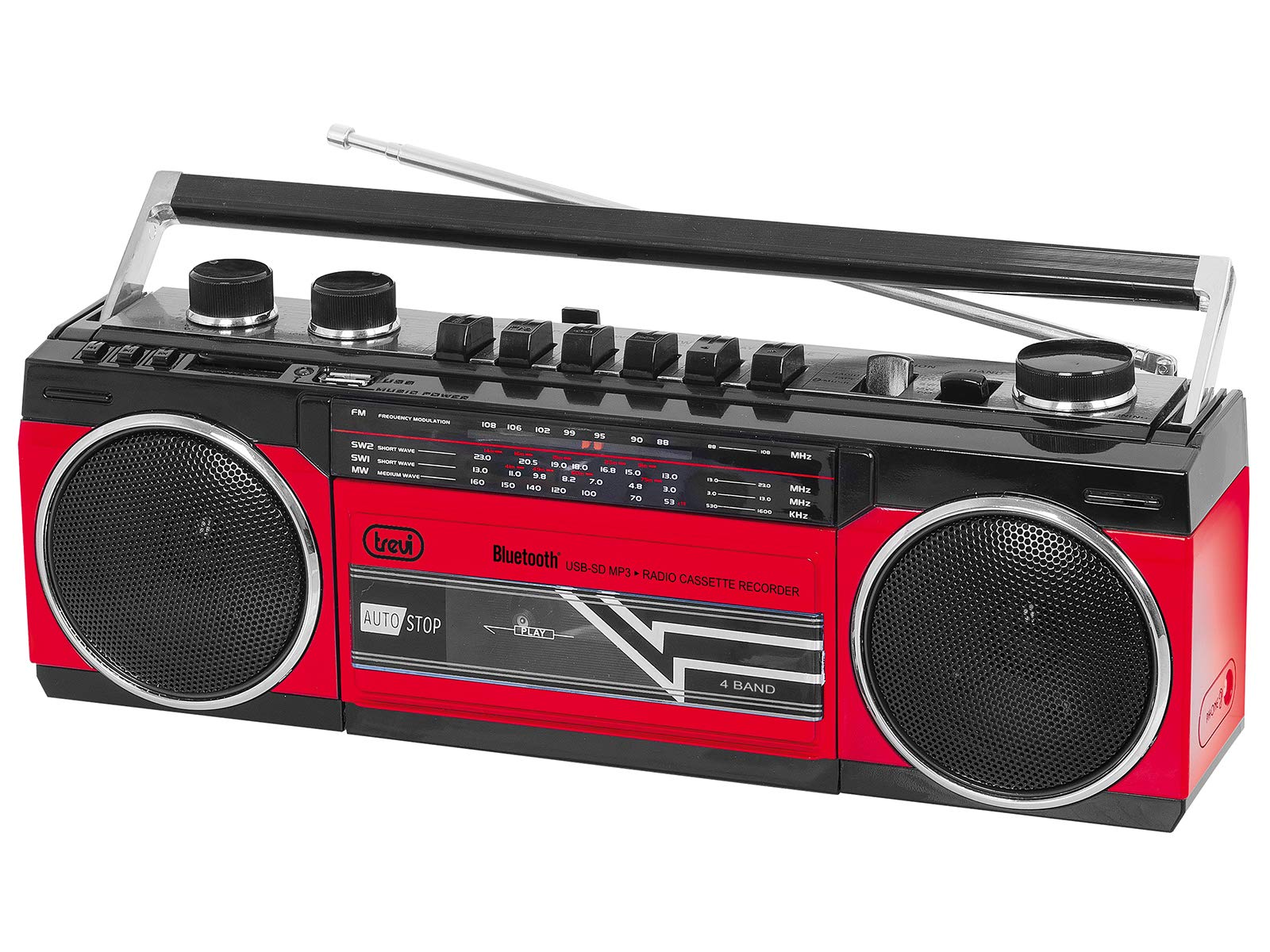
Figura 1: Frente view of the Trevi RR 501 BT Boombox, showing the dual speakers, control panel, and cassette deck.

Figura 2: Angulado view of the Trevi RR 501 BT Boombox, highlighting the side profile e manuseio.
Componentes principais:
- Palestrantes: Dois alto-falantes estéreo integrados.
- Painel de controle: Buttons for playback, mode selection, and tuning.
- Botão de volume: Ajusta o nível de saída de áudio.
- Botão de sintonia: For radio frequency selection.
- Seletor de modo: Switches between Radio, Bluetooth, USB, SD, and Cassette modes.
- Deck de cassetes: For playing and recording audio cassettes.
- Porta USB: Para reprodução a partir de pen drives USB.
- Slot para cartão SD: Para reprodução em cartão SD.
- Antena: Antena telescópica para recepção de rádio FM.
- Entrada de energia: Para conectar o cabo de alimentação CA.
- Compartimento da bateria: (Located on the bottom/rear) For optional battery operation.
Configurar
Conexão de energia:
- Alimentação CA: Insert the AC power cable into the AC input jack on the back of the unit, then plug the other end into a standard wall outlet.
- Alimentação por bateria (opcional): Open the battery compartment cover (usually on the bottom or rear). Insert the required number of D-size batteries (not included), ensuring correct polarity (+/-). Close the compartment cover securely.
Note: When using AC power, batteries are automatically disconnected. Remove batteries if the unit will not be used for an extended period.
Instruções de operação
Ligar/desligar:
To turn the unit on, rotate the Botão de Volume clockwise until you hear a click. To turn off, rotate the Botão de Volume counter-clockwise until it clicks off.
Radio Operation (FM):
- Ligue a unidade.
- Defina o Seletor de Modo to "RADIO".
- Estenda a antena telescópica para obter a melhor recepção.
- Gire o Botão de ajuste to select your desired FM station.
- Ajuste o Botão de Volume to your preferred listening level.
Conexão Bluetooth:
- Ligue a unidade.
- Defina o Seletor de Modo to "BT" (Bluetooth). The unit will enter pairing mode, indicated by a flashing LED.
- No seu dispositivo com Bluetooth (por exemplo, smartphone, tablet), ative o Bluetooth e procure por dispositivos disponíveis.
- Select "Trevi RR 501 BT" from the list of devices.
- Once paired, the LED indicator will stop flashing and remain solid. You can now play audio from your device through the boombox.
Reprodução USB/SD:
- Ligue a unidade.
- Insira uma unidade flash USB no Porta USB ou um cartão SD no Slot para cartão SD. Ensure the media contains MP3 audio files.
- Defina o Seletor de Modo to "USB/SD". The unit will automatically begin playing the first compatible audio file.
- Use the playback control buttons (e.g., Play/Pause, Next, Previous) on the unit to manage your audio.
Reprodução de cassetes:
- Ligue a unidade.
- Pressione o PARAR/EJECTAR Botão no toca-fitas para abrir o compartimento da fita.
- Insert an audio cassette with the open edge facing upwards and the tape side facing you. Close the compartment door.
- Defina o Seletor de Modo to "TAPE".
- Pressione o JOGAR botão para iniciar a reprodução.
- Use o REBOBINAR e AVANÇO RÁPIDO botões para navegar na fita.
- Imprensa PARAR/EJECTAR Para interromper a reprodução e abrir o compartimento.
Cassette Recording:
- Insert a blank cassette into the cassette deck.
- Select the desired audio source (Radio, Bluetooth, USB, SD) using the Seletor de Modo.
- Start playback of the source audio.
- Pressione o REGISTRO button (usually red) on the cassette deck. The JOGAR button will also engage. Recording will begin.
- Para parar a gravação, pressione o PARAR/EJECTAR botão.
Manutenção
- Limpeza: Use um pano macio e seco para limpar a parte externa da unidade. Não use produtos de limpeza abrasivos ou solventes.
- Manutenção do toca-fitas: Limpe periodicamente as cabeças de gravação e os roletes de pressão com um cotonete levemente umedecido.ampenriquecido com álcool isopropílico.
- Armazenar: When not in use for extended periods, store the unit in a cool, dry place, away from direct sunlight and extreme temperatures. Remove batteries if applicable.
Solução de problemas
| Problema | Possível causa | Solução |
|---|---|---|
| Sem energia | Cabo de alimentação desconectado; Pilhas descarregadas ou inseridas incorretamente. | Verifique a ligação da alimentação CA; substitua as pilhas ou certifique-se da polaridade correta. |
| Má recepção de rádio | Antena não estendida; sinal fraco. | Fully extend the telescopic antenna; Reposition the unit for better signal. |
| Bluetooth não está pareando | A unidade não está no modo Bluetooth; o dispositivo está muito longe; já está emparelhado com outro dispositivo. | Ensure mode is set to BT; Move device closer; Disconnect from other devices. |
| USB/SD não reproduz | Incorrect mode; Incompatible file format; Corrupted media. | Set mode to USB/SD; Ensure files are MP3; Try different USB/SD media. |
| Problemas de reprodução de cassetes | Cassette inserted incorrectly; Tape heads dirty. | Re-insert cassette correctly; Clean tape heads and pinch rollers. |
Especificações
| Marca | Trevi |
| Número do modelo | 0RR50102 |
| Tecnologia de Conectividade | Bluetooth, USB |
| Tipo de alto-falante | Estéreo |
| Dimensões (C x L x A) | 50 x 50 x 28 centímetros |
| Fonte de energia | AC |
| Peso do item | 1.25 quilos |
| Potência de saída | 6 Watts |
| Cor | Vermelho |
| Estilo | Retrô |
Garantia e Suporte
For warranty information and technical support, please refer to the warranty card included with your product or visit the official Trevi website. Information regarding spare parts availability and software updates is not provided in the product specifications.
Guarde o comprovante de compra para eventuais solicitações de garantia.


