1. Introdução
This manual provides essential information for setting up, operating, maintaining, and troubleshooting your Microsoft Surface Pro Model 1796. The Surface Pro is a versatile 2-in-1 device designed to function as both a high-performance laptop and a portable tablet. Please read these instructions carefully to ensure optimal use and longevity of your device.
2. Produto acabadoview
The Microsoft Surface Pro Model 1796 features a 12.3-inch PixelSense multi-touch display, an Intel Core i5 processor, 4GB of RAM, and a 128GB SSD. It operates on Windows 10 Pro, offering a full desktop experience in a portable form factor. The device supports a detachable keyboard (Surface Pro Signature Type Cover) and a digital pen (Surface Pen), both sold separately, to enhance its functionality.

Figure 2.1: Microsoft Surface Pro in tablet mode, displaying the lock screen.
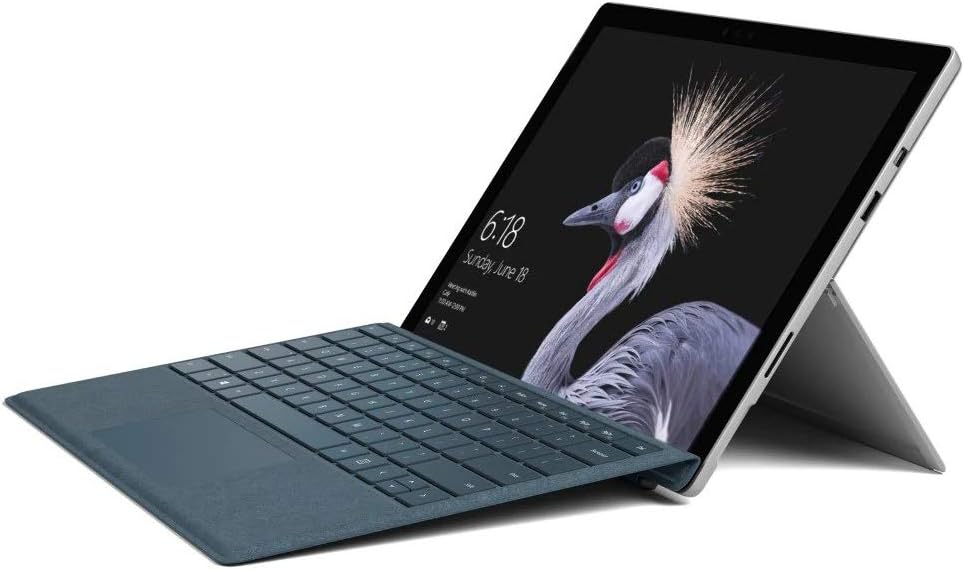
Figure 2.2: Microsoft Surface Pro with Signature Type Cover attached, configured as a laptop.

Figure 2.3: Microsoft Surface Pro tablet and detached Signature Type Cover.
3. Configuração
3.1 Inicialização Inicial
- Connect the power supply to the Surface Pro and a power outlet.
- Pressione o botão liga/desliga localizado na borda superior do dispositivo.
- Siga as instruções na tela para concluir a configuração inicial do Windows 10 Pro, incluindo a seleção do idioma, a conexão de rede e a criação da conta de usuário.
3.2 Acessórios de Conexão
- Surface Pro Signature Type Cover: Align the Type Cover with the magnetic connector along the bottom edge of the Surface Pro until it clicks into place.
- Caneta Surface: The Surface Pen connects via Bluetooth. Go to Configurações > Dispositivos > Bluetooth e outros dispositivos to pair the pen.
3.3 Carregando o dispositivo
Use the provided power adapter to charge your Surface Pro. The charging port is located on the right side of the device. A full charge provides approximately 13 hours of typical device usage.
4. Instruções de operação
4.1 Navegação básica
- Tocar: Use multi-touch gestures on the PixelSense display for navigation, zooming, and scrolling.
- Type Cover: Utilize the keyboard and trackpad for traditional laptop input.
- Caneta Surface: Write, draw, and annotate directly on the screen.
4.2 Recursos do Windows 10 Pro
Your Surface Pro comes with Windows 10 Pro, offering features such as:
- Windows Hello: For fast, secure, password-free sign-in using facial recognition.
- Cortana: Your personal digital assistant.
- Microsoft Edge: O padrão web navegador.
- Modo Tablet: Automatically or manually switch to a touch-optimized interface when the Type Cover is detached.
4.3 Configurações de exibição
The 12.3-inch PixelSense display has a resolution of 2736 x 1824 pixels. You can adjust display settings such as brightness, resolution, and scaling through Configurações > Sistema > Tela.
5. Manutenção
5.1 Limpando o Dispositivo
- Use um pano macio e sem fiapos dampened with water or an approved screen cleaner to clean the display.
- For the device body, use a soft, dry cloth. Avoid harsh chemicals or abrasive materials.
5.2 Atualizações de Software
Regularly check for and install Windows updates to ensure your device has the latest security patches and features. Go to Configurações > Atualização e segurança > Windows Update.
5.3 Cuidados com a bateria
- Evite temperaturas extremas, pois elas podem reduzir a vida útil da bateria.
- Para otimizar a saúde da bateria, evite descarregá-la completamente com frequência ou mantê-la com carga de 100% por longos períodos.
6. Solução De Problemas
6.1 Problemas comuns
- Dispositivo não liga: Ensure the device is charged. Try holding the power button for 10-15 seconds to perform a force restart.
- A tela não responde: Restart the device. If the issue persists, check for driver updates.
- Performance issues: Close unnecessary applications, check for Windows updates, or run a disk cleanup.
6.2 Entrando em contato com o suporte
For more complex issues or technical assistance, please visit the official Microsoft Support website or contact their customer service. Have your device's model number (FJU-00001) and serial number ready.
7. Especificações
| Recurso | Especificação |
|---|---|
| Nome do modelo | FJU-00001 |
| Tamanho da tela | 12.3 polegadas |
| Resolução da tela | 2736 x 1824 pixels |
| Processador | Intel Core i5 (2.6 GHz) |
| BATER | 4 GB DDR3 |
| Armazenar | SSD de 128 GB |
| Coprocessador gráfico | Gráficos Intel HD 620 |
| Sistema operacional | Windows 10 Pro |
| Tipo sem fio | 802.11b, 802.11g, 802.11n |
| Duração média da bateria | 13 horas |
| Peso do item | 1.7 libras |
| Dimensões do produto | 11.5 x 0.33 x 7.93 polegadas |
| Traseira Webresolução da câmera | 5 MP |
8. Garantia e Suporte
Your Microsoft Surface Pro Model 1796 is covered by a limited hardware warranty provided by Microsoft. For detailed warranty terms and conditions, please refer to the documentation included with your purchase or visit the official Microsoft support website. Guarde o comprovante de compra para solicitações de garantia.
For technical support, driver downloads, and service information, please visit support.microsoft.com. You may need to provide your device's serial number and model information.


