Introdução
Thank you for choosing the Dörr 204473 8 MP Snapshot IR TFT Trail Camera. This camera is designed for versatile surveillance, offering high-quality images and videos both day and night. Its robust, weatherproof design makes it ideal for outdoor use, capturing wildlife or monitoring property with its motion detection capabilities. Please read this manual carefully before operating the camera to ensure proper use and to maximize its performance.
Informações de segurança
- Não exponha a câmera a temperaturas extremas ou à luz solar direta por períodos prolongados.
- Certifique-se de que o compartimento da bateria esteja bem fechado para manter a resistência à água.
- Use only recommended battery types (AA batteries). Do not mix old and new batteries, or different types of batteries.
- Mantenha a câmera longe de campos magnéticos fortes.
- Não tente desmontar ou modificar a câmera. Isso anulará a garantia.
- Descarte as baterias e os componentes eletrônicos de forma responsável, de acordo com as normas locais.
Produto acimaview
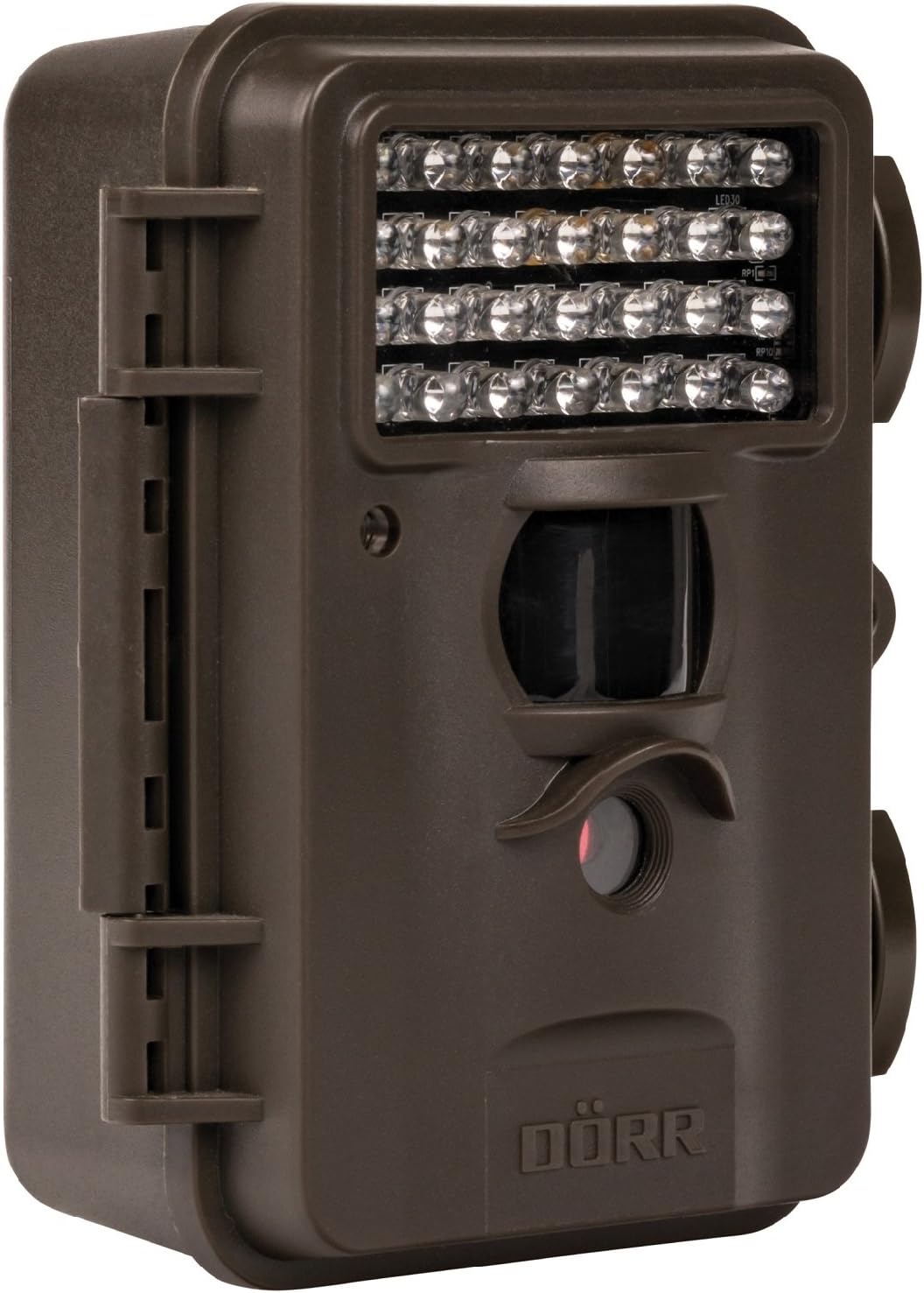
This image displays the front of the Dörr 204473 Trail Camera. Visible features include the array of 28 infrared LEDs at the top, the passive infrared (PIR) motion sensor below the LEDs, and the camera lens at the bottom. The camera has a rugged, dark brown, weatherproof casing with a latch on the left side.
The Dörr 204473 camera features a compact and durable design. Key components include:
- LEDs infravermelhos: 28 nearly invisible LEDs for night illumination up to 15 meters.
- PIR Motion Sensor: Detects movement to trigger photo or video capture.
- Lente da câmera: Captures 8MP still images and video.
- Ecrã TFT: For menu navigation and viewing captured media (located inside the camera).
- Control Keypad: For setting up and operating the camera.
- Caixa à prova de intempéries: Protects the camera from environmental elements.
Configurar
1. Instalação da bateria
- Open the camera housing latch on the side.
- Localize o compartimento da bateria.
- Insert 4 or 8 AA batteries, ensuring correct polarity (+/-).
- Feche bem a tampa do compartimento da bateria.
2. Instalação do cartão SD
- With the camera housing open, locate the SD/SDHC card slot.
- Insert an SD/SDHC memory card (up to 32 GB) into the slot until it clicks into place. Ensure the card is inserted in the correct orientation.
- Para remover, empurre o cartão delicadamente até que ele se solte.
3. Montando a Câmera
The camera can be mounted using a strap or a wall mount. Ensure the camera is positioned to capture the desired area without obstructions. The mounting type is wall mount.
- Montagem da alça: Thread the provided strap through the slots on the back of the camera and secure it around a tree or pole.
- Montagem na parede: Use appropriate screws and anchors (not included) to secure the camera to a wall or flat surface.
Instruções de operação
1. Ligar / desligar
- To power on, slide the power switch to the 'ON' position.
- Para desligar, deslize o interruptor de alimentação para a posição 'DESLIGADO'.
2. Menu de Navegação
Once powered on, the TFT display will activate. Use the keypad buttons (UP, DOWN, LEFT, RIGHT, OK, MENU) to navigate through the settings menu. The menu is available in English and German.
3. Configurando Data e Hora
- Enter the menu and navigate to 'Date/Time' settings.
- Use the navigation buttons to set the current date and time.
- Confirm with 'OK'. Each captured image will display the time, date, and temperature in °C.
4. Photo/Video Modes and Settings
The camera supports both still image and video capture. Adjust settings such as resolution, trigger interval, and burst mode via the menu.
- Resolução: Set to 8MP for still images.
- Trigger Time: The camera has a fast trigger time of 1.3 seconds.
- Detecção de movimento: Configure the sensitivity of the PIR sensor.
- Visão noturna: The 28 IR LEDs automatically activate in low light conditions for night vision up to 15 meters.
5. Viewing Files
Você pode view captured photos and videos directly on the camera's TFT display or by connecting the camera to a computer via USB (cable not included) or by inserting the SD card into a card reader.
Manutenção
- Limpeza: Use a soft, dry cloth to clean the camera lens and housing. Do not use abrasive cleaners or solvents.
- Cuidados com a bateria: Remova as pilhas se a câmera não for usada por um longo período para evitar vazamentos.
- Armazenar: Guarde a câmera em local fresco e seco, longe da luz solar direta, quando não estiver em uso.
Solução de problemas
| Problema | Possível causa | Solução |
|---|---|---|
| Câmera não liga | Baterias fracas ou descarregadas; polaridade incorreta das baterias. | Substitua as pilhas; verifique a polaridade correta. |
| Nenhuma imagem/vídeo foi capturado. | SD card full or not inserted correctly; motion sensor blocked or sensitivity too low. | Insert/replace SD card; format SD card; clear sensor path; increase sensor sensitivity. |
| Má qualidade de imagem à noite. | Subject too far from camera; IR LEDs obstructed. | Ensure subject is within 15m range; clear any obstructions from IR LEDs. |
| Camera not detecting motion | PIR sensor sensitivity too low; camera positioned incorrectly. | Increase PIR sensitivity; reposition camera for optimal detection angle. |
Especificações
| Recurso | Detalhe |
|---|---|
| Marca | DÖRR |
| Número do modelo | 204473 |
| Resolução Estática Efetiva | 8 MP |
| Resolução de vídeo eficaz | 8 MP |
| Alcance de visão noturna | 15 metros |
| Número de LEDs IR | 28 |
| Tempo de Disparo | 1.3 segundos |
| Armazenar | SD/SDHC Memory Card (up to 32 GB) |
| Fonte de energia | 4x or 8x AA Batteries |
| Cor | Preto |
| Material | Metal |
| Dimensões do item (C x L x A) | 10 x 7 x 12.2 cm |
| Nível de resistência à água | Impermeável |
| Tipo de montagem | Montagem na parede |
| Aplicações recomendadas | Detecção de movimento, visão noturna |
Garantia e Suporte
For warranty information and technical support, please refer to the documentation provided with your purchase or visit the official Dörr webGuarde seu comprovante de compra para eventuais solicitações de garantia.


