Introdução
Obrigado pela compra.asing the Wireless Bluetooth Headset. This manual provides essential information for the proper use, setup, and maintenance of your new headset. Please read it thoroughly before use to ensure optimal performance and longevity of the product.
Conteúdo da embalagem
Verifique se todos os itens listados abaixo estão incluídos no seu pacote:
- Wireless Bluetooth Headset (2 units)
- Cabo de carregamento USB (2 unidades)
- Manual do usuário

Image: Contents of the headset package, showing one black headset and a white USB charging cable.
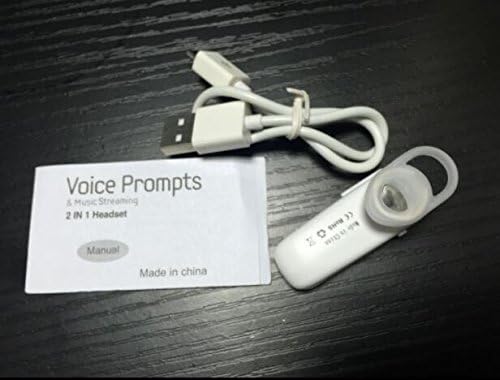
Image: Contents of the headset package, showing one white headset, a white USB charging cable, and the printed user manual.
Produto acimaview
The Wireless Bluetooth Headset is designed for convenience and portability, ideal for sports, driving, and daily use. It features a super mini design and supports voice prompts and music streaming.

Imagem: Frente view of the product packaging, displaying the black wireless Bluetooth headset inside its clear plastic casing.
Especificações
| Recurso | Descrição |
|---|---|
| Versão Bluetooth | V3.0 + EDR |
| Suporte Profiles | Headset, Handsfree, A2DP |
| Talk Time/Playing Time | Até 5 horas |
| Tempo de espera | Até 80 horas |
| Fonte de energia | Bateria de íon de lítio recarregável integrada |
| Tecnologia de Conectividade | Sem fio |
| Fator de forma | No ouvido |
| Peso do item | 15.8 onças (para 2 unidades) |
| Dimensões da embalagem | 1.97 x 1.57 x 1.18 polegadas |
| Número do modelo | Yu- TLXgo-2201 |

Image: Back of the product packaging, displaying a list of product specifications including Bluetooth version, talk time, and power source.
Configurar
Carregando o fone de ouvido
- Conecte a extremidade menor do cabo de carregamento USB à porta de carregamento do fone de ouvido.
- Conecte a extremidade mais grossa do cabo de carregamento USB a uma fonte de alimentação USB (por exemplo, porta USB do computador, adaptador de parede USB).
- The indicator light on the headset will illuminate during charging. It will change color or turn off once fully charged.
- Uma carga completa normalmente leva de 1 a 2 horas.
Emparelhamento com um dispositivo Bluetooth
- Ensure the headset is fully charged before initial pairing.
- With the headset turned off, press and hold the Multi-function Button (MFB) for approximately 5-7 seconds until the indicator light flashes red and blue alternately. This indicates the headset is in pairing mode.
- On your Bluetooth-enabled device (smartphone, tablet, etc.), go to the Bluetooth settings and ensure Bluetooth is enabled.
- Procurar available devices. The headset should appear in the list, typically named "MBT2013" or similar.
- Select the headset from the list to connect. If prompted for a password, enter "0000" (four zeros).
- Once successfully paired, the indicator light will stop flashing and may show a steady blue light, and you may hear a voice prompt confirming the connection.
- The headset will automatically connect to the last paired device when turned on, if the device's Bluetooth is active and within range.
Instruções de operação
Ligar/Desligar
- Ligar: Press and hold the Multi-function Button (MFB) for about 3 seconds until the blue indicator light flashes and you hear a voice prompt.
- Desligar: Press and hold the MFB for about 3-4 seconds until the red indicator light flashes and you hear a voice prompt.
Gestão de Chamadas
- Atender chamada: Pressione o MFB uma vez.
- Encerrar chamada: Pressione o botão multifuncional (MFB) uma vez durante uma chamada.
- Rejeitar chamada: Press and hold the MFB for about 2 seconds during an incoming call.
- Rediscar último número: Double-press the MFB when not on a call.
Reprodução de música
- Reproduzir/Pausar: Press the MFB once during music playback.
Note: Volume control may be managed directly from your connected device.
Manutenção
- Limpeza: Use um pano macio e seco para limpar o fone de ouvido. Não use produtos químicos agressivos ou materiais abrasivos.
- Armazenar: Guarde o fone de ouvido em local fresco e seco, longe da luz solar direta e de temperaturas extremas.
- Cuidados com a bateria: To prolong battery life, charge the headset regularly, even if not in frequent use. Avoid fully discharging the battery for extended periods.
- Resistência à água: Este fone de ouvido não é à prova d'água. Evite a exposição à água ou umidade excessiva.
Solução de problemas
- O fone de ouvido não liga:
- Certifique-se de que o fone de ouvido esteja totalmente carregado. Conecte-o a uma fonte de energia e tente novamente.
- Não foi possível emparelhar com o dispositivo:
- Ensure the headset is in pairing mode (red and blue lights flashing alternately). Make sure Bluetooth is enabled on your device and it is within range (typically 10 meters). Try restarting both the headset and your device.
- Sem som ou com má qualidade de som:
- Check the volume levels on both the headset and your connected device. Ensure the headset is properly connected to your device. Move closer to your device to avoid interference.
- O fone de ouvido desconecta com frequência:
- Ensure the headset is within range of your device. Check for potential interference from other wireless devices. Try re-pairing the headset.
Informações de segurança
- Do not disassemble, repair, or modify the headset. This may cause fire, electronic breakdown, or complete damage to the product.
- Keep the headset away from extreme temperatures, humidity, and corrosive substances.
- Evite deixar o fone de ouvido cair ou submetê-lo a impactos fortes.
- Do not expose the headset to open flames or dispose of it in fire.
- Descarte o produto e sua bateria de forma responsável, de acordo com as normas locais.
Garantia e Suporte
Para informações sobre garantia ou suporte técnico, consulte os dados de contato fornecidos pelo seu revendedor ou pelo fabricante. website. Guarde o comprovante de compra para solicitações de garantia.


