Manual do Usuário do dB Technologies ES 1203
Modelo: ES 1203
Introdução
The dB Technologies ES 1203 is a high-performance, 3-amp stereo sound system designed for professional audio applications. It comprises two passive wooden satellite tops and an active wooden subwoofer, delivering a powerful and coherent sound experience. This manual provides essential information for the safe and efficient operation of your ES 1203 system, covering setup, operation, maintenance, and troubleshooting.
Please read this manual thoroughly before operating the system and retain it for future reference.
Informações de segurança
Observe sempre as seguintes precauções de segurança para evitar choque elétrico, incêndio ou ferimentos:
- Fonte de energia: Connect the unit only to a power supply of the type specified in this manual and on the unit itself. Ensure the power cord is not damaged or pinched.
- Aterramento: O aparelho deve ser devidamente aterrado para evitar choque elétrico.
- Umidade: Não exponha o aparelho à chuva ou umidade. Não coloque objetos contendo líquidos, como vasos, sobre o aparelho.
- Ventilação: Garanta ventilação adequada. Não obstrua as aberturas de ventilação.
- Aquecer: Não coloque a unidade perto de fontes de calor, como radiadores, aquecedores, fogões ou outros aparelhos (incluindo amplificadores) que produzem calor.
- Manutenção: Não tente consertar este produto sozinho. Encaminhe todos os serviços de manutenção para pessoal de serviço qualificado.
- Colocação: Place the system on a stable, level surface. Ensure the pole and stand are securely assembled and stable to prevent tipping.
- cabos: Route all cables carefully to avoid tripping hazards.
Conteúdo da embalagem
The ES 1203 package includes the following components:
- 1 x ES 1203 Active Subwoofer
- 2 x Passive Satellite Tops
- 1 x Subwoofer Cover
- 1 x Bag for Satellite Tops
- 1 x 35mm Telescopic Pole
- Cabos de alto-falante de 2x7m
- 1 x Cabo de alimentação
- Manual do usuário (este documento)
Note: Speaker stands are not included in the package.
Configurar
Follow these steps for the initial setup of your ES 1203 system:
- Desembalagem: Carefully remove all components from their packaging. Inspect for any signs of damage during transit.
- Colocação do subwoofer: Place the active subwoofer on a stable, level surface. Ensure there is adequate space around it for ventilation.

Figure 1: ES 1203 Subwoofer Interior. This image shows the robust internal structure of the subwoofer, highlighting the two 12-inch woofers responsible for powerful bass reproduction.
- Satellite Assembly:
- Insert the 35mm telescopic pole into the pole mount on top of the subwoofer. Secure it firmly.
- Attach one passive satellite top to the top of the telescopic pole.

Figure 2: Assembled ES 1203 System. This image illustrates the compact and vertical assembly of the ES 1203, with the satellite tops neatly stacked on the subwoofer using the provided pole.
- For the second satellite top, you can either stack it on top of the first satellite (for a single column configuration) or use an external speaker stand (not included) for a stereo setup.
- Connecting Satellites: Use the provided 7m speaker cables to connect the satellite tops to the subwoofer. The subwoofer has dedicated outputs for the satellites.

Figure 3: Satellite Connection Detail. This close-up shows how the satellite top connects to the telescopic pole, ensuring a secure and stable setup for the column array.

Figure 4: Satellite Column Array. This image provides a clear view of the four 4-inch mid-woofers within each satellite, arranged in a logarithmic curved column array for optimized sound dispersion.

Figure 5: Satellite Side Profile. Esse view emphasizes the sleek and compact design of the satellite top, showcasing its robust wooden construction.
- Conexão de energia: Connect the power cable to the subwoofer and then to a suitable power outlet.
- Fontes de entrada: Connect your audio sources (mixer, instrument, microphone, Bluetooth device) to the input channels on the subwoofer's control panel.
- Inicialização: Power on the system. The OLED display on the subwoofer will guide you through the initial setup and configuration.
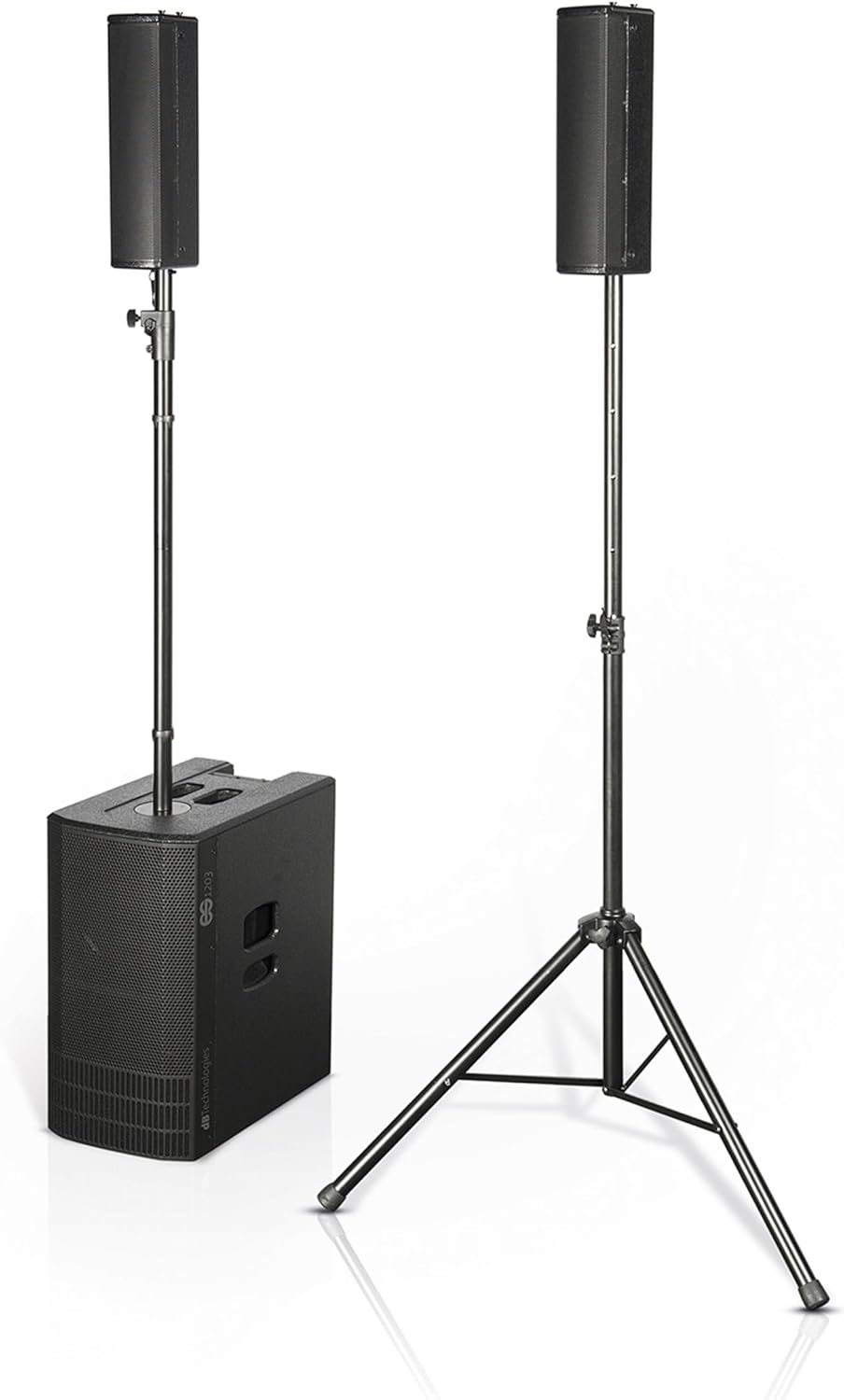
Figure 6: Full ES 1203 System Setup. This image displays the complete ES 1203 system, showing both the compact stacked configuration and the option for a wider stereo setup with an additional speaker stand.
Instruções de operação
The ES 1203 features an intuitive user interface and powerful DSP for versatile operation.
Painel de controle encerradoview

Figure 7: Subwoofer Control Panel. This detailed view of the control panel on the subwoofer highlights the OLED display, input channels, and the rotary encoder for system adjustments.
The control panel, located on the top of the subwoofer, features an OLED display and a rotary encoder for navigation and adjustments. It provides access to the integrated 5-channel digital mixer and system settings.
DSP Functions and Configuration Modes
The powerful DSP allows users to optimize the system for various environments and applications:
- Modos de configuração:
- Mono: For single-point sound reinforcement.
- Stereo: For wider soundstage, typically using two satellite tops spread apart.
- Dual Column: For extended vertical coverage, stacking both satellites on one pole.
- Directivity Modes:
- Longe: Optimized for longer throw distances.
- Aproximar: Optimized for closer audience proximity.
- Digital Mixer: Adjust levels, EQ, and create pre/post gain mixes for different purposes.
- Predefinições: Recall saved configuration presets for quick setup.
Navigate through the menus using the rotary encoder and confirm selections by pressing it.
Conectividade Bluetooth
The integrated Bluetooth module allows wireless audio streaming:
- Ative o Bluetooth no seu dispositivo móvel.
- Select "ES 1203" from the list of available devices.
- Once paired, audio from your device will stream to the system on a dedicated stereo channel.
AUX/MIX Output
The balanced AUX/MIX output provides flexibility:
- Link direto: Use as a direct output for connecting to another sound system.
- Saída auxiliar: Connect to a stage monitor or another speaker.
- Dual Column Mode: When in Dual Column mode, this output acts as a source for another ES 1203 system, providing either the left or right signal for a larger setup.
Manutenção
Proper maintenance ensures the longevity and optimal performance of your ES 1203 system:
- Limpeza:
- Desconecte a energia antes de limpar.
- Use um pano macio e seco para limpar as superfícies externas.
- Não utilize produtos de limpeza abrasivos, ceras ou solventes.
- Armazenar:
- Guarde o sistema em local fresco e seco, longe da luz solar direta e de temperaturas extremas.
- Use the provided subwoofer cover and satellite bag for protection during transport and storage.
- Inspeção: Periodically check cables for wear or damage. Ensure all connections are secure.
- Manutenção profissional: If the system requires repair, always contact qualified service personnel. Do not attempt to open or repair the unit yourself.
Solução de problemas
If you encounter issues with your ES 1203 system, refer to the following common problems and solutions:
| Problema | Possível causa | Solução |
|---|---|---|
| Sem energia | Power cable disconnected; Power outlet faulty; System fuse blown. | Check power cable connection; Try a different outlet; Contact service for fuse replacement. |
| No Sound from Satellites | Speaker cables disconnected/damaged; Satellite output level too low; DSP configuration error. | Ensure speaker cables are securely connected; Check satellite output levels on DSP; Verify DSP configuration (e.g., Mono/Stereo mode). |
| Nenhum som vindo do subwoofer | Subwoofer level too low; Input signal issue; DSP configuration error. | Increase subwoofer level; Check input source and cables; Verify DSP settings. |
| Falha no emparelhamento Bluetooth | Bluetooth not enabled on device; Device too far; Interference. | Ensure Bluetooth is on and discoverable; Move device closer; Restart both devices. |
| Som distorcido | Input signal too high (clipping); Volume levels too high; Damaged speaker. | Reduce input gain; Lower system volume; If distortion persists, contact service. |
If the problem persists after trying these solutions, please contact dB Technologies customer support or an authorized service center.
Especificações
| Recurso | Detalhe |
|---|---|
| Tipo de alto-falante | 3-amp Stereo System with 2 Full-Range Tops and 1 Subwoofer |
| Amptipo mais vital | Digipro G4 |
| Potência de saída (pico) | 2400 Watts |
| Drivers de subwoofer | 2 woofers de 12 polegadas |
| Drivers de satélite | 4 x 4-inch Mid-Woofers per satellite |
| DSP | Integrated, with 5-channel digital mixer, 3 configuration modes (Mono, Stereo, Dual Column), 2 directivity modes (Far, Near) |
| Conectividade | Bluetooth, Aux Input, AUX/MIX Output |
| Material do gabinete | Wood (Plywood) |
| Cor | Preto |
| Tipo de montagem | Montagem de pólo |
| Fonte de energia | Elétrico com fio |
| Dimensões do produto (subwoofer) | 360 mm (L) x 680 mm (A) x 545 mm (P) |
| Product Dimensions (Satellite Top) | 110 mm (L) x 460 mm (A) x 160 mm (P) |
| Peso (Subwoofer) | 29.3 kg (64.59 libras) |
| Weight (Satellite Top) | 3.3 kg |
| Usos recomendados | Professional audio playback, Live performances, Events, Installations |
Garantia e Suporte
For warranty information and technical support, please refer to the official dB Technologies webou entre em contato com seu revendedor autorizado.
Keep your proof of purchase for warranty claims. Do not attempt to repair the unit yourself, as this may void your warranty.
For the most up-to-date information, product registration, and additional resources, visit: www.dbtechnologies.com


