Introdução
Obrigado pela compra.asing the VONYX SPX-PA9210 Portable PA System. This manual provides essential information for the safe and efficient operation of your device. Please read it thoroughly before use and retain it for future reference.
Instruções de segurança
- Leia todas as instruções cuidadosamente antes de operar o dispositivo.
- Mantenha o aparelho longe de água, umidade e temperaturas extremas.
- Não abra o casing; encaminhe todos os serviços de manutenção para pessoal qualificado.
- Utilize apenas o adaptador de energia especificado para carregar o dispositivo.
- Garanta ventilação adequada para evitar superaquecimento.
- Evite a exposição prolongada a níveis de volume elevados para evitar danos auditivos.
Conteúdo da embalagem
Verifique se todos os itens estão presentes na embalagem:
- VONYX SPX-PA9210 Portable PA System Unit
- 2 x Microfones sem fio UHF
- Adaptador de energia/cabo de carregamento
- Manual do usuário (este documento)
Produto acimaview
The VONYX SPX-PA9210 is a portable PA system designed for various audio applications. It features integrated speakers, media playback options, and wireless microphones for versatile use.
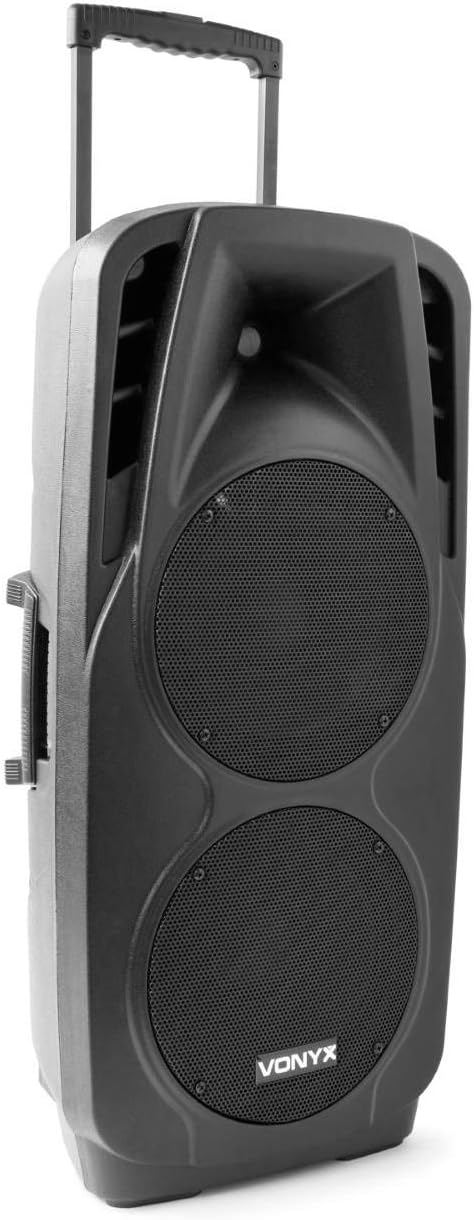
An image showing the VONYX SPX-PA9210 portable PA system. It features a black casing, two large speaker grilles on the front, and a retractable handle at the top for easy transport. A side handle is also visible.
Principais características:
- Integrated 2x 10-inch speakers with titanium tweeter controller.
- Built-in media player with USB and SD/MMC card slots.
- Conectividade Bluetooth para transmissão de áudio sem fio.
- High-performance 12V/7A rechargeable battery for 4-6 hours of autonomy.
- Two UHF wireless microphones with up to 50m range.
- Integrated trolley with telescopic handle and wheels for portability.
- LCD screen for media information display.
Configurar
1. Carregamento inicial
Before first use, fully charge the internal 12V/7A battery. Connect the provided power adapter to the charging port on the PA system and then to a suitable power outlet. The charging indicator will show the charging status. A full charge typically provides 4-6 hours of operation.
2. Ligar / desligar
- To power on the unit, locate the power switch (usually on the rear or control panel) and set it to the "ON" position.
- To power off, set the switch to the "OFF" position.
3. Configuração do microfone
- Insert fresh batteries into the two UHF wireless microphones.
- Turn on the microphones. They should automatically connect to the PA system.
- Adjust the microphone volume on the PA system's control panel. The wireless range is up to 50 meters.
Instruções de operação
1. Media Playback (USB/SD/MMC)
- Insert a USB flash drive or an SD/MMC card into the corresponding slot on the control panel.
- The system will automatically detect the media and begin playback, or you may need to select the input source using the "Mode" button.
- Use the playback controls (Play/Pause, Next, Previous) on the control panel to manage your music.
- The LCD screen will display track information.
2. Emparelhamento Bluetooth
- Press the "Mode" button on the PA system until "Mode" button on the PA system until "Bluetooth" is selected.
- No seu smartphone, tablet ou outro dispositivo com Bluetooth, ative o Bluetooth e procure por dispositivos disponíveis.
- Select "VONYX SPX-PA9210" (or similar name) from the list to pair.
- Após o emparelhamento, você pode transmitir áudio sem fio do seu dispositivo para o sistema de som.
3. Controles de Volume e Tom
- Adjust the master volume knob to control the overall sound output.
- Separate volume controls are available for microphones and media playback.
- Use the bass and treble controls (if available) to adjust the tone of the audio.
Manutenção
1. Limpeza
Wipe the exterior of the unit with a soft, dry cloth. Do not use abrasive cleaners or solvents. Ensure no liquids enter the device.
2. Cuidados com a bateria
- Para prolongar a vida útil da bateria, evite descarregá-la completamente com frequência.
- Charge the unit regularly, even if not in use, to maintain battery health.
- Guarde o aparelho em local fresco e seco quando não estiver em uso por longos períodos.
Solução de problemas
- Sem energia: Ensure the unit is charged or connected to a power source, and the power switch is in the "ON" position.
- Sem som: Check all volume controls (master, microphone, media player). Ensure the correct input source is selected. Verify microphone batteries.
- Bluetooth não conecta: Ensure the PA system is in Bluetooth mode and discoverable. Turn off and on Bluetooth on your device and try pairing again. Move closer to the PA system.
- Som distorcido: Reduce the volume. Check audio cables if using wired inputs. Ensure microphones are not too close to the speakers (feedback).
Especificações
| Marca | VÔNIX |
| Número do modelo | Sky-170.082 (SPX-PA9210) |
| Dimensões (C x L x A) | 27 x 38.5 x 81 cm |
| Peso | 16.25 kg |
| Tecnologia de Conectividade | Bluetooth, USB |
| Uso recomendado do produto | Smartphones ou tablets |
| Características especiais | Bluetooth, USB Port, Portable, LCD Screen |
| Fonte de energia | Wireless (Internal Battery) |
| Bateria | 12V/7A, 4-6 hours autonomy |
| Material | Acrilonitrila Butadieno Estireno (ABS) |
| Número de canais | 5 |
| Oradores | 2x 10-inch woofers, Titanium tweeter controller |
| Microfones | 2x UHF Wireless Microphones (up to 50m range) |
Garantia e Suporte
For warranty information and technical support, please refer to the documentation provided with your purchase or contact VONYX customer service directly.
Disponibilidade de peças de reposição: Atualmente, não há informações disponíveis sobre a disponibilidade de peças de reposição para este produto.
Atualizações de software: Information regarding guaranteed software updates for this product is currently unavailable.


