1. Introdução
The Poly Blackwire C5220 is a wired, dual-ear (stereo) headset designed for professionals requiring reliable audio communication. It features a boom microphone and offers versatile connectivity options including USB-A and 3.5 mm, making it compatible with PCs, Macs, tablets, and cell phones. This manual provides comprehensive instructions for setting up, operating, maintaining, and troubleshooting your headset.
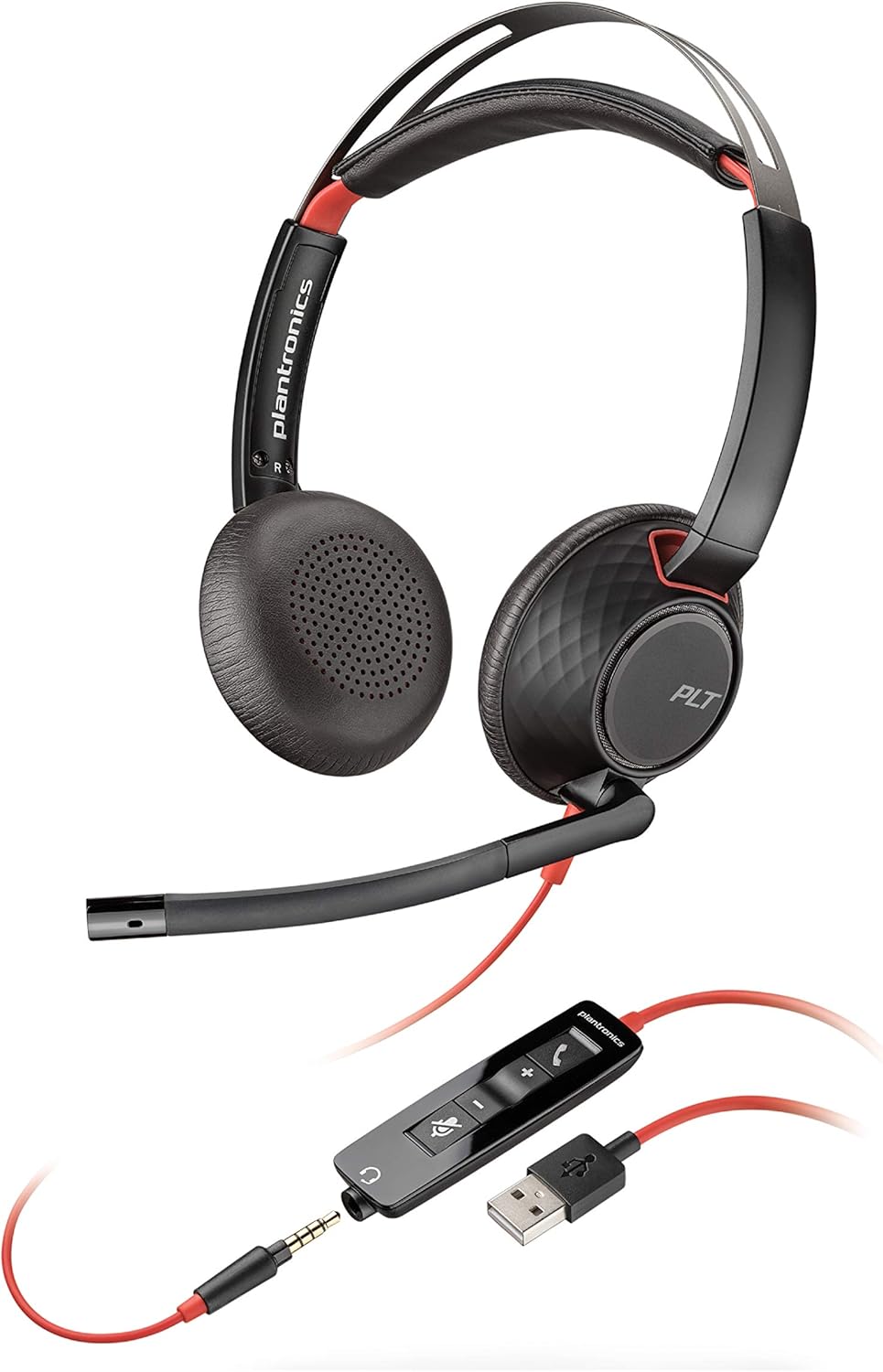
Figure 1: Poly Blackwire C5220 Wired Headset, showcasing its dual-ear design and integrated boom microphone.
2. O que está na caixa
Your Poly Blackwire C5220 package includes the following components:
- Blackwire C5220 Headset (with attached USB-A cable and 3.5mm jack)
- Maleta de transporte
- Quick Start Guide (physical card)

Figure 2: The Blackwire C5220 headset, its inline controls, and the included carrying case, highlighting its wired USB-A connectivity.
3. Configuração
The Blackwire C5220 headset offers plug-and-play functionality for quick setup.
- Conectar ao PC/Mac: Insert the USB-A connector of the headset into an available USB-A port on your computer. The headset will be automatically recognized by your operating system.
- Connect to Mobile Device/Tablet: Disconnect the 3.5mm jack from the USB-A inline control unit. Plug the 3.5mm jack directly into the audio port of your mobile phone or tablet.
- Instalação de software (opcional): For enhanced features and customization, download and install the Poly Lens Desktop App from the official Poly website. This software allows for firmware updates, personalized settings, and troubleshooting.
4. Operando o fone de ouvido
The inline control unit provides easy access to essential call management functions.
- Botão de chamada: Pressione para atender ou encerrar uma chamada.
- Aumentar volume (+): Pressione para aumentar o volume de áudio.
- Volume baixo (-): Pressione para diminuir o volume de áudio.
- Botão Mudo: Press to mute or unmute the microphone. An audible voice prompt will confirm "Mute On" or "Mute Off".

Figure 3: A user wearing the Blackwire C5220 headset, demonstrating the position of the noise-canceling microphone for clear voice capture.
5. Compatibilidade
The Blackwire C5220 headset is designed for broad compatibility with various communication platforms and devices.
- Sistemas operacionais: Compatible with PC (Windows) and Mac.
- Communication Platforms: Optimized for Microsoft Teams and other leading collaboration platforms such as Zoom, GoToMeeting, Skype, Google Meet, and Webex.
- Dispositivos: Connects to PC/Mac via USB-A, and to tablets and cell phones via 3.5 mm audio jack.

Figure 4: A user engaged in a video call, illustrating the headset's compatibility with Microsoft Teams and other collaboration platforms.
6. Comfort and Wearing Style
The Blackwire C5220 is engineered for extended wear and user comfort.
- Almofadas de ouvido: Features ultra-soft leatherette ear cushions wrapped around pillow-soft memory foam for all-day comfort.
- Faixa de cabeça: A lightweight cushioned metal headband provides durability and allows for a comfortable, custom fit.
- Estilo vestindo: Over-the-head style with two earpieces. The boom microphone can be positioned on either the left or right side, offering reversible wear.

Figura 5: Close view of the headset's ear cushions, emphasizing the ultra-soft leatherette and memory foam for enhanced comfort.
7. Desempenho de áudio
Experience clear and consistent audio with your Blackwire C5220 headset.
- Microfone com cancelamento de ruído: Ensures your voice is heard clearly by minimizing background noise.
- Qualidade de áudio: Automatically switches between wideband for telephony and hi-fi stereo for music, providing superb audio quality for various uses.
- SoundGuard DIGITAL: Protects against sound levels over 118 dBA, sudden loud sounds, and long-term exposure, ensuring safe listening.
8. Manutenção
Para garantir a longevidade e o desempenho ideal do seu headset, siga estas orientações de manutenção:
- Limpeza: Limpe delicadamente as almofadas auriculares e a faixa de cabeça com um pano macio e seco.amp pano. Evite usar produtos químicos agressivos ou materiais abrasivos.
- Armazenar: When not in use, store the headset in its provided soft carrying case to protect it from dust and physical damage.
- Cuidados com os cabos: Avoid sharp bends or excessive pulling on the cable to prevent internal wire damage. The detachable 3.5mm jack from the USB-A inline control unit is designed to prevent damage if the cable is accidentally pulled.
9. Solução De Problemas
If you encounter issues with your Blackwire C5220 headset, try the following solutions:
| Problema | Solução possível |
|---|---|
| No audio or microphone not working. |
|
| Qualidade de áudio ruim ou estática. |
|
| Inline controls not responding. |
|
10. Especificações
| Recurso | Detalhe |
|---|---|
| Nome do modelo | Fone de ouvido Plantronics Blackwire C5220 |
| Tecnologia de Conectividade | USB-A, 3.5 mm audio jack |
| Estilo de uso | Over-the-head, Dual-Ear (Stereo) |
| Microfone | Microfone boom com cancelamento de ruído |
| Audio Protection | SoundGuard DIGITAL (protects against sound levels over 118 dBA) |
| Almofadas de ouvido | Ultra-soft leatherette with memory foam |
| Resposta de frequência (fones de ouvido) | 20 Hz - 20,000 Hz |
| Frequency Response (Microphone) | 100 Hz - 6,800 Hz |
| Peso do item | 164.2 gramas (aproximadamente 5.8 onças) |
| Número do modelo | 207576-01 (Item model number: 207576-03) |
11. Garantia e Suporte
The Poly Blackwire C5220 headset comes with a Garantia global de 2 ano.
Para obter mais assistência, suporte técnico ou para acionar a garantia, visite o site oficial de suporte da Poly. website ou consulte as informações de contato fornecidas na embalagem do seu produto.
Você também pode consultar o guia do usuário oficial em PDF para obter informações mais detalhadas: Guia do usuário (PDF)