1. Produto acabadoview
The BenQ TK800 is a True 4K UHD HDR Home Entertainment Projector designed to deliver a high-quality visual experience. It features 8.3 million pixels for crisp 4K UHD images, hyper-realistic HDR10 color and tone rendering, and 3000 lumens of brightness for vivid colors in various lighting conditions. The projector includes dedicated Football and Sports modes with CinemaMaster Audio+2 for an immersive experience. Its compact design allows for easy installation with vertical keystone correction and 1.2x zoom.
2. O que está na caixa
- BenQ TK800 4K Projector
- Controle remoto
- Cabo de energia
- Guia de início rápido
- Cartão de garantia
3. Configuração e instalação
3.1 Posicionamento do projetor
The BenQ TK800 projector offers flexible placement options. Ensure the projector is placed on a stable, flat surface or mounted securely. The projector features a compact design for easy integration into your home entertainment setup.

Figura 1: Frente view of the BenQ TK800 projector, showing the lens and front ventilation.

Figura 2: parte superior view of the BenQ TK800 projector, highlighting the focus and zoom controls.
3.2 Conectividade
Connect your source devices to the projector using the available ports. The TK800 includes HDMI inputs for high-definition audio and video. A USB port is also available for media playback or powering accessories.

Figura 3: Traseira view of the BenQ TK800 projector, displaying HDMI, USB, and audio ports.
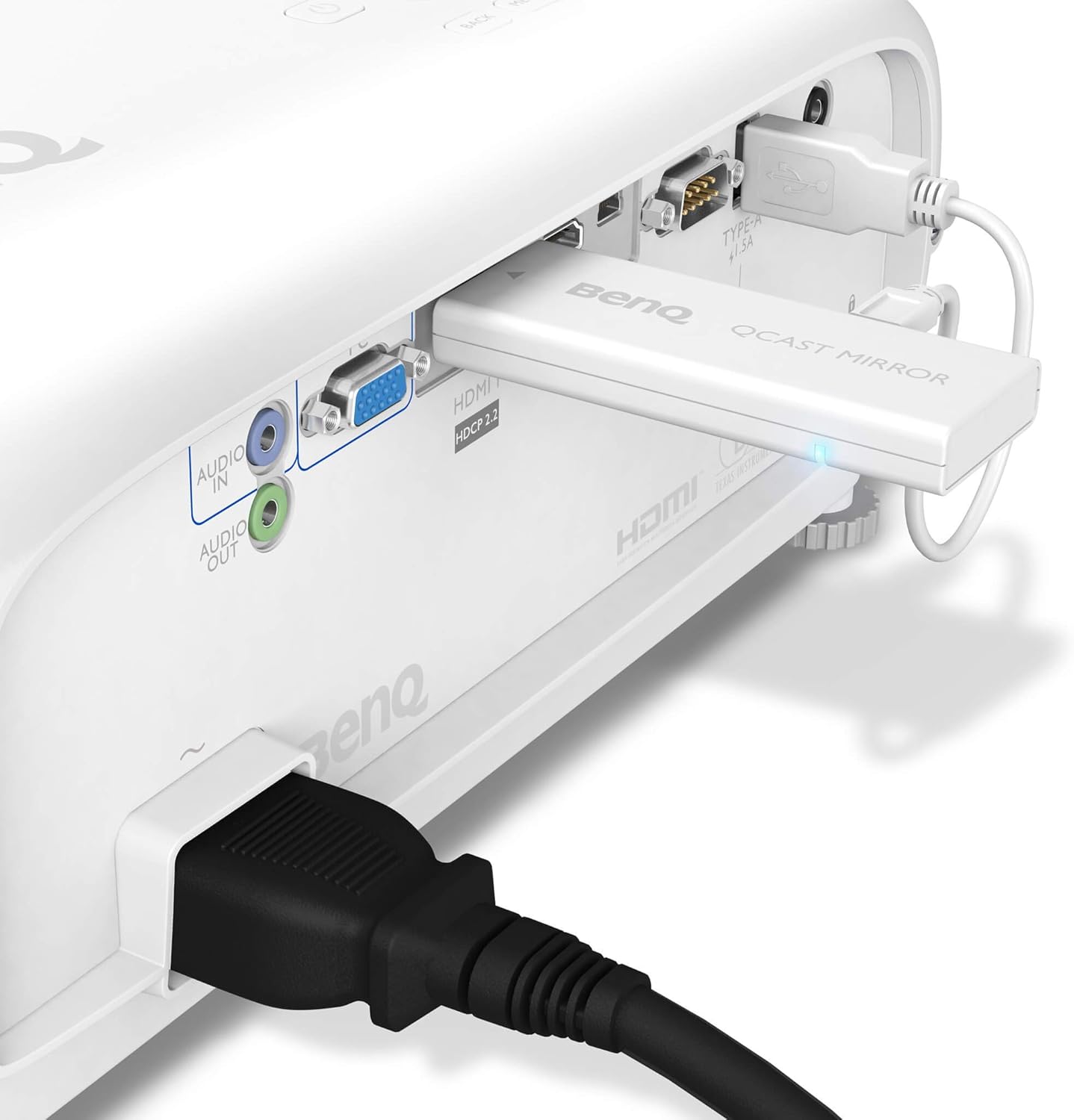
Figure 4: Close-up of the BenQ TK800's rear panel with various cables connected, illustrating typical usage.
3.3 Flexible Projection Setup
The BenQ TK800 supports flexible projection setups, including front, rear, and ceiling mounting options. Adjust the projector's position and settings to achieve the desired image on your screen or wall.
Video 1: This video demonstrates flexible projection setup options for a BenQ projector, including screen adjustment, tripod mounting, and auto cinema features. It shows how to adjust the image size, brightness, and colors based on ambient light and wall color changes.
4. Instruções de operação
4.1 Ligar/Desligar
Press the power button on the projector's control panel or the remote control to turn the unit on or off. Allow a few moments for the projector to warm up or cool down.
4.2 Ajuste de foco e zoom
Use the focus and zoom rings located near the lens to adjust the image clarity and size. The TK800 features a 1.2x zoom for flexible screen sizing without moving the projector significantly.
4.3 Correção Keystone
The projector supports vertical keystone correction to adjust the image shape if the projector is not perfectly perpendicular to the screen. This helps in achieving a perfectly rectangular image.
4.4 Modos de Imagem
The BenQ TK800 offers dedicated picture modes for optimized viewing. Select the "Football Mode" or "Sports Mode" for an enhanced sports viewing experience with vibrant colors and clear sound (CinemaMaster Audio+2). Other standard picture modes are available for general entertainment.
5. Manutenção
To ensure optimal performance and longevity of your BenQ TK800 projector, regular maintenance is recommended. Keep the lens clean using a soft, lint-free cloth. Ensure proper ventilation around the projector to prevent overheating. Refer to the full user manual for detailed cleaning instructions and lamp procedimentos de substituição.
6. Solução De Problemas
If you encounter issues with your BenQ TK800 projector, try the following basic troubleshooting steps:
- Sem imagem: Ensure all cables are securely connected and the correct input source is selected. Check the power connection.
- Imagem desfocada: Adjust the focus ring until the image is sharp.
- Distorted Image Shape: Use the keystone correction feature to adjust the image geometry.
- Sem som: Verify audio cable connections and check the projector's volume settings. Ensure the audio source is active.
For more complex issues, consult the comprehensive troubleshooting section in the full user manual or contact BenQ customer support.
7. Especificações
| Recurso | Detalhe |
|---|---|
| Marca | BenQ |
| Número do modelo | TK800 |
| Resolução | 4K UHD (3840 x 2160) |
| Brilho | 3000 Lúmens |
| Tecnologia de exibição | DLP |
| Suporte HDR | HDR10 |
| Conectividade | HDMI |
| Ampliar | 1.2x |
| Correção trapezóide | Vertical |
| Dimensões | 10.71 x 13.9 x 5.31 polegadas |
| Peso do item | 9.24 libras |
| Temperatura de operação | 0 a 40 graus Celsius |
8. Garantia e Suporte
The BenQ TK800 projector comes with a standard manufacturer's warranty. For specific warranty details, please refer to the warranty card included in your product packaging or visit the official BenQ website. For technical support, product registration, or service inquiries, please contact BenQ customer service through their official channels.