Introdução
This manual provides essential instructions for the safe and efficient operation of your Singing Machine Kids Pedestal Karaoke System. Please read this manual thoroughly before use and retain it for future reference.
The Singing Machine Kids Pedestal Karaoke System is designed to provide an engaging and interactive karaoke experience. It features an adjustable height, detachable main unit for tabletop use, multiple voice-changing effects, and connectivity options for external devices.
Conteúdo da embalagem
- Singing Machine Kids Pedestal (SMK1010)
- 2 Wired Microphones
- Adaptador CA
Configurar
1. Montagem
Carefully remove all components from the packaging. Ensure all parts listed in the 'Package Contents' section are present.
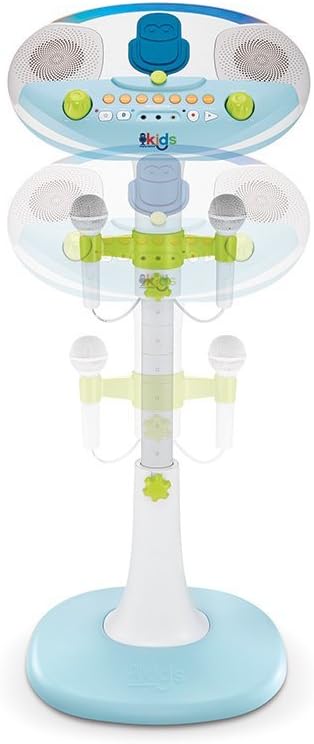
Image: The various components of the karaoke system laid out, ready for assembly.
Connect the adjustable pole to the base unit. Ensure it clicks securely into place. Then, attach the main karaoke unit to the top of the pole, aligning the connectors and pressing firmly until it locks.

Image: Illustration of the main pole being inserted into the base of the karaoke system.
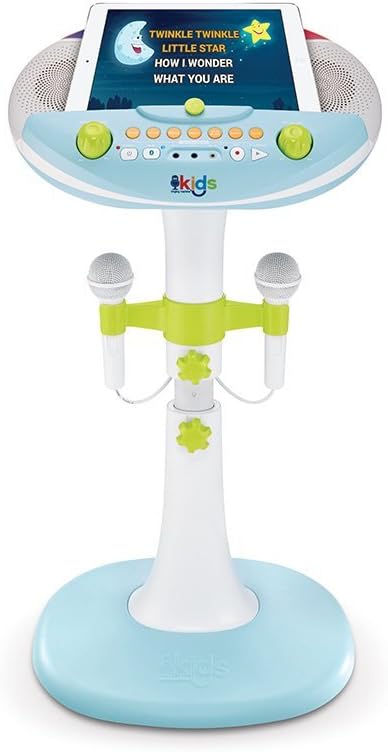
Image: The top unit of the karaoke system being placed onto the assembled pedestal stand.
The system's height is adjustable. Loosen the adjustment knobs on the pole, set to the desired height, and tighten the knobs to secure. The main unit can also be detached from the pedestal for tabletop use.
2. Conexão de energia
Connect the included AC adapter to the DC IN jack on the back of the main unit and plug it into a standard wall outlet. Alternatively, the unit can be powered by 4 C batteries (not included) for portable use.
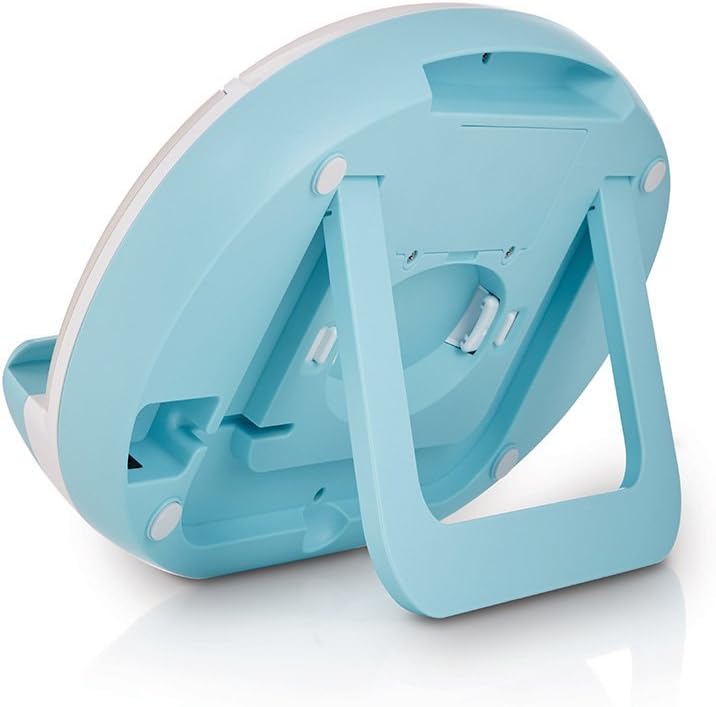
Image: A close-up of the back of the main unit, highlighting the power input and other connection ports.
3. Conexão do microfone
Plug the two wired microphones into the MIC1 and MIC2 jacks on the front panel of the main unit.
4. Posicionamento do dispositivo
Place your tablet or smartphone securely in the non-skid device holder on the main unit. This allows for easy viewing of lyrics or music selection.

Image: A tablet resting in the device holder of the karaoke system, showing how it can be used to display content.
5. Visual Guide: Unboxing and Assembly
Video: This video demonstrates the unboxing and assembly process of the Singing Machine Kids Pedestal Karaoke System, showing how to put together the base, pole, and main unit.
Instruções de operação
1. Ligar/desligar
Pressione o PODER button to turn the unit on or off. The LED lights will illuminate when the unit is on.
2. Controle de volume
Ajuste o VOLUME PRINCIPAL knob to control the overall sound output. Use the VOLUME DO MIC knob to adjust the microphone volume independently.
3. Conectividade Bluetooth
Pressione o PAR button to activate Bluetooth pairing mode. On your device, search for 'Singing Machine' and connect. Once paired, you can stream music wirelessly through the system's speakers.
4. Line-In Connection
For non-Bluetooth devices, connect an audio cable (not included) from your device's headphone jack to the ENTRADA DE LINHA jack on the main unit.
5. Voice Effects
Experiment with the six built-in voice-changing effects: NENHUM, ECO, FÊMEA, MACHO, esquilo, ROBÔ, e RÁDIO. Press the corresponding button to activate an effect.
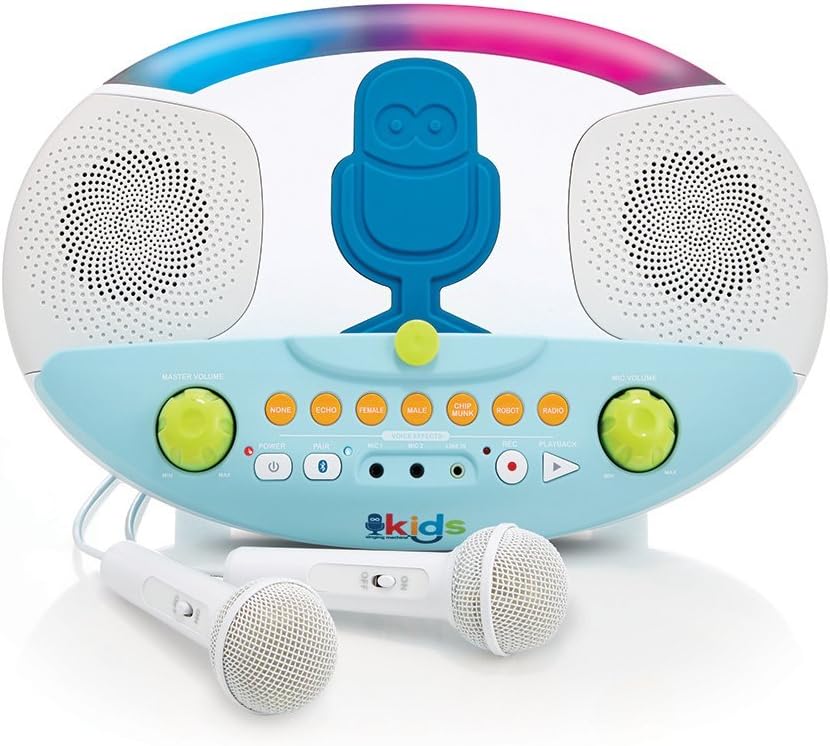
Imagem: Uma imagem detalhada view of the control panel, highlighting the various voice effect buttons and volume knobs.
6. Gravação e reprodução
Pressione o REC button to record your performance. Press the REPRODUÇÃO button to listen to your recorded audio.
Manutenção
1. Limpeza
Limpe o aparelho com um pano macio e seco. Não utilize produtos de limpeza abrasivos ou solventes. Certifique-se de que o aparelho esteja desligado da tomada antes de limpá-lo.
2. Armazenamento
When not in use, store the karaoke system in a cool, dry place away from direct sunlight and extreme temperatures. Disconnect all cables and remove batteries if storing for an extended period.
Solução de problemas
- Sem energia: Ensure the AC adapter is securely connected to both the unit and a working power outlet. If using batteries, check that they are inserted correctly and are not depleted.
- Sem som: Check the Master Volume and Microphone Volume knobs. Ensure your connected device's volume is also turned up. If using Bluetooth, confirm the device is properly paired. If using Line-In, ensure the cable is fully inserted.
- Microfone não funciona: Verify the microphone is securely plugged into its jack. Check the Microphone Volume knob. Test with the other microphone if available to isolate the issue.
- Problemas de emparelhamento Bluetooth: Make sure the unit is in pairing mode (blue LED blinking). Turn off Bluetooth on other nearby devices to avoid interference. Try restarting both the karaoke system and your Bluetooth device.
Especificações
| Peso do item | 6.8 libras |
| Dimensões do produto | 5.12 x 14.96 x 16.93 polegadas |
| Número do modelo do item | SMK1010 |
| Fonte de energia | Battery Powered (4 C batteries, not included) or AC Adapter |
| Volumetage | 6 Volts (CC) |
| Contagem de alto-falantes | 1 |
| Conectividade | Bluetooth, 3.5 mm Jack (Line-In) |
| Características especiais | Six Voice-Changing Effects, Record and Playback Function, Dedicated Microphone Volume Control, Auto Shut Off |
Garantia e Suporte
For warranty information or technical support, please refer to the documentation included with your product or contact Singing Machine customer service directly. Keep your proof of purchase for warranty claims.