1. Produto acabadoview
The Philips SENSEO Switch HD6592/61 is a versatile 2-in-1 coffee machine designed to brew both single-serve pod coffee and a full pot of filter coffee. This manual provides instructions for safe and efficient use of your appliance.

Image 1.1: The Philips SENSEO Switch coffee machine, showcasing its dual functionality for both pod and filter coffee preparation.
Principais características:
- Dual Brewing System: Prepare single cups of SENSEO pod coffee or a full pot of filter coffee.
- Desligamento automático: The machine automatically turns off after a period of inactivity to save energy.
- Easy Water Tank Filling: The water tank features a clear level indication for precise and convenient filling.
- Sistema anti-gotejamento: Allows you to pause brewing and pour a cup of filter coffee before the full cycle is complete.
- Peças próprias para máquina de lavar louça: The jug and filter holder are designed for easy cleaning in a dishwasher.
2. Informações de segurança
Read this instruction manual carefully before using the appliance and save it for future reference. Always follow basic safety precautions when using electrical appliances to reduce the risk of fire, electric shock, and personal injury.
- Garantir o volumetage indicado no aparelho corresponde ao seu volume de alimentação localtage antes de conectar.
- Do not immerse the appliance, plug, or power cord in water or any other liquid.
- Mantenha o aparelho fora do alcance das crianças.
- Não utilize o aparelho se a ficha, o cabo de alimentação ou o próprio aparelho estiverem danificados.
- Place the appliance on a stable, flat, heat-resistant surface, away from hot surfaces or open flames.
- Sempre desligue o aparelho antes de limpá-lo ou quando não estiver em uso.
- Do not open the appliance housing. Repairs should only be performed by authorized service personnel.
3. Configuração
3.1 Desembalagem e limpeza inicial
- Remova todos os materiais de embalagem da máquina de café.
- Wash the removable parts (water reservoir, jug, filter holder, drip tray) with warm water and a mild detergent. Rinse thoroughly and dry.
- Limpe o exterior da máquina com um panoamp pano.
3.2 Primeiro uso (ciclo de enxágue)
Before brewing coffee for the first time, perform a rinsing cycle to clean the internal system.
- Fill the water reservoir with fresh cold water up to the MAX indication.
- Place the empty jug (for filter coffee) or a cup (for pod coffee) on the drip tray.
- Close the lid of the pod holder (without a pod) or ensure the filter holder is empty and correctly placed.
- Pressione o botão liga/desliga para ligar a máquina.
- Press the button for filter coffee or the 2-cup button for pod coffee to start a brewing cycle with only water.
- Repeat this process once or twice until the water reservoir is empty.

Imagem 3.1: Traseira view of the coffee machine, showing the transparent water reservoir with level indicators and the filter coffee carafe in position.

Image 3.2: The coffee machine with the filter coffee section open, illustrating how to access the filter holder and water inlet for filter coffee brewing.
4. Instruções de operação
4.1 Brewing SENSEO Pod Coffee
- Ensure the water reservoir is filled with fresh cold water.
- Open the lid of the pod holder.
- Place one or two SENSEO coffee pods in the appropriate pod holder. For one cup, use the 1-cup pod holder; for two cups, use the 2-cup pod holder. Ensure the pod is centered.
- Close the lid firmly until it clicks.
- Place one or two cups on the drip tray.
- Press the 1-cup or 2-cup button to start brewing. The machine will automatically stop when the coffee is ready.

Image 4.1: The SENSEO Switch machine actively brewing two cups of pod coffee, demonstrating the pod coffee function.

Image 4.2: A close-up of the machine brewing a single cup of SENSEO pod coffee, highlighting the single-serve capability.
4.2 Brewing Filter Coffee
- Ensure the water reservoir is filled with fresh cold water up to the desired number of cups for filter coffee.
- Open the filter coffee section.
- Coloque um filtro de papel (tamanho 1x4 ou similar) no suporte do filtro.
- Add the desired amount of ground filter coffee into the paper filter.
- Close the filter coffee section and ensure the thermal jug is correctly placed on the heating plate.
- Press the filter coffee button to start brewing. The machine will brew the coffee and keep it warm in the thermal jug.
- The drip stop system allows you to remove the jug temporarily to pour a cup before brewing is complete.

Image 4.3: The SENSEO Switch machine configured for filter coffee, featuring the thermal carafe and filter holder.
4.3 Intensity Select
The machine features an Intensity Select function, allowing you to choose between a regular or a strong coffee. Refer to the control panel for specific buttons related to intensity selection.

Imagem 4.4: Vista superior view of the control panel, showing the power button, 1-cup and 2-cup buttons for pod coffee, the filter coffee button, and the Intensity Select option.

Image 4.5: A hand interacting with the control panel, demonstrating the ease of selecting brewing options.
5. Manutenção
5.1 Limpeza
A limpeza regular garante o desempenho ideal e prolonga a vida útil da sua máquina de café.
- Limpeza diária: After each use, empty and rinse the water reservoir, drip tray, and pod holder. Wipe the exterior with a damp pano.
- Peças próprias para máquina de lavar louça: The jug and filter holder can be safely cleaned in the dishwasher.
- Suporte para cápsulas: Remove the pod holder and rinse it under running water. Use a small brush if necessary to remove any coffee residue.
- Bandeja de gotejamento: Esvazie e limpe regularmente a bandeja de gotejamento e a grelha.
5.2 Descalcificação
Descaling is crucial to prevent limescale buildup, which can affect brewing performance and taste. The frequency of descaling depends on water hardness and usage.
- Use a descaling solution specifically designed for coffee machines. Follow the instructions provided with the descaling agent.
- Typically, the process involves filling the water reservoir with the descaling solution and running several brewing cycles without coffee.
- Após a descalcificação, enxágue bem a máquina executando vários ciclos com água limpa para remover qualquer resíduo do produto descalcificante.
6. Solução De Problemas
If you encounter issues with your Philips SENSEO Switch coffee machine, consult the following common troubleshooting steps:
- A máquina não liga: Verifique se o cabo de alimentação está firmemente conectado a uma tomada elétrica em funcionamento.
- Coffee is not brewing: Ensure the water reservoir is filled, the pod holder/filter holder is correctly placed, and the lid is closed properly.
- Coffee tastes weak: Check if you are using the correct amount of coffee (pods or ground coffee) and if the Intensity Select setting is appropriate. Descaling might also be necessary.
- Vazamentos de água: Ensure all removable parts are correctly assembled and seated. Check for any cracks or damage to the water reservoir or other components.
- Limescale indicator light is on: Execute um ciclo de descalcificação conforme descrito na seção de Manutenção.
If the problem persists after attempting these solutions, please contact Philips customer support for further assistance.
7. Especificações
Detailed technical specifications for the Philips SENSEO Switch HD6592/61 coffee machine:
| Especificação | Valor |
|---|---|
| Marca | FILIPES |
| Número do modelo | HD6592/61 |
| Cor | Preto |
| Dimensões do produto (C x L x A) | 28 x 15 x 40 cm |
| Peso do item | 2.4 quilos |
| Capacidade | 1 litros |
| Poder | 1450 Watts |
| Volumetage | 145 Volts |
| Material | Aço inoxidável |
| Recurso especial | Thermal (for carafe) |
| Tipo de Cafeteira | Electric filter coffee maker |
| Estilo | Senseo Switch |
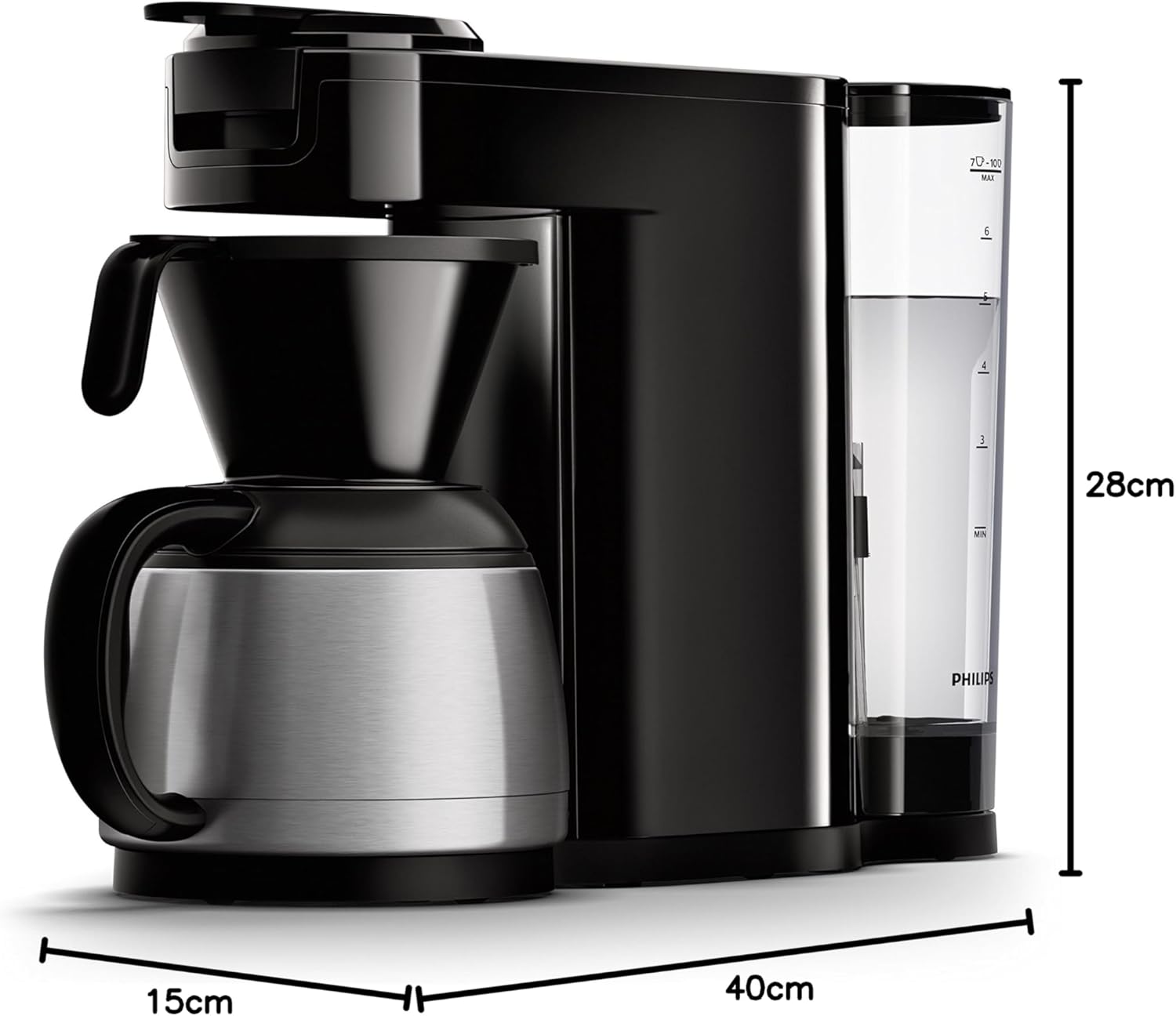
Image 7.1: Diagram illustrating the dimensions of the Philips SENSEO Switch coffee machine.
8. Garantia e Suporte
This Philips appliance comes with a standard manufacturer's warranty. Please refer to the warranty card included in your product packaging for specific terms and conditions, including warranty period and coverage.
For technical support, service, or to register your product, please visit the official Philips webou entre em contato com o departamento de atendimento ao cliente. Guarde seu comprovante de compra para eventuais solicitações de garantia.
You can find more information and support at the official Philips website: www.philips.com


