Introdução
This manual provides detailed instructions for the installation, operation, and maintenance of your LSLYA Dual 2 Din 7-inch Bluetooth Car Stereo with GPS Navigation. Please read this manual thoroughly before using the product to ensure proper function and to prevent damage.
Informações de segurança
- Instalação profissional recomendada: Installation of this car stereo requires professional guidance. Incorrect installation can lead to a short circuit or damage to the unit and vehicle. If you are unsure, seek professional assistance.
- Fonte de energia: This car stereo operates on a 12V DC power supply. Verify your vehicle's voltage before installation. Connecting to an incompatible voltage will cause a short circuit.
- Conexões de fiação: Always confirm the positive and negative terminals of your car's power supply. Connect wires according to the provided wiring diagram to ensure correct operation and prevent damage.
- No CD/DVD Player: This unit is not equipped with a CD/DVD player.
- Non-Removable Faceplate: The faceplate of this car stereo is not removable.
Configuração e instalação
Diagrama de fiação
Refer to the following diagram for proper wiring connections. Ensure all connections are secure and insulated.

This comprehensive wiring diagram provides instructions for connecting the LSLYA car stereo to the vehicle's electrical system. It details connections for all four speakers (front/rear, left/right), the rear camera, steering wheel control, constant power (+12V B+), ignition switch (+12V ACC), ground (B-), auto antenna, and headlight detection line. Proper installation according to this diagram is crucial for correct operation.
Physical Installation and Connections
The unit is designed for a standard Dual 2 Din opening. Ensure adequate space and secure mounting. Connect all necessary cables to the rear of the unit as shown in the diagram below.
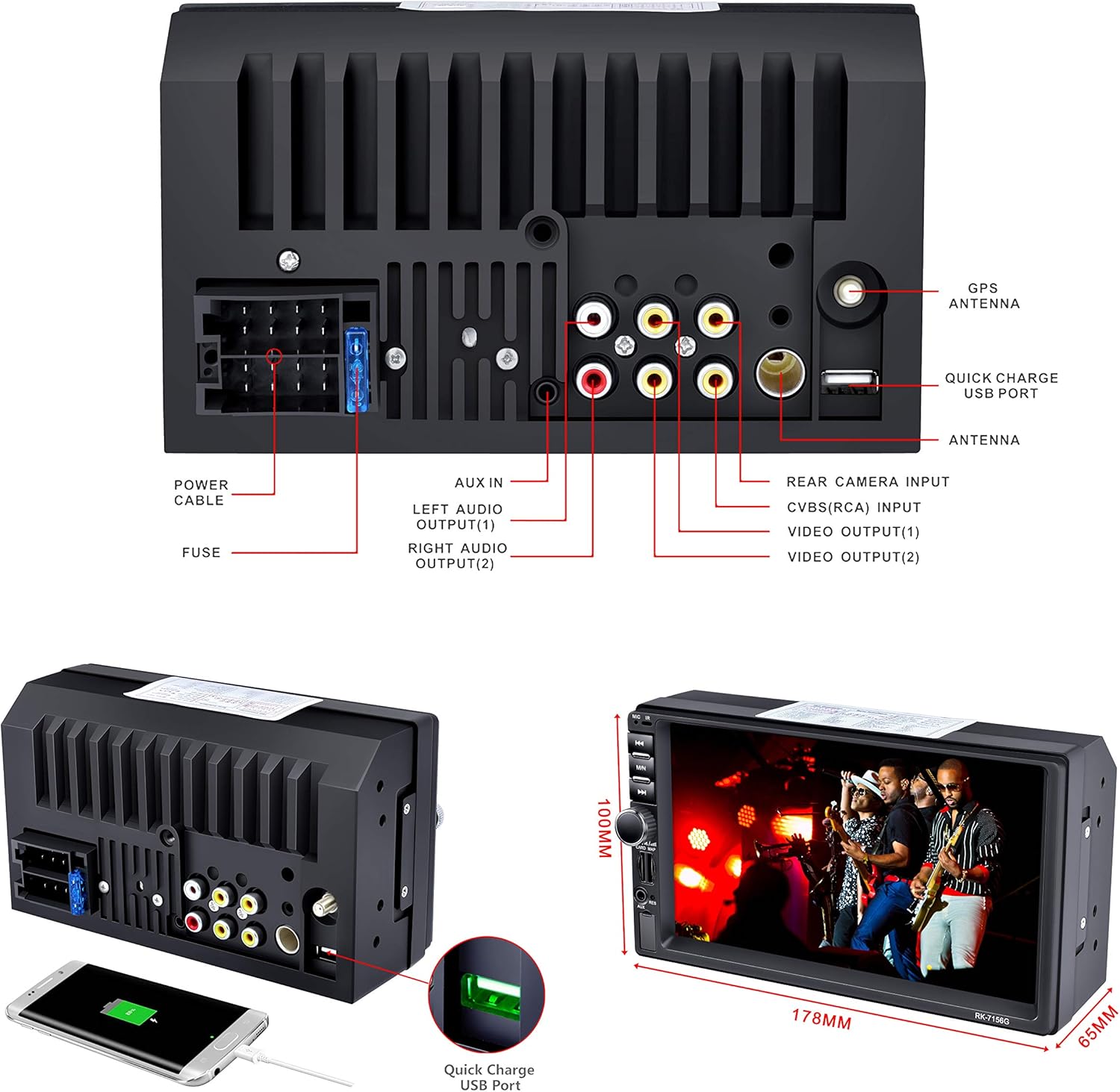
This image provides a detailed rear view of the LSLYA car stereo, illustrating all available input and output ports. These include connections for the GPS antenna, quick charge USB, radio antenna, rear camera, video outputs, left and right audio outputs, AUX input, power cable, and fuse. The physical dimensions of the unit are also indicated.
- Antena GPS: Connect the GPS antenna to the designated port for navigation functionality.
- Antena de rádio: Conecte a antena de rádio do seu veículo.
- Entrada da câmera traseira: Conecte um sensor traseiro compatível. view Câmera para auxílio no estacionamento.
- Portas USB: Utilize the USB ports for media playback and device charging.
- Saídas de áudio/vídeo: Conectar externo amplifiers or monitors as needed.
Instruções de operação
Controles básicos e interface
The unit features a 7-inch touchscreen for primary control, supplemented by physical buttons on the left side for quick access to essential functions.
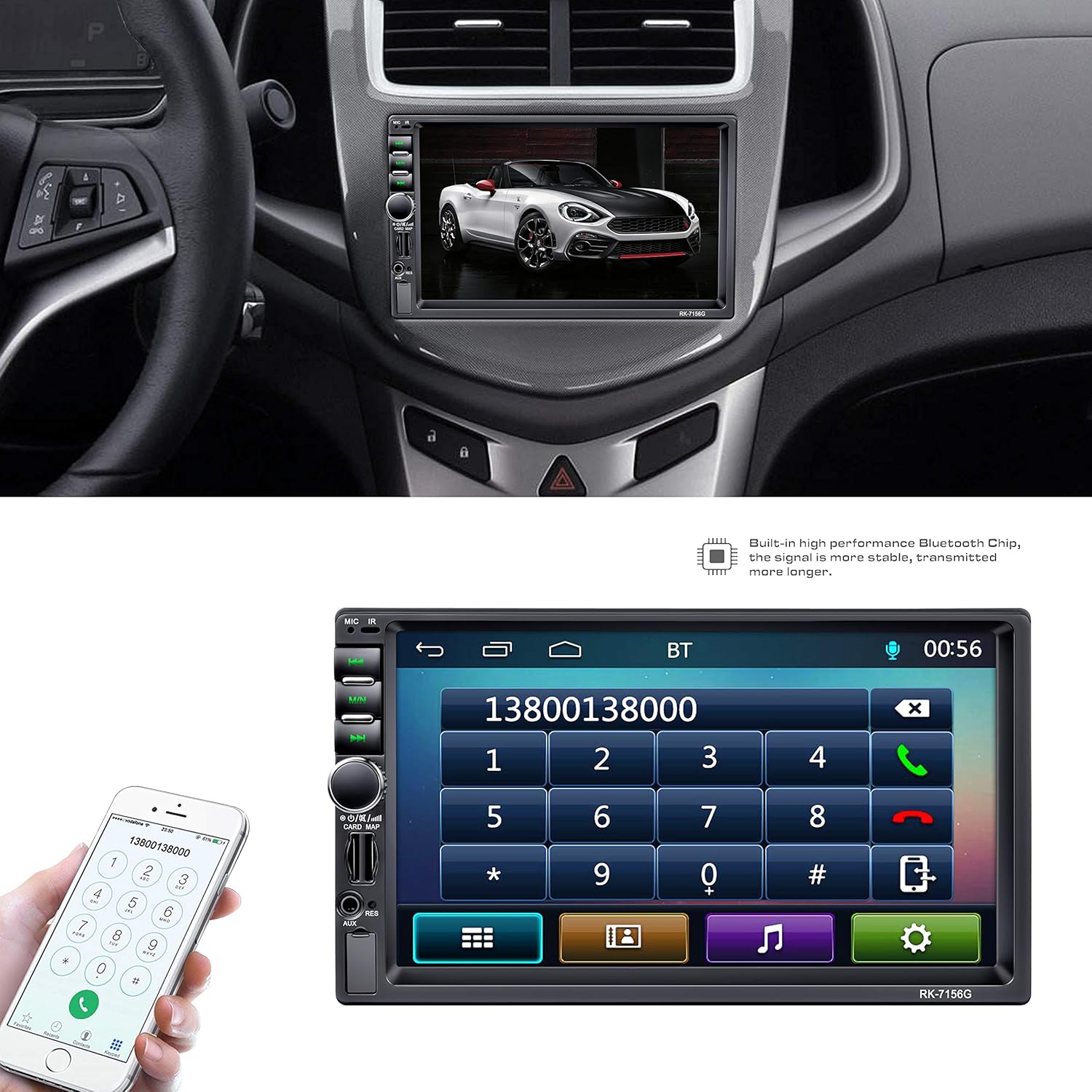
This image illustrates the LSLYA Dual 2 Din Car Stereo integrated into a vehicle's dashboard. The 7-inch touchscreen displays the Bluetooth phone call interface, allowing users to dial numbers directly from the unit. A smartphone is also shown, indicating the Bluetooth connectivity feature for hands-free communication.
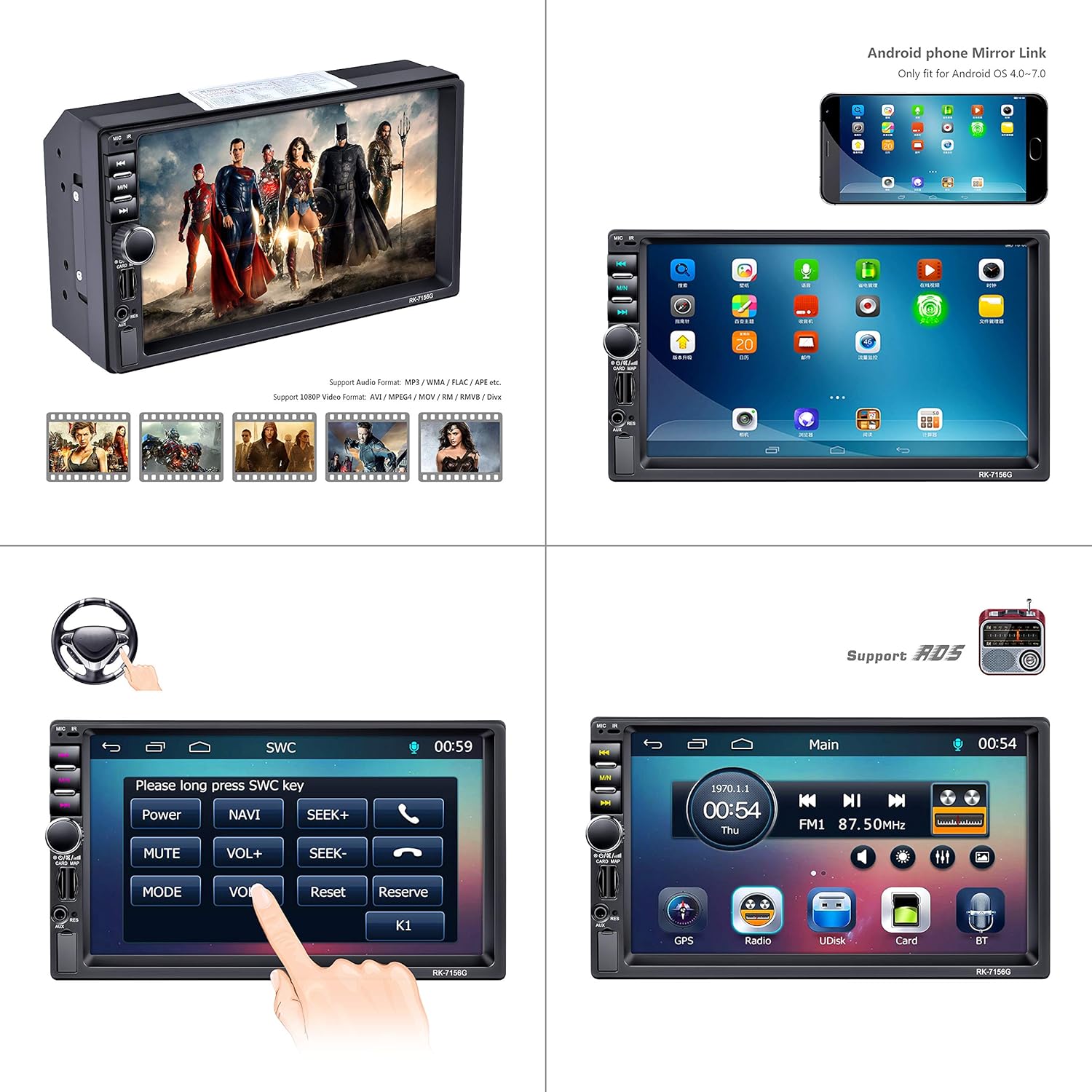
This composite image demonstrates several key functions of the LSLYA car stereo. It shows the unit's ability to play various video formats, an example of the Android phone mirror link feature (for OS 4.0-7.0), the interface for setting up steering wheel controls, and the main menu screen providing access to GPS, Radio, USB (UDisk), SD Card, and Bluetooth functions.
Emparelhamento Bluetooth
Para emparelhar seu smartphone:
- Access the Bluetooth menu on the stereo's touchscreen.
- Habilite o Bluetooth no seu smartphone e pesquise os dispositivos disponíveis.
- Select the car stereo (usually named 'BT' or similar) from your phone's list.
- Confirme o código de emparelhamento, se solicitado.
Após o emparelhamento, você poderá fazer chamadas com as mãos livres e reproduzir áudio.
Navegação GPS
The unit features a built-in GPS navigation module. To use:
- Tap the 'GPS' icon on the main menu.
- Enter your destination using the touchscreen keyboard.
- Follow the on-screen directions and voice prompts for route guidance.
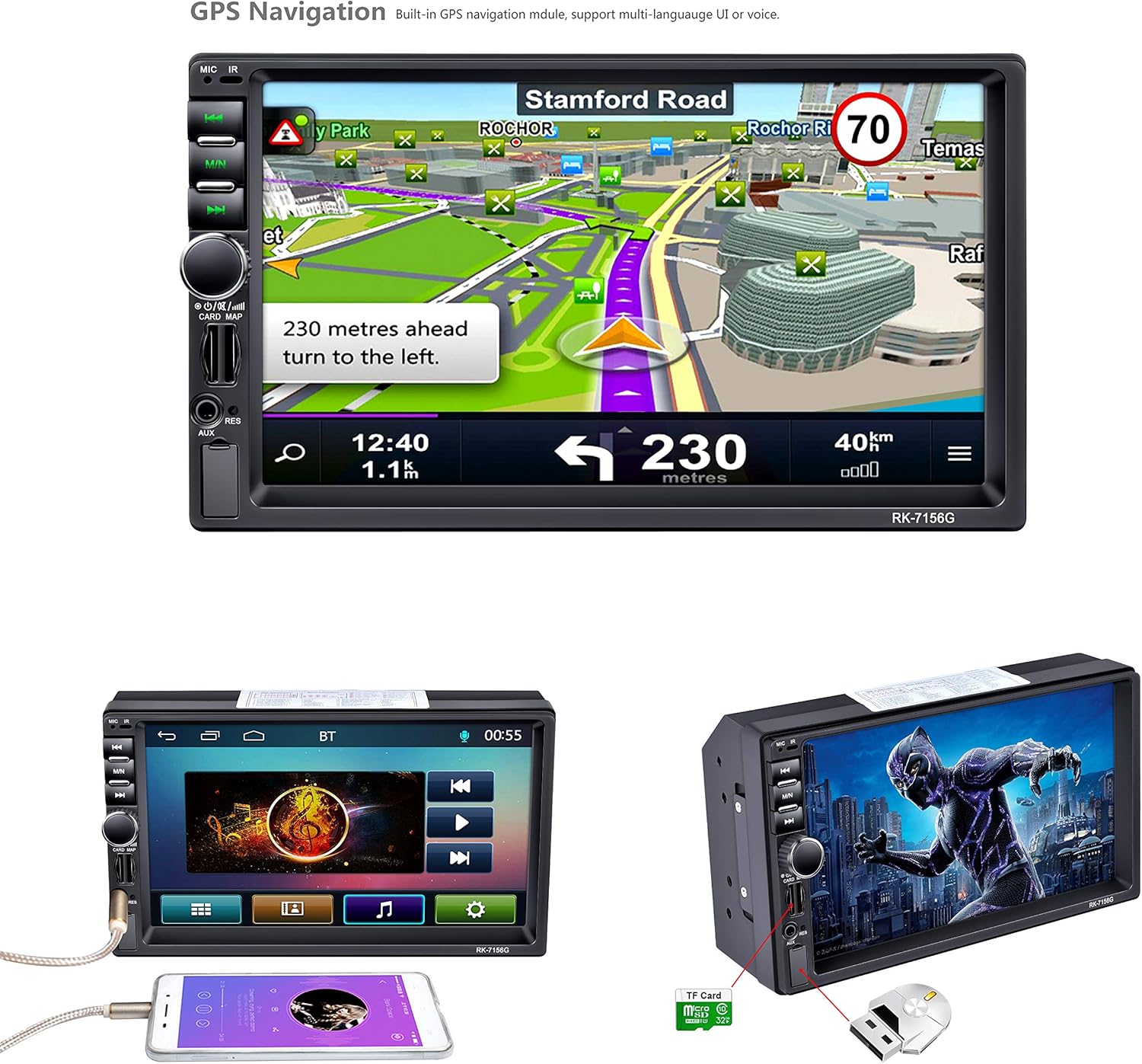
The car stereo's 7-inch screen displays the integrated GPS navigation system. The map shows a route with turn-by-turn directions, including a prompt to '230 meters ahead turn to the left'. This highlights the built-in navigation capabilities of the unit.
Media Playback (USB, SD, MP5)
The stereo supports various media formats via USB, TF/SD card slots. Insert your storage device into the appropriate slot and select the 'UDisk' (USB) or 'Card' (TF/SD) option from the main menu to browse and play media files.
Radio (FM/AM/RDS)
Select the 'Radio' icon from the main menu. Use the touchscreen to scan for stations, save presets, and access RDS information where available.
Controle do volante (SWC)
If your vehicle supports steering wheel controls, you can configure them through the stereo's settings menu. Access the SWC setup interface to map your vehicle's steering wheel buttons to the stereo's functions.
Entrada da câmera traseira
When a rear camera is connected and the vehicle is put into reverse gear, the stereo automatically displays the camera feed on the screen, often with parking guidelines.

This image showcases the audio and visual capabilities of the LSLYA car stereo. It features the sound balance adjustment screen, allowing users to fine-tune audio output. The bottom left highlights the 7-inch HD LCD display (800x480 resolution) with a vibrant image. The bottom right demonstrates the rear view camera input, displaying a clear image with parking guidelines for safe reversing.
Link do espelho
The unit supports Android phone mirror link for Android OS 4.0-7.0. Connect your compatible Android smartphone via USB to mirror its screen onto the stereo display.
Manutenção
- Limpeza: Use um pano macio e seco para limpar a tela e a parte externa da unidade. Evite produtos de limpeza abrasivos ou solventes.
- Atualizações de software: Verifique o fabricante webAcesse o site periodicamente para verificar se há atualizações de software disponíveis, garantindo assim o desempenho ideal e o acesso a novos recursos.
- Substituição de fusíveis: If the unit loses power, check the fuse located at the rear of the unit. Replace with a fuse of the same rating if blown.
Solução de problemas
- Sem energia:
- Check all power connections (B+, ACC, Ground) as per the wiring diagram.
- Verify the fuse is intact and not blown.
- Certifique-se de que a bateria do veículo tenha carga suficiente.
- Sem som:
- Verifique as conexões dos fios das caixas de som.
- Verify volume levels and mute settings.
- Ensure audio output mode is correctly selected.
- GPS não funciona/É impreciso:
- Certifique-se de que a antena GPS esteja devidamente conectada e com sinal desobstruído. view do céu.
- Check GPS settings within the unit.
- Problemas de conexão Bluetooth:
- Certifique-se de que o Bluetooth esteja ativado tanto no aparelho de som quanto no seu smartphone.
- Exclua os emparelhamentos anteriores e tente emparelhar novamente.
- Move closer to the unit if experiencing signal issues.
- Steering Wheel Controls Not Responding:
- Verify SWC wiring connections.
- Re-calibrate the steering wheel controls through the unit's settings menu.
Especificações
| Marca | LSLYA |
| Número do modelo | B07FZ49MFT |
| Tamanho da tela | 7 polegadas |
| Resolução de exibição | 800x480 (HD LCD) |
| Tecnologia de Conectividade | Bluetooth, USB |
| Características especiais | Built-In Bluetooth, Touchscreen, GPS Navigation, MP5/TF/SD/USB Media Player, Steering Wheel Control, FM/AM/RDS Tuner, Rear Camera Input, Android Mirror Link (OS 4.0-7.0) |
| Dispositivos compatíveis | Smartphone |
| Modo de saída de áudio | Estéreo |
| Potência de saída | 50 Watts (por canal) |
| Wat totaltage | 200 Watts |
| Número de canais | 4 |
| Peso do item | 2.22 libras |
| Dimensões da embalagem | 8.39 x 6.06 x 4.92 polegadas |
| Data da primeira disponibilidade | 10 de novembro de 2018 |
Garantia e Suporte
For warranty information or technical support, please refer to the documentation included with your purchase or contact LSLYA customer service through their official channels. Keep your purchase receipt as proof of purchase.