1. Introdução
This manual provides detailed instructions for the assembly, operation, and maintenance of your FLEXISPOT Electric Sit Stand Desk Base. Designed for a DIY desktop workstation, this adjustable desk frame offers flexibility and ergonomic benefits for both home and office environments. It includes an integrated power strip and a cable management tray to enhance your workspace efficiency and organization.

This image displays the assembled FLEXISPOT standing desk frame within a modern office environment, showcasing its sleek design and how it fits into a professional workspace.
2. Informações importantes de segurança
Please read and understand all safety instructions before assembly and operation to prevent injury or damage to the product.
- Siga sempre as instruções de montagem fornecidas.
- Keep the desk away from water and heat sources.
- Do not use the desk if the cord is damaged.
- Always use the desk within its weight limit.
- Keep the desk away from children and pets when in use.
3. Conteúdo da embalagem
Verify that all components are present before beginning assembly. If any parts are missing or damaged, please contact FLEXISPOT customer support.

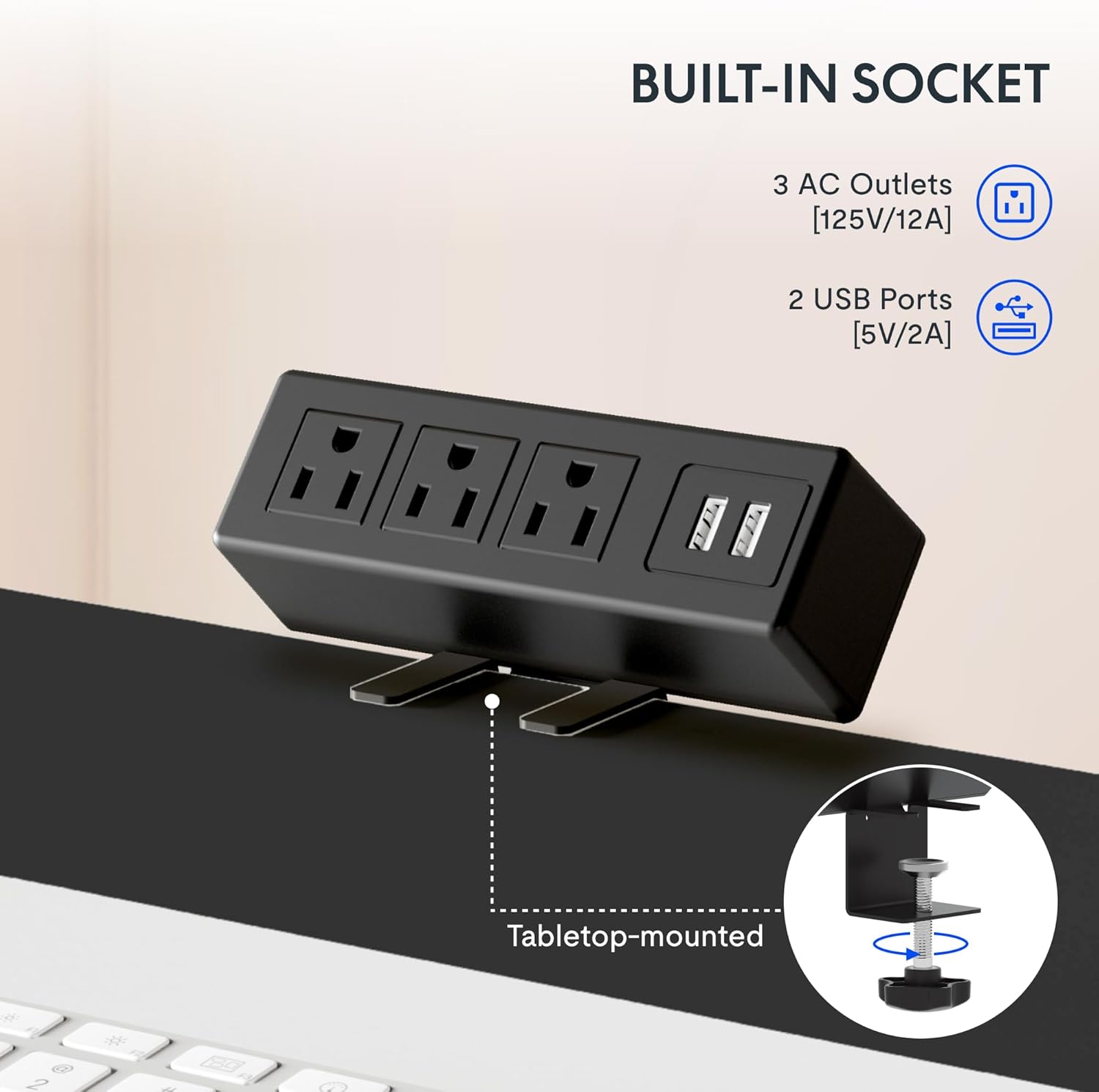
Esta imagem fornece um close-up. view da clamp-on power strip, highlighting its three AC outlets and two USB ports, designed for convenient tabletop mounting.
Lista de componentes:
- Adjustable Desk Legs (2)
- Suporte da barra transversal/estrutura
- Control Panel with Memory Functions
- Clamp Power Strip (3 AC outlets, 2 USB ports)
- Bandeja de gerenciamento de cabos
- Mounting Hardware and Tools (as provided)
- Cable Clips/Ties
4. Configuração e montagem
Assembly of the FLEXISPOT desk frame is designed to be straightforward and typically takes less than 30 minutes. Follow these steps carefully.
4.1 Prepare Your Workspace
Clear an area large enough to assemble the desk frame. Ensure you have all components and the provided tools readily available.
4.2 Monte a Estrutura
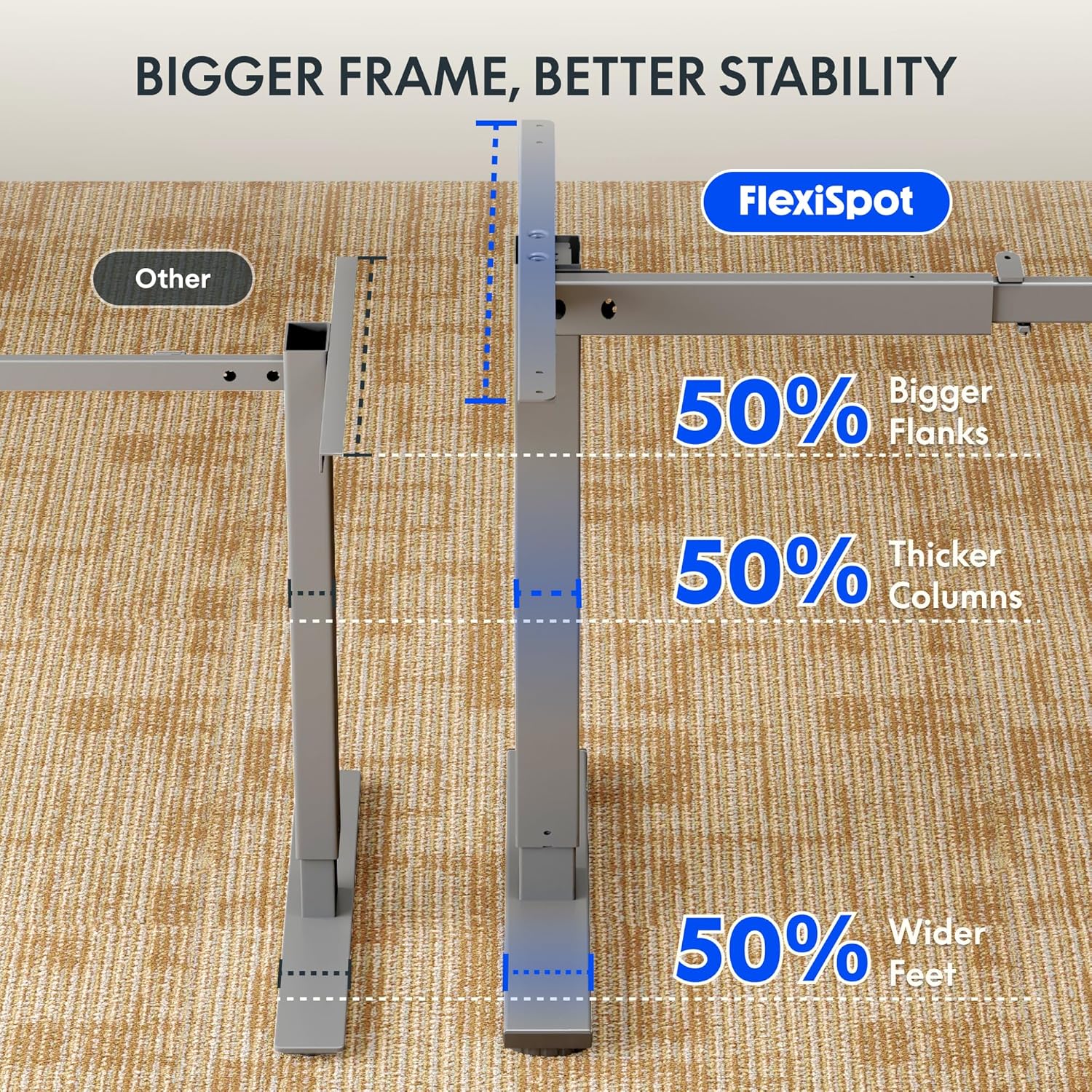
Attach the adjustable desk legs to the crossbar according to the detailed instructions in the included assembly guide. Ensure all screws are tightened securely.
4.3 Attach Your Desktop
The frame is compatible with various desktop sizes. Recommended desktop sizes are a width of 39.3" to 63" and a depth of 19.7" to 31.5". Secure your chosen desktop to the assembled frame using appropriate screws (may not be included with frame only purchase).

This diagram illustrates the recommended dimensions for a desktop panel to be used with the FLEXISPOT desk frame, ensuring proper fit and stability.
4.4 Install Power Strip and Cable Management
Anexar o clamp power strip to the edge of your desktop for easy access to power outlets. Install the cable management tray and use the provided cable clips to organize and conceal your cords, maintaining a clean and clutter-free workspace.

Esta imagem fornece um close-up. view da clamp-on power strip, highlighting its three AC outlets and two USB ports, designed for convenient tabletop mounting.
This side-by-side comparison demonstrates the significant improvement in desk organization achieved by utilizing the integrated cable management tray, transforming a cluttered setup into a tidy workspace.
5. Instruções de operação
Your FLEXISPOT desk frame features an electric height adjustment system with a memory controller for personalized comfort.
5.1 Ajuste de altura
Use the up (▲) and down (▼) arrow buttons on the control panel to smoothly raise or lower the desk to your desired height. The adjustable height range is 28.1'' to 45.7''.

This visual demonstrates the extensive height adjustment capabilities of the desk, showing its minimum height of 28.1 inches and maximum height of 45.7 inches, allowing for versatile use.
5.2 Utilizando Predefinições de Memória
The control panel allows you to save up to four preferred height settings. To save a height, adjust the desk to the desired level, then press and hold one of the numbered memory buttons (1, 2, 3, or 4) until the display confirms the setting is saved. To recall a saved height, simply press the corresponding numbered button.
This detailed image highlights the desk's control panel, featuring a digital display, up/down adjustment buttons, and four memory preset buttons for convenient height recall.
5.3 Produto Acimaview Vídeo
Para uma visão geralview of the FLEXISPOT desk and its features, please watch the official product video below.
Este vídeo oferece uma visão geral.view of FlexiSpot products, showcasing the ergonomic benefits and various uses of their adjustable desks in different settings. It demonstrates the smooth height adjustment and integrated features.
6. Manutenção
To ensure the longevity and optimal performance of your FLEXISPOT Standing Desk Frame, follow these simple maintenance guidelines:
- Limpeza: Wipe down the frame and control panel with a soft, damp pano. Evite usar produtos químicos agressivos ou abrasivos que possam danificar o acabamento.
- Gerenciamento de cabos: Periodically check and re-organize cables to prevent tangles and ensure smooth operation of the desk's height adjustment mechanism.
- Cuidados Motores: The motor is designed for maintenance-free operation. Avoid obstructing the movement of the legs during adjustment.
- Inspeção regular: Occasionally check all screws and connections to ensure they remain tight. Re-tighten if necessary.
7. Solução De Problemas
If you encounter any issues with your FLEXISPOT Standing Desk Frame, refer to the following common troubleshooting tips:
| Problema | Possível causa | Solução |
|---|---|---|
| A mesa não se move nem responde aos comandos. | Cabo de alimentação desconectado; proteção contra sobrecarga ativada; erro no motor. | Check power connections. Unplug and re-plug the desk. Reduce weight on the desk. Refer to the specific error codes in your detailed manual if available. |
| A mesa se move de forma irregular ou faz ruídos estranhos. | Conexões soltas; distribuição desigual do peso; obstrução. | Ensure all assembly screws are tight. Distribute weight evenly on the desktop. Check for any obstructions under or around the desk. |
| As configurações de memória não estão funcionando. | Procedimento de salvamento incorreto. | Ensure you press and hold the memory button until the setting is confirmed. Re-save your desired heights. |
Se o problema persistir após tentar essas soluções, entre em contato com o suporte ao cliente da FLEXISPOT para obter mais assistência.
8. Especificações
Key technical specifications for the FLEXISPOT Standing Desk Frame (Model E1):
| Recurso | Detalhe |
|---|---|
| Marca | PONTO FLEXI |
| Número do modelo | E1 |
| Dimensões do produto (P x L x A) | 19.7"D x 63"W x 45.7"H (frame only, max extension) |
| Faixa de altura ajustável | 28.1" (Min) - 45.7" (Max) |
| Recommended Desktop Width | 39.3" a 63" |
| Recommended Desktop Depth | 19.7" a 31.5" |
| Material base | Liga de aço |
| Cor | Cinza |
| Recomendação de peso máximo | 70 quilos (aprox. 154 libras) |
| Recursos do painel de controle | Digital Display, Up/Down Adjustment, 4 Memory Presets |
| Power Strip | 3 tomadas CA (125V/12A), 2 portas USB (5V/2A) |
| Montagem necessária | Sim |
| UPC | 855427008913 |
9. Garantia e Suporte
FLEXISPOT stands behind the quality of its products. Your Standing Desk Frame is covered by the following warranty:
- Garantia de 5 anos: Covers the frame, motor, and other mechanisms.
- Garantia de 2 anos: Covers the controller, switch, and electronics.
For warranty claims, technical assistance, or any questions regarding your product, please visit the official FLEXISPOT website or contact their customer support directly. Please have your model number (E1) and proof of purchase ready when contacting support.


