1. Introdução e maisview
The Alphacool Eiszyklon Aurora LUX fan is designed to provide efficient cooling and vibrant digital RGB illumination for your PC system. These fans are particularly effective on radiators due to their high static pressure, ensuring optimal performance even at lower rotational speeds. The unique light-diffusing areas distribute the aRGB light evenly, creating stunning visual effects.
Each fan features a naturally decoupled frame to minimize vibrations and noise. A single 6-pin cable simplifies connectivity, handling both fan power and aRGB control. When used with the Alphacool Aurora LUX Digital RGB controller, this single cable allows for comprehensive control over fan speed and lighting effects.

Image: Three Alphacool Eiszyklon Aurora LUX Digital RGB fans, showcasing their illuminated blue rings and central logos. These fans are designed for efficient cooling and vibrant lighting within a PC system.
2. Conteúdo da embalagem
Please verify that all components listed below are present in your package before proceeding with installation.
- 3x Alphacool Eiszyklon Aurora LUX Digital RGB Fans (120x120x25mm)
- 1x Alphacool Aurora LUX Digital RGB Controller
- 1x Remote Controller for RGB and fan speed adjustment
- Mounting Screws for fans
- Necessary connection cables (6-pin fan connectors, controller power cable)

Image: The Alphacool Aurora LUX Digital RGB controller, its accompanying remote control, a set of mounting screws, and various connection cables. These components are essential for the setup and operation of the Eiszyklon Aurora LUX fans.
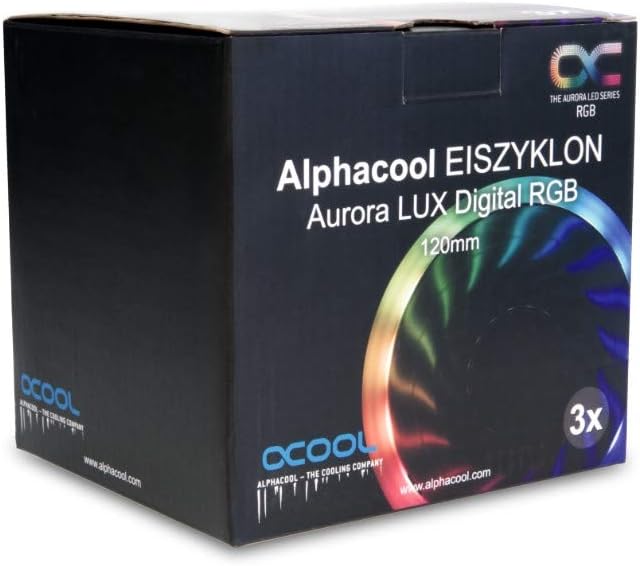
Image: The retail packaging for the Alphacool Eiszyklon Aurora LUX Digital RGB fans, indicating a 3-pack of 120mm fans. The box features product branding and an image of an illuminated fan.
3. Configuração e instalação
Follow these steps to properly install your Alphacool Eiszyklon Aurora LUX fans and controller.
- Montagem dos ventiladores: Securely attach the 120mm fans to your PC case, radiator, or desired mounting points using the provided mounting screws. Ensure proper airflow direction for optimal cooling.
- Connecting Fans to Controller: Each Eiszyklon Aurora LUX fan has a single 6-pin connector. Connect these 6-pin cables from the fans to the corresponding 6-pin fan connectors on the Alphacool Aurora LUX Digital RGB Controller. The controller has 10 such fan connectors.
- Controller Power Connection: Connect the power cable from the Alphacool Aurora LUX Digital RGB Controller to a suitable power source in your PC (e.g., SATA power connector from your power supply).
- Montagem do controlador: The controller can be mounted inside your PC case using the adhesive tape provided on its back. Choose a location that allows for easy cable management and remote signal reception.
- Optional LED Strip Connection: If you have additional digital RGB LED strips (JTS 4-Pin), you can connect them to the two dedicated JTS 4-Pin connectors on the controller.
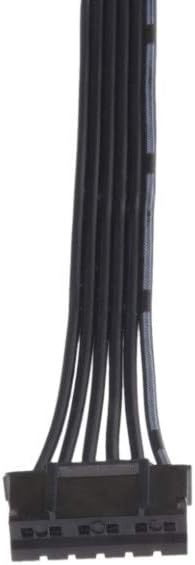
Imagem: Um close-up view of the 6-pin connector cable, which combines both power and RGB signal lines for the Alphacool Eiszyklon Aurora LUX fans.
4. Instruções de operação
The Alphacool Aurora LUX Digital RGB Controller and its remote allow for easy customization of your fan's performance and aesthetics.
- Ligar/desligar: Use the "On" and "Off" buttons on the remote controller to power the fans and lighting on or off.
- Controle de velocidade do ventilador: The remote allows you to adjust the fan speed. Refer to the remote's specific buttons (e.g., S+, S-) for increasing ou decreasing fan RPM.
- Lighting Effects and Colors: Utilize the color buttons and mode buttons on the remote to cycle through various digital RGB lighting effects and select your preferred colors. The "AUTO" button may cycle through pre-programmed effects.

Imagem: Um example of the blue illumination provided by three Alphacool Eiszyklon Aurora LUX Digital RGB fans, demonstrating the even light distribution.
5. Manutenção
A manutenção regular ajuda a garantir a longevidade e o desempenho ideal dos seus ventiladores.
- Remoção de poeira: Periodically clean the fan blades and frame to remove accumulated dust. Use compressed air or a soft brush. Ensure the system is powered off before cleaning.
- Inspeção de cabos: Occasionally check all connected cables for secure connections and any signs of wear or damage.
6. Solução De Problemas
If you encounter issues with your Alphacool Eiszyklon Aurora LUX fans, refer to the following common troubleshooting steps:
- Ventiladores não estão girando:
- Ensure the controller is properly powered (SATA power connected).
- Verify that the 6-pin fan cables are securely connected to the controller.
- Check if the remote control is functioning and sending signals (e.g., try pressing "On").
- Luzes RGB não funcionam:
- Confirm the 6-pin fan cables are fully seated in the controller, as they carry both power and RGB signals.
- Try cycling through different lighting modes or colors using the remote.
- Ensure the controller itself is receiving power.
- O controle remoto não responde:
- Check if the remote's battery needs replacement.
- Ensure there are no obstructions between the remote and the controller's IR receiver.
If problems persist, please contact Alphacool customer support for further assistance.
7. Especificações
Detailed technical specifications for the Alphacool Eiszyklon Aurora LUX Digital RGB fans and controller:
| Recurso | Especificação |
|---|---|
| Tamanho do ventilador | 120 x 120 x 25 mm |
| Velocidade Rotacional Máxima | 1100 rpm |
| Pressão estática | 2.23 mm H2O |
| Taxa de fluxo de ar | 87.32 m³/h |
| Rolamentos | Hidráulico |
| Fan/aRGB Connector | 6-Pin (proprietary) |
| Iluminação | Digital addressable 5V RGB LEDs |
| Controller Dimensions (L x W x H) | 93 x 47 x 17 mm |
| Controller Fan Connectors | 10 x 6-Pin |
| Controller Digital RGB LED Strip Connectors | 2x JTS 4-Pin |
| Ventilador Vol.tage | 12V |
| Digital RGB LED Voltage | 5V |
| Max. Power Output (Controller) | 50 W |
| Controle via | Controle remoto |
| Montagem do controlador | Fita adesiva |
| Nível de ruído | 29 dB |
| Item Weight (per fan) | 5.3 onças |
| Número do modelo | 24804 |
| ASIN | B07H2FN9VJ |

Image: A single Alphacool Eiszyklon Lux RGB fan, showing its design and the technical specifications printed on the central hub, including speed, voltage, e o quetage.

Imagem: Um profissional lateralfile view of an Alphacool Eiszyklon fan, highlighting its 25mm thickness and the design of its frame, which contributes to its decoupled operation.
8. Garantia e Suporte
For warranty information, technical support, or any inquiries regarding your Alphacool Eiszyklon Aurora LUX Digital RGB fans, please contact Alphacool directly through their official website ou distribuidores autorizados.
You can visit the official Alphacool store on Amazon for more information: Alphacool Store


