1. Introdução
Thank you for choosing the Matrix PG 2000i-USB Inverter Generator. This generator is designed to provide reliable and clean power for various applications, from sensitive electronics to power tools. Its inverter technology ensures a pure sine wave output, making it safe for charging smartphones, laptops, and other delicate devices. This manual provides essential information for the safe operation, maintenance, and troubleshooting of your generator.
2. Instruções de segurança
Read all safety warnings and instructions carefully before operating the generator. Failure to follow these instructions may result in electric shock, fire, serious injury, or death.
- Perigo de monóxido de carbono: Os geradores produzem monóxido de carbono, um gás incolor, inodoro e venenoso. Utilize o gerador somente ao ar livre, longe de janelas, portas e aberturas de ventilação. Nunca o utilize em ambientes fechados ou parcialmente fechados.
- Risco de incêndio: Gasoline is highly flammable. Refuel in a well-ventilated area with the engine off and cool. Do not smoke or allow flames or sparks near the generator or fuel tank.
- Risco de choque elétrico: Do not operate the generator in wet conditions. Ensure all electrical connections are secure and dry. Never touch electrical components with wet hands.
- Superfícies Quentes: The generator engine and muffler become very hot during operation and remain hot for a while after stopping. Avoid touching hot surfaces to prevent burns.
- Crianças e animais de estimação: Mantenha crianças e animais de estimação afastados do gerador durante o funcionamento.
- Ventilação adequada: Ensure adequate airflow around the generator to prevent overheating.
3. Conteúdo da embalagem
Your Matrix PG 2000i-USB Inverter Generator package should include the following items:
- Matrix PG 2000i-USB Inverter Generator
- Manual do usuário
- Chave de vela de ignição
- Funil de óleo
- Chave de fenda
- 12V Battery Charging Cables

Figure 3.1: Generator with included accessories.
4. Produto acabadoview
Familiarize yourself with the components of your Matrix PG 2000i-USB Inverter Generator.

Figura 4.1: Frente view of the Matrix PG 2000i-USB Inverter Generator.
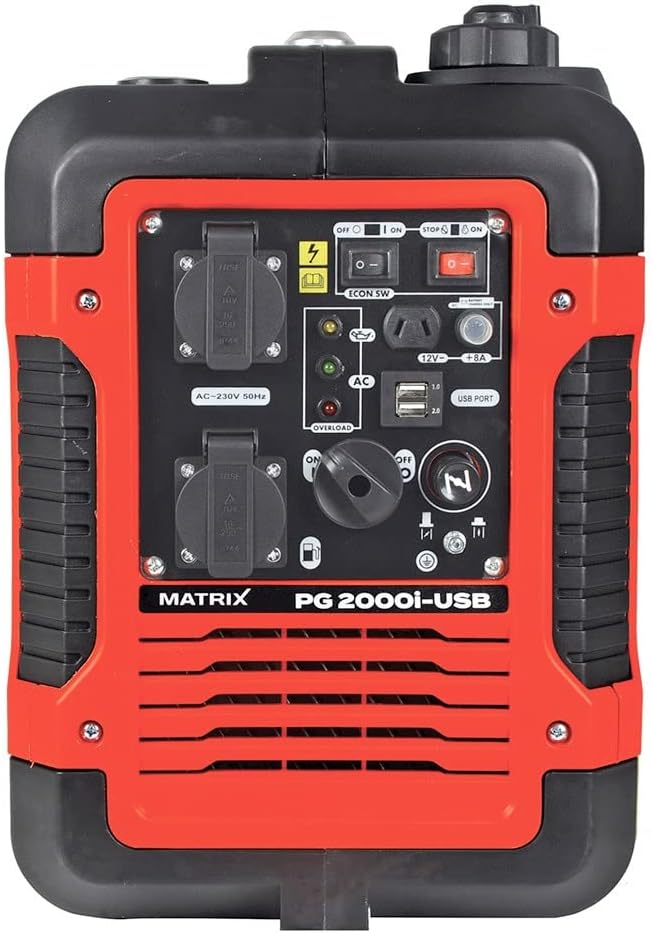
Figura 4.2: Detalhado view do painel de controle.
Componentes principais:
- Tomadas CA de 230 V: Two standard 230V outlets for connecting electrical appliances.
- Portas USB: Two USB ports (1.0 and 2.0) for charging sensitive devices like smartphones and tablets.
- DC 12V / 8A Output: Para carregar baterias de 12V.
- Chave do motor: Controla a potência do motor (ligado/desligado).
- Eco Switch: Activates Eco Mode for fuel efficiency and reduced noise.
- Alavanca de estrangulamento: Utilizado para dar partida em um motor frio.
- Tampão de combustível: For filling the gasoline tank.
- Tampa/Vareta de Medição de Óleo: For adding and checking engine oil.
- Puxe a alavanca de partida: Para dar partida manual no motor.
- Luzes indicadoras: Oil warning, overload warning, AC output indicator.

Figure 4.3: USB ports for charging devices.

Figura 4.4: parte superior view with carrying handle and fuel cap.
5. Configuração
5.1. Adicionando óleo do motor
The generator is shipped without engine oil. You must add the correct amount of oil before first use.
- Coloque o gerador em uma superfície nivelada.
- Locate and remove the oil fill cap/dipstick.
- Using the provided funnel, slowly add approximately 330 ml of 15W-40 engine oil. Do not overfill.
- Reinsert the dipstick and check the oil level. It should be at the upper mark.
- Recoloque a tampa de enchimento de óleo firmemente.
5.2. Adicionando Combustível
Use unleaded gasoline only. Do not use E85 or mixed fuels. Ensure the engine is off and cool before refueling.
- Desaparafuse a tampa do combustível.
- Carefully pour unleaded gasoline into the fuel tank. The tank capacity is 4 liters.
- Do not fill above the red indicator inside the tank. Leave space for fuel expansion.
- Recoloque a tampa do tanque de combustível firmemente.
6. Instruções de operação
6.1. Iniciando o gerador
- Ensure the generator is on a level surface and all electrical devices are disconnected.
- Gire a válvula de combustível para a posição 'LIGADO'.
- Move the choke lever to the 'CHOKE' position (for cold starts). For warm starts, the choke may not be necessary.
- Gire a chave de ignição para a posição 'LIGADO'.
- Puxe firmemente a alavanca de arranque retrátil até o motor ligar.
- Assim que o motor ligar, mova lentamente a alavanca do afogador para a posição 'LIGADO'.
- Deixe o motor aquecer por alguns minutos antes de conectar as cargas elétricas.
6.2. Parando o gerador
- Desconecte todas as cargas elétricas do gerador.
- Deixe o motor funcionar por alguns minutos sem carga para que ele esfrie.
- Gire a chave de ignição para a posição 'DESLIGADO'.
- Gire a válvula de combustível para a posição 'DESLIGADO'.
6.3. Modo Eco
The Eco Mode switch allows the generator to automatically adjust engine speed to match the electrical load. This reduces fuel consumption and noise levels when less power is required.
- To activate Eco Mode, press the 'ECON SW' switch to the 'ON' position.
- To deactivate Eco Mode (for full power output), press the 'ECON SW' switch to the 'OFF' position.
6.4. Dispositivos de conexão
Connect your devices to the appropriate outlets:
- CA 230V: Plug appliances directly into the 230V outlets. Ensure the total wattage does not exceed the generator's continuous output (1700W).
- Portas USB: Use standard USB cables to charge compatible devices.
- CC 12V: Use the provided 12V charging cables to connect to a 12V battery.

Figure 6.1: The generator can power various outdoor tools and appliances.
7. Manutenção
A manutenção regular é crucial para a longevidade e o desempenho ideal do seu gerador. Certifique-se sempre de que o motor esteja desligado e frio antes de realizar qualquer manutenção.
7.1. Cronograma de manutenção
| Item | Cada uso | A cada 25 horas / Mensalmente | A cada 100 horas / Anualmente |
|---|---|---|---|
| Verifique o nível de óleo do motor | ✓ | ||
| Filtro de ar limpo | ✓ | ||
| Trocar óleo do motor | First 20 hours, then | ✓ | |
| Inspecione a vela de ignição. | ✓ | ||
| Inspecione o filtro de combustível. | ✓ |
7.2. Troca de óleo
Drain the old oil and refill with fresh 15W-40 engine oil. Refer to section 5.1 for oil filling instructions.
7.3. Limpeza do filtro de ar
Remove the air filter cover, take out the foam filter element, and clean it with warm, soapy water. Rinse thoroughly and allow to air dry completely before reinstallation. Replace if damaged.
7.4. Inspeção da vela de ignição
Remove the spark plug using the provided wrench. Inspect for wear, carbon buildup, or damage. Clean or replace as necessary. Ensure the gap is correct according to specifications.
7.5. Armazenamento
For long-term storage, drain the fuel tank and carburetor to prevent fuel degradation. Change the engine oil, clean the air filter, and store the generator in a clean, dry place.
8. Solução De Problemas
Esta seção aborda problemas comuns que você pode encontrar com seu gerador.
| Problema | Possível causa | Solução |
|---|---|---|
| O motor não pega | Sem combustível Interruptor do motor DESLIGADO Afogador não ajustado corretamente Nível baixo de óleo Problema com a vela de ignição | Adicionar combustível LIGUE o interruptor do motor Ajustar afogador Adicionar óleo Inspecione/substitua a vela de ignição |
| Sem saída de energia | Sobrecarga Disjuntor desarmado Eco Mode engaged with high load | Reduzir carga Reinicializar o disjuntor Turn off Eco Mode for full power |
| O motor funciona mal | Combustível velho Filtro de ar sujo Problema com a vela de ignição | Esvazie e reabasteça com combustível novo. Limpar/substituir o filtro de ar Inspecione/substitua a vela de ignição |
| Indicador de sobrecarga ligado | Connected devices exceed capacity | Disconnect devices, reduce load, restart generator |
9. Especificações técnicas
| Recurso | Especificação |
|---|---|
| Modelo | PG 2000i-USB (Reference: 160100034) |
| Tipo de motor | 4 tempos, refrigerado a ar |
| Deslocamento do motor | 79 cm³ |
| Potência do motor | 3 HP (2.6 ch) |
| Potência máxima de saída | 1900 W |
| Saída de potência contínua | 1700 W |
| Volumetage | 230 V CA, 12 V CC |
| Freqüência | 50 Hz |
| Tipo de combustível | Gasolina sem chumbo |
| Capacidade do tanque de combustível | 4 litros |
| Tempo de execução (com 50% de carga) | Aproximadamente 6 horas |
| Tipo de óleo | 15W-40 |
| Capacidade de óleo | Aprox. 330 ml |
| Nível de ruído (a 5m) | 59 dB |
| Dimensões (C x L x A) | 50 x 33 x 45 cm |
| Peso | 23 kg |
| Características especiais | Inverter Technology, Eco Mode, USB Port |
10. Garantia e Suporte
For warranty information and customer support, please refer to the warranty card included with your product or contact Matrix customer service directly. Keep your purchase receipt as proof of purchase.


