Introdução
Thank you for choosing the MIFA A3 Soundbox Bluetooth Portable Speaker. This manual provides essential information for the safe and efficient use of your device. Please read it thoroughly before operating the speaker and retain it for future reference.
Informações de segurança
- Não exponha o alto-falante a temperaturas extremas, luz solar direta ou alta umidade.
- Evite deixar cair ou submeter o alto-falante a impactos fortes.
- Não desmonte nem tente consertar o alto-falante por conta própria. Contate pessoal de serviço qualificado.
- Keep the speaker away from water and liquids, despite its waterproof rating, to prevent damage to charging ports or internal components.
- Utilize apenas o cabo de carregamento e o adaptador especificados.
Conteúdo da embalagem
Por favor, verifique se a embalagem contém os seguintes itens:
- MIFA A3 Bluetooth Portable Speaker
- Cabo de carregamento USB
- Cabo de áudio AUX
- Manual do usuário (este documento)
Produto acimaview
The MIFA A3 speaker features intuitive touch controls and multiple connectivity options. Familiarize yourself with the speaker's layout:
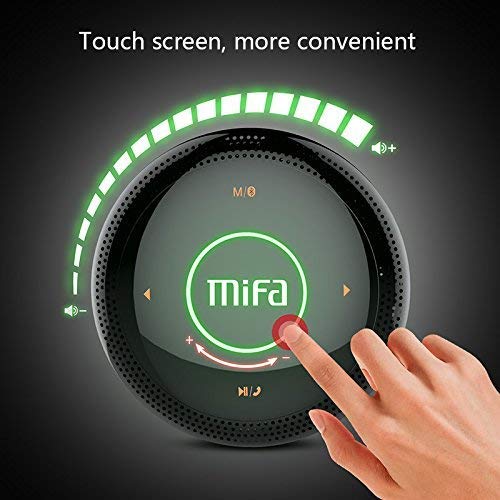
Figura 1: Principal view of the MIFA A3 speaker, highlighting the touch-sensitive control panel. The panel displays volume indicators, play/pause, and track navigation buttons. A central 'Mifa' logo is also visible.
- Painel de controle de toque: Located on the top surface for volume adjustment, playback control, and mode selection.
- Microfone: Para chamadas em modo mãos-livres.
- Porta de carregamento: Porta micro USB para carregamento.
- Entrada AUX: Conector de áudio de 3.5 mm para conexão com fio.
- Slot para cartão Micro SD: Para reproduzir música diretamente de um cartão de memória.
Configurar
1. Carregando o alto-falante
Antes da primeira utilização, carregue totalmente a coluna. Ligue o cabo de carregamento USB fornecido à porta de carregamento da coluna e a outra extremidade a um adaptador de energia USB (não incluído) ou a uma porta USB do computador.
- A luz indicadora de carregamento acenderá durante o carregamento.
- The indicator will turn off or change color once fully charged.
- A full charge provides approximately 8 hours of continuous playtime.
2. Ligar/desligar
- Para ligar: Press and hold the Power button (usually integrated into the touch panel or a dedicated button) for 2-3 seconds until you hear an audible prompt or see an indicator light.
- Para desligar: Press and hold the Power button again for 2-3 seconds.
Instruções de operação
1. Emparelhamento Bluetooth
- Certifique-se de que a caixa de som esteja ligada e no modo de emparelhamento Bluetooth (indicado por uma luz azul piscando ou um aviso sonoro).
- No seu dispositivo (smartphone, tablet, PC), ative o Bluetooth e procure por dispositivos disponíveis.
- Selecione "MIFA A3" na lista de dispositivos.
- Após o emparelhamento, o alto-falante emitirá uma confirmação sonora e a luz indicadora ficará azul fixa.
- The speaker will automatically connect to the last-paired device when powered on, if that device's Bluetooth is active and within range.
2. Conexão AUX
For devices without Bluetooth, use the provided 3.5mm AUX audio cable:
- Connect one end of the AUX cable to the speaker's AUX input port.
- Conecte a outra extremidade ao conector de fone de ouvido do seu dispositivo de áudio.
- A caixa de som mudará automaticamente para o modo AUX.
3. Reprodução de cartão Micro SD
Insert a Micro SD card (up to 32GB, FAT32 format) with music files into the designated slot. The speaker will automatically detect the card and begin playback.
4. Touch Control Operations
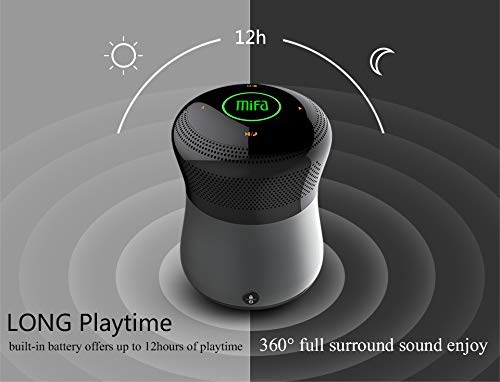
Figura 2: The MIFA A3 speaker shown with an overlay indicating "LONG Playtime" (up to 12 hours) and "360° full surround sound enjoy." This image emphasizes the speaker's battery life and audio dispersion.
- Controle de volume: Slide your finger clockwise on the touch panel to increase volume, counter-clockwise to decrease.
- Reproduzir/Pausar: Tap the central Play/Pause icon.
- Próxima faixa: Tap the "Next" arrow icon.
- Faixa anterior: Tap the "Previous" arrow icon.
- Interruptor de modo: Tap the "M/O" icon to cycle between Bluetooth, AUX, and Micro SD card modes.
- Botão de bloqueio: Press the lock icon to prevent accidental touch inputs.
5. Call Handling (Bluetooth Mode)
- Atender chamada: Tap the Play/Pause icon when a call comes in.
- Encerrar chamada: Tap the Play/Pause icon again.
- Rejeitar chamada: Press and hold the Play/Pause icon for 2 seconds.
Manutenção
- Limpe o alto-falante com um pano macio e seco. Não use produtos de limpeza abrasivos ou solventes.
- Guarde a caixa de som em local fresco e seco quando não estiver em uso por longos períodos.
- Charge the battery at least once every three months to maintain battery health.
Solução de problemas
| Problema | Solução possível |
|---|---|
| A caixa de som não liga. | Verifique se a bateria está carregada. Conecte a uma fonte de energia e tente novamente. |
| Não foi possível emparelhar via Bluetooth. |
|
| Nenhum som. |
|
| Má qualidade de som. |
|
Especificações
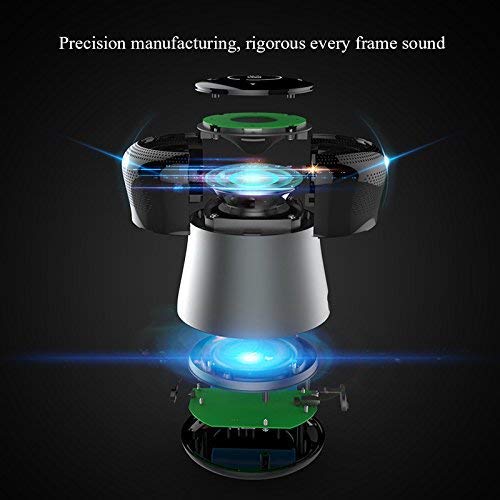
Figura 3: An exploded diagram of the MIFA A3 speaker, illustrating its internal components and structural design, emphasizing precision manufacturing.
| Modelo | MIFA A3 |
| Potência de saída | 10 W |
| Conectividade | Bluetooth 4.2, AUX, Micro SD Card |
| Bateria | 1800 mAh íon de lítio |
| Hora de brincar | Até 8 horas (com 60% do volume) |
| Tempo de carregamento | Aproximadamente 3-4 horas |
| Microfone | Integrado para chamadas em modo mãos-livres |
| Impermeável | Yes (as per product specifications, but general caution advised for ports) |
| Método de controle | Tocar |
| Dispositivos compatíveis | Laptop, PC, Smartphone, Tablet |
Garantia e Suporte
MIFA products are designed to provide reliable performance. For warranty information or technical support, please refer to the warranty card included with your purchase or visit the official MIFA website. Guarde o comprovante de compra para solicitações de garantia.
For further assistance, you may contact MIFA customer support through their official channels.