1. Introdução
Obrigado pela compra.asing the MIFA A30 Bluetooth Speaker. This manual provides essential information for setting up, operating, and maintaining your device. Please read it thoroughly before use to ensure optimal performance and longevity of your speaker.
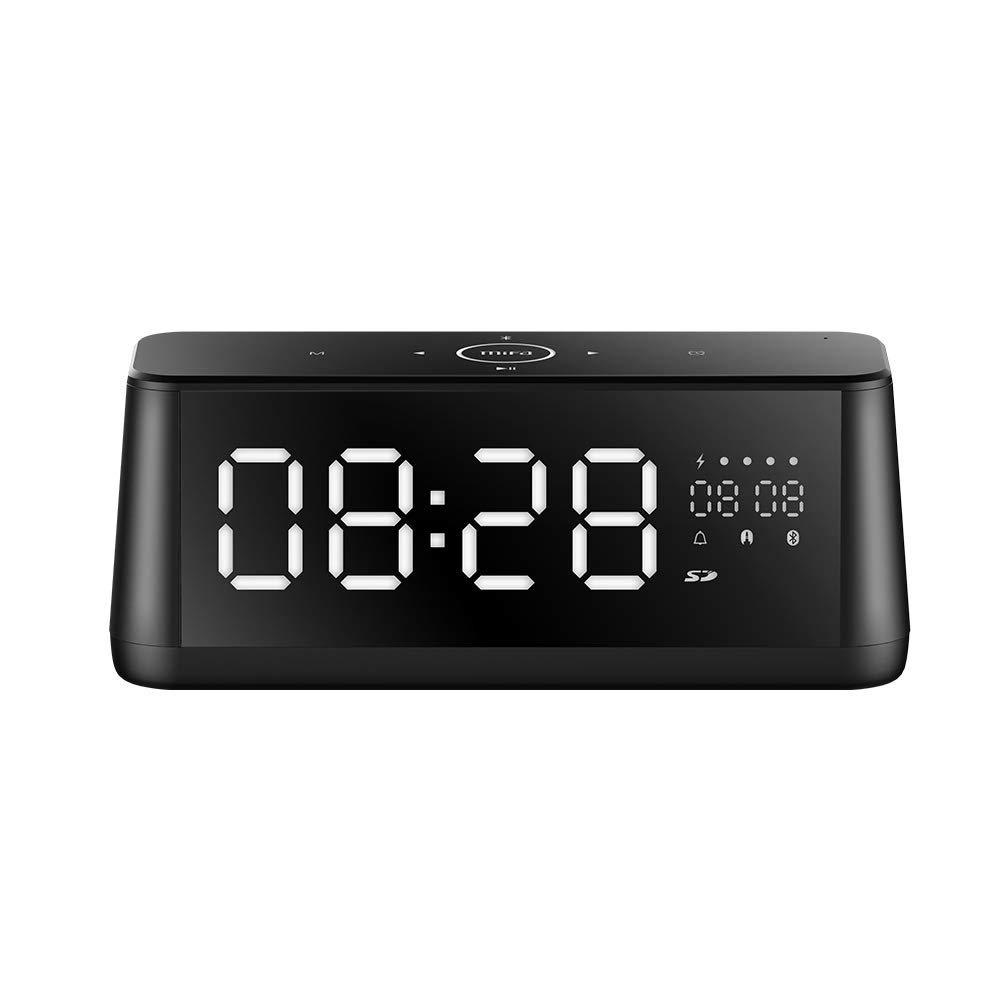
Imagem 1.1: Frente view of the MIFA A30 Bluetooth Speaker, displaying the time on its large LED screen.
2. Informações de segurança
- Não exponha o alto-falante a temperaturas extremas, luz solar direta ou alta umidade.
- Evite deixar cair ou submeter o alto-falante a impactos fortes.
- Não desmonte, repare ou modifique o dispositivo por conta própria. Para quaisquer reparos, entre em contato com pessoal de serviço autorizado.
- Keep the speaker away from water and other liquids, despite its waterproof rating, to prevent damage to ports when open.
- Utilize apenas o cabo de carregamento e o adaptador especificados.
- Limpe o alto-falante com um pano macio e seco. Não use produtos de limpeza abrasivos.
3. Conteúdo da embalagem
Por favor, verifique se a embalagem contém os seguintes itens:
- MIFA A30 Bluetooth Speaker
- Cabo de carregamento USB
- Cabo de áudio de 3.5 mm
- Manual do usuário (este documento)
4. Produto acabadoview
4.1. Componentes
The MIFA A30 speaker features a robust design with advanced audio components for high-quality sound reproduction.

Imagem 4.1: Explodida view illustrating the internal components of the MIFA A30, including two 15-watt drivers and two low-frequency passive radiators.
4.2. Control Panel and Ports
The speaker's top panel features capacitive touch controls, and the rear panel houses various connectivity ports.
Imagem 4.2: Vista de cima para baixo view of the MIFA A30 control panel, indicating the functions of each touch button for mode, playback, volume, and clock adjustment.
- Botão M (Modo): Pressione rapidamente para alternar entre os modos Bluetooth, cartão TF e AUX.
- Controle Bluetooth: Long press to turn off Bluetooth, short press to turn on.
- Botão de faixa anterior: Pressione rapidamente para ir para a faixa anterior.
- Play/Pause/Hands-Free Button: Pressione rapidamente para reproduzir/pausar a música. Pressione rapidamente para atender/encerrar chamadas. Pressione e segure para rejeitar chamadas.
- Botão de próxima faixa: Pressione rapidamente para ir para a próxima faixa.
- Botão do relógio: Long press for clock adjustment.
- Aumentar o volume: Gire no sentido horário para aumentar o volume.
- Volume baixo: Gire no sentido anti-horário para diminuir o volume.
- Microfone: Microfone embutido para chamadas com viva-voz.
- Telão LED: Shows time, date, battery level, and current mode.
5. Configuração
5.1. Carregando o alto-falante
Before first use, fully charge the speaker. Connect the provided USB charging cable to the speaker's charging port and the other end to a USB power adapter (not included) or a computer's USB port. The LED display will indicate charging status.
5.2. Ligar / desligar
- Para ligar: Press and hold the Play/Pause button until the LED display lights up.
- Para desligar: Press and hold the Play/Pause button until the LED display turns off. The speaker will automatically screen out and power off to save battery after a period of inactivity.
6. Instruções de operação
6.1. Emparelhamento Bluetooth
- Ensure the speaker is powered on and in Bluetooth mode (indicated by the Bluetooth icon on the LED display). If not, short press the 'M' button to switch to Bluetooth mode.
- No seu smartphone ou tablet, ative o Bluetooth e procure os dispositivos disponíveis.
- Selecione "MIFA A30" na lista de dispositivos.
- Once paired, the speaker will emit a confirmation sound, and the Bluetooth icon on the display will stop flashing.
- The speaker will automatically re-connect to the last paired device when powered on, if the device is within range.
6.2. Reprodução de áudio
- Reproduzir/Pausar: Pressione rapidamente o botão Reproduzir/Pausar.
- Próxima faixa: Pressione rapidamente o botão Próxima Faixa.
- Faixa anterior: Pressione rapidamente o botão da faixa anterior.
- Ajuste de volume: Gire o controle de volume no sentido horário para aumentar o volume, no sentido anti-horário para diminuir o volume.
6.3. Chamadas com viva-voz
Quando conectado via Bluetooth a um smartphone:
- Atender chamada: Pressione rapidamente o botão Reproduzir/Pausar.
- Encerrar chamada: Pressione rapidamente o botão Reproduzir/Pausar durante uma chamada.
- Rejeitar chamada: Ao receber uma chamada, mantenha pressionado o botão Reproduzir/Pausar.
6.4. Reprodução de cartão TF
- Insert a Micro-SD (TF) card with supported audio files (FLAC/APE/MP3/WMA/WAV) into the TF card slot.
- Short press the 'M' button to switch to TF Card mode. The speaker will automatically begin playing music from the card.
6.5. Entrada AUX
- Connect one end of the 3.5mm audio cable to the speaker's AUX input port and the other end to the audio output of your device (e.g., MP3 player, computer).
- Short press the 'M' button to switch to AUX mode.
- O áudio será reproduzido agora pelo alto-falante do seu dispositivo conectado.
6.6. Clock and Display Settings
- Ajuste do relógio: Long press the Clock button to enter time setting mode. Use the Next/Previous buttons to adjust values and the Play/Pause button to confirm.
- Display Luminance: The LED display has 7 adjustable luminance levels. Refer to the full product documentation for specific adjustment steps, typically involving short presses of the Clock button or a combination with volume controls.
7. Manutenção
- Limpeza: Wipe the speaker's surface with a soft, dry, lint-free cloth. Do not use liquid or aerosol cleaners.
- Armazenar: Quando não estiver em uso por longos períodos, guarde a caixa de som em local fresco e seco, longe da luz solar direta e de temperaturas extremas.
- Cuidados com a bateria: Para prolongar a vida útil da bateria, evite descarregá-la completamente com frequência. Carregue a caixa de som regularmente, mesmo quando não estiver em uso.
8. Solução De Problemas
| Problema | Possível causa | Solução |
|---|---|---|
| A caixa de som não liga. | Bateria fraca. | Carregue a caixa de som por pelo menos 2 horas. |
| Nenhum som. | Volume muito baixo; modo incorreto; dispositivo não conectado. | Increase speaker and device volume. Ensure correct mode (Bluetooth/AUX/TF Card). Re-pair Bluetooth device or check AUX cable connection. |
| O emparelhamento Bluetooth falha. | Alto-falante não está em modo de emparelhamento; dispositivo muito distante; interferência. | Ensure speaker is in Bluetooth mode. Move device closer to speaker. Turn off other Bluetooth devices. Try forgetting "MIFA A30" on your device and re-pairing. |
| TF Card not playing. | Incorrect mode; unsupported file format; card error. | Switch to TF Card mode. Ensure files are FLAC/APE/MP3/WMA/WAV. Reinsert TF card or try a different card. |
9. Especificações
| Recurso | Detalhe |
|---|---|
| Nome do modelo | A30 |
| Tipo de alto-falante | Estante de livros |
| Tecnologia de Conectividade | Bluetooth 4.2, Auxiliary (3.5mm), Micro-SD (TF Card) |
| Modo de saída de áudio | Estéreo |
| Potência máxima de saída do alto-falante | 30 Watts (2 alto-falantes de 15W) |
| Aprimoramento de graves | Two low-frequency boosters |
| Capacidade da bateria | 4000 mAh |
| Hora de brincar | Up to 10-12 hours (depending on volume and content) |
| Método de controle | Painel de toque capacitivo |
| Mostrar | 7.2" x 2.8" Mirror LED Screen with 106 LEDs, 7-level adjustable luminance |
| Formatos de áudio suportados | FLAC/APE/MP3/WMA/WAV |
| Microfone embutido | Sim, para chamadas em modo mãos-livres. |
| Impermeável | Yes (Note: Ensure ports are covered for water resistance) |
| Cor | Preto |
| Tipo de montagem | Suporte de mesa |
10. Garantia e Suporte
The MIFA A30 Bluetooth Speaker typically comes with a 30-day warranty from the date of purchase, covering manufacturing defects. Please retain your proof of purchase for warranty claims.
For technical support, troubleshooting assistance beyond this manual, or warranty inquiries, please contact MIFA customer service through their official website or the retailer where the product was purchased. Provide your product model (A30) and purchase details when seeking support.