1. Introdução
This manual provides essential information for the safe and efficient operation of your Xerox VersaLink C8000/DT Color Printer. It covers setup, daily use, maintenance, and troubleshooting. Please read this manual thoroughly before using the printer and retain it for future reference.
2. O que está na caixa
Verify that all items are present in the packaging.
- Xerox VersaLink C8000/DT Color Printer
- Cabo de alimentação
- Documentation (this manual, safety information)
- Initial Toner Cartridges (Black, Cyan, Magenta, Yellow)
3. Configuração
3.1 Desembalagem
- Retire cuidadosamente a impressora da embalagem.
- Remova todas as fitas protetoras e materiais de embalagem da parte externa e interna da impressora. Consulte o guia de instalação rápida para obter informações sobre os locais específicos.
3.2 Colocação Física
Place the printer on a sturdy, level surface capable of supporting its weight (approximately 178 pounds). Ensure adequate ventilation around the printer.

Figura 3.2.1: Frente view of the Xerox VersaLink C8000/DT Color Printer, showing its overall design and paper trays.
3.3 Conexão de Energia
- Connect the power cord to the printer's power inlet.
- Conecte a outra extremidade do cabo de alimentação a uma tomada elétrica aterrada.
- Pressione o botão liga/desliga para ligar a impressora.
3.4 Initial Configuration and Network Setup
Upon first power-on, the printer's user interface will guide you through initial setup steps, including language selection, date/time, and network configuration. The printer supports Ethernet connectivity.

Figura 3.4.1: Close-up of the printer's control panel, displaying the touch screen interface with various application icons.
For network connection, connect an Ethernet cable from your network router or switch to the Ethernet port on the printer. Follow the on-screen prompts to complete network settings.
4. Instruções de operação
4.1 Impressão básica
- Ensure the printer is powered on and connected to your network.
- Load paper into the paper trays. The printer supports standard paper sizes up to 8.5 x 14 inches.
- From your computer or mobile device, select the Xerox VersaLink C8000/DT as your printer.
- Adjust print settings (e.g., color, duplex, paper type) as needed.
- Inicie o trabalho de impressão.
4.2 Mobile and Cloud Connectivity
The VersaLink C8000/DT offers instant connectivity to cloud services and mobile devices directly from its user interface. Access pre-loaded, cloud-hosted services to manage documents and print from various platforms. Compatible with smartphones and controlled via an app.
4.3 Impressão Duplex
The printer supports automatic dual-sided (duplex) printing. This feature can be enabled through the print settings on your computer or directly from the printer's control panel for supported functions.
5. Manutenção
Substituição do cartucho de toner 5.1
When a toner cartridge is low or empty, the printer's control panel will display a notification.
- Abra a tampa frontal da impressora.
- Locate the toner cartridge that needs replacement (Black, Cyan, Magenta, or Yellow).
- Grasp the handle of the cartridge and pull it straight out.
- Desembale o novo cartucho de toner e agite-o suavemente para distribuir o toner.
- Insira o novo cartucho no compartimento correspondente até ouvir um clique.
- Feche a tampa frontal.
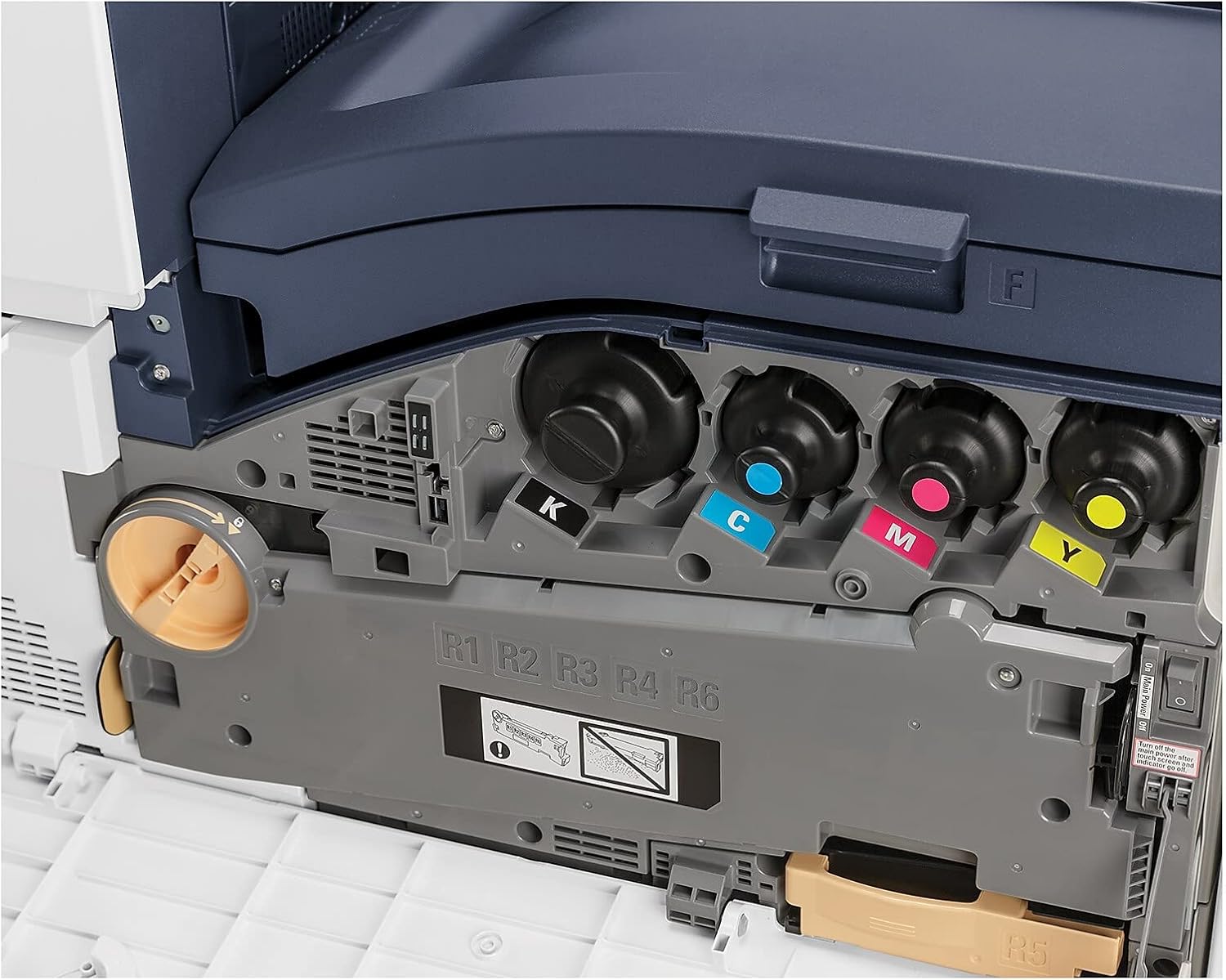
Figura 5.1.1: View of the toner cartridge compartment, showing the slots for Black (K), Cyan (C), Magenta (M), and Yellow (Y) toner.
5.2 Limpeza
Regularly clean the exterior of the printer with a soft, lint-free cloth. Do not use abrasive cleaners or solvents. Refer to the printer's internal cleaning procedures via the control panel for specific instructions on cleaning internal components.
6. Solução De Problemas
This section provides solutions to common issues. For more complex problems, refer to the online support resources or contact Xerox customer service.
- Impressora não responde: Check power connection, network cable, and ensure the printer is powered on. Restart the printer and the connected device.
- Problemas de qualidade de impressão: Check toner levels. Perform a print quality calibration from the printer's control panel. Ensure correct paper type settings.
- Atolamentos de papel: Follow the on-screen instructions or refer to the printer's internal guides for clearing paper jams from specific areas.
- Problemas de conectividade de rede: Verify Ethernet cable connection. Check network settings on the printer and your computer. Restart network devices.
7. Especificações
| Recurso | Detalhe |
|---|---|
| Marca | xerox |
| Número do modelo | C8000/DT |
| Tecnologia de impressão | Laser |
| Saída da impressora | Cor |
| Velocidade máxima de impressão (cor) | 42 ppm |
| Velocidade máxima de impressão (monocromática) | 42 ppm |
| Resolução máxima de impressão a cores | 1200 x 2400 dpi |
| Resolução máxima de impressão em preto e branco | 1200 x 2400 dpi |
| Impressão Duplex | Automático |
| Tecnologia de Conectividade | Ethernet |
| interface de hardware | Ethernet |
| Dispositivos compatíveis | Smartphones |
| Método de controle | Aplicativo |
| Tamanho máximo da mídia | 8.5 x 14 polegadas |
| Print Media Types | Envelopes, Papel (comum) |
| Capacidade máxima de entrada de folhas | 45 |
| Número de bandejas | 2 |
| Peso do item | 178 libras |
| Dimensões do produto | 28.5 x 24.4 x 31.9 polegadas |
| Capacidade de armazenamento de memória | 4096 MB |
| O quetage | 2300 watts |
| Tipo de scanner | Plataforma |
| Funções adicionais da impressora | Tudo em um |
8. Garantia e Suporte
8.1 Garantia do Produto
The Xerox VersaLink C8000/DT Color Printer comes with a standard one-year warranty. For detailed terms and conditions, please refer to the warranty documentation included with your product or visit the official Xerox support website.
8.2 Suporte ao cliente
For technical assistance, troubleshooting, or service requests, please contact Xerox customer support. Support contact information can typically be found on the Xerox website ou na documentação fornecida com a sua impressora.