1. Produto acabadoview
The CMTECK USB Conference Microphone (Model 7545900577) is a versatile desktop speakerphone designed for clear and efficient communication in various settings, including streaming, VoIP calls, Skype, interviews, and general chatting. It features 360° omnidirectional voice pickup and a built-in speaker, connecting to your computer via a single USB cable for plug-and-play convenience.
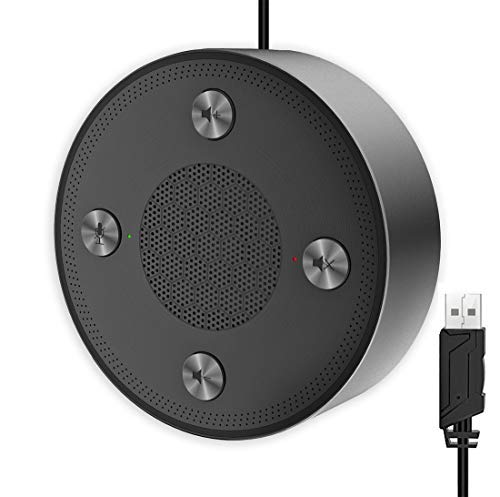
Figure 1: CMTECK USB Conference Microphone
2. Principais características
- Qualidade de som superior: Incorporates CCS3.0 Sound Card noise-canceling technology to effectively block noise and eliminate echo, ensuring crystal clear sound pickup.
- Captação de voz omnidirecional de 360°: Equipped with 4 high-sensitivity microphones, allowing for 360° voice pickup within a 4-meter (13-foot) range.
- One-Button Mute Function: Features an all-in-one control panel with quick mute buttons for both the microphone and speaker, and volume adjustment.
- Indicadores LED: Built-in LED lights indicate the working status (green for active, red for mute).
- Conectividade Plug & Play: Connects to a computer via a USB cable without requiring driver installation. Compatible with Windows (7, 8, 10) and Mac OS. Note: Not compatible with Raspberry Pi/Android.
- Design antiderrapante: Constructed with high-quality metal matte material for durability and resistance to abrasions and corrosion. Three anti-slip mats on the base provide stability.
- Design portátil: Compact and lightweight for effortless portability.
3. Guia de configuração
- Conectar ao computador: Plug the USB cable from the CMTECK Conference Microphone into an available USB port on your Windows or Mac computer.
- Instalação automática de drivers: The device is plug-and-play; your operating system should automatically detect and install the necessary drivers. No manual driver installation is required.
- Verifique a conexão: Once connected, the LED indicator on the device should light up, typically green, indicating it is powered on and ready for use.
- Selecione como dispositivo de áudio: In your computer's sound settings or your conferencing software (e.g., Skype, Zoom), select the "CMTECK USB Microphone" as your input (microphone) device and "CMTECK USB Speaker" as your output (speaker) device.
- Posicionamento ideal: For best 360° voice pickup during meetings, place the microphone in the center of your meeting area or table.
4. Instruções de operação
The CMTECK USB Conference Microphone features intuitive controls located on its top surface.
- Microfone mudo: Press the dedicated microphone mute button (often indicated by a microphone icon) to toggle the microphone on or off. The LED indicator will change to red when muted and green when active.
- Alto-falante mudo: Press the dedicated speaker mute button (often indicated by a speaker icon) to toggle the speaker on or off. The LED indicator will change to red when muted and green when active.
- Controle de volume: Use the volume up (+) and volume down (-) buttons to adjust the speaker's output volume.
- Teleconferências: Ensure the microphone and speaker are unmuted and the volume is set to an audible level. The omnidirectional pickup will capture voices from all directions around the device.
5. Manutenção
- Limpeza: Use a soft, dry cloth to clean the exterior of the device. Avoid using liquid cleaners or abrasive materials, which may damage the finish or internal components.
- Armazenar: Quando não estiver em uso, guarde o microfone em local fresco e seco, longe da luz solar direta e de temperaturas extremas.
- Cuidados com os cabos: Evite dobrar ou torcer o cabo USB em excesso para evitar danos internos.
6. Solução De Problemas
- Sem som/Microfone não funciona:
- Certifique-se de que o cabo USB esteja firmemente conectado tanto ao microfone quanto ao computador.
- Check your computer's sound settings to confirm the CMTECK device is selected as the default input and output.
- Verify that the microphone and speaker are not muted using the device's control buttons or your software settings.
- Tente conectar o dispositivo a uma porta USB diferente do seu computador.
- Poor Audio Quality (Speaker):
- While the speaker is optimized for vocals, it may not provide the best range for music or complex audio. Adjust volume levels and consider its primary use for voice.
- Ensure the device is placed on a stable, flat surface to prevent vibrations.
- Poor Audio Quality (Microphone):
- Ensure the microphone is placed centrally in the meeting area.
- Minimize o ruído de fundo no ambiente.
- Avoid placing the microphone too close to noisy computer fans or keyboards, as this can be picked up.
- Indicadores LED não funcionam:
- Check the USB connection to ensure the device is receiving power.
- The LED indicators are small and may be difficult to see from certain angles. View them directly from above.
- Incompatibilidade: The device is not compatible with Raspberry Pi or Android operating systems.
7. Especificações
| Recurso | Especificação |
|---|---|
| Marca | CMTECK |
| Nome do modelo | 7545900577 |
| Tecnologia de Conectividade | USB |
| Tipo de conector | USB |
| Recurso especial | Função Mudo |
| Dispositivos compatíveis | Computador pessoal, alto-falante |
| Cor | Lasca |
| Componentes incluídos | Unidade de microfone |
| Padrão polar | Omnidirecional |
| Sensibilidade Áudio | 10 decibéis |
| Peso do item | 6.6 onças |
| Fator de forma do microfone | Limite |
| Dimensões do item (C x L x A) | 4.72 x 4.72 x 1.26 polegadas |
| Fonte de energia | Microfone USB |
| Material | Metal |
| Sinal-Ruído | 120 dB |
| Plataforma de Hardware | PC, Mac |
8. Garantia e Suporte
For specific warranty information and technical support, please refer to the documentation included with your product or contact CMTECK customer service directly. You may also visit the official CMTECK webSite com os recursos de suporte mais recentes e informações de contato.
CMTECK Official Store: Visit CMTECK Store on Amazon

