Jabra Evolve 20 MS Stereo Headset Instruction Manual
Model: Evolve 20 (GSA4999-823-109)
1. Introdução
The Jabra Evolve 20 MS Stereo Headset is a professional wired headset designed for clear communication and music listening. It features a noise-canceling microphone to reduce background distractions and an intuitive control unit for easy call management. This manual provides essential information for setting up, operating, and maintaining your headset.
2. Conteúdo da embalagem
Por favor, verifique se a embalagem contém os seguintes itens:
- Jabra Evolve 20 MS Stereo Headset with integrated control unit
3. Produto acabadoview
3.1 Componentes do fone de ouvido
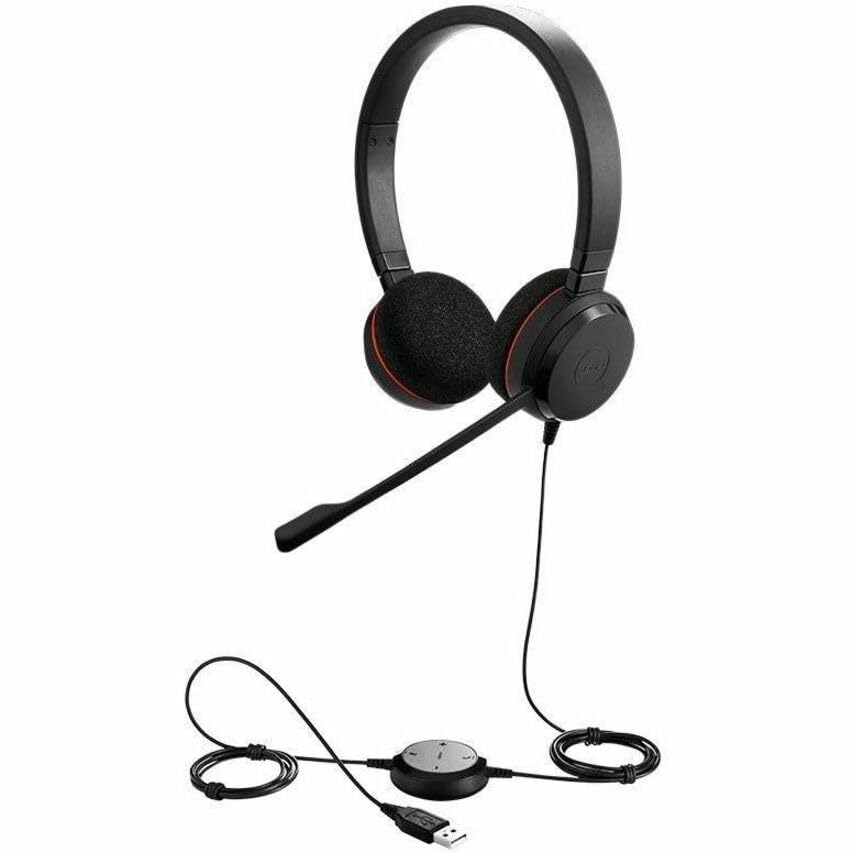
The Jabra Evolve 20 MS Stereo Headset features an adjustable headband, foam ear cushions for comfort, and a flexible microphone boom arm that can be positioned for optimal voice pickup.
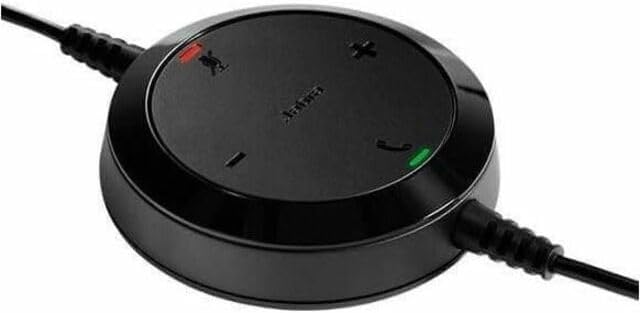
The inline control unit provides easy access to essential call management functions, including volume adjustment, microphone mute, and answer/end call buttons.
4. Configuração
4.1 Conectando-se ao seu computador
- Localize uma porta USB disponível em seu computador (desktop ou laptop).
- Plug the USB connector of the Jabra Evolve 20 headset into the USB port.
- Seu computador deverá detectar e instalar automaticamente os drivers necessários. Isso pode levar alguns instantes.
- Once installed, the headset will be ready for use. You may need to select the Jabra Evolve 20 as your default audio device (microphone and speaker) in your operating system's sound settings or your communication software (e.g., Microsoft Teams, Skype for Business).
5. Instruções de operação
5.1 Utilizando o fone de ouvido
- Ajuste a faixa de cabeça para garantir um encaixe confortável e seguro na sua cabeça.
- Position the microphone boom arm so that the microphone is approximately 2-3 cm (1 inch) from your mouth.
5.2 Using the Control Unit
- Aumentar volume (+): Pressione para aumentar o volume de audição.
- Volume baixo (-): Pressione para diminuir o volume de audição.
- Microfone mudo: Press the microphone icon button to mute or unmute your microphone during a call. An indicator light on the control unit may show the mute status.
- Atender/encerrar chamada: Press the phone icon button to answer an incoming call or end an active call.
6. Manutenção
A manutenção adequada garante a longevidade e o bom desempenho do seu fone de ouvido.
- Limpeza: Gently wipe the headset and control unit with a soft, dry cloth. For ear cushions, use a slightly damp cloth if necessary, but avoid excessive moisture. Do not use harsh chemicals or abrasive cleaners.
- Armazenar: When not in use, store the headset in a clean, dry place, away from extreme temperatures and direct sunlight. Avoid tangling the cable.
- Cuidados com os cabos: Do not pull on the cable to disconnect the headset. Always grasp the USB connector.
7. Solução De Problemas
If you encounter issues with your Jabra Evolve 20 headset, refer to the table below for common problems and solutions.
| Problema | Solução |
|---|---|
| Nenhum som nos fones de ouvido |
|
| Microfone não funciona |
|
| Os botões de controle de chamadas não respondem. |
|
8. Especificações
Key technical specifications for the Jabra Evolve 20 MS Stereo Headset:
| Recurso | Descrição |
|---|---|
| Nome do modelo | Evoluir 20 |
| Tecnologia de Conectividade | Com fio (USB) |
| Controle de Ruído | Cancelamento ativo de ruído, cancelamento passivo de ruído |
| Microfone | Cancelamento de ruído |
| Colocação da orelha | Sobre a orelha |
| Fator de forma | Na orelha |
| Material (Ear Cushions) | Espuma |
| Peso do item | 4.6 onças (0.29 libras) |
| Dimensões do produto | 8 x 7 x 1.5 polegadas |
| Dispositivos compatíveis | Desktops, Laptops, Softphones, Web Clients, Desk Phones |
| Tipo de controlador | Answer/End, Mute, Volume |
9. Garantia e Suporte
For detailed warranty information, please refer to the warranty card included with your product or visit the official Jabra webOs termos e condições da garantia podem variar conforme a região e o revendedor.
For technical support, product registration, or to access additional resources, please visit the official Jabra support webou entre em contato diretamente com o serviço de atendimento ao cliente. Guarde o comprovante de compra para eventuais solicitações de garantia.