1. Introdução
Thank you for choosing the Taylor Digital Thermohygrometer Model 5566. This device is designed to provide accurate and reliable measurements of both temperature and relative humidity (RH) in various environments such as labs, offices, and storage areas. Its clear LCD display ensures easy readability of current conditions. This manual provides essential information for the proper setup, operation, and maintenance of your thermohygrometer.
Os principais recursos incluem:
- Measures temperature from -58°F to 158°F (-50°C to 70°C).
- Measures relative humidity from 10% to 95% RH.
- Visor LCD grande e de fácil leitura.
- Switchable temperature units (°F/°C).
- Versatile mounting options: wall-mount or desktop stand.
2. Configuração
2.1 Desembalagem
Carefully remove the thermohygrometer from its packaging. Inspect the device for any signs of damage. Retain the packaging for future storage or transport.
2.2 Instalação da bateria
The Taylor Digital Thermohygrometer requires two (2) AAA batteries for operation. These batteries are typically included with the device.
- Localize a tampa do compartimento da bateria na parte traseira da unidade.
- Deslize ou desencaixe a tampa para abrir o compartimento.
- Insira duas pilhas AAA, certificando-se da polaridade correta (+ e -) conforme indicado dentro do compartimento.
- Recoloque a tampa do compartimento da bateria com segurança.
2.3 Opções de Montagem
The thermohygrometer offers flexible placement options:
- Uso na área de trabalho: Flip out the integrated stand located on the back of the unit to place it on any flat surface.
- Montagem na parede: Use the keyhole slot on the back of the unit to hang it securely on a wall hook or screw. Ensure the mounting surface is stable.
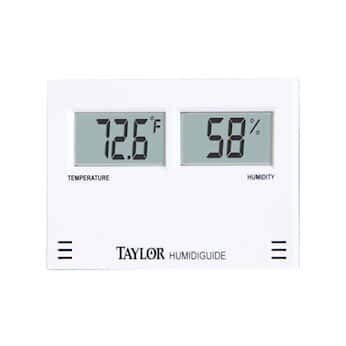
Image: The Taylor Digital Thermohygrometer, illustrating its compact design and clear LCD display for temperature and humidity readings. The device is shown from the front, highlighting its primary function.
3. Instruções de operação
3.1 Ligando
Once batteries are installed, the device will automatically power on and begin displaying readings. There is no separate power button.
3.2 Exibiçãoview
The LCD screen displays two primary readings:
- Temperatura: Shown in a 3.5-digit, 0.75" H format.
- Umidade Relativa (UR): Shown in a 2-digit, 0.75" H format.
3.3 Seleção da unidade de temperatura (°F/°C)
To switch between Fahrenheit (°F) and Celsius (°C) temperature units:
- Locate the °F/°C switch or button, usually on the back or side of the unit.
- Press or slide the switch to toggle between the two temperature scales. The display will update immediately.
3.4 Medidas de Leitura
The device continuously monitors and updates the temperature and humidity readings. For accurate measurements, ensure the device is placed in a location free from direct sunlight, drafts, or extreme temperature fluctuations. The response time for readings is typically less than 1 minute.
4. Manutenção
4.1 Limpeza
To clean the thermohygrometer, use a soft, dry cloth. For stubborn marks, a slightly damp Pode-se usar um pano com sabão neutro, seguido de um pano seco. Não use abrasive cleaners, solvents, or immerse the device in water.
4.2 Substituição da bateria
When the display becomes dim or the readings become erratic, it is time to replace the batteries. Follow the battery installation steps outlined in Section 2.2. Always replace both AAA batteries simultaneously with new ones.
4.3 Armazenamento
If the device will not be used for an extended period, remove the batteries to prevent leakage and potential damage. Store the thermohygrometer in a cool, dry place, away from direct sunlight and extreme temperatures.
5. Solução De Problemas
If you encounter issues with your Taylor Digital Thermohygrometer, please refer to the following common problems and solutions:
- Sem imagem ou imagem fraca:
Solução: Check if the batteries are installed correctly with the correct polarity. Replace both AAA batteries with fresh ones. - Inaccurate temperature or humidity readings:
Solução: Ensure the device is not exposed to direct sunlight, heat sources, cold drafts, or high humidity areas (e.g., directly above a humidifier). Allow the device to stabilize in its intended environment for at least 15-30 minutes. If readings remain consistently off, try replacing the batteries. - Display shows '---' or 'LO/HI':
Solução: This may indicate that the temperature or humidity is outside the device's measurable range. Move the device to an environment within the specified operating range.
6. Especificações
| Recurso | Especificação |
|---|---|
| Número do modelo | 5566 |
| Faixa de temperatura | -58°F a 158°F (-50°C a 70°C) |
| Faixa de umidade | 10% a 95% UR |
| Precisão RH | ±5% RH from 35% to 75% RH; ±8% RH above 95% RH; ±10% RH below 34% RH |
| Tempo de resposta | <1 minuto |
| Tipo de exibição | LCD (2-digit, 0.75" H for RH; 3.5-digit, 0.75" H for temperature) |
| Tipo de Bateria | 2 pilhas AAA |
| Tipo de montagem | Wall-mount or Desktop Stand |
| Fabricante | COLE-PARMER |
7. Garantia e Suporte
Taylor products are manufactured to high-quality standards. For specific warranty information regarding your Taylor Digital Thermohygrometer Model 5566, please refer to the warranty card included with your purchase or visit the official Taylor website. In case of any issues not covered in the troubleshooting section, or for technical support, please contact the manufacturer or your retailer.


