Bem-vindo
Thank you for choosing the iTek GGC 30-inch Curved Monitor. This manual provides essential information for setting up, operating, and maintaining your new monitor. Please read it thoroughly before use to ensure optimal performance and safety.
Instruções importantes de segurança
To prevent damage and ensure safe operation, please observe the following precautions:
- Não exponha o monitor à chuva, umidade ou temperaturas extremas.
- Assegure-se de que haja ventilação adequada ao redor do monitor. Não obstrua as aberturas de ventilação.
- Utilize apenas o adaptador de energia fornecido com o monitor.
- Evite colocar objetos pesados sobre o cabo de alimentação.
- Desconecte o cabo de alimentação da tomada se o monitor não for utilizado por um longo período.
- Não tente consertar o monitor por conta própria. Encaminhe todos os serviços de manutenção a pessoal qualificado.
- Limpe a tela do monitor e casinLimpe com um pano macio e seco. Evite usar produtos de limpeza abrasivos ou solventes.
Conteúdo da embalagem
Por favor, verifique se a embalagem contém os seguintes itens:
- iTek GGC 30-inch Curved Monitor
- Suporte para monitor (base e braço)
- Adaptador de energia e cabo
- Cabo DisplayPort
- Cabo HDMI
- Manual do usuário
- Parafusos para montagem do suporte
Produto acimaview
The iTek GGC 30-inch Curved Monitor is designed for an immersive viewing experience, ideal for gaming and professional use. It features a WFHD (2560x1080) resolution, a high 200Hz refresh rate, and a rapid 1ms MPRT response time.

Key Performance Highlights
- 200Hz Refresh Rate & AMD FreeSync Technology: Experience ultra-smooth visuals and tear-free gaming with a high refresh rate and adaptive sync technology.

Figure 2: 200Hz Refresh Rate and AMD FreeSync Technology in action. - Flicker-Free & Low Blue Light: Designed to reduce eye strain during prolonged use, providing a more comfortable viewexperiência.

Figure 3: Flicker-Free and Low Blue Light features for eye comfort. - Tempo de resposta MPRT de 1 ms: Minimizes motion blur and ghosting, crucial for fast-paced games and action sequences.

Figure 4: Rapid Refresh Rate and Response Time for smooth visuals. - Tela curva 1800R: The immersive curvature brings the edges of the screen closer to your field of view, enhancing depth perception and reducing distortion.

Figure 5: 1800R Curved Display for an immersive experience.
Configurar
Montagem do estande
- Retire cuidadosamente o monitor e o suporte da embalagem.
- Attach the stand neck to the monitor panel using the provided screws. Ensure it clicks securely into place or is fastened tightly.
- Attach the stand base to the stand neck, securing it with the thumb screw or screws from underneath.
- Coloque o monitor montado sobre uma superfície plana e estável.
Conectando Seu Monitor
The iTek GGC monitor offers multiple connectivity options for various devices:
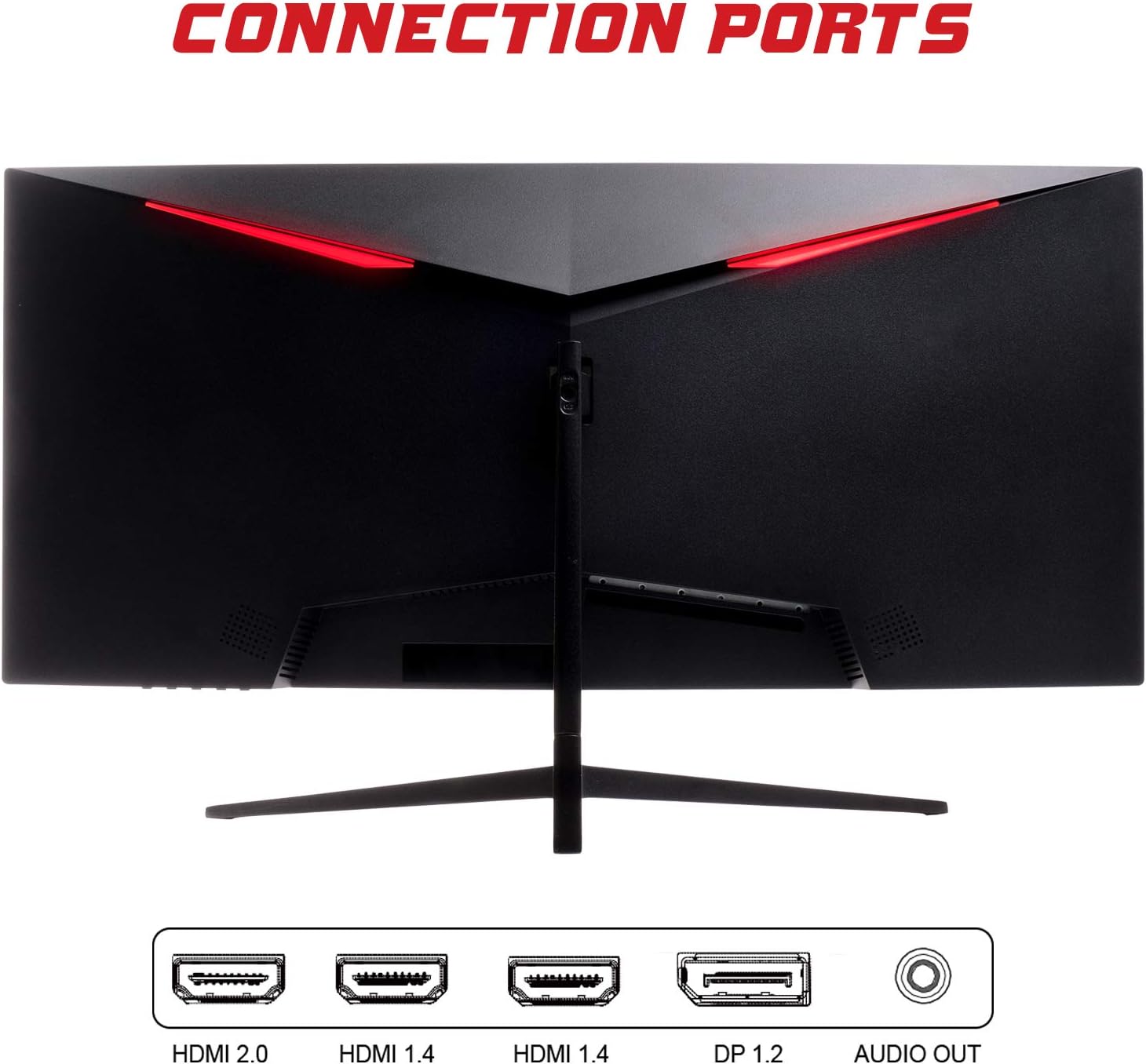
- DisplayPort (DP 1.2): For high-resolution and high-refresh-rate connections to your PC.
- HDMI (HDMI 2.0, HDMI 1.4 x2): Connect to PCs, gaming consoles, and other multimedia devices. HDMI 2.0 supports higher refresh rates at certain resolutions.
- Saída de áudio: Conecte alto-falantes externos ou fones de ouvido.
Após conectar o cabo de vídeo, conecte o adaptador de energia ao monitor e, em seguida, a uma tomada elétrica.
Operando o Monitor
Ligar/Desligar
Press the power button, usually located on the bottom or back of the monitor, to turn it on or off. The power indicator light will illuminate when the monitor is on.
Menu de exibição na tela (OSD)
The OSD menu allows you to adjust various monitor settings. Use the buttons on the monitor (typically on the back or bottom right) to navigate the menu.
- Configurações de imagem: Ajuste o brilho, o contraste, a nitidez e o gama.
- Configurações de cores: Modifique a temperatura da cor, a tonalidade e a saturação.
- Seleção de entrada: Alternar manualmente entre as entradas DisplayPort e HDMI.
- Áudio: Ajuste o volume da saída de áudio.
- Configurações do sistema: Access language, OSD timeout, and reset options.
- Características do jogo: Enable/disable FreeSync, adjust response time overdrive, and activate crosshair overlays if available.
Manutenção
Proper care ensures the longevity of your monitor:
- Sempre desligue o monitor e desconecte o cabo de alimentação antes de limpar.
- Use um pano macio e sem fiapos para limpar suavemente a tela. Para manchas persistentes, esfregue levemente.ampLimpe o pano com água ou um limpador de telas suave e não abrasivo.
- Limpe o monitor casing com um pano macio e seco.
- Evite pulverizar líquidos diretamente na tela ou casing.
- Do not use benzene, thinner, ammonia-based cleaners, or abrasive materials.
Solução de problemas
If you encounter issues with your monitor, please refer to the following table for common problems and solutions:
| Problema | Solução possível |
|---|---|
| Sem energia | Ensure the power cable is securely connected to the monitor and the power outlet. Check if the power outlet is working. |
| Sem sinal / Tela em branco | Verify the video cable (DisplayPort or HDMI) is firmly connected to both the monitor and your computer. Select the correct input source via the OSD menu. Ensure your computer is powered on and not in sleep mode. |
| Imagem piscando ou instável. | Check the video cable connection. Try a different cable or port. Ensure your graphics card drivers are up to date. Adjust the refresh rate in your computer's display settings. |
| Poor image quality (blurry, distorted colors) | Adjust brightness, contrast, and color settings in the OSD menu. Ensure the display resolution on your computer matches the monitor's native resolution (2560x1080). |
| Sem som na saída de áudio | Check the audio cable connection to your speakers/headphones. Verify the volume setting in the OSD menu and on your computer. Ensure the correct audio output device is selected in your computer's sound settings. |
Especificações técnicas
| Recurso | Especificação |
|---|---|
| Marca | Itek |
| Modelo | ITMC30V201FHD |
| Tamanho da tela | 30 polegadas |
| Tipo de painel | VA |
| Curvatura | R1800 |
| Resolução | 2560 x 1080 (WFHD) |
| Proporção da tela | 21:9 |
| Taxa de atualização | 200 Hz |
| Tempo de resposta | 1 ms MPRT |
| Brilho | 350 cd/m² |
| Taxa de contraste | 3000:1 |
| Viewângulo de engate | 178° (Horizontal/Vertical) |
| Conectividade | 1x DisplayPort 1.2, 1x HDMI 2.0, 2x HDMI 1.4, Audio Out |
| Características especiais | HDR Ready, FreeSync, Low Blue Light, Flicker Free, VESA Mountable |
| Dimensões do produto (com suporte) | 70.68 x 40.89 x 18.48 cm |
| Peso | 6.9 kg |
Eficiência Energética

For detailed energy consumption information and product registration, please refer to the official EPREL database:
Garantia e Suporte
Your iTek GGC monitor is backed by a manufacturer's warranty. Please retain your proof of purchase for warranty claims.
- Guaranteed Product Support: This product is guaranteed to have support available until at least January 1, 2031.
- For technical support, warranty inquiries, or service requests, please contact iTek customer service through their official website ou as informações de contato fornecidas com sua compra.


