Introdução
This manual provides essential instructions for the safe and efficient use of your Smart Kingfisher Rechargeable Lithium Battery and USB Charger. Please read this manual thoroughly before use and retain it for future reference.
Informações de segurança
- Aviso: Não tente carregar baterias não recarregáveis.
- Aviso: Do not charge batteries from other suppliers unless explicitly stated as compatible.
- Mantenha o carregador e as baterias longe de água e umidade.
- Do not disassemble, crush, or puncture the batteries or charger.
- Avoid exposing batteries to extreme temperatures or direct sunlight.
- Descarte as baterias de forma responsável, de acordo com as normas locais.
Conteúdo da embalagem
Verifique se todos os itens estão presentes no seu pacote:
- 2 x 425 Rechargeable Lithium Batteries
- 1 x Dual-Port USB Charger
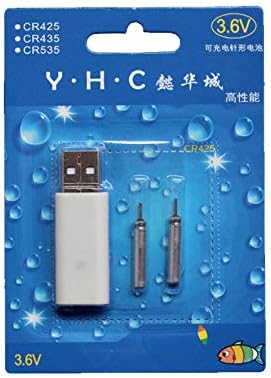
Image: Retail packaging showing the USB charger and two 425 rechargeable batteries.

Image: A pair of Smart Kingfisher 425 rechargeable lithium batteries.
Configurar
The Smart Kingfisher USB charger is designed for ease of use. No complex setup is required.
- Identify the USB charger and the 425 rechargeable batteries.
- Connect the USB charger to a compatible power source (see "Operating Instructions" for options).

Image: The USB charger unit with its two charging pins visible.
Instruções de operação
Carregando as baterias
The charger features two ports, allowing for simultaneous charging of two batteries.
- Insert the 425 rechargeable batteries into the charging ports of the USB charger. Ensure a secure connection.
- Connect the USB charger to a power source. Compatible power sources include:
- USB power adapter (wall charger)
- Banco de potência
- Carregador de carro
- Laptop or PC USB port
- Observe the LED indicator on the charger:
- A LED verde indicates that the batteries are currently charging.
- A LED vermelho indicates that the batteries are fully charged.
- O carregamento normalmente leva cerca de 3 horas para uma carga completa.
- Once fully charged, disconnect the charger from the power source and remove the batteries.
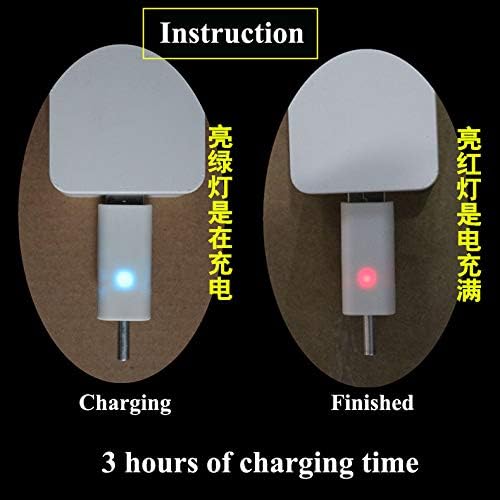
Image: Visual guide for charging status: green light for charging, red light for fully charged. Indicates a 3-hour charging time.

Image: Diagram illustrating multiple methods for charging the device, including car chargers, wall adapters, power banks, and laptops.
Manutenção
- Clean the charger and batteries with a dry, soft cloth. Do not use liquids or abrasive cleaners.
- Store the batteries and charger in a cool, dry place when not in use.
- Avoid storing fully discharged batteries for extended periods to prolong their lifespan.
Solução de problemas
| Problema | Possível causa | Solução |
|---|---|---|
| Batteries not charging (no LED indication) |
|
|
| Charging takes longer than 3 hours |
|
|
| Red LED does not turn on after extended charging |
|
|
Especificações
- Material: Plástico
- Peso do produto: 20 g (total for charger and batteries)
- Tipo de Bateria: 425 Rechargeable Lithium Battery (compatible with CR425, CR435, CR535)
- Tipo de carregador: Carregador USB Dual Port
- Entrada: USB (compatible with various USB power sources)
- Indicador de carga: Green LED (charging), Red LED (fully charged)
- Tempo aproximado de carregamento: 3 horas
Garantia e Suporte
For warranty information or technical support, please refer to the retailer's return policy or contact the manufacturer directly. Keep your purchase receipt as proof of purchase.
Para obter assistência adicional, você pode visitar o product page on Amazon.com.mx.


