1. Introdução
This manual provides essential information for the safe and efficient operation of your Intex SH4004 40-inch HD Ready LED Smart TV. Please read these instructions carefully before using the product and retain them for future reference. Your Intex SH4004 TV features a 40-inch HD Ready LED display, smart TV capabilities with Android OS, built-in Wi-Fi, and multiple connectivity options.
2. Informações de segurança
Siga sempre as precauções básicas de segurança ao usar esta televisão para reduzir o risco de incêndio, choque elétrico e ferimentos.
- Fonte de energia: Certifique-se de que a TV esteja conectada a uma fonte de alimentação com a voltagem especificada.tage alcance. Não sobrecarregue as tomadas elétricas.
- Ventilação: Não obstrua as aberturas de ventilação. Deixe espaço suficiente ao redor da TV para permitir a circulação adequada de ar e evitar o superaquecimento.
- Água e Umidade: Não exponha a TV à chuva ou umidade. Não coloque objetos contendo líquidos, como vasos, sobre a TV.
- Limpeza: Desligue a TV da tomada antes de limpar. Use um pano macio e seco. Não use produtos de limpeza líquidos ou em aerossol.
- Colocação: Coloque a TV em uma superfície estável e nivelada. Evite colocá-la sob luz solar direta ou perto de fontes de calor.
- Manutenção: Não tente consertar este produto sozinho. Encaminhe todos os serviços de manutenção para pessoal de serviço qualificado.
3. Conteúdo da embalagem
Verifique se todos os itens estão presentes na embalagem:
- Intex SH4004 40-inch HD Ready LED Smart TV
- Controle remoto
- Suporte para TV (2 peças)
- Parafusos para suporte de TV
- Cabo de energia
- Manual do usuário
4. Produto acabadoview
4.1 frente View
The front of the Intex SH4004 TV features the 40-inch LED display and the Intex brand logo at the bottom center.

Figura 4.1: Frente view of the Intex SH4004 Smart TV.
4.2 Traseira View e Portas de Conectividade
O painel traseiro abriga diversas portas de entrada e saída para conexão de dispositivos externos.

Figura 4.2: Traseira view of the Intex SH4004 Smart TV, highlighting port locations.
Portas disponíveis:
- Portas HDMI (x2): For connecting set-top boxes, Blu-ray players, gaming consoles, and other HDMI-enabled devices.
- Porta USB (x1): For connecting USB hard drives, flash drives, and other USB devices for media playback.
- Entrada da Antena: For connecting an aerial for terrestrial TV channels.
- Entradas de áudio/vídeo: For connecting older devices using composite cables.
- Conexão de Rede: Para uma conexão de internet com fio.
4.3 Dimensões
The physical dimensions of the TV are important for placement and installation.
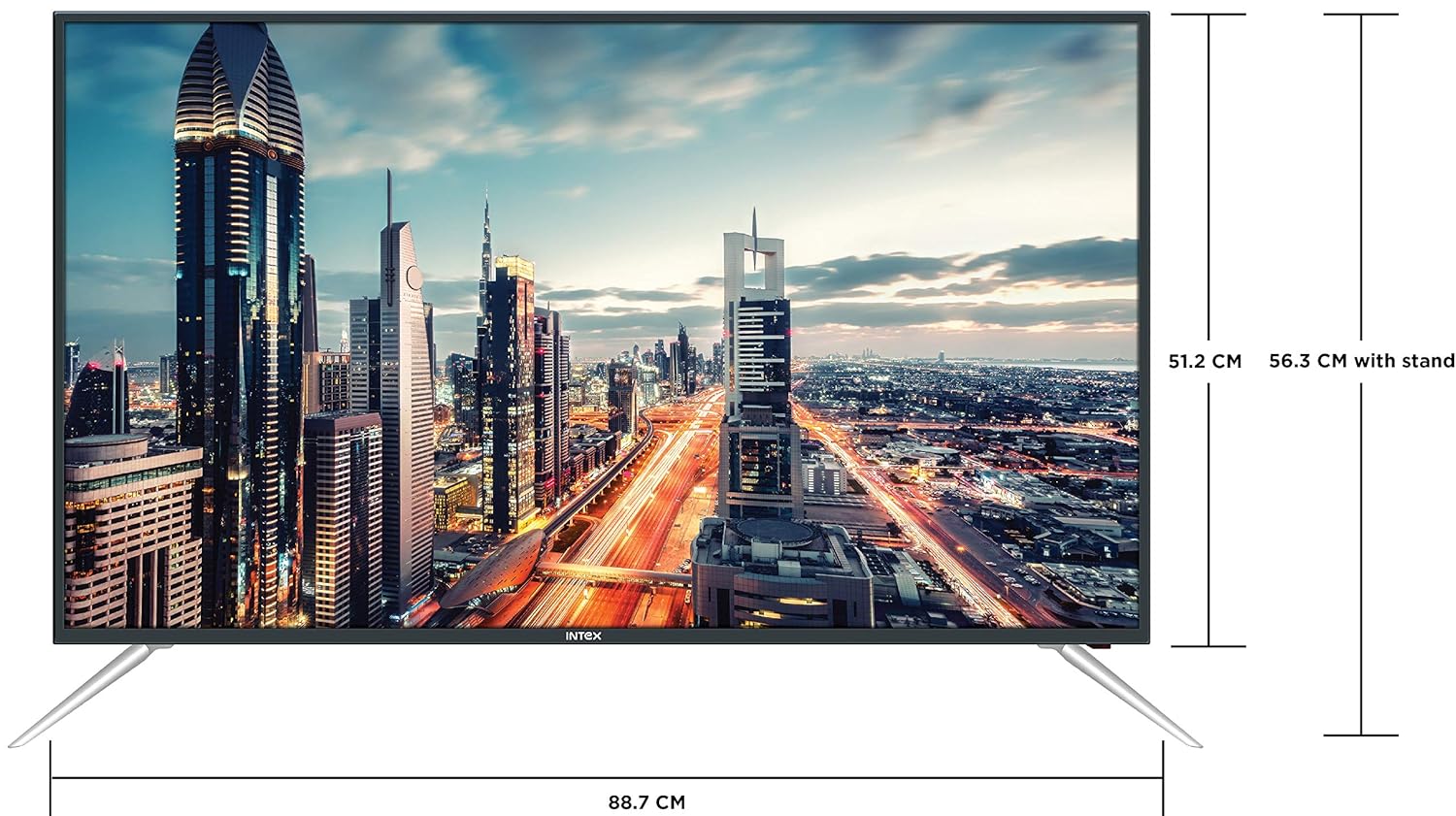
Figure 4.3: Intex SH4004 Smart TV dimensions.
- Tamanho da tela: 40 polegadas (98 cm)
- Largura: Aproximadamente 88.7cm
- Altura (sem suporte): Aproximadamente 51.2cm
- Altura (com suporte): Aproximadamente 56.3cm
- Dimensões da embalagem: 102 x 60.5 x 16 cm
- Peso do item: 10.8 kg
5. Configuração
5.1 Montagem do suporte de TV
- Coloque a TV cuidadosamente com a tela virada para baixo sobre uma superfície macia e limpa para evitar danos à tela.
- Align the stand pieces with the corresponding slots at the bottom of the TV.
- Fixe as peças do suporte usando os parafusos fornecidos. Certifique-se de apertá-los firmemente.
5.2 Montagem na parede
If you prefer to wall mount your TV, please contact Intex support for professional installation. Refer to the Warranty and Support section for contact details. Ensure you use a compatible VESA wall mount kit (not included) and follow its instructions carefully.
5.3 Conexão de energia
Conecte o cabo de alimentação à entrada de energia da TV e, em seguida, ligue a outra extremidade a uma tomada de parede.
5.4 Conectando dispositivos externos
- HDMI: Use an HDMI cable to connect devices like set-top boxes, gaming consoles, or Blu-ray players to the HDMI ports on the TV's rear panel.
- USB: Insert USB flash drives or external hard drives into the USB port for media playback.
- Antena: Connect your antenna cable to the ANTENNA IN port for receiving broadcast channels.
5.5 Assistente de Configuração Inicial
Ao ser ligada pela primeira vez, a TV irá guiá-lo através de um processo de configuração inicial:
- Seleção de idioma: Escolha o seu idioma preferido.
- Configuração de rede: Connect to your Wi-Fi network or use a wired Ethernet connection. Enter your Wi-Fi password if prompted.
- Pesquisa de canal: The TV will scan for available broadcast channels.
- Fuso horário: Defina seu fuso horário local.
6. Instruções de operação
6.1 Funções de controle remoto
The remote control allows you to navigate the TV's features. Common buttons include Power, Volume Up/Down, Channel Up/Down, Input Source, Menu, Navigation (Up/Down/Left/Right), OK, Back, Home, and Smart TV app shortcuts.
6.2 Funções básicas da TV
- Ligar/desligar: Pressione o botão Liga/Desliga no controle remoto ou na TV.
- Ajuste de volume: Use os botões de aumentar/diminuir o volume.
- Seleção de canais: Utilize os botões de mudança de canal ou insira os números dos canais diretamente.
- Fonte de entrada: Press the Input/Source button to switch between HDMI, USB, AV, and TV inputs.
6.3 Recursos da Smart TV (Sistema Operacional Android)
Your Intex SH4004 runs on Android OS, providing access to various smart features:
- Conectividade Wi-Fi: Conecte-se à sua rede doméstica para acessar a internet.
- Loja de aplicativos: Download and install applications. Supported internet services include Sony, TV Store, YouTube, and Zee5.
- Reprodução de mídia: Reproduza vídeos, músicas e view photos from connected USB devices.
- Motion Sensor Gaming: The TV supports motion sensor gaming. An in-built tennis game is included for entertainment.
- Economia de energia inteligente: Features designed to optimize energy consumption.
- Eye Safe-T Matrix: Display technology aimed at reducing eye strain.
7. Manutenção
7.1 Limpando a TV
- Desligue sempre a TV da tomada antes de limpá-la.
- Use um pano macio, seco e sem fiapos para limpar delicadamente a tela e o gabinete.
- Para marcas persistentes na tela, esfregue levemente.ampen the cloth with water or a specialized screen cleaner (ensure it's suitable for LED screens) and wipe gently. Do not spray liquid directly onto the screen.
- Evite usar produtos de limpeza abrasivos, ceras ou solventes.
7.2 Cuidados Gerais
- Mantenha a TV longe da luz solar direta e de fontes de calor.
- Garanta ventilação adequada ao redor da TV.
- Se a TV não for usada por um longo período, desconecte-a da tomada.
8. Solução De Problemas
Before contacting support, try these basic troubleshooting steps for common issues.
| Problema | Possível causa | Solução |
|---|---|---|
| Sem energia | Power cable disconnected; Power outlet fault. | Check power cable connection; Try a different outlet; Press power button on TV/remote. |
| Sem imagem, mas com som. | Fonte de entrada incorreta selecionada; Problema com dispositivo externo. | Press the 'Input/Source' button to select the correct input; Check external device connections. |
| Sem som, mas com imagem. | Volume silenciado ou muito baixo; Problema com o sistema de áudio externo. | Unmute volume or increase level; Check audio cables to external sound system. |
| Problemas de conexão Wi-Fi | Senha incorreta; Roteador muito distante; Problema no roteador. | Re-enter Wi-Fi password; Move TV closer to router or use Ethernet; Restart router. |
| Controle remoto não funciona | Pilhas descarregadas; Obstrução entre o controle remoto e a TV. | Replace remote batteries; Remove any obstructions; Point remote directly at TV sensor. |
9. Especificações
Detailed technical specifications for the Intex SH4004 Smart TV.
| Recurso | Especificação |
|---|---|
| Marca | Intex |
| Nome do modelo | SH4004 |
| Tecnologia de exibição | LIDERADO |
| Tamanho da tela | 40 polegadas (98 cm) |
| Resolução | Pronto para HD (1366 x 768 pixels) |
| Taxa de atualização | 60 Hz |
| Viewângulo de engate | 178 graus |
| Proporção da tela | 16:9 |
| Sistema operacional | Andróide |
| Processador | 1.2GHz Quad core Mali 450 |
| BATER | 512MB |
| Memória interna | 4 GB |
| Conectividade | 2 HDMI ports, 1 USB port, Built-In-Wifi, Ethernet |
| Saída de som | 20 Watts (2 speakers, Stereo) |
| Serviços de Internet suportados | Sony, TV Store, Youtube, Zee5 |
| Tipo de montagem | Wall Mount / Table Top |
| Peso do item | 10.8 kg |
10. Garantia e Suporte
Informações sobre garantia:
- The product comes with a 1-year manufacturer warranty from the date of purchase.
- An additional 2 years of extended warranty is provided by Intex.
Installation and Support:
For requesting installation, wall mounting, or a product demonstration after delivery, please contact Intex support directly.
Intex Support Contact:
- Telefone: 0120-4895555
When contacting support, please provide the product's model name (SH4004) and seller's details as mentioned on your invoice.