Introdução
The Geepas GTP7187 is a corded executive telephone designed for clear communication and convenience. It features Caller ID, a large 16-digit LCD, hands-free calling, and auto-redial functionality. This manual provides detailed instructions for setting up and operating your telephone, ensuring optimal performance and longevity.
Conteúdo da caixa
Verifique cuidadosamente o conteúdo da embalagem. Se algum item estiver faltando ou danificado, entre em contato com o vendedor.
- Aparelho de telefone
- Unidade Base
- Adaptador de energia
- Manual do usuário
- Cartão de garantia
- Cabo de telefone
Produto acimaview
Familiarize yourself with the main components of your Geepas GTP7187 telephone.
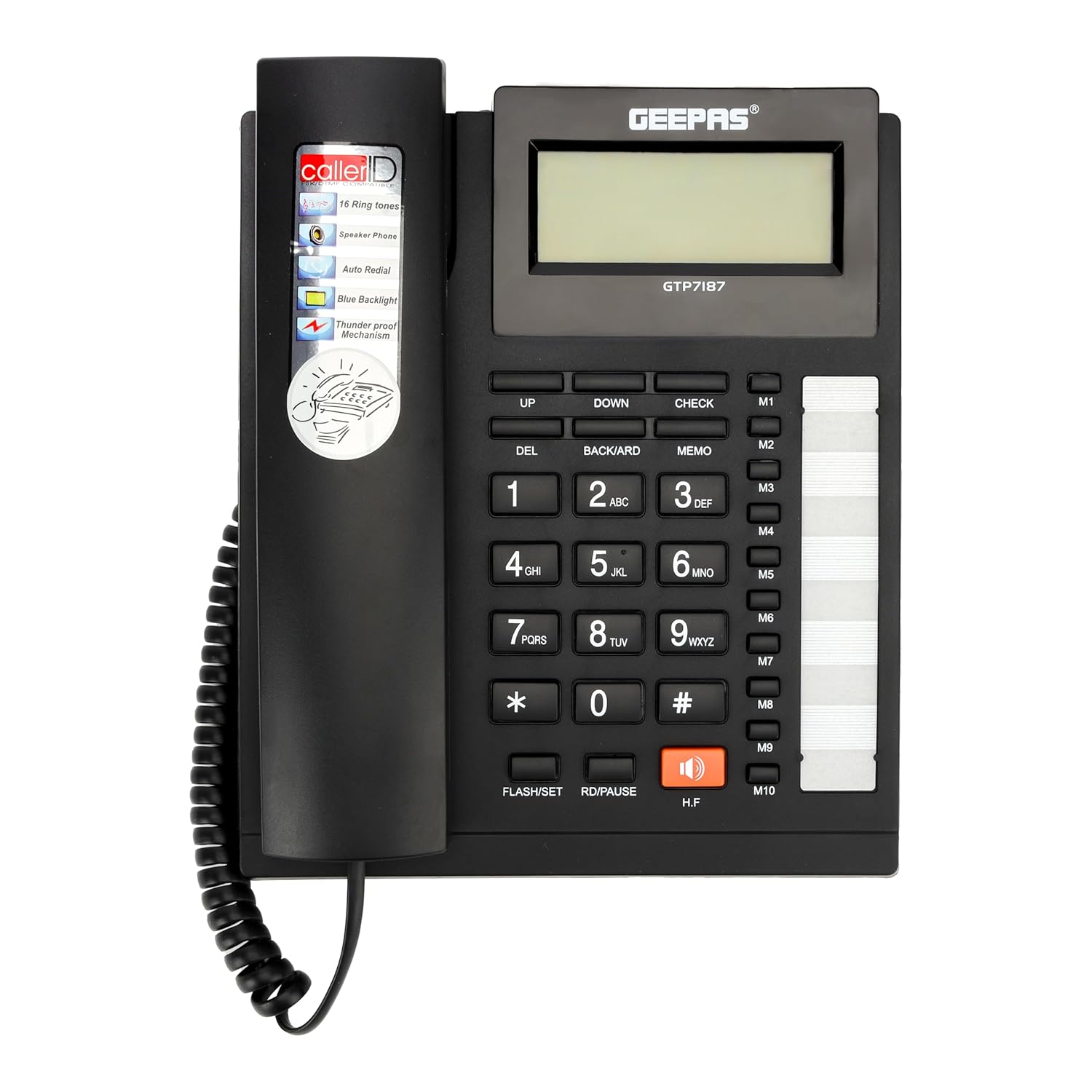
Figura 1: The Geepas GTP7187 Executive Telephone base unit and handset placed on a wooden desk. This image provides a general view of the product in a typical setting.
- Tela LCD: Extra-large, 16-digit display for Caller ID, call history, and menu navigation.
- Teclado: Teclas numéricas padrão (0-9, *, #) para discagem.
- Aparelho: Para conversas privadas.
- Speakerphone (H.F button): Permite a comunicação sem usar as mãos.
- Botões de função:
- DO: Botão Excluir.
- CIMA BAIXO: Navigation buttons for menus and call history.
- BACKWARD/CHECK: Used for reviewing information or navigating.
- MEMORANDO: Memory function button.
- M1-M10: One-touch memory dial buttons.
- FLASH/SET: Flash function or setting mode activation.
- RD/PAUSE: Redial or pause function.
- Visual Ring Indicator: A flashing light to indicate an incoming call.

Figura 2: A detailed close-up of the Geepas GTP7187 telephone's main interface, highlighting the large LCD screen, numeric keypad, and dedicated function buttons like M1-M10 for speed dialing.
Configurar
Follow these steps to set up your Geepas GTP7187 telephone.
- Conecte o aparelho: Plug the coiled cord from the handset into the designated port on the left side of the telephone base unit.
- Conecte a linha telefônica: Plug one end of the phone cord into the LINE port on the back of the telephone base unit and the other end into your wall telephone jack.
- Conecte o adaptador de energia: Insert the small end of the power adapter into the DC IN port on the back of the telephone base unit. Plug the other end of the power adapter into a standard electrical outlet.
- Verificação inicial: Once connected, the LCD display should light up. Lift the handset or press the H.F button to check for a dial tone.

Figura 3: The back panel of the Geepas GTP7187 telephone, illustrating the various connection ports for the phone line, handset, and power adapter. Ensure all connections are secure.
Instruções de operação
Fazendo chamadas
- Discagem padrão: Levante o monofone ou pressione o HF button for speakerphone. Dial the desired phone number using the keypad.
- Memory Dialing (M1-M10): To dial a stored number, lift the handset or press HF, then press the desired memory button (e.g., M1).
- Auto-Redial: If the number dialed is engaged, or to redial one of the last 15 outgoing calls, lift the handset or press HF, então pressione o RD/PAUSE botão.
Recebendo chamadas
- When an incoming call is received, the telephone will ring, and the visual ring indicator will flash.
- To answer, lift the handset or press the HF Botão para atender no modo viva-voz.
Identificação de chamadas e histórico de chamadas
- The LCD display shows the incoming caller's number (if available from your service provider).
- The telephone records up to 50 incoming calls and 15 outgoing calls.
- Use o UP e ABAIXO buttons to scroll through the call history.
- Imprensa VERIFICAR para view details of a selected call.
Chamada viva-voz
- To activate hands-free mode during a call, press the HF button. The microphone and speaker on the base unit will become active.
- Para voltar a usar o fone de ouvido, basta levantá-lo.
Phonebook Function
- The built-in phonebook allows you to store frequently called numbers.
- To store a number: Press MEMO, digite o número e pressione MEMO again and select a memory location (e.g., M1-M10) or a general phonebook entry. Refer to the detailed instructions in the included user manual for specific steps.
- When the phonebook memory is full, the display will show "100%".
Seleção de toque
- The telephone offers 16 different ringtones.
- To change the ringtone, access the settings menu using the FLASH/SET button and navigate with PARA CIMA/PARA BAIXO.
Manutenção
Os cuidados adequados garantem a longevidade do seu telefone.
- Limpeza: Limpe o telefone com um pano macio e seco.amp pano. Não use produtos de limpeza abrasivos ou solventes.
- Evite líquidos: Mantenha o telefone longe da água e de outros líquidos.
- Colocação: Place the telephone on a stable surface, away from direct sunlight, heat sources, and excessive dust.
Solução de problemas
If you encounter issues with your Geepas GTP7187 telephone, try the following solutions:
| Problema | Possível causa | Solução |
|---|---|---|
| Sem tom de discagem | Phone cord or power adapter not connected properly. | Ensure all cords are securely plugged into their respective ports and the wall jack/power outlet. |
| Não consigo ouvir quem está ligando / Quem está ligando não consegue me ouvir. | Handset or speakerphone volume too low; faulty connection; line interference. | Adjust volume. Check handset and phone line connections. Test with another phone if possible to rule out line issues. |
| Identificador de chamadas não exibido | Caller ID service not activated; incorrect phone line connection. | Contact your telephone service provider to ensure Caller ID is active. Verify phone line connection. |
| Botões não respondem | Falha temporária no software; sujeira/detritos sob os botões. | Unplug the power adapter and phone line, wait a few minutes, then reconnect. Clean the keypad surface. |
Especificações
Key technical specifications for the Geepas GTP7187 Executive Telephone.
- Marca: Geepas
- Modelo: GTP7187
- Cor: Preto
- Tipo de telefone: Corded
- Material: Plástico
- Fonte de energia: Elétrico com fio
- Tipo de discador: Teclado único
- Tipo de sistema de atendimento: Digital
- Dispositivos compatíveis: Multi-line phone setup
- Operação multilinha: Sim
- Tempo de espera do telefone: 72 horas
- Identificador de chamadas: Sim
- Material do gabinete: Plástico
- Peso do item: 660 g
Garantia e Suporte
Your Geepas GTP7187 Executive Telephone comes with a warranty and support information.
- Garantia: Este produto está coberto por um 2 anos de garantia a partir da data da compra. Guarde o comprovante de compra para eventuais solicitações de garantia.
- Apoiar: For technical assistance, troubleshooting beyond this manual, or warranty service, please contact Geepas customer support. Refer to the contact information provided on the warranty card or the official Geepas website.