1. Introdução
Thank you for choosing the Hoco E30 Wireless Earphone. This manual provides essential information for setting up, operating, and maintaining your earphone. Please read it carefully before use to ensure optimal performance and longevity of your device.
2. Informações de segurança
Para evitar danos ao seu dispositivo ou ferimentos a você e a outras pessoas, observe as seguintes precauções de segurança:
- Evite a exposição prolongada a níveis de volume elevados para evitar danos auditivos.
- Do not use the earphone while driving or in situations where you need to be aware of your surroundings.
- Mantenha o dispositivo longe de água, umidade e temperaturas extremas.
- Do not attempt to disassemble, repair, or modify the earphone. This will void the warranty.
- Utilize apenas os cabos e adaptadores de carregamento fornecidos ou certificados.
- Mantenha fora do alcance de crianças e animais de estimação.
3. Conteúdo da embalagem
Por favor, marque a caixa para os seguintes itens:
- Hoco E30 Wireless Earphone
- Cabo de carregamento USB
- Manual do usuário
4. Produto acabadoview
Familiarize yourself with the components of your Hoco E30 Wireless Earphone:

Figura 4.1: Lado view of the Hoco E30 Wireless Earphone, highlighting its sleek design and ear hook.

Figura 4.2: The Hoco E30 Wireless Earphone positioned next to a smartphone, illustrating its compact size and wireless connectivity.
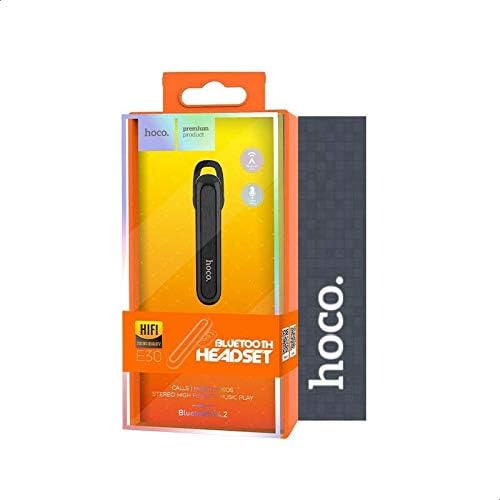
Figura 4.3: The retail packaging for the Hoco E30 Wireless Earphone, displaying branding and key features.
5. Configuração
5.1 Carregando os fones de ouvido
Before first use, fully charge your Hoco E30 earphone.
- Connect the provided USB charging cable to the charging port on the earphone.
- Connect the other end of the USB cable to a DC 5V power source (e.g., a USB wall adapter or computer USB port).
- A luz indicadora de carregamento acenderá.
- Charging typically takes approximately 2 hours. The indicator light will change or turn off once charging is complete.
5.2 Emparelhamento com um dispositivo
To connect your Hoco E30 earphone to your smartphone or other Bluetooth-enabled device:
- Ensure the earphone is fully charged and turned off.
- Press and hold the multi-function button on the earphone until the indicator light flashes red and blue alternately, indicating it is in pairing mode.
- No seu dispositivo, ative o Bluetooth e procure por dispositivos disponíveis.
- Select "Hoco E30" from the list of found devices.
- Once paired, the indicator light on the earphone will flash blue slowly, and you will hear a confirmation tone.
- The earphone has a transmission range of up to 10 meters (33 feet).
6. Instruções de operação
6.1 Ligar/Desligar
- Ligar: Press and hold the multi-function button for approximately 3 seconds until the blue indicator light flashes and you hear a power-on tone.
- Desligar: Press and hold the multi-function button for approximately 5 seconds until the red indicator light flashes and you hear a power-off tone.
6.2 Gerenciamento de Chamadas
- Atender chamada: Briefly press the multi-function button when an incoming call rings.
- Encerrar chamada: Briefly press the multi-function button during a call.
- Rejeitar chamada: Press and hold the multi-function button for 2 seconds when an incoming call rings.
- Rediscar último número: Pressione duas vezes o botão multifuncional quando não estiver em uma chamada.
6.3 Reprodução de música
- Reproduzir/Pausar: Briefly press the multi-function button to play or pause music.
- Próxima faixa: Press and hold the multi-function button for 2 seconds to skip to the next track.
- Faixa anterior: Press and hold the multi-function button for 2 seconds (during playback) to go to the previous track.
Note: The Hoco E30 supports A2DP and AVRCP protocols for high-quality audio streaming and remote control. Volume control is typically managed via the connected device.
6.4 Battery Status Display
The Hoco E30 earphone supports battery level display on compatible Apple iOS devices and some Android smartphones. Check your device's notification bar or Bluetooth settings for this feature.
7. Manutenção
- Limpeza: Use a soft, dry cloth to clean the earphone. Do not use harsh chemicals or abrasive materials.
- Armazenar: Guarde os fones de ouvido em local fresco e seco, longe da luz solar direta e de temperaturas extremas.
- Cuidados com a bateria: To prolong battery life, avoid fully discharging the earphone frequently. Charge it regularly, even if not in use for extended periods.
8. Solução De Problemas
If you encounter issues with your Hoco E30 earphone, try the following solutions:
| Problema | Solução |
|---|---|
| O fone de ouvido não liga. | Ensure the earphone is fully charged. Connect it to a power source and try again. |
| Não foi possível emparelhar com o dispositivo. |
|
| Sem som ou com má qualidade de som. |
|
| O carregamento não está funcionando. |
|
9. Especificações
| Recurso | Detalhe |
|---|---|
| Modelo | E30 |
| Versão Bluetooth | V4.2 WT |
| Protocolos Suportados | Fone de ouvido, viva-voz, A2DP, AVRCP |
| Faixa de transmissão | 10 metros (33 pés) |
| Frequência de transmissão | 2.4 GHz |
| Vol de cargatage | Corrente contínua 5 V |
| Tempo de carregamento | Aproximadamente 2 horas |
| Capacidade da bateria | 60 mAh |
| Tempo de conversação | Aproximadamente 3.5 horas |
| Tempo de reprodução de música | Aproximadamente 3.5 horas |
| Tempo de espera | Aproximadamente 110 horas |
| Peso líquido do produto | 6 gramas |
| Dimensões (C x L x A) | 58 mm x 14 mm x 25 mm |
| Material | Plástico |
| Método de controle | Tocar |
| Cor | Preto e Prata |
10. Garantia e Suporte
Hoco products are designed and manufactured to the highest quality standards. This product is covered by a limited warranty from the date of purchase. Please refer to the warranty card included in your package for specific terms and conditions.
For technical support or warranty claims, please contact your local Hoco distributor or visit the official Hoco website para mais informações.


