1. Introdução
This manual provides essential information for the safe and efficient operation of your Muse M-1990 DJ Bluetooth Party Speaker. Please read these instructions thoroughly before using the device and retain them for future reference.
The Muse M-1990 DJ is a powerful party speaker designed to deliver high-quality audio with dynamic light effects. It features multiple connectivity options including Bluetooth, CD player, USB, and AUX inputs, making it versatile for various audio sources.

Image 1.1: The Muse M-1990 DJ Bluetooth Party Speaker showcasing seus efeitos de luz integrados.
2. Informações de segurança
Observe as seguintes precauções de segurança para evitar choque elétrico, incêndio ou danos ao aparelho:
- Não exponha a unidade à chuva ou umidade.
- Não abra o casing. Encaminhe todos os serviços de manutenção para pessoal qualificado.
- Certifique-se de que a fonte de alimentação voltage corresponde à classificação indicada na etiqueta da unidade.
- Mantenha o aparelho longe da luz solar direta, fontes de calor e acúmulo excessivo de poeira.
- Assegure-se de que haja ventilação adequada ao redor da unidade.
- Não coloque objetos pesados sobre a unidade.
- Desligue a unidade durante tempestades com raios ou quando não for utilizada por longos períodos.
3. Conteúdo da embalagem
Verifique se todos os itens estão presentes na embalagem:
- Muse M-1990 DJ Party Speaker Unit
- Controle remoto (requer 2 pilhas AA, incluídas)
- Microfone com fio
- AUX IN Cable (3.5mm jack)
- Cabo de alimentação (CA 100-240V, 50/60Hz)

Image 3.1: Included accessories: remote control, wired microphone, and AUX cable.
4. Produto acabadoview
Familiarize yourself with the main components and controls of your M-1990 DJ speaker.
4.1 Painel de Controle Superior
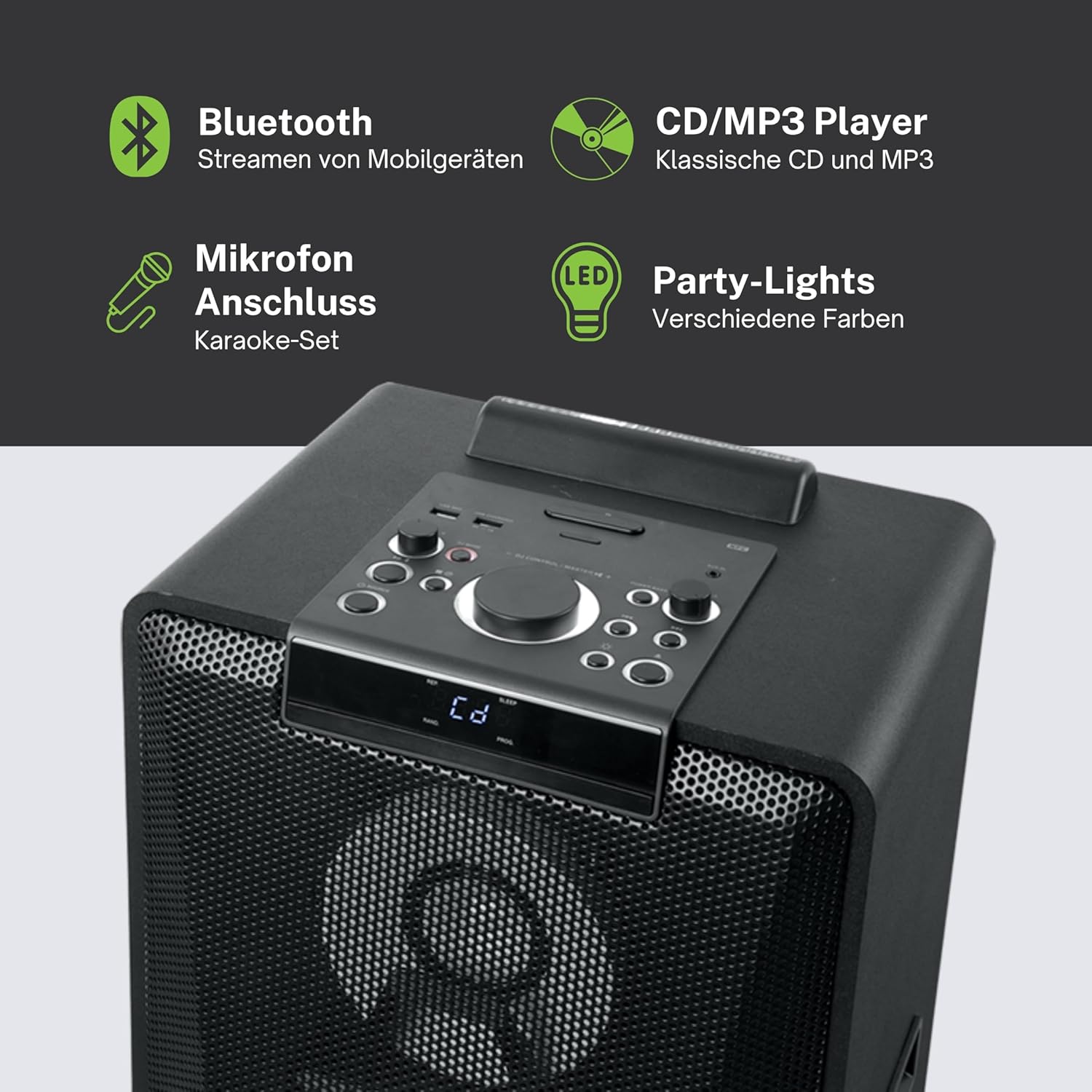
Imagem 4.1: Detalhada view of the top control panel, showing various buttons and the LED display.
The top panel features controls for power, volume, source selection, playback, light effects, and a white LED display. It also includes a built-in cradle for a tablet or smartphone.
4.2 Rear Connectivity Ports
The rear panel provides various input and output options:
- USB 2.0 Port (for MP3 playback and charging)
- AUX IN 1 (2 x RCA jacks)
- AUX IN 2 (3.5mm jack)
- Microphone Inputs (2 jacks)
- Guitar Input (1 jack)
- AC Power Input (100-240V, 50/60Hz)
5. Configuração
5.1 Posicionamento
Place the speaker on a stable, flat surface. Ensure there is adequate space around the unit for ventilation. The unit is designed for floor mounting.
5.2 Conexão de Energia
- Connect the supplied power cable to the AC power input on the rear of the speaker.
- Conecte a outra extremidade do cabo de alimentação a uma tomada de parede padrão (AC 100-240V, 50/60Hz).
- The unit does not contain a rechargeable battery and must be connected to a power source for operation.
6. Instruções de operação
6.1 Ligar/Desligar
Press the Power button on the top control panel or the remote control to turn the unit on or off.
6.2 Emparelhamento Bluetooth
- Press the Source button to select Bluetooth mode. The LED display will show 'BT' and the Bluetooth indicator will flash.
- Ative o Bluetooth no seu smartphone, tablet ou outro dispositivo compatível.
- Procurar 'M-1990 DJ' in your device's Bluetooth list and select it to pair.
- Once paired, the Bluetooth indicator will stop flashing, and you can begin streaming audio.
- For NFC-enabled devices, simply tap your device on the NFC area of the speaker for automatic pairing.
6.3 Reprodução de CD
- Pressione o botão Source para selecionar o modo CD.
- Open the CD tray and place a CD (CD, CD-R/RW, MP3 compatible) with the label side up.
- Close the CD tray. Playback will start automatically or can be initiated using the Play/Pause button.
Reprodução USB 6.4
- Insira uma unidade flash USB contendo MP3 files na porta USB 2.0.
- Press the Source button to select USB mode.
- Playback will start automatically or can be controlled using the playback buttons.
- The USB port also functions as a charging port for external devices.
6.5 Entrada AUX
- Connect your external audio device to either the AUX IN 1 (RCA jacks) or AUX IN 2 (3.5mm jack) using the appropriate cable.
- Press the Source button to select the corresponding AUX input.
- Controle a reprodução a partir do seu dispositivo conectado.
Entradas de microfone e guitarra de 6.6 mm
- Plug your microphone(s) into the Microphone input jacks.
- Plug your guitar into the Guitar input jack.
- Adjust the microphone/guitar volume using the dedicated controls on the top panel.
6.7 Efeitos de Luz
The M-1990 DJ features color-changing lights and strobe effects. Use the dedicated Light Effects button on the control panel or remote to cycle through different modes or turn the lights off.
6.8 Stereo Pairing (Dual Bluetooth)
If you have two M-1990 DJ units, you can pair them wirelessly for a stereo sound experience. Refer to the specific instructions for stereo pairing in the full manual (if provided by manufacturer) or on the manufacturer's website.
7. Manutenção
7.1 Limpeza
- Sempre desconecte a unidade da tomada antes de limpá-la.
- Use um pano macio e seco para limpar as superfícies externas.
- Não utilize produtos de limpeza abrasivos, ceras ou solventes, pois podem danificar o acabamento.
7.2 Armazenamento
Quando não estiver em uso por longos períodos, guarde a caixa de som em local fresco e seco, longe da luz solar direta e de temperaturas extremas.
8. Solução De Problemas
If you encounter issues with your M-1990 DJ speaker, refer to the following common problems and solutions:
| Problema | Possível causa | Solução |
|---|---|---|
| Sem energia | Cabo de alimentação desconectado; tomada elétrica inativa | Ensure power cable is securely connected; Try a different outlet |
| Sem som | Volume too low; Incorrect source selected; Audio cable not connected | Increase volume; Select correct input source; Check audio cable connections |
| Bluetooth não está pareando | Speaker not in pairing mode; Device Bluetooth off; Device too far | Ensure speaker is in BT mode and flashing; Enable Bluetooth on device; Move device closer (within 10m) |
| CD não está tocando | CD inserted incorrectly; CD scratched/dirty; Incorrect format | Reinsert CD correctly; Clean CD; Ensure CD is audio CD or MP3 compatible |
| USB não reproduz | Unidade USB não inserida corretamente; Files not MP3 format; USB drive corrupted | Reinsira a unidade USB; Certifique-se de que... files are MP3; Try a different USB drive |
Se o problema persistir após tentar essas soluções, entre em contato com o suporte ao cliente.
9. Especificações
Detailed technical specifications for the Muse M-1990 DJ Party Speaker:
- Número do modelo: DJ M-1990
- Marca: MUSA
- Potência de saída: 1000 Watts
- Número de canais: 2
- Tecnologia de conectividade: Bluetooth V4.2
- Dispositivos compatíveis: Smartphone, Tablet
- Entradas de áudio: 2 x Microphone jacks, 1 x Guitar jack, 2 x RCA AUX IN, 1 x 3.5mm AUX IN
- Porta USB: 1 x USB 2.0 (for MP3 playback and charging)
- Leitor de CD: Compatível com CD, CD-R/RW e MP3.
- Efeitos de luz: Color changing lights, Strobe effects, Light projection
- Fonte de energia: AC 100-240V, 50/60Hz (Electric Cable)
- Bateria recarregável: Não
- Material: Wood (cabinet)
- Cor: Preto
- Peso do item: 17.9 quilos
- Dimensões (C x L x A): 35.6 x 34.8 x 105.7 centímetros
- Uso recomendado: Party and entertainment
- Tipo de montagem: Montagem no chão
- Baterias Incluídas: 2 AA (for remote control)

Image 9.1: Dimensional drawing of the Muse M-1990 DJ speaker.
10. Garantia e Suporte
10.1 Informações de garantia
Warranty terms and conditions for the Muse M-1990 DJ speaker are typically provided with the product packaging or can be found on the official Muse webPor favor, guarde seu comprovante de compra para eventuais reclamações de garantia.
10.2 Suporte ao cliente
For further assistance, technical support, or service inquiries, please refer to the contact information provided in your product documentation or visit the official Muse customer support website.


