1. Introdução
This manual provides detailed instructions for the setup, operation, maintenance, and troubleshooting of your MUNBYN Shipping Label Printer RealWriter 941. Please read this manual thoroughly before using the printer to ensure optimal performance and longevity.

Image: The MUNBYN Shipping Label Printer RealWriter 941, a compact white and black thermal printer, shown actively printing a shipping label.
2. Configuração
2.1. O que está na caixa
Verifique se todos os componentes estão presentes na embalagem:
- Impressora térmica
- Adaptador de energia
- Cabo de energia
- Cabo USB
- Labels (for initial testing)

Imagem: Vista aérea view of the MUNBYN printer box contents, including the printer, power adapter, power cable, USB cable, and a roll of labels.
2.2. Conexão Física
- Connect the power adapter to the printer and then plug it into a power outlet.
- Connect the USB cable from the printer to your computer (Windows or macOS).
2.3. Instalação do driver
The MUNBYN RealWriter 941 is a USB-only thermal printer compatible with Windows and macOS operating systems. Drivers are required for proper functionality.
- For Windows and macOS, download the latest drivers from the official MUNBYN website or use the provided installation CD/USB if included.
- Siga as instruções na tela para concluir a instalação do driver.
- For Chromebook users, install the Munbyn Printer Extension from the Chrome Web Loja.

Image: A screenshot showing the Munbyn Printer Extension page in the Chrome Web Store, indicating compatibility with Chromebooks.
2.4. Carregando Etiquetas
The printer supports thermal labels from 1.57" to 4.3" wide. It features automatic label identification.
- Certifique-se de que a impressora esteja ligada.
- Abra a tampa superior da impressora.
- Insert the stack of thermal labels into the rear feed slot, ensuring the print side is facing up.
- Adjust the label guides to fit snugly against the edges of the labels.
- Close the top cover. The printer will automatically detect and calibrate to the label size.

Image: The MUNBYN printer shown printing various label types and sizes, including shipping labels, circular labels, and small rectangular labels, demonstrating its versatility.
3. Instruções de operação
3.1. Impressão de etiquetas
Once the printer is set up and labels are loaded, you can print from any application that supports printing.
- Open the document or label you wish to print (e.g., a shipping label PDF).
- Select 'Print' from your application's menu.
- Choose the MUNBYN RealWriter 941 as your printer.
- Ensure the paper size settings in your print dialogue match the labels loaded in the printer (e.g., 4x6 inches).
- Clique em 'Imprimir'.

Image: The MUNBYN printer connected to a laptop, demonstrating a label being printed from the computer screen to the printer.
3.2. Compatibilidade
The MUNBYN thermal label printer is designed for broad compatibility with various shipping and selling platforms, including:
- Etsy
- Shopify
- eBay
- Amazon
- Marca Posh
- Ship Station
- Shipping Easy
- Navio
- Ordoro
- Endícia Deslumbre
- Shipwire
- Shipworks
- Stockx
- Xps Ship

Image: The MUNBYN printer surrounded by logos of various e-commerce and shipping platforms, illustrating its wide compatibility.
3.3. Using the MUNBYN Print App
For convenient printing from mobile devices (iPhone/Mac OS/Android), download the 'MUNBYN Print' app.
- Scan the QR code below with your smartphone or tablet.
- Baixe e instale o aplicativo.
- Follow the in-app instructions to connect to your printer and print.

Image: A smartphone screen displaying a QR code for downloading the 'MUNBYN Print' app, compatible with Android 7 / iOS 11 and newer versions.
4. Manutenção
4.1. Limpeza da cabeça de impressão
Regular cleaning of the print head ensures clear and consistent print quality. Use a cotton swab lightly dampenriquecido com álcool isopropílico.
- Desligue a impressora e desconecte o cabo de alimentação.
- Open the top cover to access the print head.
- Gently wipe the print head surface with the alcohol-dampened cotton swab.
- Deixe a cabeça de impressão secar completamente antes de fechar a tampa e religar a energia.
4.2. Armazenamento de etiquetas
Store thermal labels in a cool, dry place away from direct sunlight and heat sources to prevent premature fading or damage to the thermal coating.
5. Solução De Problemas
If you encounter issues with your MUNBYN printer, refer to the following common problems and solutions. For a comprehensive guide, please consult the official Troubleshooting Guide PDF available for download.
- Printer not responding: Ensure the power cable and USB cable are securely connected. Check if the printer's power indicator light is on. Restart both the printer and your computer.
- Etiquetas não alimentando corretamente: Verify that labels are loaded correctly and the label guides are adjusted to the label width. Ensure there are no obstructions in the paper path.
- Poor print quality (faded, smudged, or incomplete prints): Clean the print head as described in the Maintenance section. Ensure you are using high-quality thermal labels. Check print settings in your software to ensure resolution and darkness are appropriate.
- Printer beeps continuously: This may indicate an error or an empty label roll. Check the label supply and clear any paper jams.
- Problemas com o motorista: Reinstall the printer drivers from the official MUNBYN website. Certifique-se de que seu sistema operacional esteja atualizado.
Para obter mais assistência, consulte o Guia de solução de problemas (PDF).
6. Especificações
Detailed technical specifications for the MUNBYN Shipping Label Printer RealWriter 941 (Model ITPP941):
| Recurso | Especificação |
|---|---|
| Nome do modelo | P941 |
| Número do modelo do item | ITPP941 |
| Tecnologia de impressão | Térmico |
| Resolução | 203 x 203 DPI (203 Dots Per Inch) |
| Velocidade máxima de impressão monocromática | 150mm/s (72 ppm) |
| Tamanho máximo da mídia | 4 x 6 polegadas |
| Largura da impressão | 1.57" a 4.3" |
| Tecnologia de Conectividade | USB |
| Dispositivos compatíveis | PC, Laptops, Windows, Mac, Chromebook |
| Consumo de energia | 60 Watts |
| Peso do item | 3.08 libras (1.4 kg) |
| Dimensões do produto | 3.8"D x 7.8"L x 4.3"A (1.61 x 2.99 x 1.54 polegadas) |
| Capacidade de armazenamento de memória | 4 MB |
| UPC | 613310860730 |
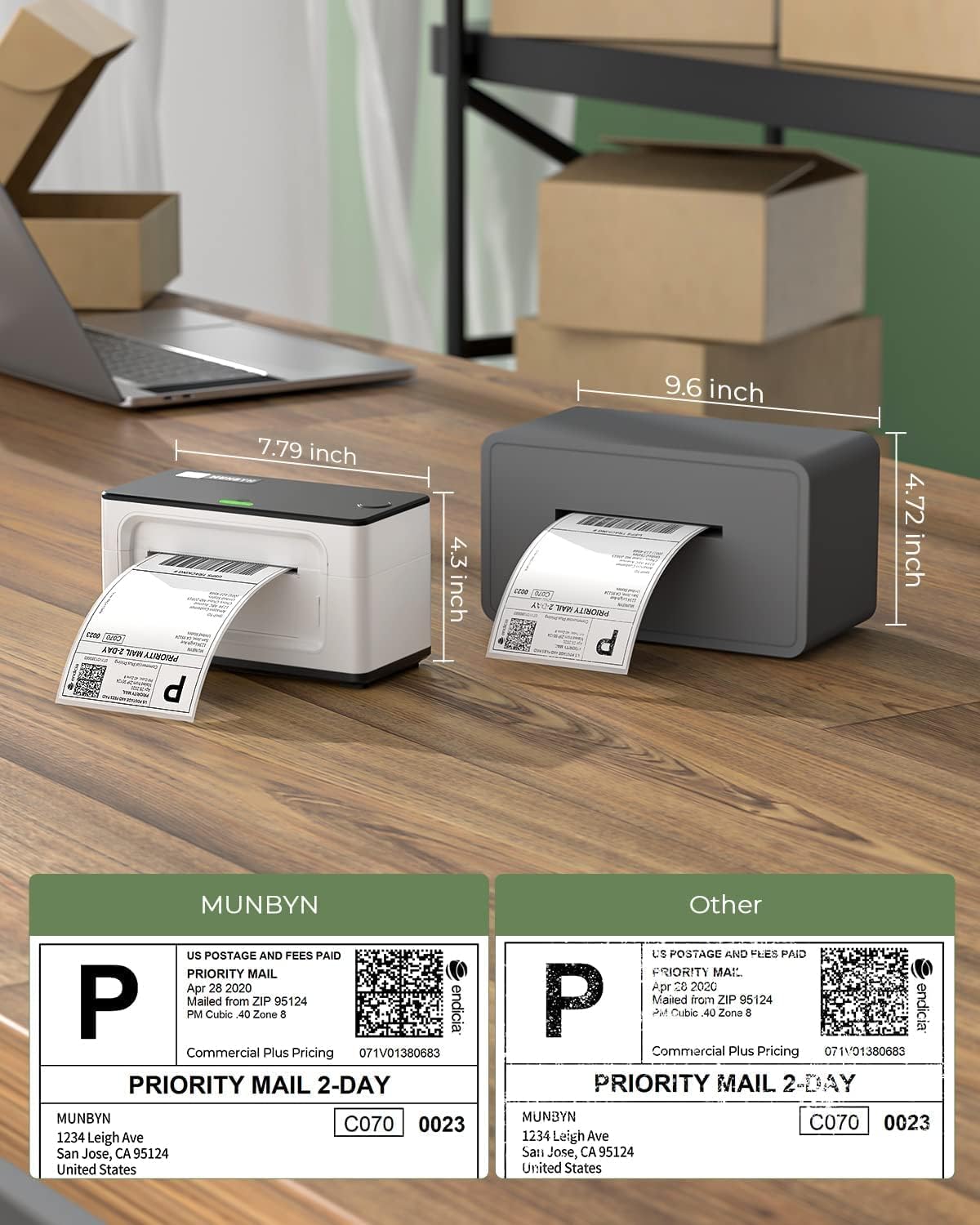
Image: A visual comparison of the MUNBYN printer's dimensions (7.79 inches length, 4.5 inches height) against another printer model.

Image: A comparison table showing different MUNBYN printer models (941U, 941BP, 941AP) with their connectivity, compatible devices, resolution, and max print speed.
7. Garantia e Suporte
7.1. Informações de garantia
MUNBYN provides perpetual customer support and product protection for any product issues. The manufacturer's warranty period is two years from the date of purchase.
7.2. Suporte ao cliente
For any questions or assistance, please contact MUNBYN customer support:
- Telefone: +1 628 229 3612 (Monday through Friday, EST 9:00-24:00, excluding public holidays)
- E-mail: suporte@munbyn.com
- Chat ao vivo: Available on the official MUNBYN website.
- Remote Desktop Operations Support: Available as needed.
When contacting support, please provide your order number.

Image: A graphic illustrating the various customer support options offered by MUNBYN, including phone call, teaching video, live chat, and remote desktop support.


