Introdução
Thank you for choosing the NEDIS Wi-Fi Smart Fan Heater. This manual provides essential information for the safe and efficient operation of your new device. Please read these instructions carefully before use and retain them for future reference. Proper use and maintenance will ensure optimal performance and longevity of the product.
Instruções de segurança
Para reduzir o risco de incêndio, choque elétrico ou ferimentos, siga sempre estas precauções básicas de segurança:
- Leia todas as instruções antes de usar este aquecedor.
- Não utilize este aquecedor próximo a banheiras, chuveiros ou piscinas.
- Não cubra o aquecedor. Cobrir o aquecedor pode causar superaquecimento e incêndio.
- Keep combustible materials such as furniture, pillows, bedding, papers, clothes, and curtains at least 1 meter (3 feet) from the front of the heater and keep them away from the sides and rear.
- Desligue sempre o aquecedor quando não estiver em uso.
- Não opere nenhum aquecedor com um cabo ou plugue danificado ou após o aquecedor não funcionar corretamente, tiver caído ou danificado de qualquer maneira.
- Não passe o fio por baixo do carpete. Não cubra o fio com tapetes, passadeiras ou coberturas semelhantes. Arrume o fio longe da área de tráfego e onde não haja tropeços.
- É necessário extremo cuidado quando qualquer aquecedor for usado por crianças ou inválidos ou perto deles, e sempre que o aquecedor for deixado funcionando e sem supervisão.
- This heater is equipped with a tip-over protection switch that automatically shuts off the heater if it is accidentally knocked over.
- Certifique-se de que o aquecedor esteja colocado em uma superfície estável e nivelada.
- Somente para uso interno.
Produto acimaview
Familiarize yourself with the main components of your NEDIS Wi-Fi Smart Fan Heater.
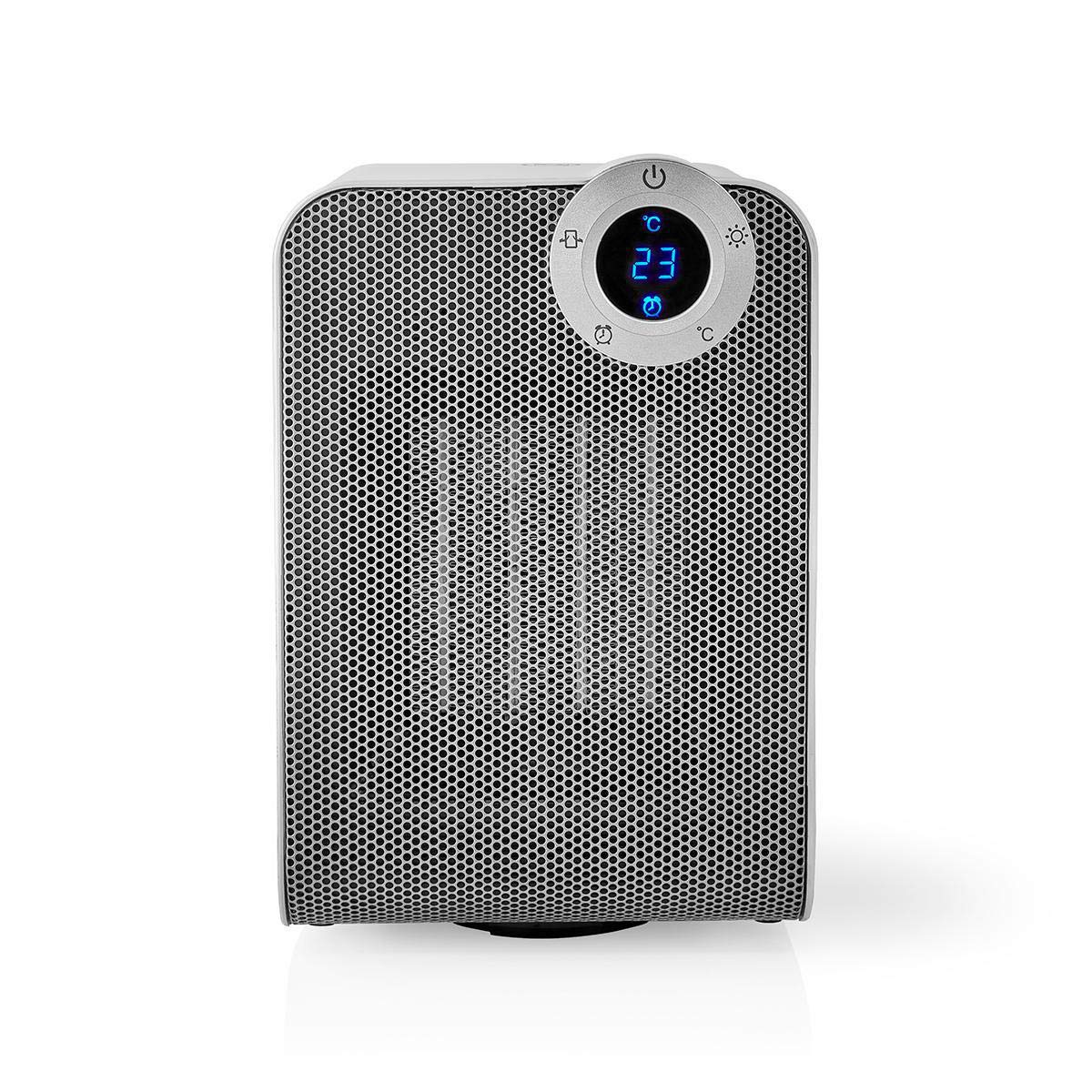
The front panel features a digital display that shows the current temperature and settings. Surrounding the display are touch-sensitive buttons for power, mode selection, oscillation, and timer functions.

The rear of the heater includes the main power switch (often a rocker switch) and the air intake grille. Ensure this area is not obstructed for proper airflow.

The compact design of the heater allows for easy placement in various indoor settings.
Configurar
Desembalando
- Retire cuidadosamente o aquecedor da embalagem.
- Verifique se houve danos durante o transporte. Se houver danos, não utilize o produto e entre em contato com o suporte ao cliente.
- Guarde a embalagem para armazenamento ou transporte futuros.
Colocação
- Coloque o aquecedor em uma superfície firme e nivelada.
- Ensure there is at least 1 meter (3 feet) of clear space around the heater to allow for proper air circulation and to prevent fire hazards.
- Do not place the heater near curtains, drapes, or other loose fabrics that could block the air intake or outlet.
- Certifique-se de que o cabo de alimentação não esteja preso ou colocado sob objetos pesados.
Ligação inicial
- Plug the heater into a suitable electrical outlet (220-240V AC, 50/60Hz).
- Flip the main power switch on the back of the unit to the 'ON' position.
- The digital display on the front will illuminate, indicating the heater is in standby mode.
Wi-Fi Connection & App Setup
The NEDIS Wi-Fi Smart Fan Heater can be controlled via the Nedis SmartLife app, offering advanced features and remote control.
- Baixe o Nedis SmartLife Aplicativo disponível na App Store (iOS) ou na Google Play Store (Android).
- Crie uma nova conta ou faça login se já tiver uma.
- Certifique-se de que seu smartphone esteja conectado a uma rede Wi-Fi de 2.4 GHz.
- No aplicativo, toque no ícone '+' para adicionar um novo dispositivo.
- Follow the on-screen instructions in the app to connect your heater to your Wi-Fi network. This usually involves putting the heater into pairing mode (refer to the app for specific instructions, often by pressing and holding a button on the heater).
- Once connected, you can control the heater from anywhere using the app.
Instruções de operação
Controle manual
The heater can be operated directly using the touch buttons on the front panel:
- Botão de energia: Pressione para ligar ou desligar o aquecedor.
- Botão de modo: Cycle through heating modes (e.g., High Heat 1800W, Low Heat 900W, Fan Only).
- Ajuste de temperatura: Use the '+' and '-' buttons (or similar) to set the desired temperature. The heater will operate at 1800W for rapid heating and automatically switch to 900W once the set temperature is approached.
- Botão de oscilação: Press to activate or deactivate the horizontal oscillation feature, distributing heat across a wider area.
- Botão do temporizador: Set a timer for the heater to automatically turn off after a specified duration.
SmartLife App Control
Once connected to the Nedis SmartLife app, you can access advanced control features:
- Ligar/Desligar remotamente: Controle o aquecedor de qualquer lugar.
- Ajuste de temperatura: Precisely set and monitor the room temperature.
- Seleção de modo: Choose between different heating levels or fan-only mode.
- Controle de oscilação: Ative ou desative o recurso de oscilação.
- Agendamento: Create custom heating schedules for different times of the day or week.
- Função do temporizador: Set a countdown timer for automatic shutdown.
Controle de voz
The heater supports voice control through popular smart assistants. To enable this, link your Nedis SmartLife account with your preferred voice assistant (Google Home or Amazon Alexa) via their respective apps. Once linked, you can use voice commands such as:
- "Hey Google, turn on the heater."
- "Alexa, set the heater to 22 degrees."
- "Hey Google, turn off the heater."
Manutenção
Limpeza
Regular cleaning helps maintain the heater's efficiency and extends its lifespan.
- Desligue sempre o aquecedor da tomada e deixe-o arrefecer completamente antes de o limpar.
- Limpe as superfícies exteriores com um pano macio, damp pano. Não use produtos de limpeza abrasivos ou solventes.
- Use a vacuum cleaner with a brush attachment to remove dust from the air intake and outlet grilles.
- Certifique-se de que não entre água no interior do aquecedor.
Armazenar
Quando não estiver em uso por longos períodos:
- Unplug the heater and clean it as described above.
- Guarde o aquecedor na embalagem original ou em uma caixa adequada para protegê-lo contra poeira e danos.
- Mantenha em local fresco e seco, longe da luz solar direta e da umidade.
Solução de problemas
Se você tiver problemas com seu aquecedor, consulte os problemas comuns e suas soluções a seguir:
| Problema | Possível causa | Solução |
|---|---|---|
| Aquecedor não liga. | No power, main switch off, tip-over switch activated. | Check power outlet, ensure main switch is ON, place heater upright on a stable surface. |
| Sem saída de calor. | Modo incorreto, termostato configurado muito baixo. | Select a heating mode (High/Low), increase the thermostat setting above the current room temperature. |
| A conexão Wi-Fi falha. | Incorrect Wi-Fi password, 5GHz network, distance from router. | Verify Wi-Fi password, ensure you are on a 2.4GHz network, move heater closer to the router, try re-pairing. |
| O aquecedor desliga inesperadamente. | Overheating protection, tip-over protection, timer activated. | Ensure heater is not covered, clear obstructions, place upright, check timer settings. Allow to cool before restarting. |
Especificações
| Recurso | Especificação |
|---|---|
| Número do modelo | WIFIFNH20CWT |
| Fonte de energia | Elétrico com fio |
| Potência de saída | 1800 W (Alto), 900 W (Baixo) |
| Método de aquecimento | Convecção |
| Dimensões (C x L x A) | 16.5 x 14.5 x 25 cm |
| Peso do item | 1.8 kg |
| Cor | Prata branca |
| Características especiais | On/Off Timer, Oscillation, Tip-over Protection, Thermostat, Wi-Fi, App Control, Voice Control (Alexa, Google Home) |
| Tipo de instalação | Montagem no chão |
| Uso recomendado | Indoor, Home, Study Room |
| Pilhas necessárias | Não |
Garantia e Suporte
Your NEDIS Wi-Fi Smart Fan Heater is covered by a manufacturer's warranty. Please refer to the warranty card included with your purchase for specific terms and conditions, including the warranty period and coverage details.
For technical support, troubleshooting assistance, or warranty claims, please contact NEDIS customer service. Contact information can typically be found on the product packaging, the NEDIS website, ou seu recibo de compra.


