1. Introdução
This user manual provides comprehensive instructions for the installation, operation, and maintenance of your ComfortStar Mini Split Single Zone Heat Pump. This system is designed to provide efficient heating and cooling for your space. Please read this manual thoroughly before operating the unit to ensure proper function and safety.
The ComfortStar Mini Split system is known for its energy efficiency, quiet operation, and ability to provide comfort even in extreme temperatures, down to -13°F (-25°C) for heating. It utilizes R410A refrigerant, which is environmentally friendly.
2. Informações de segurança
Always observe the following basic precautions to reduce the risk of fire, electric shock, or injury to persons or property:
- Instalação profissional: A instalação e a manutenção devem ser realizadas somente por pessoal qualificado.
- Fonte de energia: Ensure the power supply matches the unit's specifications. Do not operate with damaged power cords or plugs.
- Ventilação: Do not block air inlets or outlets of the unit.
- Exposição à água: Do not expose the indoor unit to water. Do not operate with wet hands.
- Crianças e animais de estimação: Mantenha crianças e animais de estimação afastados do aparelho durante o funcionamento.
- Limpeza: Desligue a energia antes de limpar ou realizar qualquer manutenção.
- Refrigerante: The system contains R410A refrigerant. Do not attempt to service the refrigerant circuit yourself.
3. Produto acabadoview e Componentes
Your ComfortStar Mini Split system consists of an indoor unit, an outdoor unit, and a remote control. Understanding each component is key to proper operation.

Figure 3.1: Complete ComfortStar Mini Split System. This image displays the indoor wall-mounted unit, the outdoor condenser unit, and the wireless remote control, providing a comprehensive view dos principais componentes.
3.1. Unidade interna
The indoor unit is typically mounted on a wall and is responsible for circulating conditioned air within your space. It contains the evaporator coil, fan, and air filter.

Figure 3.2: ComfortStar Indoor Unit. This image shows the sleek, white indoor unit designed for wall mounting, which houses the fan and evaporator coil.
3.2. Unidade Externa
The outdoor unit, or condenser, is placed outside your building. It contains the compressor, condenser coil, and expansion valve. It is responsible for releasing or absorbing heat from the outdoor air.
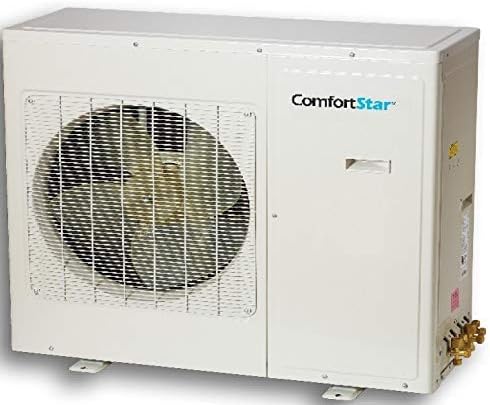
Figure 3.3: ComfortStar Outdoor Unit. This image displays the robust outdoor condenser unit, which contains the compressor and is responsible for heat exchange with the outside environment.
3.3. Controle remoto
The wireless remote control allows you to conveniently adjust settings such as mode, temperature, fan speed, and timer functions from anywhere within range.

Figure 3.4: ComfortStar Remote Control. This image shows the ergonomic remote control with an LCD display and various buttons for controlling the mini split system's functions.
4. Configuração e instalação
The ComfortStar Mini Split system requires professional installation. This section provides an overview of the installation process. Do not attempt to install the unit yourself unless you are a certified HVAC technician.
4.1. Lista de verificação de pré-instalação
- Verify that the electrical supply meets the unit's requirements (voltage, ampera).
- Garanta espaço suficiente para as unidades internas e externas, permitindo a circulação adequada de ar e o acesso para manutenção.
- Confirm that the wall for the indoor unit is strong enough to support its weight.
- Gather necessary tools and materials (e.g., mounting brackets, refrigerant lines, electrical wiring).
4.2. General Installation Steps (Professional Only)
- Monte a unidade interna firmemente na parede, certificando-se de que esteja nivelada.
- Install the outdoor unit on a stable, level surface, ensuring proper drainage.
- Conecte as linhas de refrigerante entre as unidades interna e externa. Certifique-se de que as conexões estejam devidamente alargadas e apertadas para evitar vazamentos.
- Connect the electrical wiring between the units and to the main power supply, following local electrical codes.
- Esvazie as linhas de refrigerante para remover o ar e a umidade.
- Realize um teste de vazamento em todas as conexões.
- Libere o fluido refrigerante no sistema.
- Teste o funcionamento da unidade em todos os modos.
For detailed installation instructions, refer to the separate installation manual provided with the unit or consult a certified HVAC professional.
5. Instruções de operação
This section explains how to use your remote control to operate the ComfortStar Mini Split system.
5.1. Funções de controle remoto
The remote control features an LCD display and various buttons for easy operation:
- Botão ON/OFF: Liga ou desliga a unidade.
- Botões TEMP +/-: Ajusta a temperatura desejada.
- Botão MODE: Alterna entre os modos de operação (Automático, Resfriamento, Desumidificação, Aquecimento, Ventilação).
- Botão VELOCIDADE DO VENTILADOR: Ajusta a velocidade da ventoinha (Automático, Baixa, Média, Alta).
- Botão SWING: Controla o movimento vertical das aletas para direcionar o ar.
- Botões TIMER ON/OFF: Sets the timer for automatic power on/off.
- Botão de suspensão: Ativa o modo de repouso para operação silenciosa e economia de energia durante o sono.
- Botão TURBO: Ativa o resfriamento ou aquecimento rápido para mudanças rápidas de temperatura.
- Botão AUTOLIMPEZA: Initiates the self-cleaning function for the indoor unit.
- Botão LED: Turns the indoor unit's display LED on or off.
- Botão SIGA-ME: Activates the "Follow Me" function, where the remote control's sensor measures the temperature and adjusts the unit accordingly.
- Botão LOCK: Bloqueia os botões do controle remoto para evitar alterações acidentais.
- Botão de reset: Redefine as configurações do controle remoto.
5.2. Modos de operação
- Modo automático:
- The unit automatically selects the appropriate operating mode (Cool, Heat, or Fan) based on the room temperature and your set temperature.
- Modo legal:
- Cools the room to the desired temperature. Adjust temperature using TEMP +/- buttons.
- Modo Seco (Desumidificação):
- Reduz a umidade do ambiente. A velocidade do ventilador é controlada automaticamente.
- Modo de aquecimento:
- Heats the room to the desired temperature. This unit is a heat pump, providing efficient heating even in low ambient temperatures.
- Modo fã:
- Circulates air without heating or cooling. You can adjust the fan speed.
6. Manutenção
Regular maintenance ensures optimal performance and longevity of your ComfortStar Mini Split system. Always disconnect power before performing any maintenance.
6.1. Limpeza do filtro de ar
The electrostatic carbon active fiber filter should be cleaned regularly, typically every 2-4 weeks, depending on usage and air quality.
- Abra o painel frontal da unidade interna.
- Remova os filtros de ar com cuidado.
- Limpe os filtros usando um aspirador de pó ou lave-os com água morna e detergente neutro.
- Deixe os filtros secarem completamente em local sombreado antes de os recolocar. Não os exponha à luz solar direta.
- Reinstale os filtros e feche o painel frontal.
6.2. Limpeza da Unidade Externa
Periodically check the outdoor unit for debris (leaves, dirt) that may obstruct airflow. Clean the coils gently with a soft brush or water hose. Ensure the area around the outdoor unit is clear of obstructions.
6.3. Manutenção Profissional
It is recommended to have your system professionally inspected and serviced annually by a qualified HVAC technician. This includes checking refrigerant levels, electrical connections, and overall system performance.
7. Solução De Problemas
Antes de entrar em contato com o suporte ao cliente, consulte a tabela a seguir para obter informações sobre problemas comuns e suas soluções.
| Problema | Possível causa | Solução |
|---|---|---|
| A unidade não liga. | Sem energia; Pilhas do controle remoto descarregadas; Disjuntor desarmado. | Verifique a ligação elétrica; Substitua as pilhas do controle remoto; Reinicie o disjuntor. |
| Refrigeração/aquecimento insuficiente. | Dirty air filter; Blocked outdoor unit; Incorrect mode setting; Low refrigerant. | Clean air filter; Clear obstructions from outdoor unit; Select correct mode; Contact professional for refrigerant check. |
| Ruído incomum. | Loose parts; Fan obstruction; Compressor issue. | Check for loose parts; Remove obstruction; Contact professional if compressor noise. |
| Vazamento de água da unidade interna. | Cano de esgoto entupido; Instalação incorreta. | Clear drain pipe; Contact professional for installation check. |
| O controle remoto não funciona. | Dead batteries; Obstruction between remote and unit; Remote out of range. | Replace batteries; Remove obstruction; Move closer to unit. |
Se o problema persistir após tentar essas soluções, entre em contato com um técnico qualificado.
8. Especificações
Key technical specifications for the ComfortStar Mini Split Single Zone Heat Pump, Model CFS-CXH24CDI/24CDO:
- Modelo: CFS-CXH24CDI/24CDO
- Capacidade: 24,000 BTU (2 Toneladas)
- SEER (Índice de Eficiência Energética Sazonal): Até 25
- Refrigerante: R-410A
- Recurso especial: Aquecimento (Bomba de Calor)
- Low Ambient Operation: Capable of heating down to -13°F (-25°C)
- Tipo de filtro: Electrostatic Carbon Active Fiber Filter
- Fonte de energia: Elétrico com fio
- Fator de forma: Minisplit
- Nível de ruído: Super quiet technology
- Temporizador: Função de temporizador de 24 horas
- Reinicialização automática: Sim
9. Garantia e Suporte
ComfortStar provides a limited warranty for this product:
- Garantia do compressor: 7 anos
- Garantia das peças: 5 anos
For warranty claims, technical support, or service inquiries, please contact your authorized ComfortStar dealer or the customer service number provided with your purchase documentation. Ensure you have your model number (CFS-CXH24CDI/24CDO) and proof of purchase readily available.
You can also visit the official ComfortStar website for additional resources and support information. (Note: Specific website URL not provided in source data, user should refer to product packaging or purchase documentation).


