Introdução
This manual provides comprehensive instructions for the proper use and maintenance of your ELECTROPRIME 8GB Rechargeable USB LCD Digital Voice Recorder, Model ASH20BEBUBEB26998. Please read this manual thoroughly before operating the device to ensure optimal performance and longevity. Keep this manual for future reference.
Produto acimaview
The ELECTROPRIME Digital Voice Recorder is a compact and versatile device designed for high-quality audio recording and MP3 playback. It features an LCD screen for easy navigation, 8GB of internal storage, and a rechargeable battery.
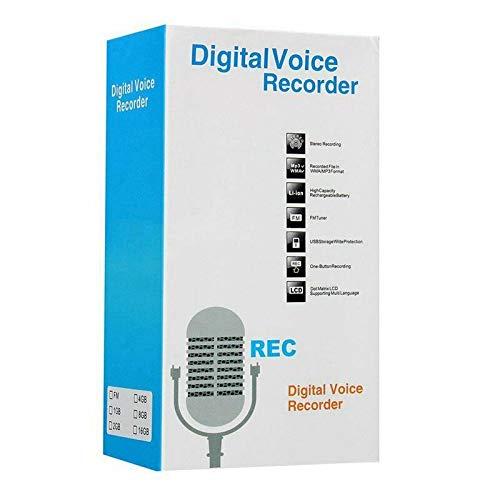
Figure 1: ELECTROPRIME Digital Voice Recorder with included accessories, including earphones, USB cable, and telephone adapter.
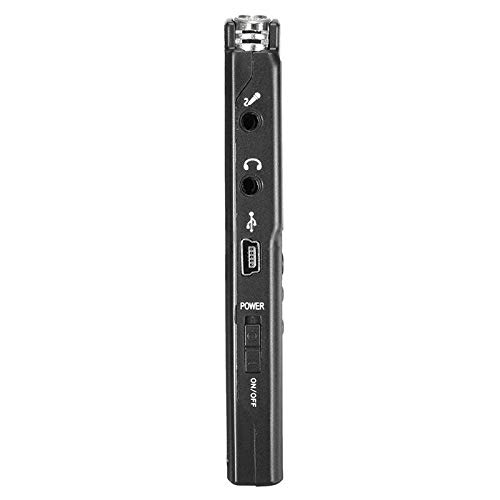
Figura 2: Lateral view of the recorder, highlighting the USB port, headphone jack, microphone input, and power switch.
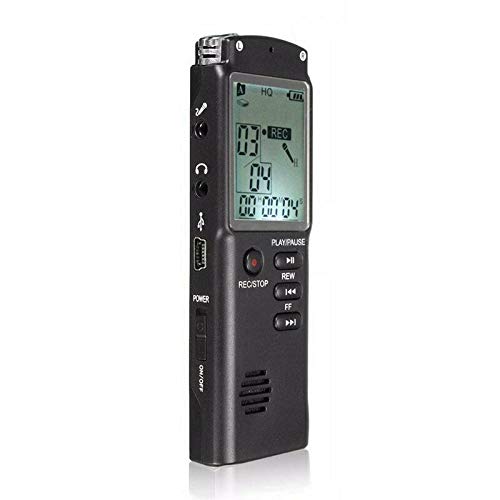
Figura 3: Frente view of the recorder, displaying the LCD screen with recording information and control buttons.
Configurar
- Carregando o dispositivo: Connect the recorder to a computer's USB port or a USB wall adapter using the provided USB cable. The LCD screen will indicate charging status. A full charge typically takes 2-3 hours.
- Ligar/desligar: Locate the ON/OFF switch on the side of the device. Slide it to the "ON" position to power on and to the "OFF" position to power off.
- Configuração inicial: Upon first power-on, you may need to set the date and time. Use the navigation buttons (REW, FF) and Play/Pause button to adjust and confirm settings.
Instruções de operação
Gravação de áudio
- Iniciar gravação: With the device powered on, press the REC/PARAR button once. The LCD will display "REC" and a timer, indicating that recording has started.
- Pausar gravação: Durante a gravação, pressione o REPRODUZIR/PAUSAR button to pause. Press it again to resume.
- Parar gravação: Pressione o REC/PARAR button again to stop recording. The recording will be saved automatically.
Reprodução de gravações
- Acessar gravações: In standby mode, use the REW or FF buttons to navigate through your saved recordings.
- Reproduzir/Pausar: Pressione o REPRODUZIR/PAUSAR button to start playback of the selected recording. Press again to pause.
- Ajustar volume: Use the volume control buttons (if present, typically on the side or via menu) to adjust playback volume.
Transferindo Files para um computador
- Conectar: Connect the recorder to your computer using the USB cable.
- Access Device: O gravador aparecerá como uma unidade de disco removível no seu computador.
- Transferência: Open the drive, locate your audio files (usually in a folder like "RECORD" or "VOICE"), and copy them to your computer.
Using as an MP3 Player
The device supports MP3 audio playback. Transfer MP3 files to the device's internal storage via USB connection. Use the REW e FF botões para selecionar faixas e REPRODUZIR/PAUSAR para controlar a reprodução.
Manutenção
- Limpeza: Use um pano macio e seco para limpar a parte externa do dispositivo. Não use produtos de limpeza líquidos ou solventes.
- Cuidados com a bateria: Para prolongar a vida útil da bateria, evite descarregar completamente o dispositivo com frequência. Carregue o dispositivo regularmente, mesmo que não o utilize por longos períodos.
- Armazenar: Guarde o dispositivo em local fresco e seco, longe da luz solar direta, temperaturas extremas e alta umidade.
- Evite o impacto: Proteja o dispositivo contra quedas e impactos, que podem danificar os componentes internos.
Solução de problemas
| Problema | Solução possível |
|---|---|
| O dispositivo não liga. | Ensure the battery is charged. Connect to a USB power source and try again. Check the ON/OFF switch position. |
| Cannot record audio. | Check if the device has sufficient memory. Delete old files if necessary. Ensure the microphone is not obstructed. |
| Dispositivo não reconhecido pelo computador. | Try a different USB port or cable. Ensure the device is powered on when connected. Restart your computer. |
| Qualidade de áudio ruim. | Ensure the recording environment is quiet. Keep the device close to the audio source. Check recording settings (if adjustable). |
Especificações
- Marca: ELETROPRIME
- Número do modelo: ASH20BEBUBEB26998
- Capacidade de armazenamento em memória: 8 GB
- Formato de áudio: MP3
- Interface de hardware: USB
- Dispositivos compatíveis: Leitor de MP3
- Fonte de energia: Bateria recarregável (carregamento USB)
Garantia e Suporte
Specific warranty information for this product is not provided in the available documentation. For warranty claims or technical support, please contact your retailer or the manufacturer, ELECTROPRIME, directly. Retain your proof of purchase for any warranty-related inquiries.
For further assistance, please refer to the official ELECTROPRIME website ou entre em contato com o departamento de atendimento ao cliente.