Introdução
This manual provides detailed instructions for the setup, operation, and maintenance of your LIGE BW0223 Smart Watch. Please read this guide thoroughly to ensure proper use and to maximize the features of your device. The LIGE BW0223 Smart Watch is designed to assist with fitness tracking, health monitoring, and smart notifications, compatible with both iOS and Android devices.
1. Configuração
1.1 Carregando o dispositivo
Before initial use, fully charge your LIGE BW0223 Smart Watch. Connect the magnetic charging cable to the charging contacts on the back of the watch and plug the USB end into a standard USB power adapter (5V/1A recommended). The watch display will indicate charging status. A full charge typically takes approximately 2 hours.

The back of the LIGE Smart Watch features a magnetic charging interface and advanced optical sensors for continuous monitoring of heart rate, blood pressure, and blood oxygen levels.
1.2 Instalação e emparelhamento do aplicativo
- Baixe o aplicativo complementar: Scan the QR code provided in the watch packaging or search for the designated companion app (e.g., 'FitPro' or 'LIGE Smart') in your smartphone's app store (App Store for iOS, Google Play Store for Android).
- Ativar Bluetooth: Certifique-se de que o Bluetooth esteja ativado em seu smartphone.
- Abra o aplicativo: Inicie o aplicativo instalado e siga as instruções na tela para criar uma conta ou fazer login.
- Emparelhe o relógio: Within the app, navigate to the device management section (often labeled 'Device', 'My Device', or 'Add Device'). The app will search for available Bluetooth devices. Select 'BW0223' or 'LIGE Smart Watch' from the list to initiate pairing. Confirm the pairing request on both your phone and the watch if prompted.
1.3 Configurações iniciais
After successful pairing, complete your personal profile within the app, including gender, age, height, and weight. This information helps improve the accuracy of fitness and health data. You can also set preferences for units of measurement (metric/imperial) and time format (12/24-hour).
2. Instruções de operação
2.1 Tela e Navegação
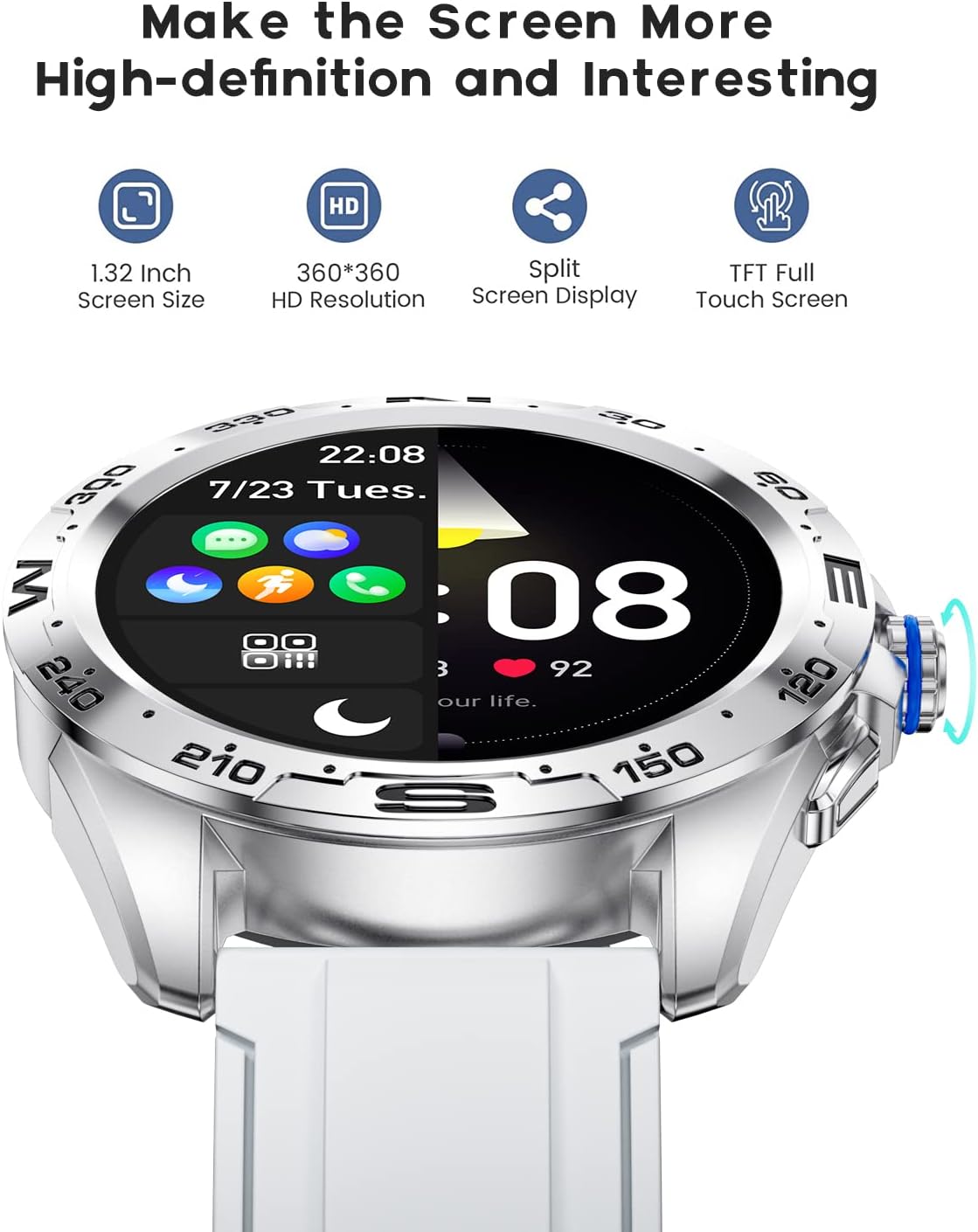
The LIGE BW0223 Smart Watch features a 1.28-inch full touch screen with 360x360 HD resolution. Navigate the watch interface using touch gestures:
- Deslize para cima/para baixo: Navegue pelos menus ou notificações.
- Deslize para a esquerda/direita: Acesse funções rápidas ou diferentes telas de dados.
- Tocar: Selecione um item ou confirme uma ação.
- Pressione o botão lateral: Retorne à tela inicial ou ligue/desligue o dispositivo.

The LIGE Smart Watch features a 1.28-inch full touch screen with 360x360 HD resolution, offering clear visuals and responsive interaction. It supports a split-screen display for quick access to functions.
2.2 Modos Esportivos
The watch supports 7 sports modes, including walking, running, cycling, and climbing. To access:
- Swipe on the watch face to find the 'Sports' or 'Workout' icon.
- Tap to select your desired activity.
- Tap 'Start' to begin tracking. The watch will record duration, steps, calories burned, and distance.
- To end a workout, swipe right or press the side button, then select 'End' or 'Pause'.
2.3 Monitoramento de Saúde
The LIGE BW0223 Smart Watch provides 24/7 heart rate tracking, blood pressure, and blood oxygen monitoring. These measurements are for reference only and should not be used for medical diagnosis.
- Frequência cardíaca: Deslize para acessar a interface de frequência cardíaca para view your current heart rate. The watch continuously monitors your heart rate throughout the day.
- Pressão arterial/Oxigenação sanguínea: Swipe to the respective interfaces and tap to initiate a measurement. Ensure the watch is snug on your wrist for accurate readings.
- Monitoramento do sono: Wear the watch to bed, and it will automatically track your sleep patterns, including deep sleep, light sleep, and wake-up times. View Dados detalhados sobre o sono no aplicativo complementar.
2.4 Chamadas Bluetooth
After pairing your watch with the app and enabling the Bluetooth call function (usually a separate Bluetooth connection in your phone's settings, e.g., 'BW0223_CALL'), you can make and receive calls directly from your watch.
- Fazendo chamadas: Access the 'Dialer' or 'Contacts' function on your watch to dial a number or select a contact.
- Recebendo chamadas: Quando uma chamada for recebida, o relógio exibirá o identificador de chamadas. Toque no ícone verde para atender ou no ícone vermelho para rejeitar.
- O relógio possui microfone e alto-falante integrados para comunicação sem usar as mãos.

With the LIGE Smart Watch, you can make and receive Bluetooth calls directly from your wrist. It includes a built-in microphone and speaker for convenient communication.
2.5 Notificações de mensagens
Enable message notifications through the companion app to receive alerts for SMS, calls, and various social media applications (e.g., Facebook, Twitter, WhatsApp, LinkedIn, Instagram) directly on your watch.
- Ensure the app has necessary permissions to access notifications on your smartphone.
- Configure which apps send notifications to your watch within the companion app settings.
- Deslize para baixo no mostrador do relógio para view notificações recentes.

The LIGE Smart Watch provides call and message reminders, displaying notifications from SMS, Facebook, Twitter, WhatsApp, LinkedIn, and Instagram directly on your wrist.
NUNCA personalização
Personalize your watch by changing watch faces. Many options are available directly on the watch or through the companion app.
- Em observação: Long-press the watch face, then swipe left or right to browse available faces. Tap to select.
- Através do aplicativo: Open the companion app, navigate to 'Dial Market' or 'Watch Faces' to explore and download additional designs.
Personalize your LIGE Smart Watch with a variety of customizable watch faces and a rich user interface. Choose from different styles to match your preference and occasion.
3. Manutenção
3.1 Limpeza do Relógio
Limpe seu relógio regularmente para garantir o melhor desempenho e higiene. Use um pano macio e sem fiapos para limpar a tela e a caixa do relógio. Para sujeira mais difícil, use um pano levemente umedecido.ampen the cloth with water. Avoid using harsh chemicals, abrasive materials, or strong detergents.
3.2 Resistência à água (IP68)
The LIGE BW0223 Smart Watch is IP68 waterproof, meaning it is resistant to dust and can withstand immersion in water up to 1.5 meters for 30 minutes. It is suitable for daily use, such as hand washing, rain, and splashes.
Limitações importantes:
- Do not wear the watch in hot showers, saunas, or steam rooms, as steam and hot water can compromise the seals.
- Avoid diving or high-pressure water activities.
- Do not operate buttons or the touchscreen underwater.
- Se o relógio se molhar, seque-o completamente antes de carregar ou usar.
3.3 Cuidados com a bateria
Para prolongar a vida da bateria:
- Evite temperaturas extremas.
- Carregue o relógio regularmente, mas evite deixá-lo completamente descarregado por longos períodos.
- Reduce screen brightness and disable unnecessary notifications or features if battery life is a concern.
4. Solução De Problemas
4.1 O relógio não liga nem carrega.
- Certifique-se de que o cabo de carregamento esteja firmemente conectado tanto ao relógio quanto à fonte de alimentação.
- Verify the power adapter and USB port are functional.
- Clean the charging contacts on the watch and cable to remove any dust or debris.
- Allow the watch to charge for at least 30 minutes before attempting to power it on.
4.2 Problemas de conexão Bluetooth
- Certifique-se de que o Bluetooth esteja ativado no seu smartphone e no relógio.
- Mantenha o relógio dentro do alcance do Bluetooth do seu smartphone (normalmente 10 metros).
- Reinicie o smartphone e o relógio.
- Unpair the watch from your phone's Bluetooth settings and re-pair it through the companion app.
- Certifique-se de que o aplicativo complementar esteja sendo executado em segundo plano e tenha as permissões necessárias.
4.3 Notifications Not Working
- Verify the watch is successfully paired with the companion app.
- Verifique as configurações de notificação no aplicativo complementar para garantir que os aplicativos desejados estejam ativados.
- Ensure your smartphone's notification access is granted to the companion app (check phone settings: Apps & notifications > Special app access > Notification access).
- Desative o modo "Não perturbe" tanto no seu telefone quanto no seu relógio.
4.4 Leituras de saúde imprecisas
- Certifique-se de que o relógio esteja bem ajustado ao seu pulso, a cerca de um dedo de distância do osso do pulso.
- Mantenha o sensor limpo e livre de suor ou sujeira.
- Remain still during measurements for best accuracy.
- Remember that health data from smartwatches is for reference and not intended for medical use.
5. Especificações
| Número do modelo | BW0223 |
| Marca | LIGE |
| Tamanho da tela | 1.28 polegadas |
| Entrada de Interface Humana | Tela sensível ao toque |
| Tecnologia de Conectividade | Bluetooth |
| Classificação de resistência à água | IP68 |
| Tipo de Bateria | Polímero de lítio |
| Forma | Redondo |
| Peso do item | 7 onças |
6. Informações de garantia
The LIGE BW0223 Smart Watch comes with a standard limited warranty against manufacturing defects. The warranty period typically covers 12 months from the date of purchase. This warranty does not cover damage caused by misuse, accidents, unauthorized modifications, or failure to follow the instructions in this manual. Please retain your proof of purchase for warranty claims.
7. Suporte ao cliente
If you encounter any issues or have questions not covered in this manual, please contact LIGE customer support. Refer to the contact information provided with your product packaging or visit the official LIGE website para obter assistência.


