1. Introdução
Thank you for choosing the Hoco BS31 Bright Sound Sports Wireless Speaker. This manual provides essential information for the proper setup, operation, and maintenance of your device. Please read it thoroughly before use to ensure optimal performance and longevity.
2. Produto acabadoview e Características
The Hoco BS31 is a compact and portable wireless speaker designed for versatile audio playback. It features robust connectivity options and a durable design, making it suitable for various environments.
- Wireless V4.2 JLAC6928B for stable and efficient connection.
- Integrated 53mm speaker for clear audio output.
- Class A polymer battery with 500mAh capacity for extended playback.
- Multiple playback modes: Wireless (Bluetooth), TF card, and AUX input.
- Compact and lightweight design, weighing only 140g.
- Supports A2DP, AVRCP, HFP, HSP protocols for broad compatibility.

Imagem: Frente view of the Hoco BS31 speaker in army green, showcasing its compact design and front controls.

Image: The Hoco BS31 speaker held in a hand, demonstrating its small, palm-sized, and portable nature.
3. Conteúdo da embalagem
Por favor, verifique se a embalagem contém os seguintes itens:
- Hoco BS31 Wireless Speaker
- Cabo de carregamento USB
- Manual do usuário
4. Controles e Interfaces
Familiarize yourself with the speaker's buttons and ports for proper operation.
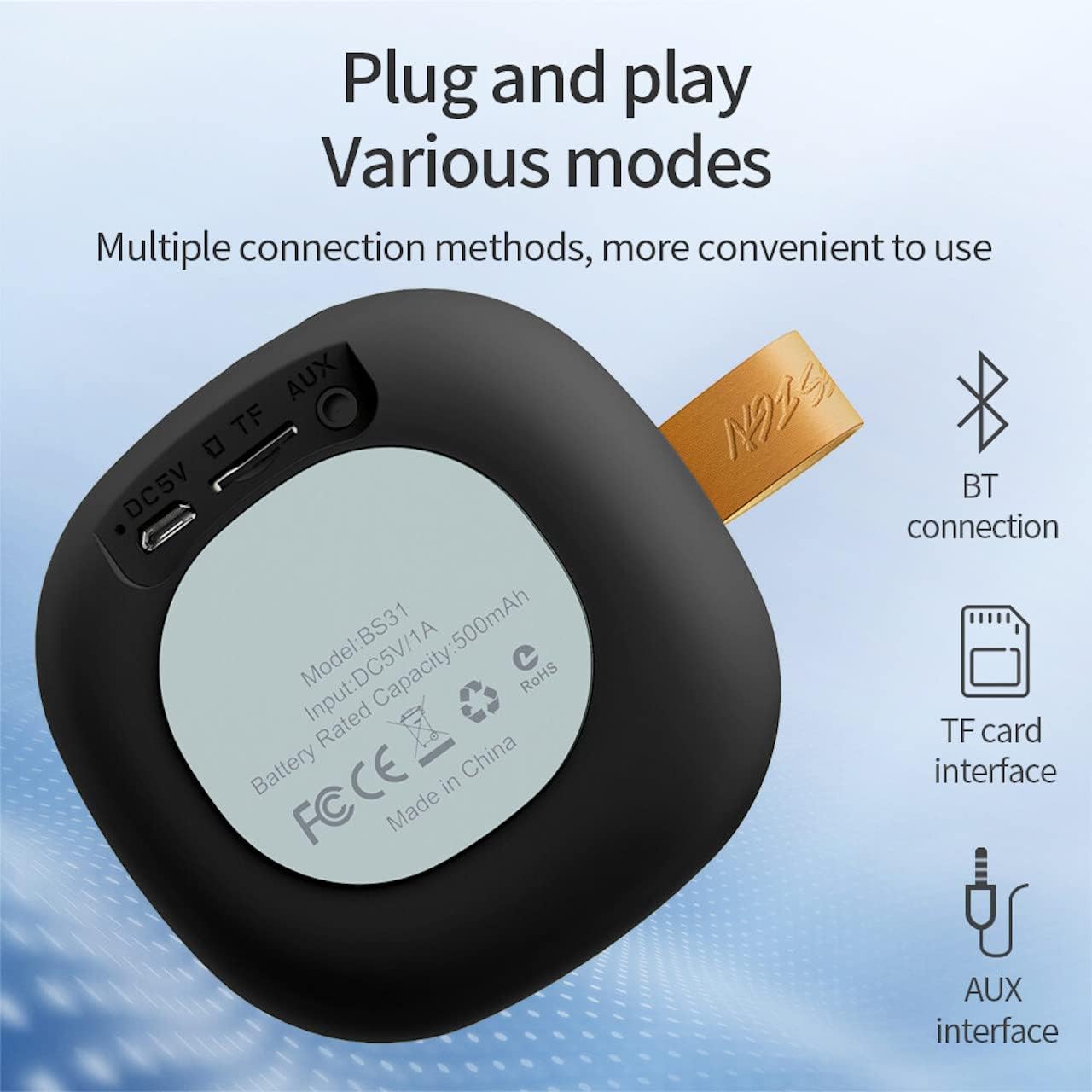
Image: A diagram illustrating the functions of the control buttons on the Hoco BS31 speaker.
- Botão liga/desliga (⏻): Press and hold to switch on/off. Short press to play/pause music or answer/end calls.
- Previous Song / Volume Up (⏮): Short press for previous song. Long press to increase volume.
- Next Song / Volume Down (⏭): Short press for next song. Long press to decrease volume.
- Mode Button (⏸): Pressione rapidamente para alternar entre os modos Bluetooth, cartão TF e AUX.

Imagem: Traseira view of the Hoco BS31 speaker, highlighting the DC 5V charging port, TF card slot, and AUX input.
- Porta DC 5V: Para carregar a caixa de som usando o cabo USB fornecido.
- Slot para cartão TF: Insira um cartão TF (MicroSD) para reprodução direta de música.
- Porta AUX: Conecte dispositivos de áudio externos usando um cabo de áudio de 3.5 mm.
5. Configuração
5.1. Carregando o alto-falante
Before first use, fully charge the speaker. Connect the provided USB charging cable to the DC 5V port on the speaker and the other end to a USB power adapter (not included) or a computer's USB port. The charging time is approximately 2 hours. The indicator light will show charging status (e.g., red for charging, off when fully charged).
5.2. Ligar / desligar
To power on the speaker, press and hold the Power button (⏻) until you hear an audible prompt. To power off, press and hold the Power button again until the speaker shuts down.
6. Instruções de operação
6.1. Emparelhamento Bluetooth
- Ensure the speaker is powered on and in Bluetooth pairing mode (indicated by a flashing blue light or audible prompt). If not, short press the Mode button (⏸) to switch to Bluetooth mode.
- No seu dispositivo móvel (smartphone, tablet, etc.), ative o Bluetooth e procure por dispositivos disponíveis.
- Select "Hoco BS31" from the list of found devices.
- Once paired, the speaker will indicate a successful connection (e.g., solid blue light or audible prompt).
- You can now play audio from your device through the Hoco BS31 speaker.
6.2. Modo de cartão TF
Insira um cartão TF (MicroSD) com áudio MP3. files into the TF card slot. The speaker will automatically detect the card and switch to TF card playback mode. Use the Previous/Next Song buttons to navigate tracks.
6.3. Modo AUX
Connect one end of a 3.5mm audio cable (not included) to the AUX port on the speaker and the other end to the audio output jack of your external device (e.g., MP3 player, computer). The speaker will automatically switch to AUX mode. Control playback from your external device.

Image: Visual representation of the Hoco BS31's multiple connection methods, including Bluetooth, TF card, and AUX.
6.4. Music Playback and Call Functions
- Reproduzir/Pausar: Short press the Power button (⏻).
- Próxima música: Short press the Next Song button (⏭).
- Música anterior: Short press the Previous Song button (⏮).
- Aumentar o volume: Long press the Previous Song button (⏮).
- Volume baixo: Long press the Next Song button (⏭).
- Atender/encerrar chamada: Short press the Power button (⏻) when a call comes in.
- Rejeitar chamada: Press and hold the Power button (⏻) when a call comes in.

Image: The Hoco BS31 speaker positioned next to a smartphone, demonstrating its use for music playback.
7. Manutenção e Cuidados
- Mantenha o alto-falante seco. Não o exponha à água ou umidade excessiva.
- Limpe o alto-falante com um pano macio e seco. Não use produtos de limpeza abrasivos ou solventes.
- Evite temperaturas extremas. Não guarde a caixa de som em ambientes muito quentes ou muito frios.
- Do not attempt to disassemble or repair the speaker yourself. This will void the warranty and may cause damage.
- Carregue a caixa de som regularmente, mesmo quando não estiver em uso, para manter a vida útil da bateria.
8. Solução De Problemas
| Problema | Possível causa | Solução |
|---|---|---|
| A caixa de som não liga. | Bateria fraca. | Carregue a caixa de som por pelo menos 30 minutos. |
| Não é possível emparelhar com o dispositivo Bluetooth. | O alto-falante não está em modo de emparelhamento; o Bluetooth do dispositivo está desligado; os dispositivos estão muito distantes. | Ensure speaker is in pairing mode. Turn Bluetooth on/off on device. Move devices closer. |
| Nenhum som. | Volume muito baixo; modo incorreto; dispositivo não está reproduzindo. | Increase speaker/device volume. Check correct mode (BT, TF, AUX). Ensure audio is playing on source device. |
| Cartão TF não reconhecido. | Cartão inserido incorretamente; formato não suportado; cartão corrompido. | Reinsira o cartão TF. Certifique-se de que... files are MP3 format. Try a different TF card. |
9. Especificações
| Recurso | Detalhe |
|---|---|
| Modelo | BS31 |
| Tamanho do alto-falante | 53 mm |
| Dimensões | 86 x 86 x 44 mm |
| Peso | 140g |
| Versão sem fio | V4.2 (JLAC6928B) |
| Protocolos Suportados | A2DP, AVRCP, HFP, HSP |
| Capacidade da bateria | 500mAh (Class A polymer battery) |
| Vol de cargatage | Corrente contínua 5 V |
| Tempo de carregamento | Aproximadamente 2 horas |
| Música/tempo de chamada | Aproximadamente 3 horas |
| Opções de conectividade | Wireless (Bluetooth), TF card, AUX |
| Potência máxima de saída | 5 Watts |
10. Garantia e Suporte
Hoco products are manufactured to high quality standards. For warranty information and technical support, please refer to the warranty card included with your product or visit the official Hoco website.
Oficial Website: www.hocotech.com


