1. Introdução
This manual provides detailed instructions for the Amazon Basics Aluminum Type-C Docking Station. This device expands the connectivity of your USB-C enabled laptop or tablet, offering a wide range of ports for various peripherals and external displays. Please read this manual thoroughly before use to ensure proper operation and to maximize the product's functionality.
2. Recursos do Produto
- 11-in-1 Multi-Port Design: Integrates Mini DisplayPort, HDMI, VGA, 3 USB-A ports, Ethernet, SD/TF card reader, 3.5mm audio jack, and a Type-C charging port (PD 100W).
- Saída de vídeo em alta resolução: Supports Ultra HD 4K output via Mini DisplayPort/HDMI and Full HD 1080P via VGA, allowing for mirroring or extending your display to HDTVs, monitors, or projectors. Note: 4K resolution is supported at 30Hz refresh rate.
- Transferência rápida de dados: Three USB 3.0 A ports provide data transfer speeds up to 5Gbps, backward compatible with USB 2.0/1.0.
- Conexão de rede estável: 1000Mbps RJ45 Ethernet port ensures a fast and reliable wired network connection.
- Leitor de cartão universal: Integrated SD and TF slots allow simultaneous reading of universal SD and Micro SD memory cards.
- Fornecimento de energia: Type-C charging port supports Power Delivery (PD) up to 100 watts for charging your host device.
- Conectividade de áudio: Entrada de áudio de 3.5 mm para fones de ouvido ou alto-falantes.
- Construção durável: Features an aluminum pedestal-style housing for enhanced durability and heat dissipation.
3. Conteúdo da embalagem
- Amazon Basics Aluminum Type-C Docking Station
- Manual do usuário
4. Produto acabadoview and Port Layout
Familiarize yourself with the various ports and their functions on your docking station.

Imagem: Close-up view of the Amazon Basics Type-C Docking Station's ports, including Ethernet, Mini DisplayPort, HDMI, VGA, and USB-C.
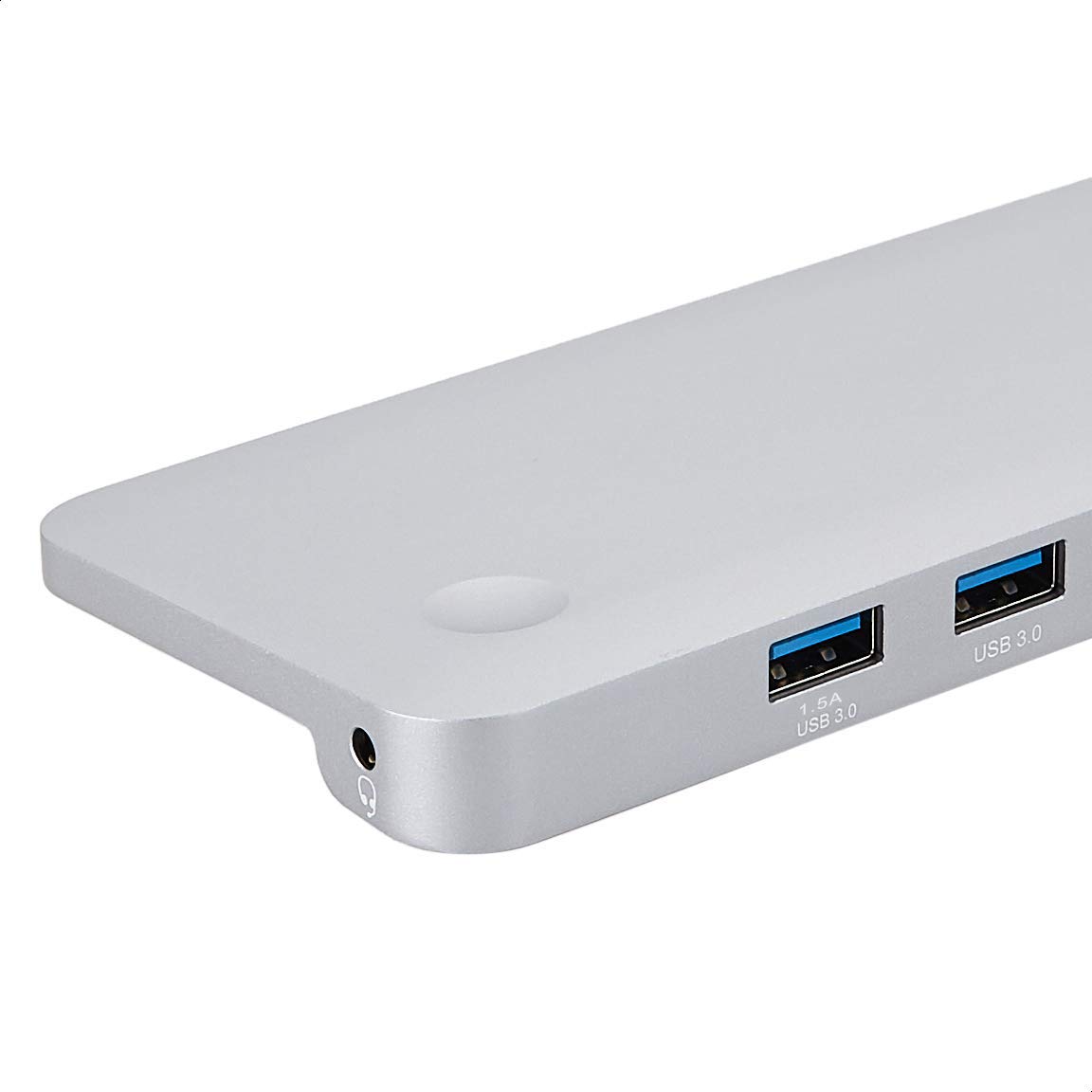
Imagem: Detalhada view of the USB 3.0 ports and 3.5mm audio jack on the Amazon Basics Type-C Docking Station.
- Conector host USB-C: Connects to your laptop or tablet's USB-C port.
- Portas USB 3.0 (x3): For connecting USB devices such as external hard drives, keyboards, mice, or USB flash drives.
- Slot para cartão SD: For reading standard SD memory cards.
- Slot para cartão TF (Micro SD): Para leitura de cartões de memória Micro SD.
- Porta Ethernet RJ45: Para conexão de rede com fio.
- Mini DisplayPort: Para conectar a um monitor externo.
- Porta HDMI: Para conectar a um monitor externo.
- Porta VGA: Para conectar a um monitor externo.
- Conector de áudio de 3.5 mm: Para conectar fones de ouvido ou alto-falantes.
- Porta de carregamento USB C PD: For connecting a USB-C power adapter to charge your host device and power the docking station.
5. Instruções de configuração
Siga estes passos para configurar sua estação de acoplamento:
- Conectar ao dispositivo host: Plug the integrated USB-C host connector cable from the docking station into an available USB-C port on your laptop or tablet. Ensure your host device's USB-C port supports DisplayPort Alt Mode (DP Alt Mode) for video output functionality.
- Conectar à energia (opcional, mas recomendado): If your host device requires charging or if you are connecting power-intensive peripherals, connect your USB-C power adapter (up to 100W) to the USB-C PD Charging Port on the docking station. This will charge your host device and provide stable power to the docking station and connected peripherals.
- Conecte periféricos: Connect your desired peripherals (e.g., external monitors, USB devices, Ethernet cable, SD/TF cards, audio devices) to the corresponding ports on the docking station.

Image: Amazon Basics Type-C Docking Station connected to a laptop, with multiple peripherals like a USB drive and external display cables plugged in.
6. Instruções de operação
6.1. Saída de vídeo
- Connect your monitor or projector to the HDMI, Mini DisplayPort, or VGA port.
- Your operating system should automatically detect the external display. You may need to adjust display settings (e.g., extend, duplicate) in your computer's display preferences.
- The docking station supports 4K resolution at 30Hz refresh rate via HDMI and Mini DisplayPort. For optimal performance, ensure your display and cables support the desired resolution and refresh rate.
- Dual video display is supported, allowing you to mirror or expand your screen across multiple monitors.
6.2. USB Data Transfer
- Plug your USB devices into the USB 3.0 ports.
- The ports support data transfer speeds up to 5Gbps.
6.3. Conexão Ethernet
- Connect an Ethernet cable from your router or modem to the RJ45 Ethernet port on the docking station.
- Your computer should automatically establish a wired network connection.
6.4. SD/TF Card Reader
- Insert your SD or TF (Micro SD) card into the corresponding slot.
- The cards will appear as removable drives on your computer, allowing you to access and transfer files. Both slots can be used simultaneously.
6.5. Saída de áudio
- Connect your headphones or speakers to the 3.5mm audio jack.
- You may need to select the docking station as the default audio output device in your computer's sound settings.
6.6. Power Delivery (PD)
- Connect your laptop's USB-C power adapter to the USB-C PD Charging Port on the docking station.
- This port supports up to 100W power delivery to charge your host device while using the docking station.
7. Compatibilidade
This docking station is compatible with a wide range of USB-C enabled devices, including but not limited to:
- MacBook Pro 2018/2017/2016
- iPad Pro 2018
- Mac mini 2018
- MacBook Air
- iMac 2017
- Samsung Note9
- HUAWEI MateBook X
- Dell XPS 13
- ThinkPad
- Chromebook
Importante: This product functions only with computers that support DisplayPort Alt Mode (DP Alt Mode) via their USB-C port. Please verify your computer's specifications for compatibility before use.
8. Solução De Problemas
- Sem saída de vídeo:
- Certifique-se de que a porta USB-C do seu dispositivo host seja compatível com o Modo Alternativo DisplayPort.
- Check all cable connections (USB-C to host, video cable to monitor).
- Verify the external monitor is powered on and set to the correct input source.
- Tente reiniciar o computador.
- 4K Resolution Not Working at 60Hz:
- This docking station supports 4K resolution at a maximum refresh rate of 30Hz. If your monitor is set to 4K@60Hz, it will not display correctly. Adjust your display settings to 4K@30Hz or a lower resolution with a higher refresh rate if desired.
- USB Devices Not Recognized or Disconnecting:
- Ensure the docking station is receiving sufficient power. Connect a USB-C power adapter to the PD port if you are using multiple power-intensive USB devices.
- Try connecting the USB device directly to your computer to confirm it is functional.
- Reconnect the docking station to your computer.
- No Network Connection via Ethernet:
- Verifique a conexão do cabo Ethernet tanto na estação de acoplamento quanto no seu roteador/modem.
- Verify your network settings on your computer.
- Verifique se o seu roteador/modem está funcionando corretamente.
- Sem saída de áudio:
- Ensure your headphones or speakers are properly connected to the 3.5mm audio jack.
- Check your computer's sound settings and select the docking station as the default audio output device.
- Host Device Not Charging:
- Ensure a compatible USB-C power adapter is connected to the docking station's USB-C PD Charging Port.
- Verify that your host device supports USB-C Power Delivery.
- Verifique se o adaptador de energia e o cabo estão danificados.
9. Especificações
| Recurso | Especificação |
|---|---|
| Marca | Noções básicas sobre a Amazon |
| Número do modelo | UTC-DOCK01-PRO |
| Cor | Cinza |
| Dimensões (CxLxA) | 28 x 7.5 x 1.4 Centimeters (11.02 x 2.95 x 0.55 Inches) |
| Peso do item | 317 g (0.32 quilogramas) |
| Total de portos | 11 |
| Portas USB | 3 x USB 3.0 Tipo A |
| Portas de saída de vídeo | 1 x HDMI, 1 x Mini DisplayPort, 1 x VGA |
| Resolução HDMI | Até 4K@30Hz |
| Mini DisplayPort Resolution | Até 4K@30Hz |
| Porta Ethernet | RJ45 Gigabit Ethernet (10/100/1000Mbps) |
| Leitor de cartão | SD and TF (Micro SD) slots, simultaneous read |
| Porto de áudio | 3.5mm Áudio Jack |
| Porta de carregamento USB-C PD | Até 100 Watts |
| interface de hardware | Ethernet, HDMI, Mini DisplayPort, VGA, USB-A, USB-C, SD/TF, Audio |
10. Manutenção
- Limpeza: Use a soft, dry cloth to clean the docking station. Avoid using liquid cleaners or aerosols.
- Armazenar: Guarde o dispositivo em local fresco e seco, longe da luz solar direta e de temperaturas extremas.
- Manuseio: Avoid dropping or subjecting the device to strong impacts. Do not attempt to disassemble or modify the docking station.
11. Informações de segurança
- Mantenha o dispositivo longe de água, fogo e ambientes com alta umidade.
- Não exponha o dispositivo a temperaturas extremas.
- Utilize apenas adaptadores e cabos de energia compatíveis.
- Mantenha fora do alcance de crianças.
- Caso o dispositivo esteja danificado ou apresente mau funcionamento, interrompa o uso imediatamente e entre em contato com o suporte ao cliente.
12. Garantia e Suporte
This Amazon Basics product comes with a Garantia limitada de 1 anos from the date of purchase. This warranty covers manufacturing defects and workmanship under normal use. It does not cover damage caused by misuse, accident, modification, or unauthorized repair.
For warranty claims, technical support, or further assistance, please contact Amazon Basics customer service through your Amazon purchase history or the official Amazon Basics support channels.


