Introdução
Thank you for choosing the TOPTECH Jet-4 Portable Bluetooth Speaker. This manual provides essential information for setting up, operating, and maintaining your speaker to ensure optimal performance and longevity. Please read this manual thoroughly before using the product.

Image: The TOPTECH Jet-4 Bluetooth Speaker, showcasingraças ao seu design compacto e à iluminação LED vibrante.
Informações de segurança
To prevent fire or shock hazards, always follow basic safety precautions when using this product:
- Não exponha o alto-falante à chuva ou umidade.
- Não desmonte nem modifique o alto-falante. Encaminhe todos os serviços de manutenção a pessoal qualificado.
- Mantenha a caixa de som longe da luz solar direta, fontes de calor e temperaturas extremas.
- Evite deixar cair ou submeter o alto-falante a impactos fortes.
- Utilize apenas o cabo de carregamento e o adaptador de energia especificados.
Conteúdo da embalagem
- Alto-falante Bluetooth TOPTECH Jet-4
- Cabo de carregamento USB
- Manual do usuário
Produto acimaview
Controles e portas
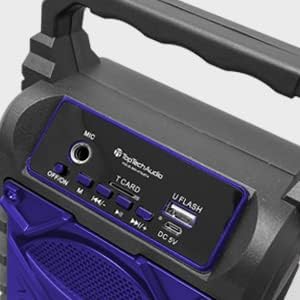
Imagem: Detalhada view of the speaker's top control panel, showing various buttons and input ports.
- Entrada de microfone: Connect an external microphone for karaoke.
- Interruptor DESLIGAR/LIGAR: Power the speaker on or off.
- Botão M (Modo): Switch between Bluetooth, AUX, USB, and TF Card modes.
- Previous / Volume Down Button: Pressione rapidamente para a faixa anterior, pressione e segure para diminuir o volume.
- Botão Reproduzir / Pausar: Reproduzir ou pausar a reprodução de áudio.
- Next / Volume Up Button: Pressione rapidamente para a próxima faixa, pressione e segure para aumentar o volume.
- T CARD Slot: Insert a TF (MicroSD) card for direct audio playback.
- Porta U FLASH (USB): Insira um pen drive USB para reprodução direta de áudio.
- Porta DC 5V: Connect the USB charging cable to power and charge the speaker.
Principais características

Image: An infographic showing the TOPTECH Jet-4 speaker with icons representing its key features: easy portability, mic port, mode karaoke, disco light, TF card port, and USB port.
- Som poderoso: Dual-driver stereo output delivers crisp highs and deep bass for a premium audio experience.
- Reprodução em vários modos: Supports Bluetooth, AUX, USB, and TF card input for versatile music streaming.
- Karaokê pronto: Built-in karaoke mode with light effects and mic support makes any party more fun.
- TWS Pairing Support: Connect two speakers wirelessly for immersive, room-filling sound.
- Bateria de longa duração: Enjoy up to 6 hours of playtime with a rechargeable battery, perfect for all-day events.
Configurar
Carga Inicial
Before first use, fully charge the speaker. Connect the provided USB charging cable to the DC 5V port on the speaker and the other end to a USB power adapter (not included) or a computer USB port.

Image: A visual representation of a fully charged battery, symbolizing the speaker's long battery life.
The charging indicator light will illuminate during charging and turn off or change color when fully charged. A full charge typically takes a few hours.
Instruções de operação
Emparelhamento Bluetooth
- Turn on the speaker by sliding the OFF/ON switch to the 'ON' position. The speaker will enter Bluetooth pairing mode automatically, indicated by a flashing LED light and an audible prompt.
- Ative o Bluetooth no seu smartphone, tablet ou outro dispositivo com Bluetooth.
- Procurar available Bluetooth devices and select "JET-4" from the list.
- Assim que estiver conectado, o alto-falante emitirá um sinal sonoro de confirmação e a luz LED parará de piscar.
- Agora você pode reproduzir áudio do seu dispositivo através do alto-falante.
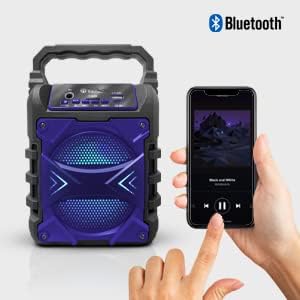
Image: The TOPTECH Jet-4 speaker positioned next to a smartphone, illustrating the seamless Bluetooth connection process.
Playback Modes (AUX, USB, TF Card)
Pressione o botão 'M' (Modo) para alternar entre os modos de reprodução disponíveis:
- Modo AUX: Connect an external audio device using a 3.5mm audio cable (not included) to the AUX input.
- Modo USB: Insert a USB flash drive into the 'U FLASH' port. The speaker will automatically detect and play compatible audio files.
- Modo de cartão TF: Insert a TF (MicroSD) card into the 'T CARD' slot. The speaker will automatically detect and play compatible audio files.
Modo Karaokê
To use the karaoke function, connect a microphone (not included) to the 'MIC' input port. Adjust the microphone volume as needed. The speaker's built-in light effects will enhance the karaoke experience.
TWS Pairing (True Wireless Stereo)
For an enhanced stereo sound experience, you can pair two TOPTECH Jet-4 speakers together:
- Ensure both Jet-4 speakers are powered on and not connected to any Bluetooth device.
- On one speaker (this will be the primary speaker), long press the 'M' (Mode) button until you hear a pairing tone.
- Os dois alto-falantes se conectarão automaticamente. Assim que a conexão for estabelecida, você ouvirá um sinal sonoro de confirmação.
- Now, connect your Bluetooth device to the primary speaker as described in the 'Bluetooth Pairing' section. Audio will play through both speakers in stereo.

Image: Two TOPTECH Jet-4 speakers wirelessly connected to a smartphone, demonstrating the True Wireless Stereo (TWS) pairing feature for expanded sound.
Manutenção
- Limpe o alto-falante com um pano macio e seco. Não use produtos de limpeza abrasivos ou solventes.
- Guarde o alto-falante em local fresco e seco quando não estiver em uso.
- Avoid prolonged exposure to extreme temperatures or humidity.
Solução de problemas
| Problema | Solução |
|---|---|
| A caixa de som não liga. | Certifique-se de que a bateria esteja carregada. Conecte a caixa de som a uma fonte de energia usando o cabo USB. |
| Sem som no alto-falante. | Check the volume level on both the speaker and your connected device. Ensure the correct playback mode is selected. |
| O emparelhamento Bluetooth falha. | Ensure the speaker is in pairing mode. Turn off Bluetooth on your device and turn it back on. Try restarting both the speaker and your device. Make sure no other devices are connected to the speaker. |
| Má qualidade de som. | Move the speaker closer to your Bluetooth device to reduce interference. Ensure the audio source is of good quality. |
Especificações
| Recurso | Detalhe |
|---|---|
| Marca | TOPTECH |
| Número do modelo | JET-4-BLUE |
| Fonte de energia | Alimentado por bateria |
| Tecnologia de Conectividade | Bluetooth, USB |
| Entrada de áudio | Guitar Input, Karaoke Input, USB |
| Número de canais | 2 |
| Material | Plástico, Metal |
| Peso do item | 1.54 libras |
| Dimensões da embalagem | 9.29 x 6.38 x 4.17 polegadas |
| UPC | 689259338593 |
Garantia e Suporte
Para informações sobre garantia e suporte ao cliente, consulte os detalhes de contato fornecidos na embalagem do produto ou visite o site oficial da TOPTECH. webGuarde o comprovante de compra como prova para eventuais solicitações de garantia.