1. Introdução
Obrigado pela compra.asing the Lenco SPR-100BK Splash-Proof Bluetooth Speaker. This portable speaker delivers powerful sound with strong bass and features FM radio, USB, SD card playback, and integrated light effects. Designed for durability, it is splash-proof, making it suitable for various environments. This manual provides essential information for safe and optimal use of your device.
2. Instruções importantes de segurança
- Não exponha o dispositivo a temperaturas extremas, luz solar direta ou alta umidade.
- Ensure the charging port cover is securely closed when near water to maintain splash-proof integrity.
- Não desmonte nem modifique o dispositivo. Encaminhe todos os serviços de manutenção a pessoal qualificado.
- Utilize apenas o cabo de carregamento especificado.
- Mantenha o dispositivo longe de campos magnéticos fortes.
- Evite deixar cair ou submeter o dispositivo a impactos fortes.
3. Produto acabadoview
Familiarize yourself with the components of your Lenco SPR-100BK speaker.
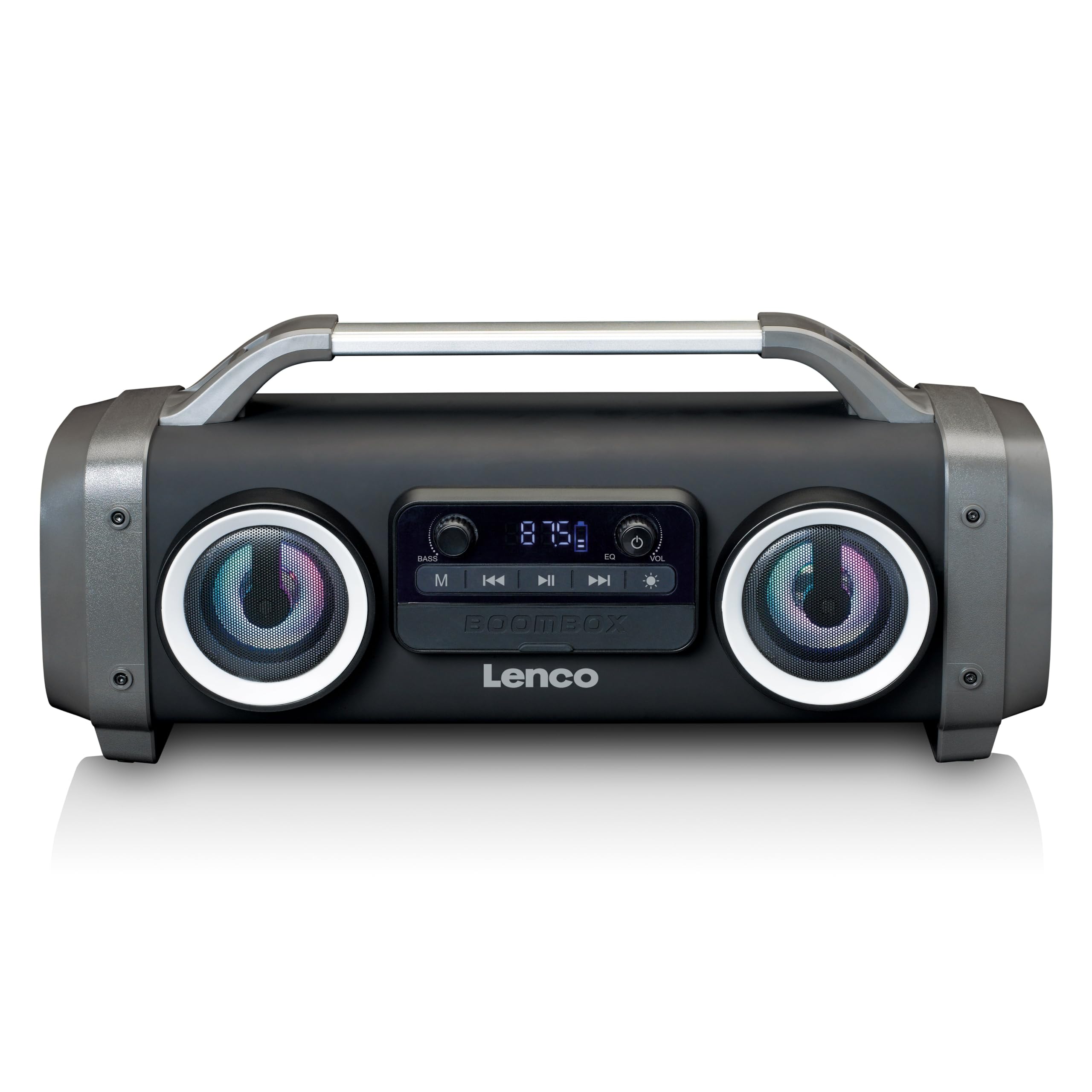
Figura 1: Frente view of the Lenco SPR-100BK speaker, showing the main speaker grille, control panel, and integrated light effects.
3.1 Controles e Portas
- Botão de energia: Liga ou desliga o alto-falante.
- Botão de modo: Switches between Bluetooth, FM Radio, USB, SD, and AUX modes.
- Botão Reproduzir/Pausar: Reproduz ou pausa o áudio.
- Botão de controle de volume: Ajusta o volume principal.
- Botão de reforço de graves: Ajusta o nível de graves.
- Botão de efeito de luz: Cycles through or turns off light effects.
- Porta USB: Para reprodução a partir de pen drives USB.
- Slot para cartão SD: Para reprodução em cartão SD.
- Entrada AUX (3.5 mm): Para conectar dispositivos de áudio externos.
- Charging Port (Mini USB): Para carregar a bateria interna.
4. Configuração
4.1 Desembalagem
Carefully remove the speaker and all accessories from the packaging. Ensure the following items are present:
- Lenco SPR-100BK Bluetooth Speaker
- Cabo de carregamento USB
- Cabo de áudio de 3.5 mm (cabo AUX)
- Manual do usuário
4.2 Carregando a bateria
- Locate the Mini USB charging port on the speaker.
- Connect the supplied USB charging cable to the speaker's charging port.
- Connect the other end of the USB cable to a compatible USB power adapter (5V/1A, not included) or a computer's USB port.
- A luz indicadora de carregamento acenderá, geralmente em vermelho, durante o carregamento. Ela se apagará ou mudará de cor (por exemplo, para azul) quando a carga estiver completa.
- A full charge takes approximately 4-5 hours and provides up to 15 hours of playback (without light effects).
4.3 Inicialização Inicial
Pressione e segure o Botão de energia for a few seconds until the speaker powers on and you hear an audible prompt or see the display light up.
5. Operação
5.1 Ligar/Desligar
- Para ligar: Pressione e segure o Botão de energia.
- Para desligar: Pressione e segure o Botão de energia de novo.
5.2 Conexão Bluetooth
- Ligue a caixa de som. Ela entrará automaticamente no modo de emparelhamento Bluetooth, indicado por um LED piscando.
- Ative o Bluetooth no seu dispositivo móvel (smartphone, tablet, etc.).
- Procurar dispositivos Bluetooth disponíveis e selecione "SPR-100BK" da lista.
- Após o emparelhamento, o alto-falante emitirá um som de confirmação e o LED parará de piscar.
- Modo True Wireless Stereo (TWS): If you have two SPR-100BK speakers, you can pair them for stereo sound.
- Ensure both speakers are powered on and in Bluetooth mode.
- On one speaker (the master), press and hold the Botão de modo until you hear a TWS pairing prompt.
- The two speakers will automatically connect. Once connected, pair your device to the master speaker as described above.
Rádio 5.3 FM
- Pressione o Botão de modo repeatedly until you select FM Radio mode.
- Para fazer uma busca automática e salvar estações: Pressione e segure o Botão Reproduzir/Pausar. The speaker will scan for available FM stations and save them automatically.
- To switch between saved stations: Use the Botões de faixa anterior/seguinte (if available, otherwise it will cycle through automatically).
- Observação: For better FM reception, ensure the included 3.5mm audio cable is plugged into the AUX input, as it acts as an external antenna.
5.4 Reprodução de cartão USB/SD
- Insira um pen drive USB ou um cartão SD (com áudio compatível). files) na respectiva porta/slot.
- The speaker will automatically switch to USB or SD mode and begin playback. If not, press the Botão de modo para selecionar a fonte correta.
- Use o Botão Reproduzir/Pausar e Botões de faixa anterior/seguinte para controlar a reprodução.
5.5 Entrada AUX
- Connect one end of the supplied 3.5mm audio cable to the AUX input on the speaker.
- Conecte a outra extremidade à entrada de fone de ouvido ou à saída de áudio do seu dispositivo externo.
- Pressione o Botão de modo para selecionar o modo AUX.
- Controle a reprodução e o volume a partir do seu dispositivo externo.
5.6 Efeitos de Luz
Pressione o Botão de efeito de luz to cycle through different light modes or to turn the lights off. The speaker features 12 color light effects.
5.7 Ajuste de som
- Volume: Gire o Botão de controle de volume to increase or decrease the overall sound level.
- Baixo: Gire o Bass Boost Knob to adjust the intensity of the bass.
6. Manutenção
6.1 Limpeza
Wipe the speaker with a soft, dry cloth. Do not use abrasive cleaners, waxes, or solvents. For stubborn dirt, a slightly damp cloth can be used, ensuring all port covers are sealed.
6.2 Cuidados com a bateria
- To prolong battery life, fully charge the speaker before first use.
- Evite descarregar completamente a bateria com frequência.
- If storing the speaker for an extended period, charge it to about 50% every few months.
6.3 Armazenamento
Guarde a caixa de som em local fresco e seco, longe da luz solar direta e de temperaturas extremas.
7. Solução De Problemas
| Problema | Possível causa | Solução |
|---|---|---|
| A caixa de som não liga. | A bateria está esgotada. | Carregue a caixa de som usando o cabo USB fornecido. |
| Nenhum som. | O volume está muito baixo; o modo selecionado está incorreto; o dispositivo não está conectado. | Increase volume; press Mode button to select correct source; ensure Bluetooth device is paired or AUX cable is connected. |
| O emparelhamento Bluetooth falha. | Alto-falante não está em modo de emparelhamento; dispositivo muito distante; interferência. | Ensure speaker is in Bluetooth pairing mode (flashing LED); move device closer; turn off other Bluetooth devices. |
| Recepção de rádio FM ruim. | No external antenna; weak signal. | Plug in the 3.5mm AUX cable to act as an antenna; try moving the speaker to a different location. |
| A reprodução via USB/SD não está funcionando. | Não suportado file formatação; cartão/unidade não inserido corretamente; corrompido files. | Garantir files are in a supported format (e.g., MP3); reinsert the USB drive/SD card; try a different drive/card. |
8. Especificações
| Número do modelo | SPR-100BK |
| Marca | Lenco |
| Potência de saída | 25 Watts RMS |
| Conectividade | Bluetooth, USB, SD Card, 3.5mm AUX Input |
| Tipo de Bateria | Íon de lítio (4400 mAh) |
| Tempo de reprodução | Up to 15 hours (reduced with light effects) |
| Entrada de carregamento | 5V/1A (Mini USB) |
| Características especiais | Splash-proof design, Integrated light effects, FM Radio, TWS function |
| Dimensões (C x L x A) | 60 x 60 x 85 cm |
| Peso | 2 quilos |
Nota: As especificações estão sujeitas a alterações sem aviso prévio.
9. Garantia e Suporte
9.1 Informações de garantia
This Lenco product is covered by a warranty for a period of 2 anos on parts from the date of purchase. This warranty covers manufacturing defects and workmanship under normal use. It does not cover damage caused by misuse, accidents, unauthorized modifications, or normal wear and tear.
9.2 Atualizações de Software
Software updates for this product are guaranteed until 13 de abril de 2030.
9.3 Suporte ao cliente
For technical assistance, warranty claims, or product inquiries, please contact Lenco customer support through their official website or the retailer where the product was purchased. Please have your model number (SPR-100BK) and proof of purchase ready.
Lenco Oficial Website: www.lenco.com


